


 Video Converter Ultimate
 บันทึกหน้าจอ
 ซ่อมวิดีโอ
วิธีเพิ่มความเร็ววิดีโอ TikTok บน Tiktok หรือใช้ซอฟต์แวร์ทางเลือกอื่น
หนึ่งในแอปความบันเทิงวิดีโอที่เติบโตเร็วที่สุดที่คุณสามารถใช้บนโทรศัพท์มือถือได้ก็คือ TikTok แม้ว่า TikTok จะเปิดตัวในปี 2016 แต่ก็กลายเป็นที่นิยมอย่างมากภายในไม่กี่เดือนหลังจากวันเปิดตัว นอกจากนี้ เทคนิคการตัดต่อยอดฮิตอย่างหนึ่งในแอปนี้คือการเร่งความเร็ววิดีโอเพื่อสร้างเอฟเฟกต์ภาพ ดังนั้นหากคุณเป็นหนึ่งในคนเหล่านั้นและอยากรู้ว่าทำอย่างไร คุณมาถูกที่แล้ว เพราะเราจะมาพูดถึงเครื่องมือหลายแบบที่จะช่วยให้คุณเรียนรู้วิธีเร่งความเร็ววิดีโอบน TikTokได้.

ส่วนที่ 1. วิธีเพิ่มความเร็ววิดีโอบน TikTok
อย่างที่ได้กล่าวไปแล้วว่า TikTok ได้กลายเป็นหนึ่งในแพลตฟอร์มคลิปวิดีโอสั้นที่โด่งดัง ดังนั้นการตัดต่อวิดีโอในนี้จึงสามารถทำได้อย่างง่ายดาย โปรดทราบว่าคุณสามารถเร่งความเร็ววิดีโอระหว่างถ่ายได้เลย ไม่จำเป็นต้องมาทำทีหลังหลังจากถ่ายเสร็จแล้ว นอกจากนี้ หากคุณลองเร่งความเร็ววิดีโอบน TikTok คุณจะต้องกะความเร็วรวมเองโดยที่ยังไม่รู้แน่ชัดว่านั่นคือความเร็วที่คุณต้องการหรือไม่ อย่างไรก็ตาม ถ้าคุณไม่อยากดาวน์โหลดเครื่องมือของบุคคลที่สามเพื่อเร่งวิดีโอ TikTok เองก็สามารถทำได้เช่นกัน ดังนั้นให้ทำตามขั้นตอนด้านล่างนี้เพื่อเร่งความเร็ววิดีโอบน TikTok.
วิธีถ่ายวิดีโอแบบเร่งความเร็วบน TikTok:
ขั้นตอนที่ 1 ก่อนอื่นให้ดาวน์โหลด TikTok ลงบนโทรศัพท์มือถือของคุณ แล้วเปิดแอปหลังจากดาวน์โหลดเสร็จ.
ขั้นตอนที่ 2 กดปุ่มเครื่องหมาย + เพื่อเริ่มถ่ายวิดีโอ จากนั้นแตะ เพิ่มเสียง (Add sound) เพื่อใส่เพลงพื้นหลังและฟิลเตอร์หากต้องการ ทีนี้หากต้องการเร่งความเร็ววิดีโอให้แตะ Speed แล้วเลือกตัวเลือกความเร็วที่มีอยู่ด้านล่าง เมื่อต้องการเริ่มบันทึกให้แตะปุ่ม วงกลม และแตะอีกครั้งหากต้องการหยุด.
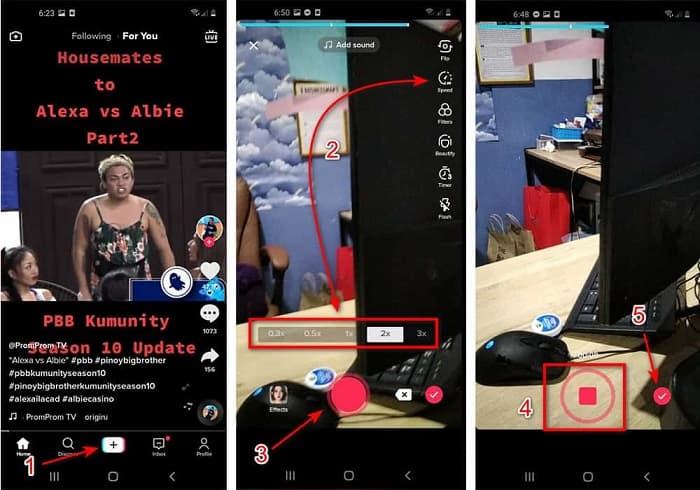
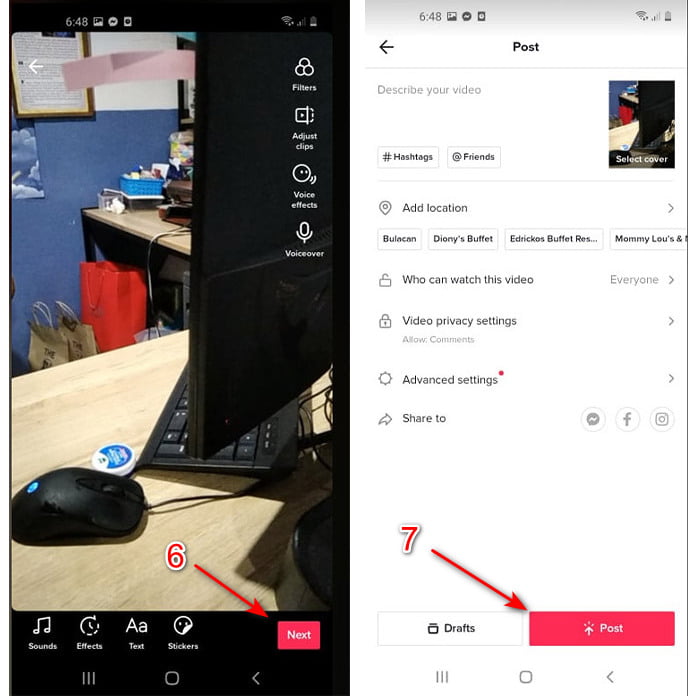
ขั้นตอนที่ 3 เมื่อต้องการตรวจเช็ควิดีโอให้กดปุ่ม เครื่องหมายถูก (check) แล้วแตะ Next จากนั้นแตะ Post เพื่ออัปโหลดวิดีโอลง TikTok.
ส่วนที่ 2 วิธีเพิ่มความเร็ววิดีโอ TikTok บน Video Converter Ultimate
ต่างจากฟังก์ชันตัดต่อในตัวที่ TikTok มีให้คุณ Video Converter Ultimate ช่วยให้คุณเร่งความเร็ววิดีโอแบบกำหนดเองได้ง่ายกว่า และระหว่างที่ปรับความเร็วก็จะมีหน้าพรีวิวให้ดูเพื่อเช็กว่าความเร็วของวิดีโอตรงกับที่คุณต้องการหรือไม่ นอกจากนี้ ซอฟต์แวร์สุดล้ำตัวนี้ยังให้ผู้ใช้ได้สัมผัสฟีเจอร์การตัดต่อระดับมืออาชีพในขั้นตอนที่เรียบง่าย เพราะด้วยฟีเจอร์ขั้นสูงที่มีให้ คุณจึงต้องเสียเงินเล็กน้อยเพื่อใช้งาน แต่อย่ากังวลไป เพราะราคาไม่ได้สูงถึงหลักพันหรือแม้แต่หลักร้อยดอลลาร์ หากคุณอยากรู้ว่าคุณจะได้ประโยชน์หรือฟีเจอร์เด่นอะไรบ้างเมื่อมีเครื่องมือนี้ไว้ใช้งาน ให้ดูจากรายการด้านล่าง.
ฟีเจอร์เด่นที่ดีที่สุดที่คุณจะพบใน Video Converter Ultimate:
◆ นี่เป็นซอฟต์แวร์ที่ไม่ขึ้นกับแพลตฟอร์ม ซึ่งหมายความว่าคุณสามารถดาวน์โหลดได้บนพีซี, Mac หรือ Linux
◆ เครื่องมือแก้ไข แปลง โปรแกรมสร้าง GIF และอื่นๆ ขั้นสูงทั้งหมดมีอยู่ในเครื่องมือนี้
◆ การใช้งานเครื่องมือนี้มีประโยชน์มากสำหรับทุกคน แม้แต่มืออาชีพหรือมือใหม่ในการแก้ไข
◆ อนุญาตให้ผู้ใช้แสดงความสร้างสรรค์ผ่านคุณสมบัติการแก้ไขต่างๆ ที่มีให้ที่นี่
◆ แม้ว่าเครื่องมือจะจ่ายไปแล้ว แต่ก็ยังมีราคาไม่แพงและราคาไม่แพงมากสำหรับทุกคนที่ต้องการทดลองใช้
ตอนนี้ หากคุณอยากรู้วิธีเร่งความเร็ววิดีโอ TikTokด้วยโปรแกรมตัดต่อทางเลือกสุดเจ๋งตัวนี้ ให้อ่านและทำตามคำแนะนำด้านล่างเพื่อให้การปรับความเร็วสำเร็จตามต้องการ.
ขั้นตอนการเร่งความเร็ววิดีโอ TikTok ด้วย Video Converter Ultimate:
ขั้นตอนที่ 1 หากต้องการใช้ซอฟต์แวร์นี้ คุณต้องดาวน์โหลดมาติดตั้งบนพีซีหรือ Mac ก่อน จากนั้นติดตั้ง ทำการตั้งค่าเบื้องต้นง่าย ๆ แล้วคลิก Finish เพื่อดำเนินการต่อ.
ดาวน์โหลดฟรีสำหรับ Windows 7 หรือใหม่กว่าดาวน์โหลดอย่างปลอดภัย
ดาวน์โหลดฟรีสำหรับ MacOS 10.7 หรือใหม่กว่าดาวน์โหลดอย่างปลอดภัย
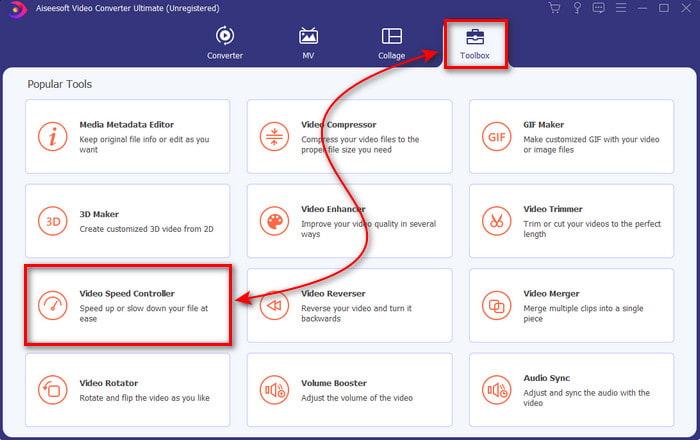
ขั้นตอนที่ 2 กดที่ Toolbox แล้วเลือก Video Speed Controller ที่อยู่ด้านใน.
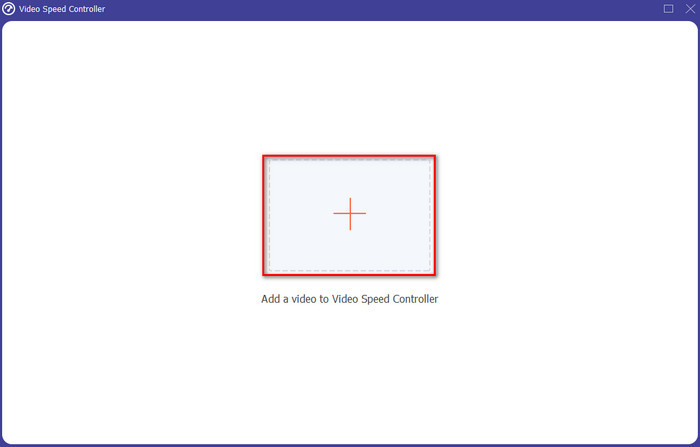
ขั้นตอนที่ 3 เพื่อเพิ่มไฟล์ที่คุณต้องการเร่งความเร็วให้คลิกปุ่ม + จากนั้นเลือกไฟล์จากโฟลเดอร์ที่ปรากฏขึ้น แล้วคลิก Open เพื่อดำเนินการต่อ.
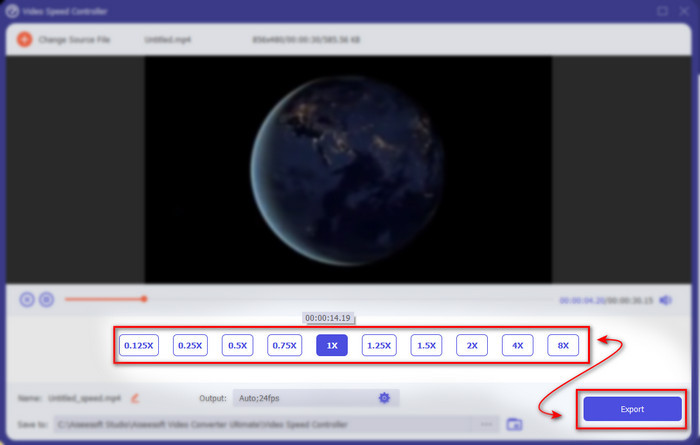
ขั้นตอนที่ 4 เมื่อต้องการปรับความเร็ววิดีโอให้เลือกตัวเลือก speed ด้านล่าง และเมื่อต้องการดาวน์โหลดไฟล์ให้คลิก Export เพื่อเริ่มกระบวนการบันทึกไฟล์.
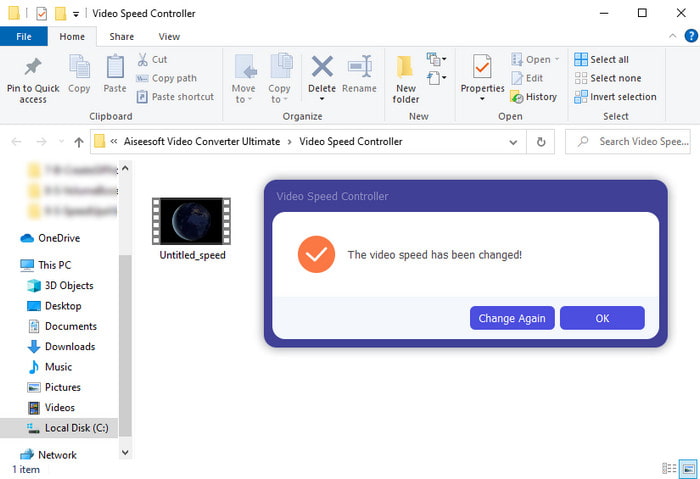
ขั้นตอนที่ 5 ไม่จำเป็นต้องรอนานเป็นนาที เพราะไฟล์จะพร้อมใช้งานภายในไม่กี่วินาที ดังนั้นหากมีหน้าต่างโฟลเดอร์ปรากฏขึ้นบนหน้าจอ แสดงว่าไฟล์ถูกส่งออกเรียบร้อยแล้ว ให้คลิกไฟล์เพื่อชมวิดีโอที่คุณได้เร่งความเร็วไว้.
ที่เกี่ยวข้อง:
ส่วนที่ 3 คำถามที่พบบ่อยเกี่ยวกับการเร่งความเร็ววิดีโอบน Tiktok
วิธีเพิ่มความเร็ววิดีโอ TikTok ที่ไม่ใช่ของคุณ?
หากคุณต้องการเร่งความเร็ววิดีโอที่ไม่ใช่ของคุณเอง คุณจะต้องดาวน์โหลดวิดีโอ TikTok นั้นมาก่อน จากนั้นกดปุ่ม + แล้วเลือกอัปโหลด (Upload) แล้วเลือกวิดีโอจากแกลเลอรี เลือกตัวเลือกความเร็ว แล้วกดNext เพื่ออัปโหลด หรือจะใช้Video Converter Ultimate ในการเร่งความเร็ววิดีโอตามขั้นตอนที่อธิบายไว้ข้างต้นก็ได้.
ฉันสามารถบันทึกวิดีโอ 3 นาทีบน Tiktok ได้หรือไม่?
ใช่ คุณสามารถทำได้หากบันทึกแยกกัน แต่คุณไม่สามารถบันทึกวิดีโอ 3 นาทีแบบตรงๆ ได้ เนื่องจากความยาวของการบันทึกด้วยการสนับสนุนแอพนี้คือ 15 ถึง 60 วินาทีเต็ม ดังนั้น หากความยาววิดีโอที่คุณต้องการบันทึกมากกว่า 1 นาที การบันทึกแยกกันจะดีกว่า อย่างไรก็ตาม หากคุณเป็นหนึ่งในผู้ใช้ที่ได้รับการคัดเลือกจาก Tiktok ให้ลองบันทึกเป็นเวลา 3 นาที ถือว่าคุณโชคดีเพราะได้ทดสอบเฉพาะกลุ่มเล็กๆ เท่านั้น
ฉันสามารถเพิ่ม MP3 ลงในวิดีโอของฉันบน Tiktok ได้หรือไม่?
เมื่อ TikTok เปิดตัวครั้งแรก ผู้ใช้ได้รับอนุญาตให้เพิ่มเพลงลงในวิดีโอของตน แต่ตอนนี้พวกเขาได้ลบคุณลักษณะนี้แล้ว เนื่องจากปัญหาลิขสิทธิ์ที่ได้ยื่นไปยัง TikTok ดังนั้น เพื่อหลีกเลี่ยงปัญหา พวกเขาลบออกและเพิ่มตัวอย่างเพลงที่มีหรือคุณสามารถใช้แอปอื่นทำเพื่อคุณ
Tiktok มีการจำกัดอายุหรือไม่?
ตามข้อกำหนดและเงื่อนไขของ TikTok ผู้ที่มีอายุ 13 ปีขึ้นไปต้องเป็นอายุของผู้ใช้ที่จะใช้แอพนี้ นอกจากนี้ Tiktok ยังไม่มีการยืนยันอายุเมื่อคุณสมัครใช้งาน ดังนั้นคาดว่าเนื้อหา 16+ จะปรากฏขึ้นบนฟีดของคุณ
สรุป
ตอนนี้เมื่อคุณรู้แล้ววิธีเร่งความเร็ววิดีโอบน TikTok ก็ถึงเวลาที่จะสนุกไปกับมัน นอกจากนี้ ให้เลือกวิธีที่คุณคิดว่าเหมาะกับคุณที่สุด หากคุณคิดว่าฟีเจอร์เร่งความเร็วในตัวของ TikTok เพียงพอ ก็ใช้มันได้เลย แต่ถ้าคุณอยากได้การเร่งความเร็วที่ดีกว่าพร้อมพรีวิว ให้ใช้ Video Converter Ultimate ไม่ว่าคุณจะเลือกวิธีใด คุณก็สามารถคาดหวังผลลัพธ์ที่ยอดเยี่ยมได้จากฟังก์ชันและประสิทธิภาพโดยรวมของทั้งสองตัวเลือก.
-
 7 ขั้นตอนง่าย ๆ ในการแก้ไขปัญหา OBS Audio Delay [แก้ไขแล้ว]
 คุณมีปัญหาในการดูวิดีโอคลิปของคุณหลังจากบันทึกเนื่องจากความล่าช้าของเสียงเมื่อใช้ OBS Studio หรือไม่? อ่านบทความด้านล่างเพื่อเรียนรู้วิธีแก้ไขเสียงไม่ซิงค์อย่างมีประสิทธิภาพ
-
 วิธีที่ยอดเยี่ยมที่เป็นไปได้ | วิธีแก้ไข VLC Audio Delay [2021]
 คุณมีช่วงเวลาที่ยากลำบากในการดูภาพยนตร์เรื่องโปรดบนเครื่องเล่นสื่อ VLC เนื่องจากความไม่แน่นอนของเสียงหรือไม่? อ่านบทความนี้ต่อเพื่อทราบวิธีแก้ไข VLC audio delay ที่เป็นไปได้ทั้งหมด
-
 วิธีที่ดีที่สุดในการเพิ่มปริมาณ MP4 ออนไลน์และออฟไลน์
 คุณมีปัญหาในการได้ยินเสียงของคลิปวิดีโอของคุณหรือไม่? อ่านบทความด้านล่างเพื่อทราบวิธีเพิ่มปริมาณ mp4 ในรูปแบบต่างๆ
