


 Video Converter Ultimate
 บันทึกหน้าจอ
 ซ่อมวิดีโอ
6 วิดีโอ Reverser ที่ดีที่สุดบน Mac/Windows/Android/iPhone/Online
การเล่นวิดีโอย้อนกลับกลายเป็นหนึ่งในเอฟเฟกต์ภาพที่น่าประทับใจที่สุดที่บรรณาธิการวิดีโอจำนวนมากนิยมใช้กันในปัจจุบัน เพียงแค่เล่นวิดีโอย้อนกลับ คุณก็สามารถเพิ่มความว้าวให้กับวิดีโอสำเร็จรูปของคุณ ทำให้สะดุดตายิ่งขึ้นได้ ดังนั้น ในบทความนี้เราจะมาสำรวจว่าโปรแกรมกลับวิดีโอ (video reverser)ตัวไหนบ้างที่ดีที่สุด ทั้งแบบใช้ฟรีและแบบเสียเงิน และตอนนี้ ถ้าคุณพร้อมจะเริ่มออกเดินทางแล้ว ก็ขอให้คาดเข็มขัดนิรภัยให้เรียบร้อย แล้วเริ่มต้นการสำรวจไปพร้อมกันเลย.

ส่วนที่ 1 2 ของซอฟต์แวร์ Video Reverser ที่ดีที่สุดสำหรับพีซีและ Mac
1. Video Converter Ultimate
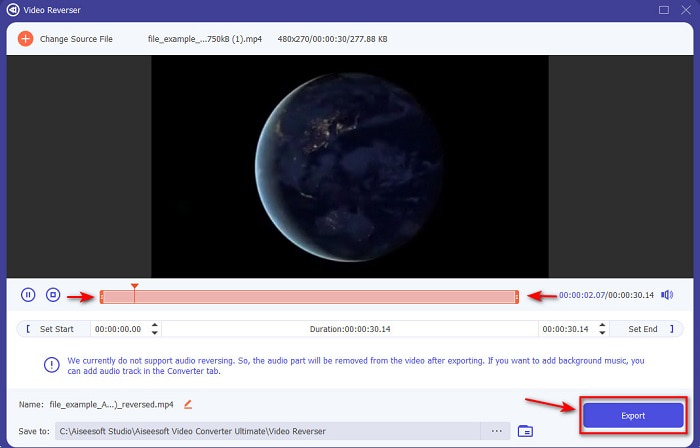
ตัวแรกในลิสต์นี้คือโปรแกรมแปลงไฟล์ขั้นเทพที่คุณสามารถใช้สร้างวิดีโอสุดประทับใจได้ โดยแทบไม่ต้องมีคู่มือสอน เพราะด้วยคำแนะนำที่ชัดเจน ทำให้เครื่องมือตัวนี้เหมาะทั้งสำหรับผู้เริ่มต้น และมือโปรที่ต้องการสร้างวิดีโอที่ดูโดดเด่น Video Converter Ultimate คือโปรแกรมตัดต่อสำหรับเล่นวิดีโอย้อนกลับระดับท็อป และเป็นตัวเลือกยอดนิยมที่สุดในลิสต์นี้ เครื่องมือนี้ช่วยให้ผู้ใช้ปลดปล่อยศักยภาพเต็มที่ในการตัดต่อ โดยไม่ซับซ้อนอย่างที่คิด อย่างที่กล่าวไปแล้วว่าคำแนะนำและข้อมูลที่ชัดเจนภายในเครื่องมือ ช่วยผู้ใช้จำนวนมากที่ไม่มีประสบการณ์ด้านการตัดต่อได้มาก แม้คุณจะเป็นมือโปรอยู่แล้ว ก็ยังใช้โปรแกรมนี้เพื่อสร้างวิดีโอที่น่าประทับใจกว่าเดิมได้ ในแบบที่โปรแกรมตัดต่อปัจจุบันของคุณอาจทำไม่ได้.
ดาวน์โหลดฟรีสำหรับ Windows 7 หรือใหม่กว่าดาวน์โหลดอย่างปลอดภัย
ดาวน์โหลดฟรีสำหรับ MacOS 10.7 หรือใหม่กว่าดาวน์โหลดอย่างปลอดภัย
ข้อดี
- ดีที่สุดในการทำให้วิดีโอของคุณดูยอดเยี่ยมเมื่อเทียบกับโปรแกรมตัดต่ออื่นๆ
- ใช้งานง่าย การเรียนรู้วิธีใช้เครื่องมือนี้จะใช้เวลาไม่เกิน 15 นาทีหรือน้อยกว่านั้น
- หากคุณกำลังมองหาเครื่องมือที่ครบครัน นี่ต้องเป็นตัวเลือกแรกของคุณ
จุดด้อย
- ซอฟต์แวร์ได้รับเงินแล้ว แต่ Movavi มีราคาแพงกว่ามากถ้าเราจะเปรียบเทียบ
- จำเป็นต้องดาวน์โหลดเครื่องมือก่อนจึงจะสามารถใช้งานได้
2. Movavi วิดีโอสวีท
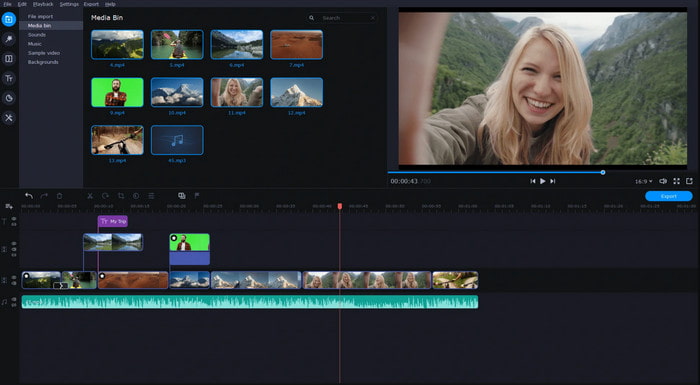
อีกหนึ่งเครื่องมือในลิสต์นี้คือ Movavi Video Suite โปรแกรมเล่นวิดีโอย้อนกลับ Movavi (Movavi video editor reverse) นี้อยู่ในวงการมาพักใหญ่แล้ว และมีผู้ใช้นับล้านคน เพราะมีฟีเจอร์ตัดต่อขั้นสูงให้ใช้งานได้คล้ายกับ Video Converter Ultimate นอกจากนี้ โปรแกรมยังมีสิ่งที่น่าสนใจมากมายให้กับผู้ใช้ อย่างไรก็ตาม ข้อเสียของโปรแกรมนี้คือกระบวนการเรนเดอร์ใช้เวลานานและค่อนข้างช้า อีกทั้งตัวโปรแกรมรองรับฟอร์แมตไฟล์ค่อนข้างจำกัด ทำให้คุณเลือกประเภทไฟล์ได้ไม่มาก เนื่องจากขอบเขตการรองรับค่อนข้างแคบ.
ข้อดี
- ใช้งานง่ายเป็นโปรแกรมแก้ไขกึ่งมืออาชีพ
- อินเทอร์เฟซดูเรียบร้อยและใช้งานง่ายมาก
- พร้อมใช้งานใน Mac และ Windows
จุดด้อย
- เครื่องมือนี้มีราคาแพงมากเมื่อเทียบกับเครื่องมือในรายการนี้
- คุณสมบัติส่วนใหญ่ที่คุณสามารถใช้ได้บน Windows นั้นไม่มีให้ใช้งานบน Mac
- มีเทมเพลตให้คุณเลือกน้อยกว่า
ที่เกี่ยวข้อง:
ส่วนที่ 2 ของ Video Reverser Online ที่ดีที่สุด 2
1. Kapwing
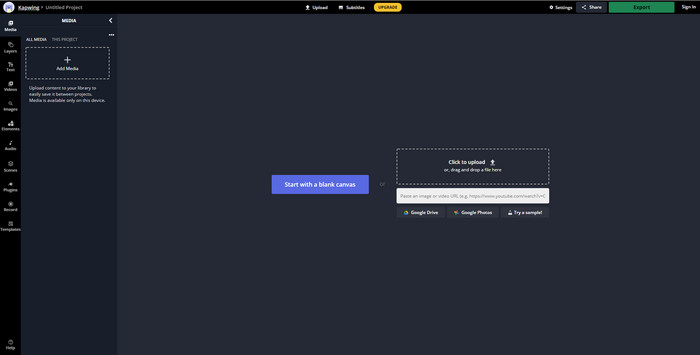
ไม่อยากเสียเงินใช่ไหม? ลองใช้Kapwing กลับวิดีโอ (kapwing reverse) ซึ่งทำได้ฟรีและง่ายมาก Kapwing เป็นหนึ่งในเครื่องมือออนไลน์ที่ใช้งานง่ายที่สุด นอกจากนี้ยังมีฟีเจอร์ตัดต่อบางอย่างให้ใช้ฟรี แต่คุณจำเป็นต้องมีอินเทอร์เน็ต แม้หน้าตาอินเทอร์เฟซของเครื่องมือจะดูดี เพราะมีความคล้ายกับ Adobe Photoshop เวอร์ชันออนไลน์ แต่การอัปโหลดและส่งออกไฟล์อาจยุ่งยากเล็กน้อย เนื่องจากขึ้นกับความเร็วอินเทอร์เน็ตของคุณ หากอินเทอร์เน็ตไม่เสถียร ก็เตรียมเจอกับกระบวนการทำงานที่เชื่องช้าได้เลย และเมื่อคุณส่งออกไฟล์จากที่นี่ จะมีลายน้ำปรากฏอยู่ที่มุมล่างขวาของวิดีโอที่กลับด้านแล้ว.
ข้อดี
- เครื่องมือเว็บฟรี
- ใช้งานง่าย
- กระบวนการย้อนกลับง่าย ๆ คุณจะต้องปฏิบัติตาม
จุดด้อย
- ขึ้นอยู่กับอินเทอร์เน็ต ซึ่งหมายความว่าหากคุณไม่มีการเชื่อมต่ออินเทอร์เน็ต คุณจะไม่สามารถใช้เครื่องมือนี้ได้
- ขั้นตอนการแก้ไขนั้นรวดเร็ว แต่การอัปโหลดและดาวน์โหลดไฟล์จะใช้เวลาสักครู่
- ผลลัพธ์สุดท้ายมีลายน้ำที่ด้านล่างขวาของวิดีโอ
2. VideoReverser .com
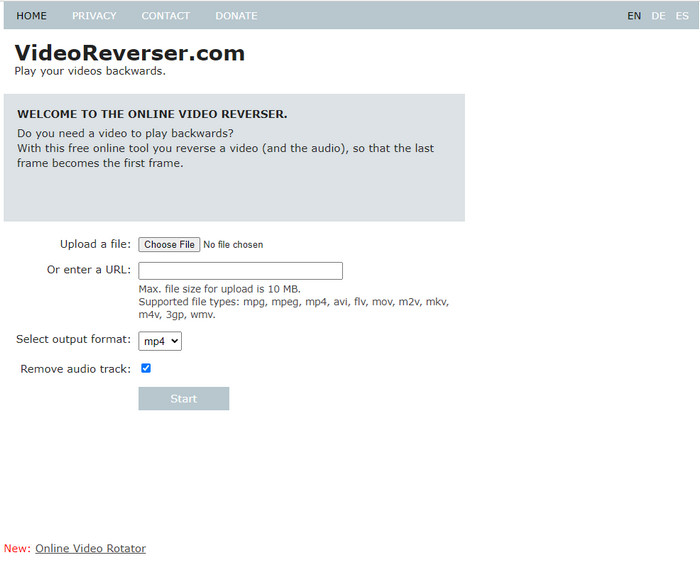
VideoReverser.com ถือเป็นหนึ่งในเว็บสำหรับกลับวิดีโอออนไลน์ที่ดีที่สุดที่คุณสามารถค้นหาและใช้งานบนเว็บได้ เว็บทูลนี้เหมาะสำหรับคนที่ต้องการเพียงการกลับวิดีโอแบบง่ายๆ สั้นๆ ดังที่กล่าวไป คุณสามารถใส่ไฟล์วิดีโอได้ไม่เกิน 10 MB เท่านั้น ขนาดไฟล์ดังกล่าวถือว่าค่อนข้างน้อย หากเทียบกับเครื่องมืออื่นที่นำเสนอในบทความนี้ อย่างไรก็ตาม หากคุณมีวิดีโอสั้นๆ ที่อยากกลับด้าน ลองใช้เครื่องมือนี้ดูได้เลย.
ข้อดี
- ไม่มีค่าใช้จ่ายแอบแฝงหากคุณเข้าถึงเครื่องมือ
- อินเทอร์เฟซเครื่องมือที่เข้าใจง่าย
- เครื่องมือนี้เน้นที่การย้อนกลับวิดีโอของคุณ
จุดด้อย
- รองรับรูปแบบน้อยลงและส่วนใหญ่เมื่อคุณพยายามย้อนกลับวิดีโอที่นี่จะล้มเหลว
- ขนาดไฟล์สูงสุด 10 mb ที่คุณสามารถอัปโหลดได้
- ไม่สามารถเข้าถึงได้หากไม่มีอินเทอร์เน็ต
ส่วนที่ 3 2 ของแอป Video Reverser ที่ดีที่สุดใน Android และ iOS
1. ย้อนกลับวิดีโอย้อนกลับ (Android)
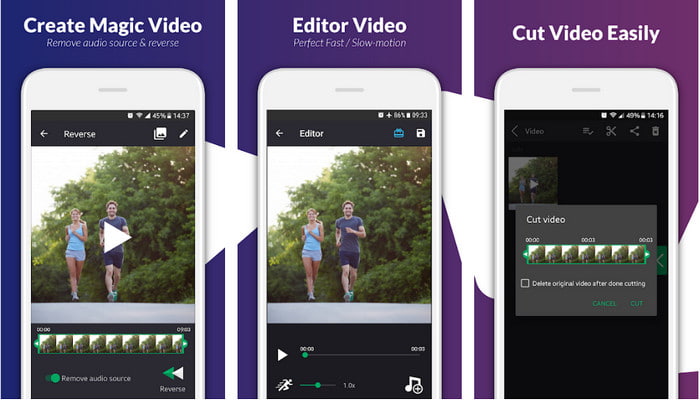
แอป reverse video backward มีให้ดาวน์โหลดฟรีเฉพาะบน Play Store เท่านั้น ซอฟต์แวร์กลับวิดีโอนี้เหมาะสำหรับการเล่นวิดีโอย้อนกลับ และใช้งานได้ง่ายสำหรับผู้ที่ใช้โทรศัพท์ Android อย่างไรก็ตาม ผู้ใช้จำนวนมากบ่นว่าแอปมักค้าง มีโฆษณาป๊อปอัปเด้งขึ้นมาแม้คุณจะปิดแอปไปแล้ว และถึงแม้คุณจะสามารถตัดต่อวิดีโอในนี้ได้ด้วยก็ตาม โดยรวมแล้วคะแนนรีวิวของแอปนี้ค่อนข้างต่ำ เมื่อเทียบกับแอปที่มีฟังก์ชันคล้ายกันบน Play Store.
ข้อดี
- ก่อนที่คุณจะดาวน์โหลดเครื่องมือนี้ มันจะให้แนวคิดบางอย่างในการสร้างเอฟเฟกต์การย้อนกลับอันมหัศจรรย์
- รองรับ 50 ภาษาที่คุณสามารถเลือกได้
จุดด้อย
- มีหลายกรณีที่เครื่องมือขัดข้องเนื่องจากไม่ทราบสาเหตุ
- โฆษณาที่น่ารำคาญมีอยู่ทุกที่ แม้ว่าคุณจะปิดเครื่องมือโฆษณาจะแสดงบนหน้าจอของคุณ
- เครื่องมือมีข้อผิดพลาดเมื่อเราลองใช้
2. โปรแกรมตัดต่อวิดีโอย้อนกลับ (iOS)
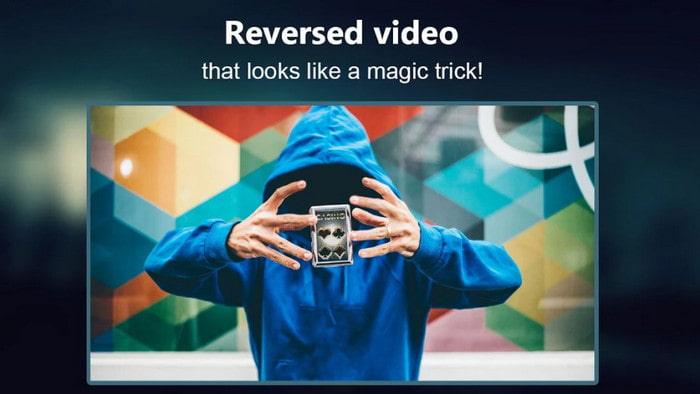
แอปกลับวิดีโอ (reverse video app) ตัวนี้สามารถดาวน์โหลดได้ฟรีบน iOS Reverse Video Editor ได้รับคะแนนรีวิวที่ดีจากผู้ใช้จำนวนมาก การที่แอปมีคะแนนสูงถึง 4.5 ดาวอาจทำให้หลายคนเข้าใจผิดได้ เพราะคุณอาจคิดว่าแอปนี้ยอดเยี่ยมในทุกด้าน แต่แท้จริงแล้ว นักพัฒนาแอปพยายามผลักดันให้ผู้ใช้ให้คะแนน 5 ดาวก่อน จึงจะสามารถเข้าถึงฟีเจอร์ของแอปได้ และคอมเมนต์ส่วนใหญ่ก็ดูไม่มีสาระ และทำให้รู้สึกว่าถูกเขียนโดยบ็อต เพื่อปั่นกระแสความนิยมของแอป.
ข้อดี
- เครื่องมือนี้มีคะแนนยอดเยี่ยมจากผู้ใช้ 67.4k ราย
- อินเทอร์เฟซของมันค่อนข้างดีเมื่อเทียบกับตัวย้อนกลับ iOS อื่น ๆ
จุดด้อย
- ผู้ใช้ถูกบังคับให้ให้คะแนนแอป 5 ดาวเพื่อปลดล็อกคุณสมบัติพิเศษในแอป
- บทวิจารณ์แอพด้านล่างนี้ไม่สมเหตุสมผล โดยพื้นฐานแล้ว หากคุณต้องการทราบว่าแอปคืออะไร ไม่ต้องดูบทวิจารณ์
- ข้อบกพร่องยังคงอยู่ในแอพนี้และโดยส่วนใหญ่แล้ววิดีโอที่คุณใส่ลงในแอพจะค้าง
ส่วนที่ 4 แผนภูมิเปรียบเทียบ
| คุณสมบัติ | ตัวแปลงวิดีโอ UltiR | Movavi | Kapwing | VideoReverser.com | ย้อนกลับวิดีโอย้อนกลับ | โปรแกรมตัดต่อวิดีโอย้อนกลับ |
| คุณสมบัติย้อนกลับ |  | | | | | |
| โฆษณาที่น่ารำคาญบนอินเทอร์เฟซ |  | | | | | |
| ลายน้ำหลังจากส่งออก | | | | | | |
| คุณสมบัติการแก้ไขอื่นๆ เช่น การตัด การครอบตัด และอื่นๆ | | | | | มีให้ใช้งาน แต่รีวิวบอกว่าใช้ไม่ได้ | มีให้ใช้งาน แต่รีวิวบอกว่าใช้ไม่ได้ |
| ความพร้อมของโปรแกรม | เครื่องมือบนเดสก์ท็อป | เครื่องมือบนเดสก์ท็อป | เครื่องมือบนเว็บ | เครื่องมือบนเว็บ | เครื่องมือที่ดาวน์โหลดบน Android | iOS ที่ดาวน์โหลดได้ด้วยเหมือนกัน |
| ช่วงราคา | 1 เดือน: $25.00 ใบอนุญาตตลอดชีพ:$55.20 สิทธิ์การใช้งานแบบผู้ใช้หลายคนตลอดชีพ/5 PCs: $119.00 | โปรแกรมตัดต่อวิดีโอ Movavi $39.95 Movavi Video Editor Plus $59.95 | เครื่องมือออนไลน์ฟรี | เครื่องมือออนไลน์ฟรี | ไม่มีในการซื้อแอป | การซื้อในแอป 3 ถึง 50 ช่วง $ |
ส่วนที่ 5. คำถามที่พบบ่อยเกี่ยวกับ Video Reverser
เหตุใดวิดีโอย้อนกลับของฉันจึงสูญเสียคุณภาพ
เครื่องมือส่วนใหญ่ลดคุณภาพของวิดีโอย้อนกลับเนื่องจากไม่รองรับรูปแบบวิดีโอคุณภาพสูง หรือบางทีคุณอาจตั้งค่าเป็นต่ำแทนที่จะเป็นสูง ปัญหาทั้งสองนี้ไม่สามารถแก้ไขได้ด้วยการเปลี่ยนซอฟต์แวร์หรือปรับการตั้งค่า
ฉันสามารถใช้วิดีโอที่กลับด้านเป็นทรานสิชั่นได้หรือไม่
แน่นอนใช่ แทนที่จะใช้การเปลี่ยนภาพเคลื่อนไหวเวอร์ชันเก่า คุณสามารถย้อนกลับวิดีโอเพื่อให้ดูน่าดึงดูดยิ่งขึ้น แม้ว่าคุณจะไม่ได้ใช้เครื่องมือแก้ไขแบบมืออาชีพหรือมีประสบการณ์ในการแก้ไข คุณยังสามารถบรรลุการเปลี่ยนแปลงที่ยอดเยี่ยมด้วยการย้อนกลับวิดีโอ
หากฉันย้อนกลับวิดีโอ วิดีโอจะกลับด้านหรือไม่
ไม่จริง เพราะการย้อนกลับและการกลับด้านไม่เหมือนกัน แม้ว่าทั้งคู่จะเปลี่ยนรูปลักษณ์ดั้งเดิมของวิดีโอ แต่ก็ยังไม่เหมือนเดิม ตัวอย่างเช่น หากคุณย้อนกลับวิดีโอ วิดีโอจะเล่นตั้งแต่ต้นจนจบหากคุณกลับด้าน วิดีโอจะกลับด้านและยังคงเล่นตั้งแต่ต้นจนจบ
สรุป
เมื่อมาถึงช่วงท้าย บรรดาเครื่องมือที่เรรีวิวในบทความนี้ล้วนยอดเยี่ยมในแบบของตัวเอง ขึ้นอยู่กับแพลตฟอร์มที่คุณใช้งาน และทั้งหมดเหมาะสำหรับผู้ที่ใช้เดสก์ท็อป มีอินเทอร์เน็ต หรือใช้มือถือทั้งสิ้น นอกจากนี้ หากคุณยังตัดสินใจเลือกไม่ได้ เรามีคำแนะนำให้คุณ Video Converter Ultimate ได้ก้าวข้ามขีดจำกัดของการเป็นเพียงแค่โปรแกรมแปลงไฟล์และตัดต่อวิดีโอ เครื่องมือนี้ได้ช่วยผู้ใช้นับล้านมาแล้ว และตอนนี้ก็พร้อมจะช่วยคุณเช่นกัน ดังนั้น ดาวน์โหลดเครื่องมือนี้ตอนนี้ แล้วสนุกไปกับการค้นพบความสวยงามของโปรแกรมตัวนี้.
-
 วิธีแปลงไฟล์ MKV เพื่อเล่นบน PS3 อย่างราบรื่น [แก้ไขแล้ว]
 ต้องการเล่นวิดีโอ MKV บน PS3 ของคุณหรือไม่? อย่างไรก็ตาม PS3 ไม่สามารถเล่นไฟล์ MKV ได้โดยตรง บทความนี้จะแสดงวิธีการแปลงวิดีโอ MKV เป็นรูปแบบวิดีโอที่รองรับ PS3 เพื่อเล่นบน PS3 โดยไม่ต้องยุ่งยาก
-
 เครื่องเล่น Android DVD – วิธีเล่นวิดีโอ DVD บนมือถือ Android
 จะเล่นไฟล์ DVD บนมือถือ Android ได้อย่างไร? มีเครื่องเล่นดีวีดี Android หรือไม่? ในบทความนี้ คุณจะได้เรียนรู้เกี่ยวกับ 3 วิธีในการเล่นวิดีโอดีวีดีบนโทรศัพท์มือถือ Android ที่มีหรือไม่มีไดรเวอร์ภายนอก
-
 10 สุดยอดเครื่องเล่น Android MP4 ฟรีสำหรับเล่นวิดีโอ HD/4K
 แม้ว่ามือถือ Android จะมีโปรแกรมเล่นเริ่มต้นสำหรับเล่นวิดีโอ MP4 แต่ก็ไม่รองรับการปรับการตั้งค่าการเล่นและฟังก์ชันอื่นๆ ดังนั้น คุณสามารถเรียนรู้เกี่ยวกับเครื่องเล่น MP4 Android 10 ที่ดีที่สุดจากบทความนี้
