


 Video Converter Ultimate
 บันทึกหน้าจอ
 ซ่อมวิดีโอ
 ดาวน์โหลดอย่างปลอดภัย
ใช้ตัวหมุนวิดีโอออนไลน์และบอกลาวิดีโอกลับหัว
ในยุคดิจิทัล เนื้อหาวิดีโอเป็นส่วนสำคัญในชีวิตของเรา วิดีโอเป็นวิธีที่ยอดเยี่ยมในการถ่ายทอดข้อความของคุณ ไม่ว่าคุณจะต้องการจดจำช่วงเวลาพิเศษหรือสร้างเนื้อหาที่น่าตื่นเต้นสำหรับโซเชียลมีเดียหรือธุรกิจของคุณ แต่คุณอาจพบว่าวิดีโอของคุณจำเป็นต้องอยู่ในตำแหน่งที่ถูกต้องเพราะบันทึกผิดที่หรือเพราะต้องพลิกในแนวนอนหรือแนวตั้ง
บทความนี้จะแนะนำคุณเกี่ยวกับเครื่องมือหมุนวิดีโอออนไลน์ที่ดีที่สุดซึ่งช่วยให้คุณปรับวิดีโอให้เป็นทิศทางที่ต้องการได้ สำรวจตัวเลือกต่าง ๆ ได้มากขึ้นจากการอ่านบทความนี้ให้จบ.

ส่วนที่ 1 สุดยอดวิดีโอ Rotators ออนไลน์
1. หมุนวิดีโอของฉัน
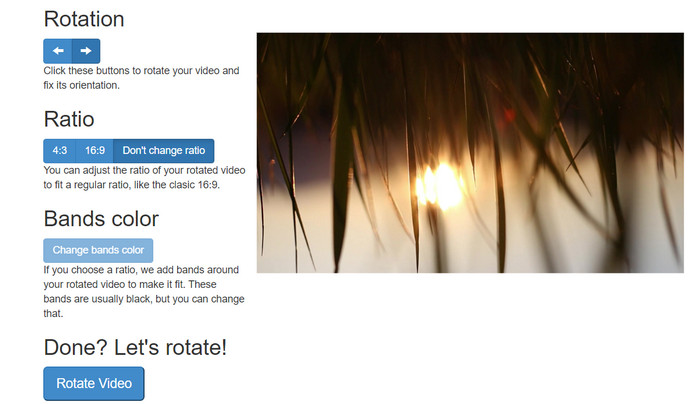
RotateMyVideo เป็นเครื่องมือออนไลน์ที่ง่ายและฟรีที่ให้คุณหมุนและพลิกวิดีโอของคุณได้ทุกทิศทางโดยไม่ต้องใช้ซอฟต์แวร์พิเศษ เครื่องมือนี้ช่วยให้คุณหมุนวิดีโอได้ครั้งละ 90 องศา และมีอินเทอร์เฟซที่เรียบง่ายซึ่งทำให้กระบวนการรวดเร็วและง่ายดาย RotateMyVideo เป็นตัวเลือกที่ดีหากคุณต้องการหมุนวิดีโอด้วยเหตุผลส่วนตัวหรือเพื่อธุรกิจ สามารถช่วยคุณประหยัดเวลาและความพยายาม
ข้อดี
- หมุนวิดีโอออนไลน์ฟรีโดยไม่มีค่าใช้จ่ายแอบแฝง
- รองรับการหมุนทีละ 90 องศา
- พลิกวิดีโอในแนวนอนหรือแนวตั้ง
จุดด้อย
- สามารถหมุนได้เฉพาะวิดีโอที่มีขนาดน้อยกว่า 500 MB
- ขั้นตอนการแปลงวิดีโออาจใช้เวลาสักครู่
- อินเทอร์เฟซผู้ใช้อาจไม่น่าสนใจ
ขั้นตอนในการหมุนวิดีโอออนไลน์ด้วย RotateMyVideo:
ขั้นตอนที่ 1. เปิดเว็บเบราว์เซอร์และไปที่เว็บไซต์ RotateMyVideo.
ขั้นตอนที่ 2. คลิกปุ่ม Pick Video เพื่ออัปโหลดวิดีโอที่คุณต้องการหมุน.
ขั้นตอนที่ 3. จากนั้นเลือกการจัดวางวิดีโอที่คุณต้องการโดยคลิกปุ่มที่เหมาะสม คุณสามารถหมุนวิดีโอไปทางซ้ายหรือขวา พลิกในแนวนอนหรือแนวตั้ง หรือคงไว้ตามทิศทางเดิม.
ขั้นตอนที่ 4. หากคุณพอใจกับวิดีโอที่หมุนแล้ว ให้คลิกปุ่ม Rotate video เพื่อบันทึกการเปลี่ยนแปลง.
2. คลิดิโอ
Clideo เป็นแพลตฟอร์มตัดต่อวิดีโอออนไลน์ที่ใช้งานง่ายและหลากหลาย ซึ่งมีเครื่องมือทรงพลังสำหรับการตัดต่อวิดีโอรวมถึงการหมุนวิดีโอ นอกจากนี้ Clideo ยังมีฟีเจอร์ต่าง ๆ เช่น การตัดวิดีโอ การรวมคลิป การใส่เสียงลงในวิดีโอ และอื่น ๆ อีกมากมาย จึงเป็นเครื่องมือตัดต่อวิดีโอที่ครบครัน แตกต่างจากซอฟต์แวร์ตัดต่อวิดีโออื่น ๆ ตรงที่ Clideo ทำงานผ่านเว็บทั้งหมด คุณจึงไม่ต้องดาวน์โหลดหรือติดตั้งโปรแกรมใด ๆ.
ข้อดี
- อัปโหลดวิดีโอจากแหล่งต่างๆ
- เข้ากันได้กับรูปแบบวิดีโอหลายรูปแบบ
- ส่วนต่อประสานที่ใช้งานง่าย
จุดด้อย
- ไม่เหมาะสำหรับความต้องการตัดต่อวิดีโอขั้นสูง
- รุ่นฟรีมีข้อ จำกัด
ขั้นตอนสำหรับตัวแปลงวิดีโอแนวตั้งเป็นแนวนอนออนไลน์:
ขั้นตอนที่ 1. ใช้เว็บเบราว์เซอร์เข้าไปที่เว็บไซต์ Clideo จากนั้นแสดงเครื่องมือทั้งหมดจากหน้าแรก.
ขั้นตอนที่ 2. เลือกตัวเลือก Rotate Video จากเมนู แล้วเลือก Choose file เพื่ออัปโหลดวิดีโอที่คุณต้องการหมุน คุณยังสามารถลากและวางไฟล์วิดีโอลงบนหน้าเว็บได้โดยตรง.
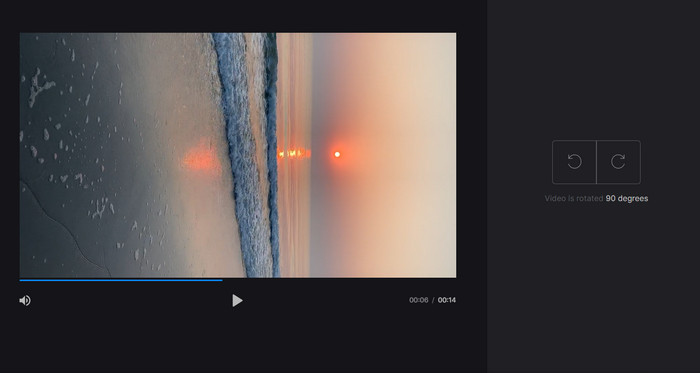
ขั้นตอนที่ 3. คลิกปุ่ม Rotate ที่อยู่ด้านขวาของเครื่องเล่นวิดีโอ เลือกทิศทางการหมุนวิดีโอที่ต้องการโดยคลิกปุ่มที่สอดคล้องกัน วิดีโอสามารถหมุนตามเข็มหรือตามเข็มนาฬิกาในแนวนอนหรือแนวตั้งได้.
3. เฟล็กคลิป
Flexclip เป็นเครื่องมือแก้ไขวิดีโอออนไลน์ที่น่าประทับใจ ซึ่งช่วยให้คุณสร้างวิดีโอที่ดูเป็นมืออาชีพได้โดยไม่ยุ่งยาก สิ่งที่ดีที่สุดอย่างหนึ่งเกี่ยวกับ Flexclip คือไลบรารีเทมเพลตมากมายที่คุณสามารถใช้เพื่อเริ่มต้นกระบวนการตัดต่อวิดีโอของคุณ นอกจากนี้ยังมีเวอร์ชันฟรีที่ให้คุณสร้างวิดีโอที่มีความยาวไม่เกิน 1 นาทีโดยไม่มีลายน้ำ
ข้อดี
- ไลบรารีเทมเพลตที่กว้างขวาง
- เสนอตัวเลือกการปรับแต่งที่หลากหลาย
จุดด้อย
- ราคาอาจสูงชันสำหรับผู้ใช้บางราย
- ควบคุมคุณภาพวิดีโอได้อย่างจำกัด
ขั้นตอนในการหมุนวิดีโอออนไลน์โดยไม่มีลายน้ำโดยใช้ Flexclip:
ขั้นตอนที่ 1. ไปที่เว็บไซต์ Flexclip สมัครบัญชีฟรี หรือหากมีอยู่แล้วให้เข้าสู่ระบบ เมื่อเข้าสู่ระบบแล้ว ให้คลิกปุ่ม Start from Scratch.
ขั้นตอนที่ 2. คลิกปุ่ม Upload เพื่ออัปโหลดวิดีโอที่คุณต้องการหมุน หรือคุณสามารถลากและวางไฟล์วิดีโอลงในตัวแก้ไขได้เช่นกัน.
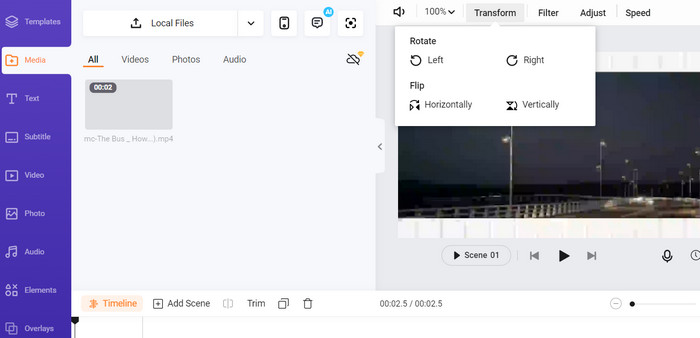
ขั้นตอนที่ 3. เมื่ออัปโหลดวิดีโอเรียบร้อยแล้ว ให้คลิกปุ่ม Transform ที่อยู่ในแถบเมนูด้านบนของหน้าพรีวิว ใช้ปุ่มเพื่อหมุนวิดีโอของคุณตามเข็มหรือตามเข็มนาฬิกาจนได้ทิศทางที่ต้องการ.
4. แคปวิง
นี่เป็นอีกหนึ่งเครื่องมือออนไลน์ฟรีที่ช่วยให้คุณหมุนวิดีโอได้เช่นกัน โดยรองรับการหมุนทีละ 90 องศา และการพลิกวิดีโอด้วย ฟีเจอร์ขั้นสูงอย่างเช่นการใส่ข้อความ ใส่เพลง และเอฟเฟกต์พิเศษต่าง ๆ ทำให้มันเป็นเครื่องมือตัดต่อวิดีโอที่ครบเครื่อง ขณะเดียวกัน อินเทอร์เฟซที่ใช้งานง่ายและคลังเครื่องมือกับเทมเพลตที่หลากหลาย ก็ทำให้เหมาะอย่างยิ่งสำหรับผู้เริ่มต้น.
ข้อดี
- การตัดต่อวิดีโอที่หลากหลาย
- ออนไลน์และบนคลาวด์
จุดด้อย
- ความยาววิดีโอจำกัด
- ขนาดไฟล์จำกัด
ขั้นตอนในการหมุนวิดีโอออนไลน์โดยใช้ Kapwing:
ขั้นตอนที่ 1. ไปที่เว็บไซต์ Kapwing และสมัครบัญชีผู้ใช้ฟรี หรือหากมีอยู่แล้วให้ลงชื่อเข้าใช้ จากนั้นคลิกปุ่ม Start Editing เพื่อเริ่มโปรเจกต์ใหม่.
ขั้นตอนที่ 2. คลิกปุ่ม Upload เพื่ออัปโหลดวิดีโอที่คุณต้องการหมุน.
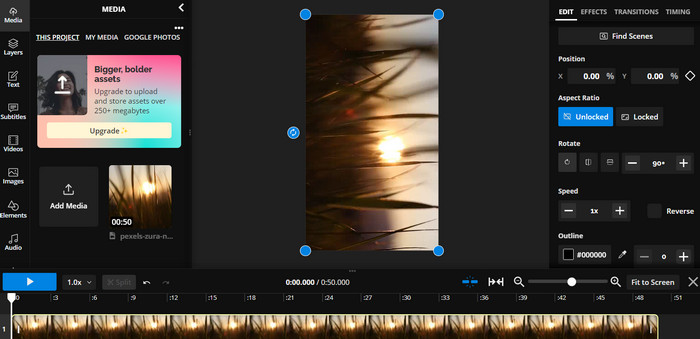
ขั้นตอนที่ 3. จากนั้นเลือกไฟล์มีเดียจากไทม์ไลน์ แล้วตัวเลือกการแก้ไขจะปรากฏขึ้นในเมนูด้านขวา.
ขั้นตอนที่ 4. เลือกตัวเลือก Rotate และกำหนดทิศทางที่คุณต้องการหมุนวิดีโอ ระบุองศาเพื่อกำหนดมุมในการหมุน เพียงเท่านี้ก็เรียบร้อย.
5. เครื่องตัดวิดีโอออนไลน์
นี่เป็นเครื่องมือออนไลน์ฟรีที่ให้คุณหมุนวิดีโอได้ทุกทิศทาง คุณสามารถอัปโหลดวิดีโอของคุณแล้วใช้เครื่องมือหมุนเพื่อปรับการวางแนวของวิดีโอ
ข้อดี
- รวดเร็วและมีประสิทธิภาพ
- ใช้งานได้ฟรี
จุดด้อย
- จำเป็นต้องมีการเชื่อมต่ออินเทอร์เน็ต
- การสูญเสียคุณภาพวิดีโอ
ขั้นตอนในการหมุนวิดีโอออนไลน์ด้วย Online Video Cutter:
ขั้นตอนที่ 1. ไปที่เว็บไซต์ทางการของ Online Video Cutter.
ขั้นตอนที่ 2. คลิกปุ่ม Open file เพื่ออัปโหลดวิดีโอที่คุณต้องการแก้ไข.
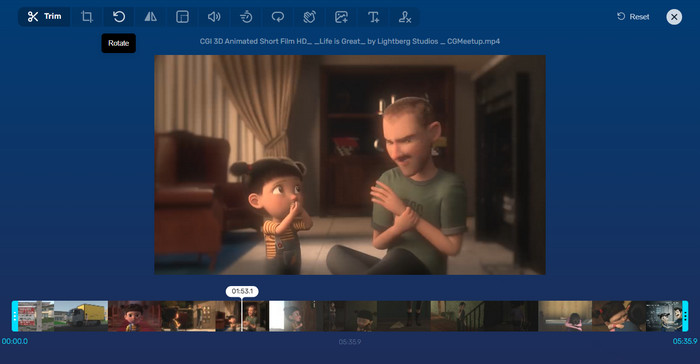
ขั้นตอนที่ 3. เมื่อวิดีโอนำเข้าเสร็จแล้ว ระบบจะพาคุณไปยังหน้าตัดต่อของโปรแกรม ครั้งนี้ให้กดปุ่ม Rotate จากเมนู.
ขั้นตอนที่ 4. หากคุณพอใจกับการหมุนวิดีโอแล้ว ให้กดปุ่ม Save ที่มุมล่างขวา.
ส่วนที่ 2 เครื่องมือทางเลือก: Video Rotator ออฟไลน์
FVC Video Converter Ultimate เป็นแอปเดสก์ท็อปที่รองรับทั้ง Windows และ Mac ช่วยให้ผู้ใช้สามารถแปลงและหมุนวิดีโอแบบออฟไลน์ได้ นอกจากนี้ผู้ใช้ยังสามารถหมุนวิดีโอตามเข็มหรือตามเข็มนาฬิกาได้ทีละ 90, 180 หรือ 270 องศา ด้วยชุดเครื่องมือตัดต่อวิดีโอที่หลากหลาย คุณยังสามารถตัดต่อ รวมคลิป ปรับการตั้งค่าวิดีโอ และอื่น ๆ อีกมากมาย มาดูวิธีการทำงานของโปรแกรมหมุนวิดีโอนี้กัน.
ขั้นตอนที่ 1. ดาวน์โหลดและติดตั้งเครื่องมือ
ก่อนอื่น รับโปรแกรมโดยดาวน์โหลดและติดตั้งลงในคอมพิวเตอร์ของคุณ หลังจากนั้นให้เปิดใช้งานทันที
ดาวน์โหลดฟรีสำหรับ Windows 7 ขึ้นไปดาวน์โหลดอย่างปลอดภัย
ดาวน์โหลดฟรีสำหรับ MacOS 10.7 ขึ้นไปดาวน์โหลดอย่างปลอดภัย
ขั้นตอนที่ 2. อัปโหลดวิดีโอที่จะหมุน
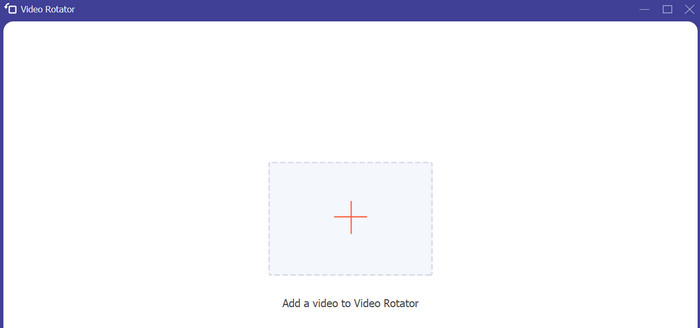
จากนั้นไปที่แท็บ Toolbox และเข้าใช้ตัวเลือก Video Rotator ของโปรแกรม หลังจากคลิกตัวเลือกนี้แล้ว ระบบจะให้คุณอัปโหลดวิดีโอ ตอนนี้ให้คลิกปุ่มสัญลักษณ์ Plus เพื่อใส่วิดีโอที่ต้องการ.
ขั้นตอนที่ 3. หมุนวิดีโอ
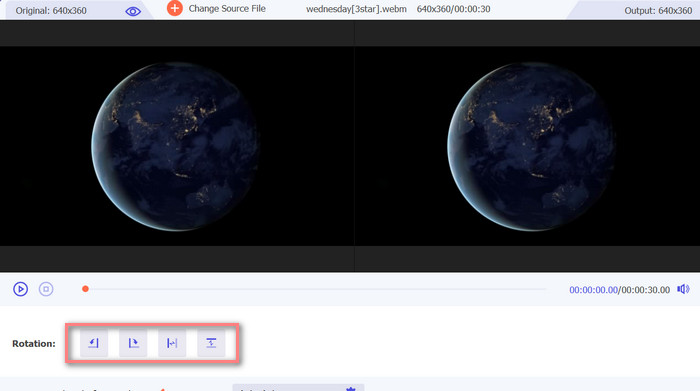
ณ จุดนี้ ทำเครื่องหมายที่ปุ่มหมุนที่เหมาะสมเพื่อรับการวางแนววิดีโอที่คุณต้องการ การแสดงตัวอย่างเป็นแบบเรียลไทม์ คุณจึงปรับเปลี่ยนได้อย่างรวดเร็ว
ขั้นตอนที่ 4. รับไฟล์วิดีโอที่หมุนแล้ว
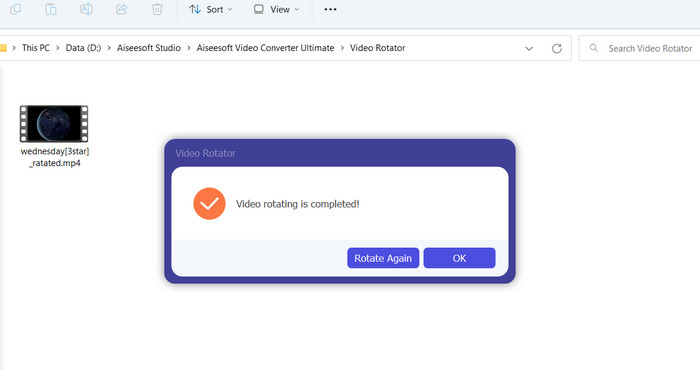
สุดท้ายให้กดปุ่ม Export เพื่อบันทึกสำเนาวิดีโอที่แก้ไขแล้ว จากนั้นจะมีการแจ้งเตือนปรากฏขึ้นพร้อมกับเปิดโฟลเดอร์ที่จัดเก็บวิดีโอโดยอัตโนมัติ.
ส่วนที่ 3 คำถามที่พบบ่อยเกี่ยวกับ Video Rotators Online
ตัวหมุนวิดีโอออนไลน์ปลอดภัยหรือไม่?
ตัวหมุนวิดีโอทางอินเทอร์เน็ตส่วนใหญ่ใช้งานได้อย่างปลอดภัย เพื่อให้แน่ใจว่าข้อมูลและความเป็นส่วนตัวของคุณได้รับการปกป้อง การเลือกเครื่องมือที่มีชื่อเสียงและเชื่อถือได้เป็นสิ่งสำคัญ
ฉันสามารถหมุนวิดีโอบนสมาร์ทโฟนของฉันได้ไหม
ใช่ ตัวหมุนวิดีโอออนไลน์จำนวนมากเหมาะกับมือถือและสามารถเข้าถึงได้บนเว็บเบราว์เซอร์ของสมาร์ทโฟนของคุณ
มีข้อจำกัดใดๆ ในการใช้ตัวหมุนวิดีโอออนไลน์หรือไม่
ใช่ ตัวหมุนวิดีโอออนไลน์บางตัวอาจมีข้อจำกัด เช่น ข้อจำกัดด้านขนาดไฟล์ ความสามารถในการแก้ไขที่จำกัด หรือคุณภาพวิดีโอที่ลดลง
สรุป
เครื่องมือหมุนวิดีโอออนไลน์มอบวิธีการหมุนวิดีโอที่สะดวกและใช้งานง่ายโดยไม่ต้องดาวน์โหลดหรือติดตั้งซอฟต์แวร์ใด ๆ สามารถใช้งานได้จากทุกอุปกรณ์ที่เชื่อมต่ออินเทอร์เน็ตและใช้งานระหว่างเดินทางได้ อย่างไรก็ตาม เครื่องมือเหล่านี้อาจมีข้อจำกัดด้านความสามารถ เช่น ขนาดไฟล์สูงสุดและคุณภาพวิดีโอที่ลดลง ดังนั้นเราจึงนำเสนอทางเลือกแบบออฟไลน์เพื่อช่วยแก้ไขข้อจำกัดเหล่านี้.
-
 [4 วิธี] วิธีเพิ่มความเร็ววิดีโอออนไลน์ของคุณอย่างง่ายดาย
 คุณต้องการเร่งความเร็ววิดีโอออนไลน์หรือไม่? อ่านบทความนี้เพื่อให้คุณทราบข้อมูลเพิ่มเติมเกี่ยวกับการเร่งความเร็ววิดีโอด้วยวิธีต่างๆ ที่เป็นไปได้
-
 วิธีที่ยอดเยี่ยมเกี่ยวกับวิธีตัดวิดีโอออนไลน์อย่างสะดวกสบาย
 การตัดวิดีโอเป็นวิธีที่ดีที่สุดในการสร้างไฮไลต์วิดีโอ โพสต์นี้จะให้วิธีการตัดวิดีโอออนไลน์อย่างง่ายดาย อ่านเพื่อเรียนรู้เพิ่มเติม
-
 สร้าง GIF เคลื่อนไหวที่ดีที่สุดของคุณผ่าน Online GIF Maker [2023]
 บทวิจารณ์ที่ให้ข้อมูลเกี่ยวกับวิธีการสร้าง GIF โดยใช้เครื่องสร้าง GIF ออนไลน์แบบง่ายๆ ที่คุณเคยพบเห็นหรือไม่ผ่านทางเว็บ
