


 Video Converter Ultimate
 บันทึกหน้าจอ
 ซ่อมวิดีโอ
[พิสูจน์แล้ว] 2 ตัวแก้ไขแท็กที่ดีที่สุดที่พร้อมใช้งานบน Windows & Mac
ไฟล์เสียงส่วนใหญ่ที่เราอัดบน Windows จะอยู่ในรูปแบบ WMA และคุณสามารถแก้ไขเมทาดาทาของไฟล์เหล่านี้ได้ด้วยการใช้ตัวแก้ไขเมทาดาทา WMA อย่างไรก็ตาม การเลือกตัวแก้ไขเมทาดาทาที่เหมาะสมสำหรับใช้งานบนเดสก์ท็อปอาจเป็นงานที่ค่อนข้างยากสำหรับผู้ใช้ทั่วไป แต่วันนี้ งานนี้ไม่ได้ยากอย่างที่คุณคิด ด้วยความช่วยเหลือจากโปรแกรมแก้ไข 2 ตัวที่คุณสามารถใช้ได้ทั้งบน Windows และ Mac อยากรู้ไหมว่าทั้งสองตัวนี้คืออะไร หากคุณอ่านบทความนี้ต่อไป เราจะรีวิวเปรียบเทียบทั้งสองซอฟต์แวร์อย่างเป็นกลางให้คุณดาวน์โหลดไปลองใช้และดูว่าอันไหนดีกว่า อย่าพลาดและเพลิดเพลินไปกับการอ่านบล็อกโพสต์นี้เพื่อทำความรู้จักกับ 2 เครื่องมือสุดยอดที่คุณไม่ควรพลาดในปี 2022 นี้.

ส่วนที่ 1 ใช้ Ultimate WMA Tag Editor ที่มีใน Windows & Mac เพื่อแก้ไขแท็ก WMA
อันดับแรกในรายการของเราคือตัวแก้ไขข้อมูลเมตา WMA ที่ดีที่สุด FVC Video Converter Ultimate ซึ่งเป็นเครื่องมือที่นำเสนอตัวแก้ไขที่ทรงพลังสำหรับแท็กที่ทุกคนชื่นชอบ ด้วยเครื่องมือนี้ คุณสามารถจัดการกับปัญหานี้ได้อย่างง่ายดายอย่างมืออาชีพ แม้ว่าคุณจะไม่เคยมีประสบการณ์ในการแก้ไขแท็ก WMA ก็ตาม ไม่เหมือนกับโปรแกรมแก้ไขแท็กอื่นๆ คุณไม่จำเป็นต้องมีความรู้มากมายเกี่ยวกับตัวแก้ไขข้อมูลเมตาเกี่ยวกับวิธีการใช้งาน ภายในไม่กี่คลิกและเสี้ยววินาที คุณจะได้รับการแท็ก WMA ของคุณโดยไม่ทำให้เสียเหงื่อ
อยากได้มากกว่านี้ไหม หนึ่งในคุณสมบัติที่โดดเด่นที่สุดที่เครื่องมือนี้นำเสนอคือ Toolbox ที่คุณสามารถทำสิ่งต่าง ๆ ได้มากมายซึ่งเครื่องมืออื่นไม่สามารถให้คุณได้ เช่น การบีบอัด ตัดต่อ การใส่ลายน้ำหรือเอาออก การย้อนกลับวิดีโอ และอื่น ๆ อีกมากมาย ดังนั้นงานต่าง ๆ บนไฟล์มีเดียทุกประเภทที่คุณนึกถึงก็สามารถจัดการได้อย่างง่ายดายด้วยความช่วยเหลือจากเครื่องมือนี้ นอกจากนี้ คุณยังสามารถแปลงไฟล์ WMA ของคุณไปเป็นฟอร์แมตใหม่มากกว่า 1000 รูปแบบได้อย่างรวดเร็วด้วยกระบวนการแปลงความเร็วสูง น่าทึ่งใช่ไหม นั่นแหละคือความสามารถของเครื่องมือขั้นสุดยอดนี้ และเพื่อเรียนรู้วิธีใส่แท็ก WMA ขั้นตอนด้านล่างจะช่วยให้คุณจัดการได้อย่างมืออาชีพ.
ขั้นตอนที่ 1 ก่อนอื่นให้คลิกปุ่มดาวน์โหลดด้านล่าง แล้วเลือกว่าคุณกำลังใช้ Windows หรือ Mac อยู่ จากนั้นติดตั้งโปรแกรมให้เรียบร้อยและหลังจากติดตั้งเสร็จให้เปิดโปรแกรมขึ้นมา.
ดาวน์โหลดฟรีสำหรับ Windows 7 หรือใหม่กว่าดาวน์โหลดอย่างปลอดภัย
ดาวน์โหลดฟรีสำหรับ MacOS 10.7 หรือใหม่กว่าดาวน์โหลดอย่างปลอดภัย
ขั้นตอนที่ 2 ที่ส่วนด้านบน ให้คลิกที่ Toolbox แล้วทำแบบเดียวกันกับ Media Metadata Editor.
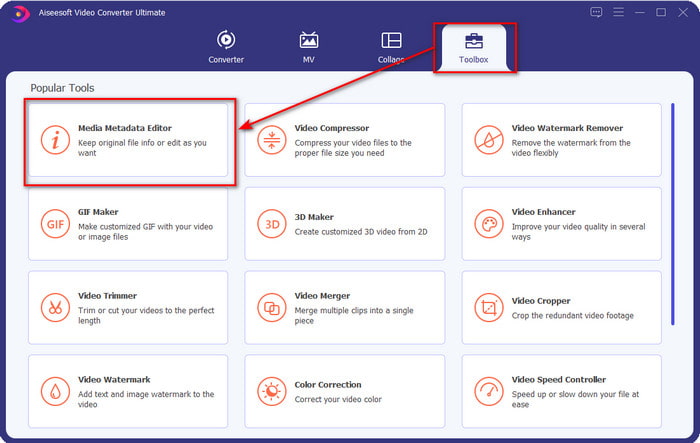
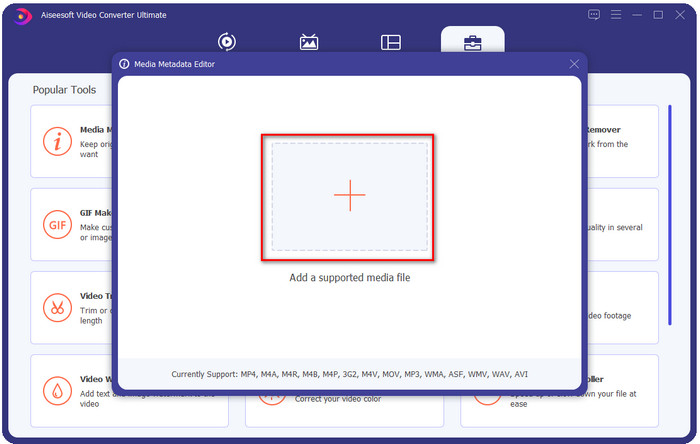
ขั้นตอนที่ 3 ใส่ไฟล์โดยการคลิกไอคอน + บนหน้าต่างเล็กที่จะแสดงขึ้นมา จากนั้นค้นหาไฟล์ WMA ในโฟลเดอร์ แล้วกด Open เพื่อไปยังขั้นตอนถัดไป.
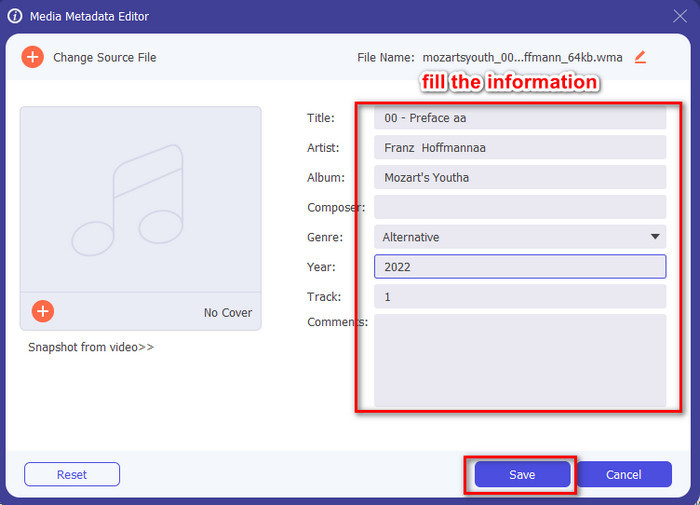
ขั้นตอนที่ 4 ในส่วนนี้ คุณสามารถแก้ไขเมทาดาทาหรือแท็กในไฟล์ WMA ได้ และกรอกข้อมูลในกล่องข้อความให้ครบถ้วน หลังจากนั้นให้คลิก Save เพื่อบันทึกการเปลี่ยนแปลงที่คุณทำกับไฟล์เสียง ด้วยวิธีนี้คุณก็ใส่แท็กเมทาดาทาลงในไฟล์เสียงได้อย่างรวดเร็วราวกับนับ 1-2-3.
ส่วนที่ 2 ใช้ตัวแก้ไขแท็ก WMA ฟรีที่มีใน Windows & Mac เพื่อเปลี่ยนข้อมูลเมตาของ WMA
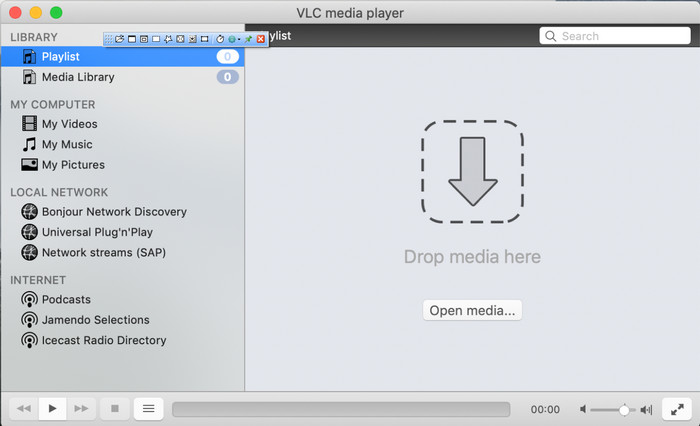
VLC Player เป็นอีกหนึ่งตัวแก้ไขแท็ก WMA ที่คุณสามารถดาวน์โหลดได้ฟรีบนทั้ง Windows และ Mac มีเดียเพลเยอร์ตัวนี้สามารถช่วยคุณแก้ไขแท็กของไฟล์วิดีโอและเสียงได้ แต่ต่างจากซอฟต์แวร์ตัวแรกที่กล่าวถึง เครื่องมือนี้ไม่ได้ถูกออกแบบมาโดยเฉพาะสำหรับการเพิ่มเมทาดาทาให้ไฟล์มีเดียใด ๆ จุดประสงค์หลักคือใช้เล่นไฟล์มีเดียรูปแบบต่าง ๆ ที่โปรแกรมเล่นสื่อเดิมหรือติดมากับเครื่องไม่สามารถเล่นได้หากไม่ดาวน์โหลดตัวแปลงสัญญาณ (codec) เพิ่มเติม แม้ว่าเครื่องมือนี้จะสามารถเพิ่มแท็กได้ แต่ก็ยังไม่ทรงประสิทธิภาพเท่าตัวแก้ไขแท็กที่ออกแบบมาโดยเฉพาะตัวอื่น ๆ.
ยิ่งไปกว่านั้น เครื่องมือนี้ได้พิสูจน์หลายสิ่งหลายอย่างสำหรับเราแล้ว เพราะมันเชื่อถือได้และปลอดภัยในการดาวน์โหลด นอกจากฟีเจอร์ดังกล่าวแล้ว เครื่องมือนี้ยังสามารถแปลง แก้ไขอย่างง่าย และบันทึกหน้าจอได้หากต้องการ เราสามารถพูดได้ว่ามันเป็นเครื่องมืออเนกประสงค์ที่ไม่ได้มีความเป็นเลิศในด้านฟังก์ชันอื่น ๆ แต่การเล่นวิดีโอนั้นดีที่สุดในตลาดอย่างไม่ต้องสงสัย
ส่วนที่ 3 แผนภูมิเปรียบเทียบระหว่างตัวแก้ไขแท็ก WMA ฟรีและขั้นสูง
เพื่อให้การตรวจสอบเข้าใจง่ายขึ้น เราได้รวมแผนภูมิเปรียบเทียบเพื่อให้ทราบว่าเครื่องมือใดดีกว่าที่จะดาวน์โหลดลงในไดรฟ์ของคุณ โปรดอ่านอย่างละเอียดเพื่อเปรียบเทียบและเปรียบเทียบ FVC Video Converter และ VlC Player และตัดสิน ซึ่งเป็นตัวแก้ไขข้อมูลเมตา WMA ที่ดีที่สุด
| FVC Video Converter Ultimate | VS | เครื่องเล่น VLC |
 | พร้อมใช้งานบน Windows & macOS | |
| รองรับรูปแบบที่หลากหลายเพื่อแก้ไขแท็ก |  |
| ฟังก์ชันอเนกประสงค์ เช่น การตัดแต่ง การตัด การแก้ไข และอื่นๆ | |
| ใช้งานง่าย | |
| ส่วนต่อประสานกราฟิกกับผู้ใช้ที่ดีที่สุด | |
ส่วนที่ 4 คำถามที่พบบ่อยเกี่ยวกับ WMA Metadata Editor
ฉันสามารถเล่น WMA บน VLC ได้หรือไม่
ใช่แล้ว คุณสามารถเล่นไฟล์ WMA บน VLC ได้อย่างง่ายดายเพราะมันรองรับรูปแบบนี้ หากคุณต้องการรู้ข้อมูลเพิ่มเติมเกี่ยวกับ VLC คุณสามารถอ่านบทความนี้ได้ เพียงแตะที่ลิงก์นี้ คุณจะได้รู้จักVLC และทางเลือกอื่น ๆ ที่มีให้ใช้งาน.
WMA คืออะไร?
WMA เป็นรูปแบบไฟล์เสียงที่ใช้เก็บชุดตัวแปลงสัญญาณเสียง (audio codec) ที่ถูกสร้างขึ้นโดย Microsoft ด้วยความช่วยเหลือจากผู้ประพันธ์เพลง Stan LePard รูปแบบเสียงนี้เป็นหนึ่งในคู่แข่งชื่อดังของรูปแบบเสียงมาตรฐานอย่าง MP3 อย่างไรก็ตาม รูปแบบนี้ไม่ได้รับความนิยมเท่าที่คุณอาจคาดไว้ ดังนั้นหากคุณต้องการส่งไฟล์นามสกุล .wma ให้ผู้อื่น คาดได้เลยว่าคุณอาจต้องใช้แอปของบุคคลที่สาม หากผู้รับปลายทางไม่ได้ใช้ Windows แล้วควรทำอย่างไร คุณสามารถแปลง WMA เป็น MP3 เพื่อให้เข้ากันได้กับอุปกรณ์ของผู้รับได้หรือไม่ ด้วยความช่วยเหลือจากบทความนี้ คุณจะได้เรียนรู้วิธีแปลง WMA เป็น MP3 บน Windows, Mac และแบบออนไลน์.
ฉันจำเป็นต้องมีตัวแปลงสัญญาณเพิ่มเติมเพื่อเล่น WMA หรือไม่?
ขึ้นอยู่กับโปรแกรมที่คุณกำลังใช้อยู่ หากคุณเป็นผู้ใช้ Windows คุณไม่จำเป็นต้องดาวน์โหลดตัวแปลงสัญญาณเพิ่มเติมเพื่อเล่นไฟล์เสียงบนเดสก์ท็อปของคุณ อย่างไรก็ตาม ไม่ใช่ผู้ใช้ Windows ทุกคน ดังนั้นการแปลงไฟล์เสียงจึงเป็นวิธีที่ดีที่สุดในการทำให้ WMA เข้ากันได้กับอุปกรณ์ของคุณ หากคุณกำลังมองหาตัวแปลง เราขอแนะนำให้คุณเลือกตัวแปลงเสียงที่ดีที่สุดที่คุณสามารถดาวน์โหลดได้บน Windows และ Mac นั่นคือ FVC Video Converter Ultimate ทำตามขั้นตอนเหล่านี้หากต้องการทราบ ดาวน์โหลดเครื่องมือบนเดสก์ท็อปของคุณ แล้วติดตั้งต่อไป เปิดเครื่องมือ แล้วคลิกไอคอน + เพื่ออัปโหลดไฟล์ WMA ที่ด้านขวาบน ให้คลิกที่ Convert All to แล้วเลือกรูปแบบเสียงที่มีอยู่ในรายการ กด Convert All เพื่อเริ่มกระบวนการแปลง ง่ายๆ อย่างนั้น
สรุป
ตอนนี้เรามีแนวคิดเกี่ยวกับ FVC Video Converter Ultimate และโปรแกรมเล่น VLC แล้ว ก็ถึงเวลาเลือกโปรแกรมแก้ไขแท็ก WMA ที่ดีที่สุดที่คุณควรใช้ เครื่องมือเหล่านี้เหมาะอย่างยิ่งสำหรับการแก้ไขแท็กของไฟล์ WMA ของคุณ ดังนั้นไม่ว่าคุณต้องการ คุณก็สามารถแก้ไขแท็กได้อย่างรวดเร็ว แต่ถ้าคุณต้องการให้เครื่องมือระดับมืออาชีพจัดการกับงานนี้ ให้เลือกเครื่องมือขั้นสูงสุด เมื่อกดปุ่มดาวน์โหลด คุณจะมีข้อมูลนี้ในระบบปฏิบัติการทั้งสองเพื่อปรับแท็ก WMA ของคุณ
-
 ข้อมูลเมตาคืออะไร: เรียนรู้ข้อมูลพื้นฐานเกี่ยวกับข้อมูลเมตา
 เมตาดาต้าคืออะไร? สิ่งนี้สำคัญหรือไม่? ข้อมูลเมตามีส่วนใดบ้าง คุณมีคำถามเดียวกันหรือไม่? ในบทความนี้ คุณจะได้เรียนรู้ข้อมูลพื้นฐานเกี่ยวกับข้อมูลเมตา
-
 4 อันดับเครื่องมือดูข้อมูลเมตาที่ดีที่สุดทั้งแบบออนไลน์และออฟไลน์ [อัปเดต 2025]
 ฉันสามารถตรวจสอบข้อมูลเมตาของไฟล์ของฉันได้หรือไม่ ได้ ด้วยความช่วยเหลือของโพสต์นี้ เราจะแนะนำให้คุณรู้จักกับผู้ดูข้อมูลเมตาต่างๆ ที่คุณสามารถใช้ได้
-
 6 ตัวเลือกที่ชื่นชอบ Snapchat ตัวกรอง Snapchat แบบเคลื่อนไหวบน Snapchat
 ต้องการทราบวิธีที่ดีที่สุดในการเพิ่มตัวกรองในวิดีโอ Snapchat หรือไม่? คุณสามารถคลิกที่นี่และเรียนรู้ตัวกรองต่างๆ ที่คุณสามารถใช้เพื่อนำไปใช้กับวิดีโอ Snapchat
