


 Video Dönüştürücü Ultimate
 Ekran kaydedicisi
 Video Onarımı
 Güvenli İndirme
MP4'ü GIF'e Ücretsiz ve Çevrimiçi Dönüştürün [Adım Adım Kılavuz]
This guide focuses on converting MP4 video files to GIF animated images. The GIF file format is used to store animated images. It is usually twenty frames for delivering a story or for fun. Nowadays, oceans of GIF image files are created and shared on social media. In fact, you do not need to envy others since you can learn multiple ways to extract several frames from an MP4 video file and save them as an animated GIF.

Bölüm 1. Yüksek Kaliteyi Korurken MP4'ü GIF'e Toplu Dönüştürme
MP4 Masaüstünde GIF'e Nasıl Dönüştürülür
Looking to turn your favorite MP4 video clip into a looping animated GIF? Whether you want to create memes, share a reaction, or make content more engaging, converting MP4 to GIF is easy with FVC Video Converter Ultimate. This all-in-one video toolbox allows you to convert, compress, and edit videos without quality loss - and creating GIFs is just a few clicks away.
• MP4, MOV, AVI, MKV ve daha fazlasını GIF ve diğer medya formatlarına dönüştürün.
• Videonuzu GIF'e dönüştürmeden önce kırpın, kesin ve önizleyin.
• Dosyaları saniyeler içinde dönüştürmek için donanım hızlandırma ile güçlendirilmiştir.
• Mükemmel çıktı için kare hızını, çözünürlüğü ve döngü seçeneklerini ayarlayın.
• Zamandan tasarruf etmek için birden fazla videoyu aynı anda GIF'e dönüştürün.
Ücretsiz İndirWindows 7 veya üzeri içinGüvenli İndirme
Ücretsiz İndirMacOS 10.7 veya üzeri içinGüvenli İndirme
İşte FVC Video Converter Ultimate ile MP4'ü GIF'e dönüştürme yöntemi:
Step 1: Download, install, and launch FVC Video Converter Ultimate on your computer.
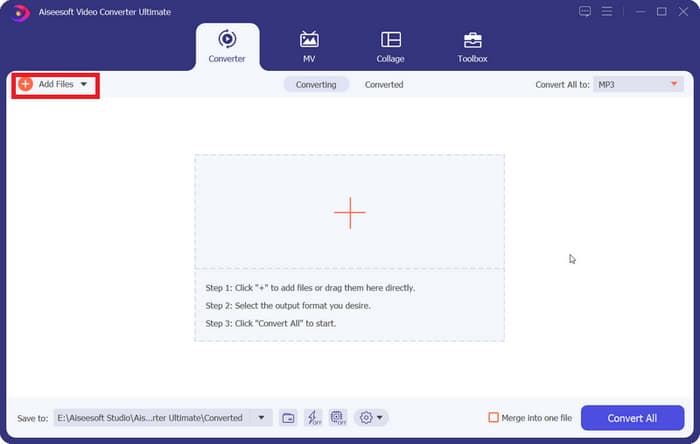
Step 2: Click Add Files or drag and drop your MP4 video into the main interface.
Step 3: Choose GIF as the output Format and click Convert All to convert MP4 to animated GIF.
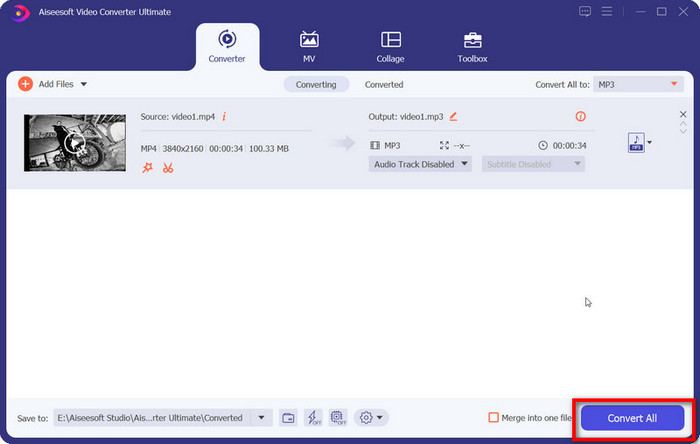
FVC Video Converter Ultimate, MP4'ten GIF'e dönüştürmeyi basit, hızlı ve esnek hale getirir. İster bir içerik yaratıcısı olun, ister sadece eğlenceli animasyonlar yapmak isteyin, bu araç ihtiyacınız olan her şeyi sağlar.
Bölüm 2. MP4'ü Ücretsiz ve Kolayca Animasyonlu GIF'e Dönüştürün
FVC Ücretsiz Videodan GIF'e Dönüştürücüyü Kullanarak MP4'ü GIF'e Nasıl Dönüştürürsünüz
What should the best MP4 to GIF converter look like? Firstly, it should be easy to use for both beginners and experienced users. Moreover, it should have the ability to protect image quality. Therefore, we recommend FVC Free Video to GIF Maker.

FVC Bedava Video - GIF Oluşturucu
122.446+ İndirme- MP4'ü herhangi bir sınırlama olmaksızın ücretsiz olarak animasyonlu GIF'e dönüştürün.
- Yeni bir GIF oluşturmak için belirli kareleri çıkarın.
- GIF görüntüleri için kapsamlı düzenleme araçları sunun.
- Birden fazla MP4 video dosyasını hızlı bir şekilde toplu olarak işleyin.
Ücretsiz İndirWindows 7 veya sonrası içinGüvenli İndirme
Ücretsiz İndirMacOS 10.7 veya sonrası içinGüvenli İndirme
Kısaca konuşursak, MP4'ü GIF'e kaliteyi kaybetmeden dönüştürmek en iyi seçenektir.
MP4 Masaüstünde GIF'e Nasıl Dönüştürülür
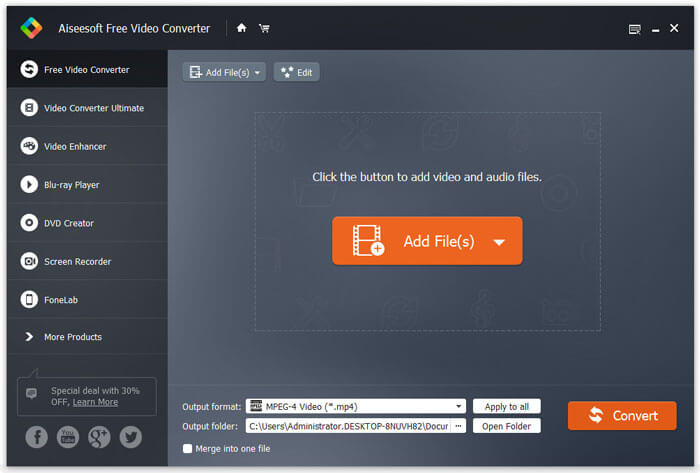
1. Adım: MP4 dosyalarını içe aktarın
Launch the best free MP4 to GIF converter once you installed it to your computer. Then click the big Add Files button to import all MP4 videos you wish to convert. Alternatively, drag and drop the MP4 files into the dot-line box to import them directly.
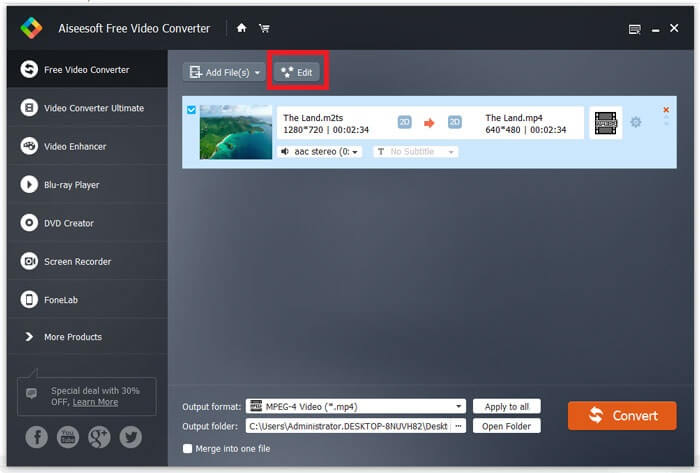
2. Adım: Videoları kırpın ve düzenleyin
After loading, click the Edit menu on the top ribbon to open the video editing window. Remove unwanted frames with the trim tool. It allows you to reset starting and ending points. Then trim other MP4 files.
3. Adım: MP4'ü GIF'e dönüştürün
Once you go back to the main interface, click and expand the Output format drop-down list, search for gif and select relative option. Hit the Open Folder button and set a specific folder to save the output. Finally, click the Convert button to start converting MP4 to GIF in batch.
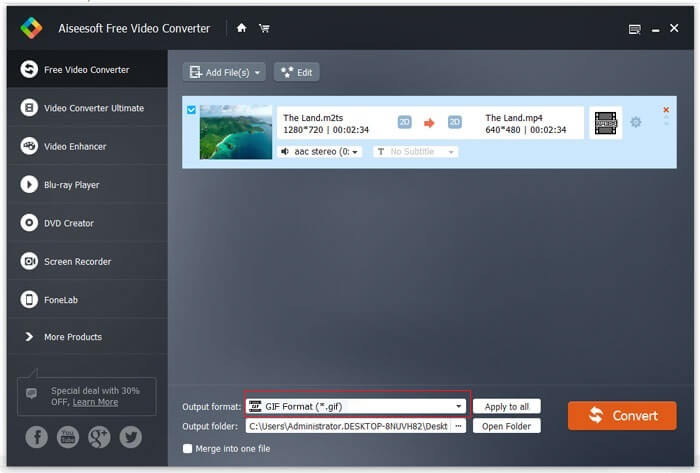
Bu, MP4'ü GIF'e dönüştürmek için ücretsiz bir çözümdür. Ancak bu araç, FVC Video Converter Ultimate ile karşılaştırıldığında metin katmanları, filtreler veya efektler ekleme gibi gelişmiş video düzenleme araçlarından yoksundur. Bu nedenle yine de Ultimate aracını indirip denemenizi öneririm.
Ücretsiz İndirWindows 7 veya üzeri içinGüvenli İndirme
Ücretsiz İndirMacOS 10.7 veya üzeri içinGüvenli İndirme
Bölüm 3. Adobe Photoshop ile MP4'ü GIF'e Nasıl Dönüştürürsünüz
Photoshop ile MP4'ü GIF'e dönüştürün
Photoshop, dünya çapında popüler bir resim düzenleyicidir. Hem ortalama insanlar hem de profesyonel fotoğrafçılar makinelerinde bulunur. Photoshop'un MP4'ü GIF'e dönüştürebileceğini merak edebilirsiniz. Cevap evet ve aşağıdaki adımları paylaşacağız.
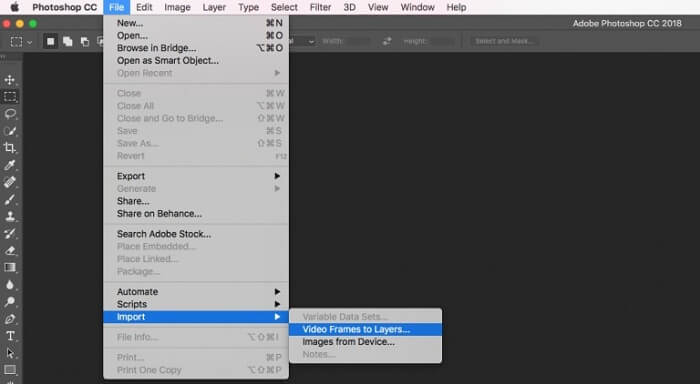
Step 1: Run your Photoshop, go to the File menu on the top ribbon, select Import and then pick Video Frames to Layers. Now, find and open the source MP4 video from your hard disk.
Photoshop videonuzu açamazsa, önce onu desteklenen codec bileşenlerine dönüştürmeniz gerekir.
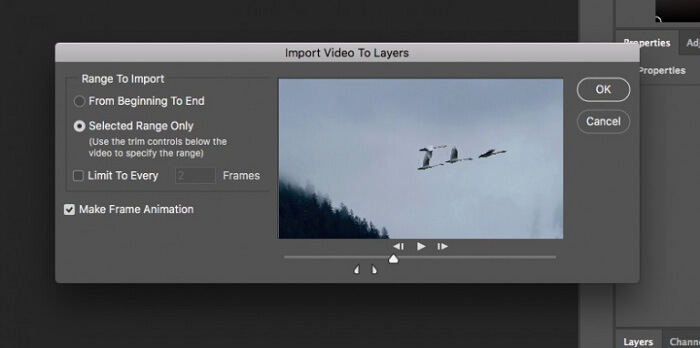
Step 2: When prompted, check the box next to Make Frame Animation. If your video file is very long, trim it with the sliders on the timeline. Then click OK to confirm it.
Step 3: Then Photoshop will import each frame of the video clip as an image. You can edit every image or keep them as default.
Step 4: Head to the File menu, select Export and then Save for Web. Then the save to web dialog will pop up. Customize the options on the right panel, such as Image Size, Quality, and more. To make a looping GIF, select the proper option from the Looping Options drop-down list.
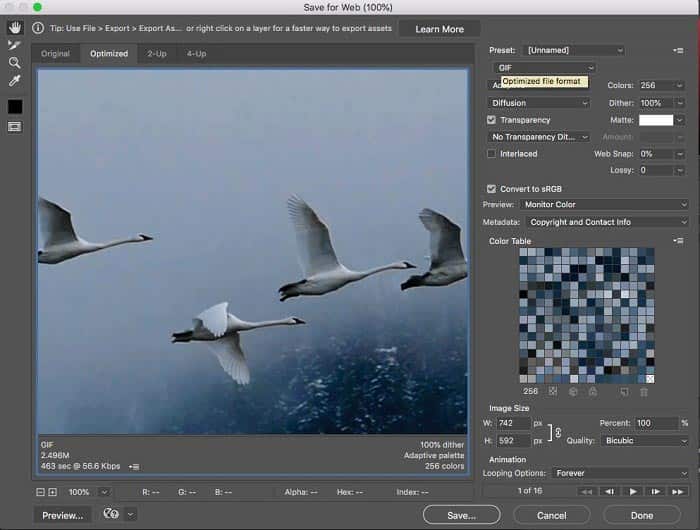
Step 5: Hit the Play icon at the bottom right corner to preview the effect. If it is okay, click the Save button and follow the onscreen instructions to turn MP4 to GIF in Photoshop.
Daha önce Photoshop satın aldıysanız, iyi bir seçenek olabilir. Ancak satın almadıysanız, FVC Video Converter Ultimate gibi profesyonel bir MP4'ten GIF'e dönüştürücü kullanmanız daha iyi olur. Sonuç olarak, MP4'ü GIF'e dönüştürmek için Photoshop kullanmak, abonelik ücreti nedeniyle maliyetli olabilir ve karmaşık arayüzü onu yeni başlayanlar için daha az uygun hale getirir. Dışa aktarma işlemi genellikle sınırlı optimizasyonla büyük dosya boyutlarıyla sonuçlanır.
Bölüm 4. MP4'ü Çevrimiçi Olarak GIF'e Nasıl Dönüştürürsünüz
FVC Ücretsiz Çevrimiçi Video Dönüştürücü ile MP4'ü GIF'e dönüştürün
If you wish to save an MP4 as GIF image with Windows Movie Maker, you still need an online converter app. To be honest, it is easier to convert MP4 to GIF online directly if you use a right tool, such as FVC Free Online Video Converter. It is the web-based MP4 to GIF freeware.
Step 1: Navigate to the official page of FVC Free Online Video Converter in your browser to open the freeware directly.
Dosyaları toplu dönüştürmek için Masaüstü Sürümü indirin.

Step 2: Click the Add Files to Convert button to install the launcher and import an MP4 from your computer.
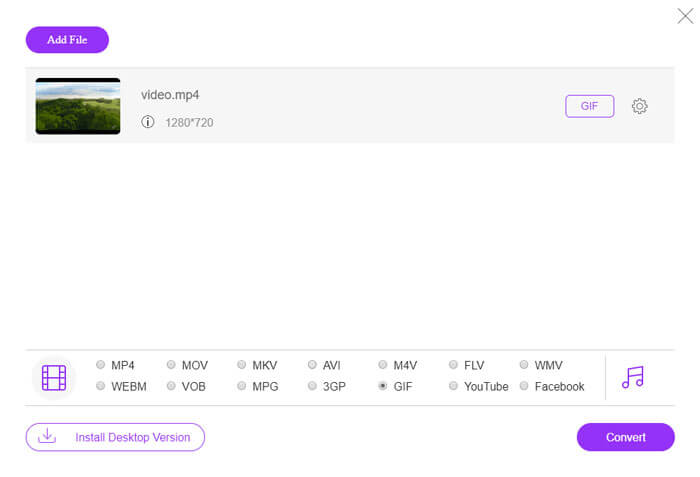
Step 3: Now, select GIF as the output format. Customize other options, like Encoder, Frame rate, Resolution, Bitrate, and other parameters.

Step 4: Hit the Convert button to start changing MP4 to GIF online. When it completes, the output folder will pop up immediately.
Çevrimiçi uygulama, dönüştürme sırasında resimlerinizi otomatik olarak sıkıştıracaktır, bu nedenle çıktı kalitesi çok iyi değildir.
MP4'ü GIF'e Dönüştürmek İçin Ezgif Nasıl Kullanılır
Ezgif, herhangi bir yazılım indirmenize gerek kalmadan MP4 videolarını kolayca GIF'lere dönüştürmenize olanak tanıyan popüler bir ücretsiz çevrimiçi araçtır. GIF'inizi daha iyi kalite ve daha küçük dosya boyutu için kırpma, yeniden boyutlandırma ve optimize etme gibi çeşitli düzenleme özelliklerini destekler.
Step 1. Go to the Ezgif Website and select the video to GIF converter tool. Click Choose File to select your MP4 video from your device, then click Upload video to upload it.
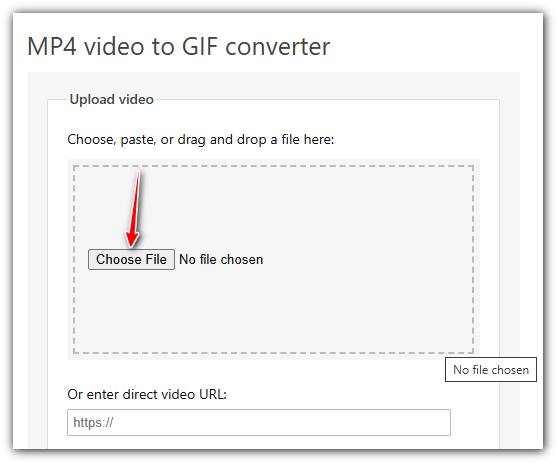
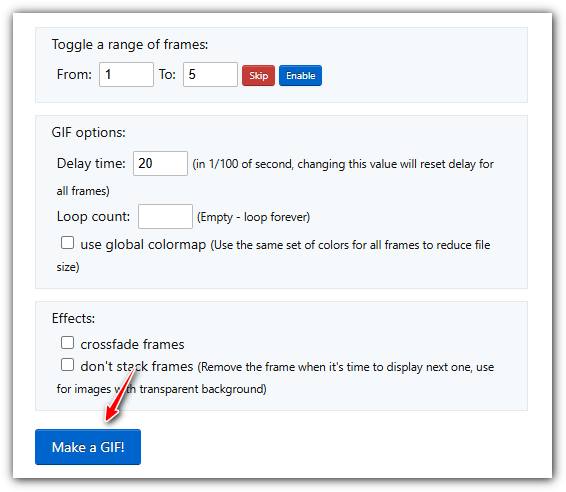
Step 2. After uploading, you can trim the video by setting start and end times, resize it, or change frame rate to adjust the GIF quality and size.
Step 3. Once you’ve set your preferences, click Make a GIF! to process your video and generate the GIF.
MP4 ve GIF
2001 yılında Moving Picture Experts Group (MPEG) tarafından piyasaya sürülen MP4 formatı, video, ses, altyazı ve görüntü verilerini ayrı parçalarda kaydetmenize yardımcı olabilir. MPEG-4 Part 14'ün kısaltmasıdır. Ayrıca, video akışı ve paylaşımı için kullanılan en popüler formatlardan biridir.
GIF, web grafikleri için yaygın bir görüntü formatıdır. Küçük resimleri ve metin içeren resimleri kaydetmenin yanı sıra GIF, web sitelerinde temel animasyonları da içerebilir ve görüntüleyebilir. Kayıpsız bir formattır ve GIF sıkıştırması görüntü netliğini bozmaz.
FVC Free Online Video Converter, yazılım yüklemeden videoları MP4, AVI ve MOV gibi popüler formatlara hızla dönüştürmek için ücretsiz, kullanımı kolay bir araçtır. Kayıt gerektirmez ve basit bir arayüze sahiptir. Ancak, internet hızına bağlıdır, dosya boyutunu sınırlar ve gelişmiş özelliklerden yoksundur. Hızlı, sıradan video dönüştürmeleri için harika bir seçimdir.
Bölüm 5: MP4'ü GIF'e Dönüştürme Hakkında SSS
FFmpeg ile GIF'i ücretsiz olarak MP4'e nasıl dönüştürebilirim?
Open www.7-zip.org and click release builds to download ffmpeg-release-full.7z. After extracting this zip file, you can open Command Prompt and enter the command line ffmpeg -f gif -i file.gif -c:v libx264 outfile.mp4. Then press Enter to confirm your command.
GIF dosyalarını nasıl görüntülerim?
GIF, benzersiz bir görüntü formatıdır. Daha çok bir videoya benziyor ama hareketsiz bir görüntü değil. Ancak, çoğu medya oynatıcı yazılımı GIF'leri açamaz. Ayrıca, yalnızca birkaç fotoğraf yöneticisi uygulaması hareketli görüntüleri oynatabilir. Neyse ki, GIF dosyalarını IE, Chrome, Firefox ve daha fazlası gibi büyük web tarayıcılarında görüntüleyebilirsiniz.
MP4'ü GIF'e dönüştürmek yasal mı?
Çoğu durumda, MP4'ü eğlence için GIF'e dönüştürmek uygundur. Ancak çoğu MP4 film ve kişisel video dosyası telif hakkı ile korunmaktadır. Özel bir videoyu değiştirmek istiyorsanız, yazarın onayını alsanız iyi olur.
Sonuç
Bu makale MP4'ü GIF formatına dönüştürmenin dört yolunu paylaştı. Photoshop, profesyonel bir fotoğraf düzenleyicidir ve GIF olarak kaydetmek için MP4'ten birkaç kare çıkarabilir. Ancak oldukça pahalıdır. Windows Movie Maker, işi bitirmek için fazladan dönüştürücülerle çalışmak zorundadır. Çevrimiçi MP4'ten GIF'e dönüştürücü, kalite kaybını önemsemiyorsanız istediğinizi elde etmenin uygun bir yoludur. Öte yandan FVC Free Video to GIF Maker, ihtiyacınızı karşılamanın en kolay yoludur. Daha çok soru? Lütfen mesajınızı aşağıya bırakın.
-
 MTS'yi MOV'a Dönüştürmenin En İyi 3 Ücretsiz Yolu
 MTS dosyasını bilgisayarınızda veya iPhone / Android telefonunuzda oynatamıyor musunuz? MTS dosyası nedir ve nasıl oynatılır? En iyi MTS Video Dönüştürücü nedir? Bu gönderi, daha iyi oynatma için MTS'yi MOV'a dönüştürmenize yardımcı olacak 3 basit ve ücretsiz yolu paylaşıyor.
-
 Masaüstünde ve Çevrimiçi Olarak Kaçırmamanız Gereken En İyi 6 WAV Kaydedici
 Bu makalede paylaştığımız en iyi WAV kayıt yazılımı, profesyoneller gibi ses ve ses yakalamanıza yardımcı olan çeşitli kullanışlı özelliklere sahiptir.
-
 MTS ve M2TS Arasındaki Fark Nedir?
 MTS veya M2TS dosyası nedir? M2TS ve MTS arasındaki fark nedir? Video kameranın kaydedilmiş MTS veya M2TS dosyasını nasıl izleyebilirim? Bu gönderideki tüm cevapları bulun.

