


 Chuyển đổi video Ultimate
 Trình ghi màn hình
 Sửa chữa video
[Windows và Mac] Tìm hiểu cách cắt MP4: Công cụ trực tuyến và ngoại tuyến tốt nhất
Cắt khung hình video là công việc phổ biến bạn sẽ thường làm nếu thích chỉnh sửa video. Thay đổi kích thước là cách tốt nhất để làm nổi bật những chi tiết bạn muốn người xem chú ý. Vì vậy, thay vì phải phóng to hoặc thu nhỏ trong lúc quay – khá rườm rà, và nếu tay bạn run thì lại càng rắc rối – tại sao bạn không thử cắt khung hình sau khi quay xong? Hơn nữa, nếu bạn phóng to hoặc thu nhỏ video khi quay, rất có thể tính chân thực của video sẽ bị ảnh hưởng. Dựa trên những giải thích đó, dưới đây là danh sách những công cụ tốt nhất để cắt và học cách cắt một tệp MP4 với các bước cụ thể. Giờ bạn hãy tập trung đọc các bài hướng dẫn bên dưới, chúng sẽ cung cấp căn cứ để bạn biết nên dùng công cụ nào nhằm có được phần mềm cắt khung hình hoàn hảo.

Phần 1. Cách cắt video MP4 ngoại tuyến với các bước và chi tiết
1. FVC Video Converter Ultimate (Window & Mac)
Bạn muốn biết cách cắt video như trong các bộ phim Hollywood? Kể cả khi bạn là người mới bắt đầu, bạn vẫn có thể đạt được khả năng cắt khung hình rất tốt. Để làm được điều này, bạn có thể dùng FVC Video Converter Ultimate để cắt MP4 theo chiều dài và chiều rộng cụ thể. Không giống như các công cụ khác được liệt kê ở đây, phần mềm này được phát triển để vượt qua mọi trở ngại mà bạn gặp phải. Thay vì phải truy cập hoặc tải xuống nhiều phần mềm khác nhau để hoàn thành công việc, bạn có thể dùng một công cụ đa năng nhất để xử lý mọi tác vụ. Bạn muốn biết thêm về cách tính năng này hoạt động? Vậy chúng ta hãy tiếp tục với các bước và học cách cắt như một người chuyên nghiệp.
Bước 1. Tải xuống và cài đặt FVC Video Converter Ultimate vào máy tính của bạn. Chọn phiên bản phù hợp với máy tính để bàn hoặc máy tính xách tay của bạn. Sau đó, bạn có thể điều chỉnh các thiết lập của công cụ và nhấp Hoàn tất để lưu các điều chỉnh.
Tải xuống miễn phí cho Windows 7 trở lên. Tải xuống an toàn.
Tải xuống miễn phí cho MacOS 10.7 trở lên. Tải xuống an toàn.
Bước 2. Khởi chạy công cụ bằng cách nhấp vào biểu tượng phần mềm trên màn hình. Giao diện tương tự như thế này sẽ xuất hiện trên màn hình, có nghĩa là phần mềm đã hoạt động bình thường.
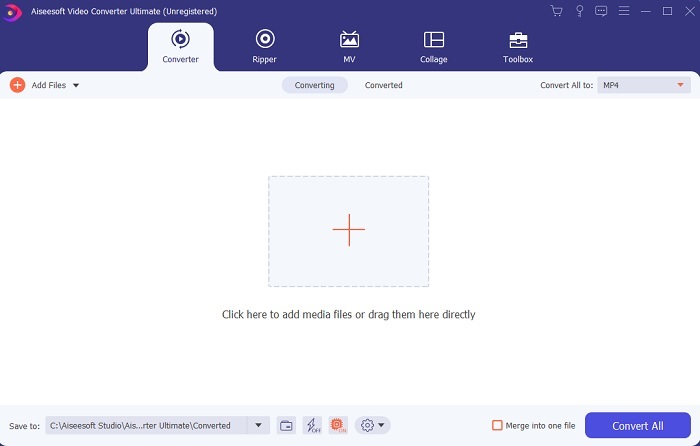
Bước 3. Nhấp vào Add Files để chèn video MP4 mà bạn muốn cắt.
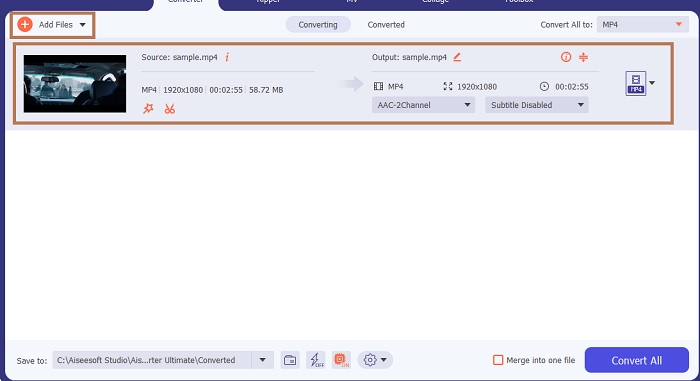
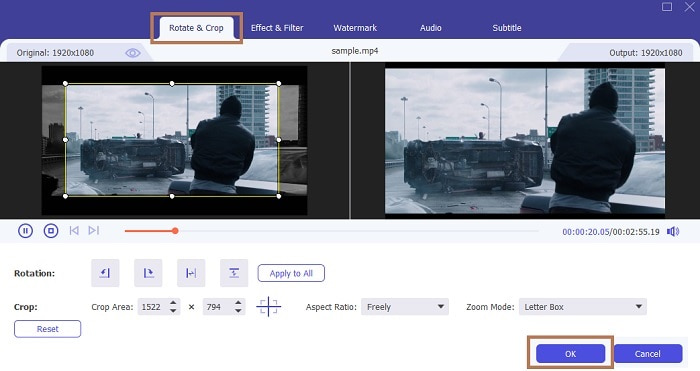
Bước 4. Sau khi chèn tệp, nhấn nút hình cây đũa thần để thêm “phép màu” cho video của bạn, sau đó chuyển đến thẻ Rotate & Crop. Để cắt MP4, bạn có thể bắt đầu bằng cách kéo các chấm nhỏ để thay đổi chiều dài và chiều rộng của video. Ngoài ra, nếu bạn muốn đặt kích thước cụ thể, bạn có thể vào Aspect Ratio và chọn tỷ lệ phù hợp. Khi hoàn tất, nhấp OK để lưu và tiếp tục.
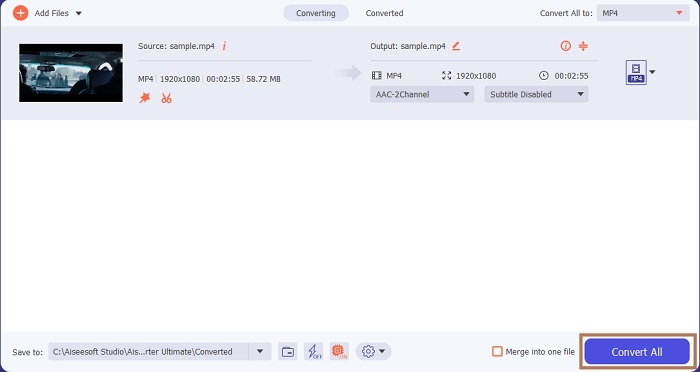
Bước 5. Ở giao diện chính của công cụ, bạn có thể thay đổi định dạng bằng cách nhấp vào nút danh sách thả xuống. Nếu không muốn thay đổi định dạng, bạn cứ để nguyên rồi nhấp vào Convert All. Chờ một lát để quá trình hoàn tất, và thế là xong.
Ngoài việc cắt khung hình, công cụ này còn cho phép bạn dễ dàng ghép nhiều tệp MP4, nén video MP4 thành kích thước nhỏ hơn và còn nhiều tính năng khác.
2. iMovie (Mac)
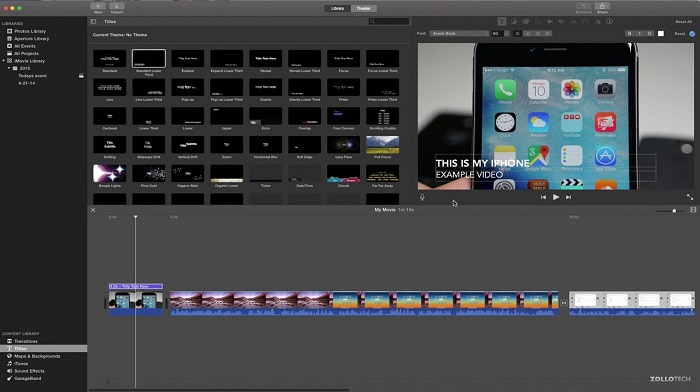
Bạn muốn biết cách cắt video MP4 trên Mac? Vậy thì iMovie có thể là công cụ phù hợp cho công việc này. Mặc dù FVC Video Converter Ultimate cũng hỗ trợ Mac, nhưng có thể bạn muốn thử một phần mềm khác. iMovie không mạnh bằng công cụ ở trên nhưng vẫn đáng để trải nghiệm các tính năng chỉnh sửa mà nó cung cấp. Chỉ với công cụ này, bạn còn có thể thêm hiệu ứng chuyển cảnh vào giữa các đoạn video. Muốn biết cách cắt video bằng iMovie? Hãy làm theo các bước dưới đây.
Bước 1. Tải iMovie bằng trình tìm kiếm (trình duyệt) của bạn.
Bước 2. Sau khi cài đặt, nhấp vào Import Movie để nhập các video bạn muốn cắt.
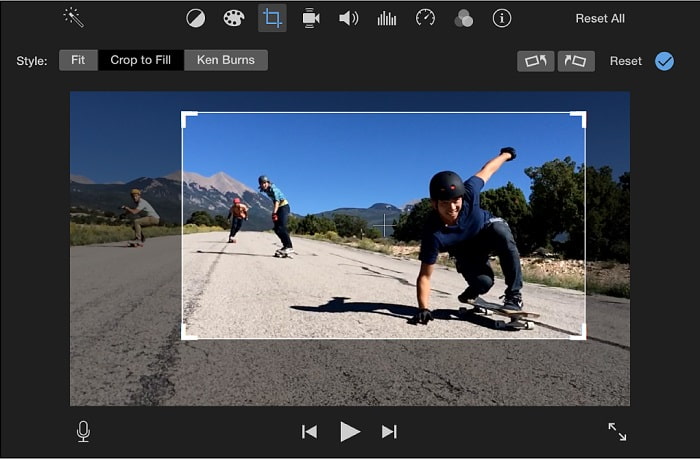
Bước 3. Chọn kiểu cắt khung hình bạn muốn áp dụng cho video giữa Crop to Fill và Ken Burns. Nhấp vào Apply Crop Adjustment là xong.
Phần 2. Chọn giải pháp thay thế tốt nhất về cách cắt MP4 trực tuyến
1. VEED.IO
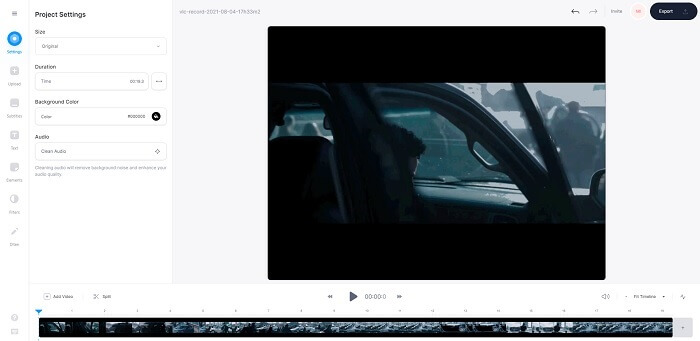
Cắt MP4 trực tuyến với sự trợ giúp của VEED.IO. Công cụ online này cung cấp một số tính năng chỉnh sửa cơ bản giống như công cụ đầu tiên ở trên. Nhưng không giống các công cụ đã đề cập trước đó, công cụ này và công cụ tiếp theo không cần tệp cài đặt bổ sung để hoạt động, vì bạn có thể truy cập trực tuyến – điều này rất tiện lợi. Tuy nhiên, điểm bất tiện là bạn phải tạo tài khoản để sử dụng, khá phiền cho tất cả chúng ta, đặc biệt là với những người chỉ muốn chỉnh sửa ngay lập tức. Nếu muốn thử dùng VEED.IO, bạn có thể truy cập bằng cách tìm kiếm nó trên công cụ tìm kiếm của mình.
2. Video
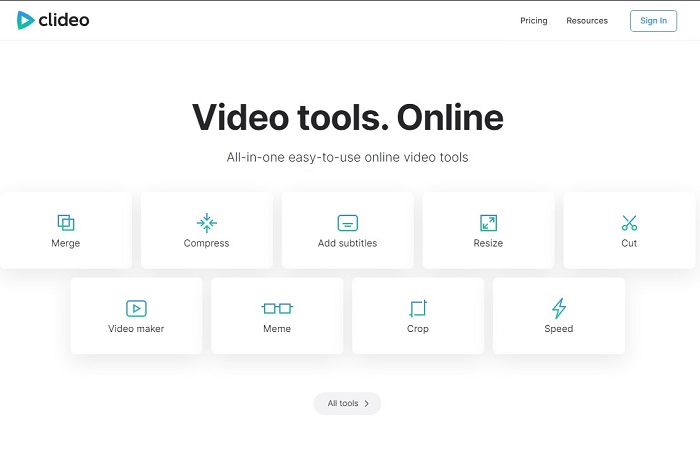
Một phần mềm trực tuyến khác cho phép bạn cắt MP4 mà không cần mã hóa lại là Clideo. Công cụ này không yêu cầu tạo tài khoản hay tải về để sử dụng, nhưng các tính năng của nó rất hạn chế. Cụ thể là nó còn ít hơn cả những chức năng chỉnh sửa cơ bản. Vì thế, nếu bạn muốn thỏa sức sáng tạo, công cụ này sẽ phần nào giới hạn bạn. Ngoài ra, quá trình tải video lên để bắt đầu cắt cũng sẽ mất một thời gian và phụ thuộc vào tốc độ internet của bạn. Tuy vậy, không cần lo lắng vì nó dễ sử dụng, miễn phí và thực hiện đúng chức năng. Bạn có thể thử nó khi có nhu cầu.
Phần 3. Câu hỏi thường gặp về Crop MP4
Ý nghĩa của MP4 là gì?
MP4 là tệp đa phương tiện chứa dữ liệu thay vì mã cho âm thanh và video. Ngoài ra, nó có thể lưu trữ dữ liệu cho phụ đề và ảnh tĩnh nếu bạn muốn. MP4 được gọi là MPEG-4 Phần 14.
Cái nào tốt hơn: MP3 hay MP4?
Còn tùy vào tình huống. Ví dụ, định dạng phổ biến nhất để lưu trữ nhạc, bản ghi âm, đoạn âm thanh, v.v. là MP3. Mặc dù MP4 cũng có thể chứa tệp âm thanh vì đây là một định dạng vùng chứa đa chức năng, MP4 vẫn là định dạng chính để tải xuống video hoặc clip, ghi hình và chuyển đổi. Để biết thêm thông tin về hai định dạng này, hãy đọc bài MP3 vs. MP4.
Bạn có thể Crop MP4 trên VLC không?
Có, bạn có thể cắt trên VLC mặc dù nó có khả năng cắt xén trình phát đa phương tiện tốt và chuyển đổi là một trong những tính năng mà nó cung cấp. Nhưng nó không phải là lựa chọn lý tưởng để cắt video mặc dù nó vẫn đáng để thử. Vì vậy, nếu bạn không thích VLC làm người cắt xén của mình thì bạn có thể chọn công cụ từ trên.
Phần kết luận
Có thể hiểu dễ dàng rằng việc cắt xén là một trong những công việc dễ dàng nhất nhưng cũng dễ thất bại. Nhưng như họ nói nếu bạn chọn đúng công cụ để thực hiện công việc thì bạn rất tốt để đi. Vì vậy, chúng ta có nghĩa là gì bởi công cụ phù hợp? Ý chúng tôi là FVC Video Converter Ultimate. Thay vì giải quyết cho công cụ khác ở trên hoặc trên web, tại sao bạn không giải quyết với công cụ cắt xén tốt nhất được đề cập ở trên. Nó đang được liệt kê ở đầu vì một mục đích và mục đích đó là thống trị tất cả các công cụ.
-
 4 phương pháp tốt nhất để chuyển đổi MOV sang MP3 một cách dễ dàng trên Windows và Mac
 Khi muốn trích xuất các tập tin âm thanh MP3 từ tập tin MOV, bạn có thể tìm hiểu thêm về 4 công cụ chuyển MOV sang MP3 hiệu quả nhất để có được những tập tin như mong muốn từ bài viết.
-
 WAV sang MP3 - 5 trình chuyển đổi miễn phí hàng đầu để chuyển đổi WAV sang MP3
 Trang này là danh sách dài các công cụ chuyển đổi WAV sang MP3 miễn phí (iTunes, Audacity, VLC, Windows Media Player và Free Audio Converter) để thay đổi WAV sang MP3 trên máy tính.
-
 M4V to MP3 Converter - 4 phương pháp tốt nhất để trích xuất MP3 từ tệp M4V
 Khi bạn muốn trích xuất âm thanh MP3 từ video M4V một cách dễ dàng, bạn có thể tìm hiểu thêm về 4 bộ chuyển đổi M4V sang MP3 tốt nhất để có được các tệp âm thanh mong muốn từ bài viết.
