


 Chuyển đổi video Ultimate
 Trình ghi màn hình
 Sửa chữa video
 Tải xuống an toàn
Cách miễn phí và trực tuyến để chuyển đổi RMVB sang MP4
RMVB (RealMedia Variable Bitrate) là một tệp video RealMedia không được tất cả ứng dụng hỗ trợ. Nhiều người muốn thay đổi định dạng tệp từ RMVB sang MP4 để dễ dàng phát trên điện thoại di động. Hướng dẫn này sẽ chỉ cho bạn ba cách miễn phí và trực tuyến để chuyển đổi tệp RMVB sang MP4 nhanh chóng, giúp bạn tiếp tục thưởng thức video của mình mà không gặp rắc rối.

Phần 1. Làm thế nào để chuyển đổi RMVB sang MP4 với RMVB sang MP4 Converter
Để chuyển RMVB sang MP4 trên Windows 10 hoặc Mac, một trình chuyển đổi RMVB sang MP4 là khá nhanh và đáng tin cậy. Free RMVB to MP4 Video Converter là một trình chuyển đổi video miễn phí và hữu dụng, cho phép chuyển đổi nhanh từ RMVB sang MP4. Nó cũng hỗ trợ chuyển RMVB sang AVI, FLV, MOV hoặc các định dạng khác. Dưới đây là các bước để đổi RMVB sang MP4.
Tải Miễn PhíDành cho Windows 7 trở lênTải Xuống An Toàn
Tải Miễn PhíDành cho MacOS 10.7 trở lênTải Xuống An Toàn
Bước 1. Trước khi bắt đầu, bạn cần tải xuống và cài đặt phần mềm miễn phí này trên máy tính. Sau đó, khởi chạy Free RMVB to MP4 Converter và nhập các tệp RMVB vào chương trình bằng cách nhấp vào nút Add File(s). Nhân tiện, nó cho phép bạn thực hiện chuyển đổi hàng loạt cùng lúc, vì vậy bạn có thể chuyển đổi nhiều tệp RMVB đồng thời.
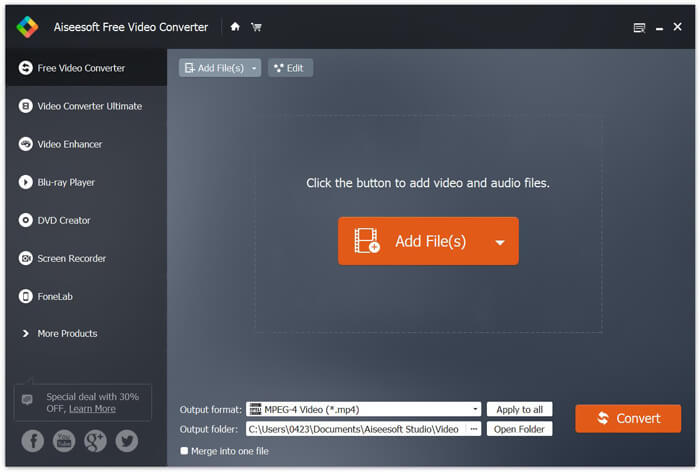
Bước 2. Sau khi thêm tệp vào chương trình, hãy đi tới Output format rồi chọn định dạng MP4.

Bước 3. Nhấp vào nút Convert. Chờ vài phút, và bạn sẽ nhận được các tệp MP4 như mong muốn.
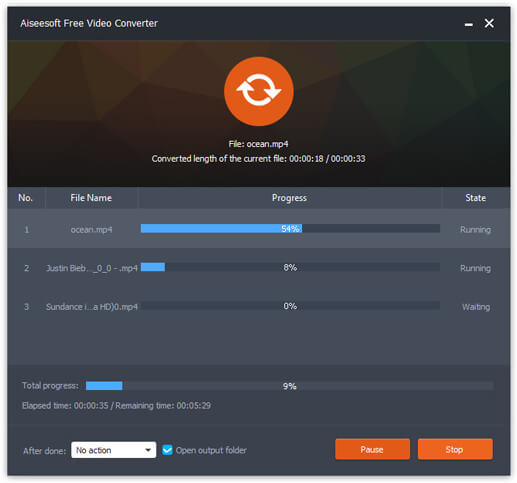
Khi đã có tệp MP4, bạn có thể phát trên máy tính hoặc thiết bị di động. Ngoài ra, bạn cũng có thể dùng Free RMVB to MP4 Converter này để chuyển RM sang MP4, hoặc chuyển WMV sang MP4.
Phần 2. Làm thế nào để chuyển đổi RMVB sang MP4 với VLC
VLC cũng hoạt động như một công cụ chuyển đổi video thực tế và bạn có thể dễ dàng chuyển đổi các tệp RMVB của mình sang MP4 với chất lượng cao. Hãy xem cách sử dụng VLC để thực hiện công việc này.
Bước 1. Trước hết, bạn cần tải xuống và cài đặt chương trình VLC Media Player trên máy tính, rồi chạy nó.
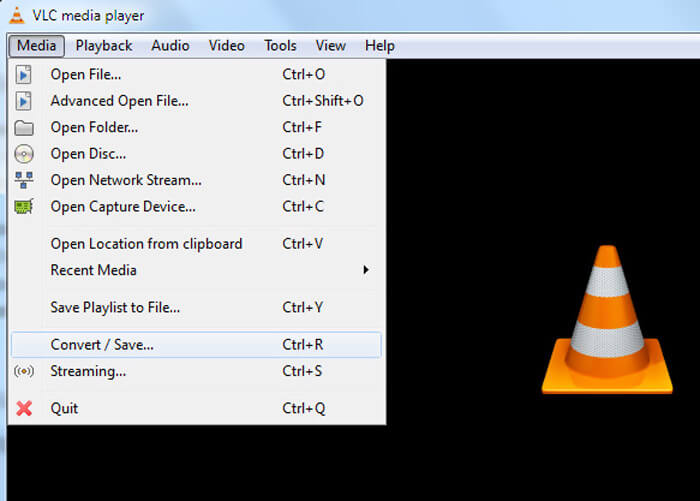
Bước 2. Đi tới Media tab, sau đó chọn Convert/Save để tiếp tục.
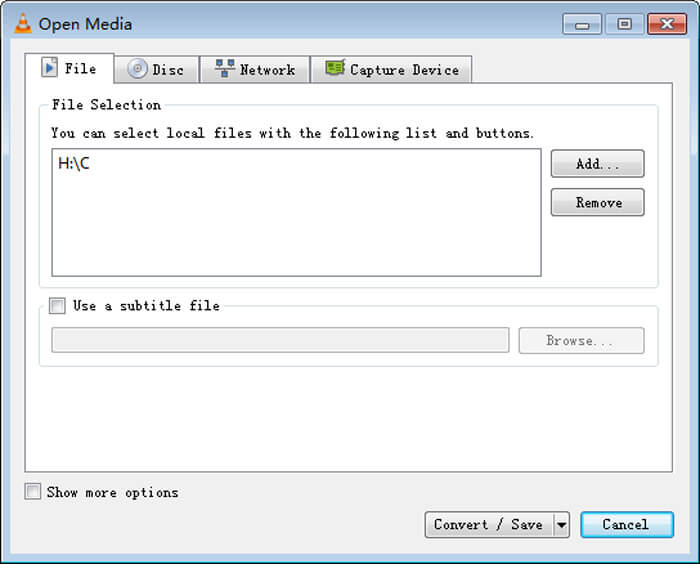
Bước 3. Khi thấy cửa sổ Open Media, bạn cần thêm tệp RMVB vào VLC bằng cách nhấp nút Add… trong mục File. Sau đó, nhấp nút Convert/Save ở cuối cửa sổ.
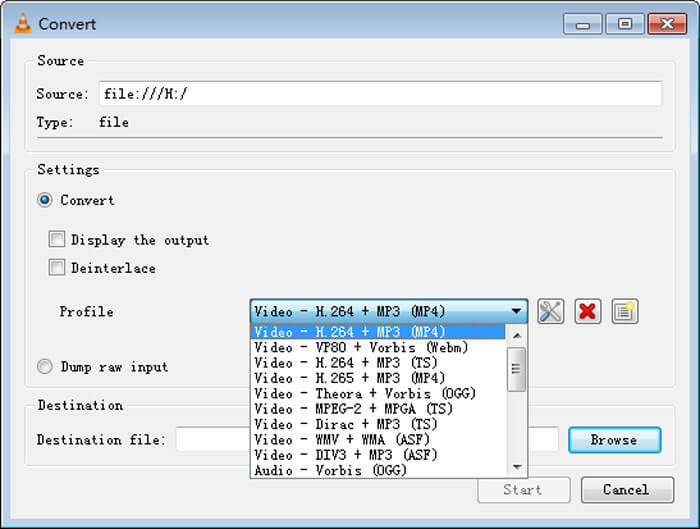
Bước 4. Tiếp theo, bạn sẽ vào cửa sổ Convert. Tại đây, hãy tìm mục Settings, vào Profile, rồi chọn MP4 làm định dạng đầu ra từ menu thả xuống. Cuối cùng, nhấp Start để chuyển RMVB sang MP4 nhằm phát lại dễ dàng.
Phần 3. Làm thế nào để thay đổi RMVB thành MP4 trực tuyến
Trình chuyển đổi video trực tuyến cũng hỗ trợ chuyển video RMVB sang MP4 với tốc độ nhanh. Free Online Video Converter là một trình chuyển đổi video dựa trên web, có thể chuyển đổi bất kỳ tệp video hoặc âm thanh phổ biến nào sang MP4, MOV, FLV, AVI, MP3, AAC và nhiều định dạng khác miễn phí. Nó cho phép người dùng đổi tệp từ RMVB sang MP4 dễ dàng ngay trên trình duyệt.
Bước 1. Truy cập https://www.free-videoconverter.net/free-online-video-converter/ và nhấp vào nút Add Files to Convert để kích hoạt trình khởi chạy.
Tải xuống phiên bản dành cho máy tính để bàn để chuyển đổi tập tin hàng loạt.

Bước 2. Sau đó, nhập tệp RMVB của bạn vào công cụ trực tuyến này. Tiếp theo, chọn định dạng MP4 trong thẻ Video. Khi đã sẵn sàng chuyển đổi, hãy nhấn nút Convert để bắt đầu. Khi quá trình kết thúc, các tệp đã chuyển đổi sẽ được tự động lưu vào máy tính của bạn.

RMVB so với MP4
RMVB, một biến thể mới hơn của định dạng Real Media (.RM) tiêu chuẩn, là định dạng tệp video Real Media được nén bằng cách sử dụng tốc độ bit thay đổi. Đây là một định dạng phổ biến cho phim và anime Châu Á. Các tệp RMVB có kích thước nhỏ hơn và có tốc độ bit thấp hơn nhưng chất lượng tốt hơn.
Được phát hành bởi Nhóm chuyên gia hình ảnh chuyển động (MPEG) vào năm 2001, định dạng MP4 có thể giúp bạn lưu dữ liệu video, âm thanh, phụ đề và hình ảnh trong các bản nhạc riêng biệt. Nó là viết tắt của MPEG-4 Part 14. Thêm vào đó, nó là một trong những định dạng phổ biến nhất được sử dụng để phát trực tuyến và chia sẻ video.
Phần 4. Câu hỏi thường gặp về RMVB sang MP4
Tệp RMVB là gì?
RMVB (RealMedia Variable Bitrate) là một định dạng tệp video Real Media sử dụng tốc độ bit thay đổi. Nó đã từng rất phổ biến để phân phối anime, phim, tập, torrent, v.v. của Châu Á trên web vì kích thước tệp nhỏ hơn và chất lượng tốt hơn nhiều.
Làm thế nào để mở một tệp RMVB?
RealPlayer hỗ trợ phát lại các tệp RMVB trong Windows, Mac OS X và Linux. Hoặc bạn có thể sử dụng VLC để phát các tệp RMVB.
HandBrake có thể chuyển đổi RMVB sang MP4 không?
HandBrake là một công cụ tuyệt vời để chuyển đổi video hoạt động trên một số thiết bị được hỗ trợ. Đó là một sự lựa chọn tuyệt vời cho bất kỳ ai muốn biến RMVB thành MP4.
Vì vậy, đó là cách bạn chuyển đổi tệp RMVB sang MP4. Bạn có gặp phải bất kỳ sự cố nào khi làm theo các bước được đề cập ở trên không? Hãy cho chúng tôi biết suy nghĩ của bạn.
-
 3 bước đơn giản để ghi tập tin / thư mục video _TS sang DVD trên Mac / Windows
 Làm cách nào để chuyển đổi và ghi tệp TS vào đĩa DVD? Hướng dẫn từng bước này sẽ chỉ cho bạn cách sao chép tệp và thư mục TS sang DVD trên Windows / Mac để bạn có thể xem tệp TS trên đầu đĩa DVD hoặc TV.
-
 6 cách dễ dàng để chuyển đổi TS sang AVI / MKV / MOV / WMV trên Windows / Mac
 Bạn muốn chuyển đổi các tập tin TS sang AVI / MKV / MOV / WMV một cách nhanh chóng? Bài viết này hiển thị các trình chuyển đổi video trực tuyến và ngoại tuyến với hướng dẫn đầy đủ. Có lẽ bạn có thể nhận được trình chuyển đổi TS miễn phí tốt nhất tại đây.
-
 Cách chuyển MP4 sang M4A trên Windows / Mac (Miễn phí & Trực tuyến)
 Làm cách nào để chuyển đổi MP4 sang M4A trực tuyến? Tôi có thể trích xuất âm thanh từ các tệp MP4 không? Đọc bài đăng này và bạn sẽ nhận được tất cả câu trả lời về việc chuyển đổi từ MP4 sang M4A.

