


 Chuyển đổi video Ultimate
 Trình ghi màn hình
 Sửa chữa video
 Tải xuống an toàn
Chuyển đổi WTV sang MP4: Cách chuyển đổi WTV sang MP4
WTV, là sự kế thừa của định dạng DVR-MS, được phát triển bởi Microsoft để lưu trữ nội dung TV được ghi lại bởi Windows Media Center. Được mã hóa theo tiêu chuẩn MPEG-2 và MPEG-4 và MPEG-1 Layer II hoặc Dolby Digital AC-3, WTV được hỗ trợ bởi một số phần mềm như FFMPEG, Windows Media Center, CyberLink PowerDVD 12, Nero 12, HandBrake, CCextractor, v.v.

If you want to watch or share WTV files conveniently, you had better convert WTV to MP4, the most popular format for almost any device.
We’ve searched the Internet in a quest for WTV to MP4 converter and found the top 2 free WTV to MP4 converters to turn WTV to MP4.
Phần 1. Công cụ chuyển đổi video miễn phí - Chuyển đổi WTV sang MP4 trực tuyến
Well, it is very easy to convert WTV to MP4. The easiest way to change WTV to MP4 is to finish it online. Free Online Video Converter is the freeware to convert WTV to MP4 and other mainstream video and audio formats. This free online tool is compatible with Windows 10/8/7 and Mac OS X 10.7 or above, and you can easily transcode WTV to MP4 within steps.
Để hợp lý hóa quy trình, bạn có thể làm theo hướng dẫn:
1. Click Add Files to Convert button to upload WTV files from PC.
2. Select MP4 from the checkbox.
3. Click Convert to convert and download WTV files automatically.
Bây giờ, chúng tôi ở đây để hướng dẫn bạn cách chuyển đổi WTV sang MP4 một cách chi tiết.
Step 1. Add WTV files
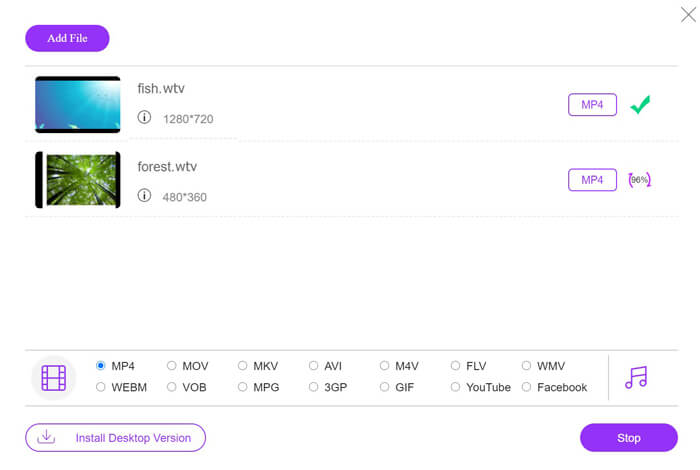
Open this free online WTV to MP4 converter via your browser. Click Add Files to Convert button, and a pop-up window prompts to tell you to download and install the launcher. Just download it and the open-source window will appear after the successful installation. Then you can select the WTV recordings on your computer for uploading. This freeware supports batch conversion and you can add more than one WTV files online.

Step 2. Select MP4
Tick the checkbox of MP4 on the bottom, where you can find various output options like MKV, AVI, M4V, FLV, VOB, GIF, YouTube, Facebook, MP3, AAC, WMA, WAV, FLAC, etc.
In addition, you can click the Settings icon next to the output MP4 pane to adjust the encoder, frame rate, resolution, bitrates, and other parameters.

Step 3. Convert WTV to MP4
After everything is done, click the Convert button and a window appears that requires you to select the destination to store the converted MP4 files. Choose the destination and return to this free online converter, click Convert again to start converting and downloading the MP4 files automatically. You can see the conversion progress percentage directly.
Phần 2. HandBrake - Chuyển đổi WTV sang MP4 trên PC / Mac
Một cách miễn phí khác để chuyển đổi WTV sang MP4 là sử dụng HandBrake. HandBrake là số ít phần mềm có thể đọc các tệp WTV. Bên cạnh đó, nó cũng có thể chuyển mã WTV sang MP4 / MKV trên máy tính Windows và Mac của bạn.
HandBrake là phần mềm máy tính để bàn mã nguồn mở, vì vậy bạn nên tải xuống bộ chuyển đổi miễn phí này trước tiên trên máy tính của mình.
Một lần nữa, các bước đơn giản để chuyển đổi WTV sang MP4 trong HandBrake như sau:
1. Thêm tệp WTF hoặc toàn bộ thư mục vào HandBrake.
2. Cấu hình MP4 tùy chỉnh trong HandBrake.
2. Xem trước và chuyển đổi WTV sang MP4.
Dưới đây là hướng dẫn toàn diện để thay đổi WTV thành MP4 trong HandBrake.
Step 1. Add WTV files into HandBrake
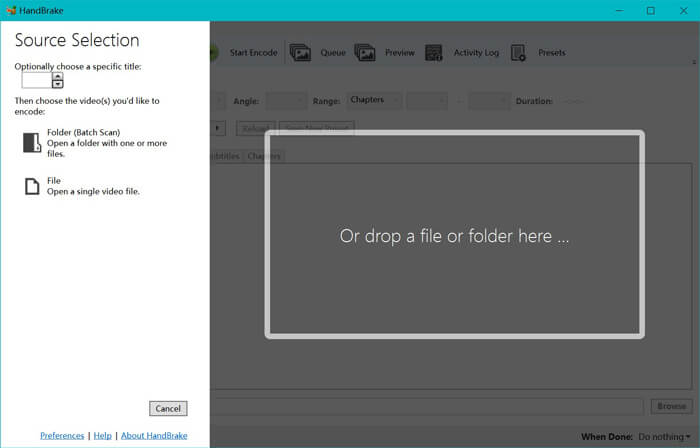
Once you have installed HandBrake on your computer, HandBrake will present the open-source dialog by default. Here you can click Folder or File to select the WTV files or folder into main window. Alternatively, you can also drag and drop the WTV files into this software.
Step 2. Select MP4 format
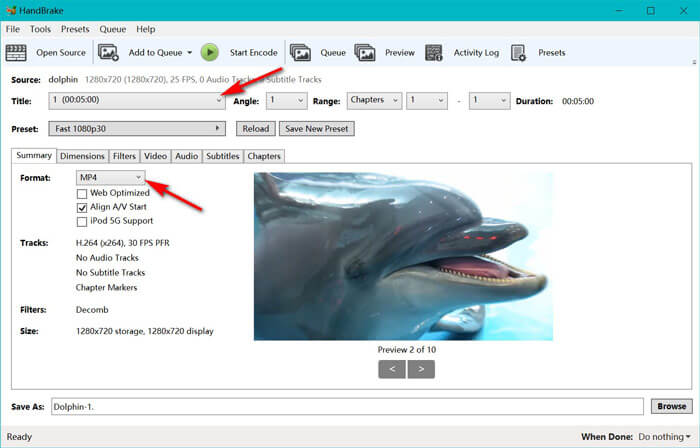
Once you have loaded the WTV files, you can select the exact WTF file from the Title drop-down option. Then select MP4 in the tab of Summary as the output for the selected WTV file. Besides, HandBrake allows you to adjust the dimensions, filters, video codec/quality, audio track, etc. Not only MP4, it can also convert other formats like AVI, MOV, M2TS, etc., to MKV.
Step 3. Preview and convert WTV to MP4
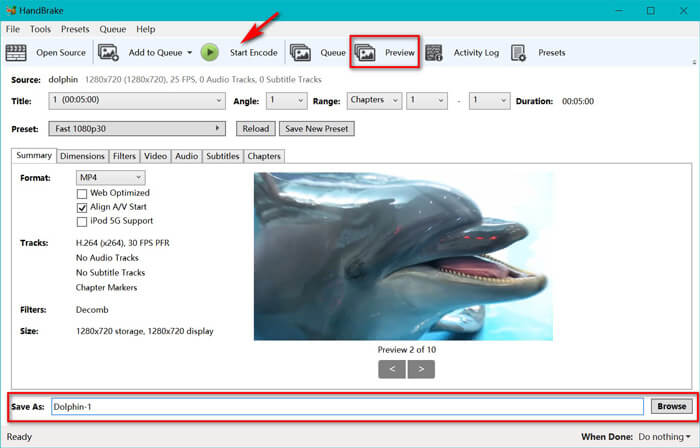
HandBrake’s Preview on the toolbar feature allows you to see what your new MP4 video will look before encoding it. After all your settings are just right, give the name of the converted MP4 files and select the location of your new videos by clicking the Browse button at the bottom. Finally, just click Start Encode button on the toolbar to convert WTV to MP4.
Phần 3. Câu hỏi thường gặp về WTV sang MP4
Tại sao HandBrake lại lưu MP4 thành M4V?
Đối với các tệp MP4, HandBrake sẽ tự động các tệp MP4 bằng cách sử dụng phần mở rộng M4V, khi bạn chọn âm thanh AC3 và phụ đề SRT hoặc có các điểm đánh dấu chương để tùy chỉnh tệp MP4. Nhưng bạn có thể thay đổi trực tiếp phần mở rộng .m4v thành .mp4.
Trình phát VLC có thể phát các tệp WTV không?
VLC không thể phát trực tiếp các tệp WTV. Bạn nên cài đặt Gói mã K-Lite để cài đặt gói mã WTV và sau đó phát các tệp WTV trên VLC.
Tôi có thể chuyển đổi các tệp WTV được bảo vệ không?
Có, bạn có thể. Tuy nhiên, chỉ MCEBuddy hỗ trợ chỉnh sửa và chuyển đổi tệp WTF thương mại được bảo vệ. Bạn phải sử dụng phần mềm này để sao chép và chuyển đổi các tệp WTV được bảo vệ.
Phần kết luận
Để sử dụng thuận tiện các tệp WTV đã ghi của Window Media Center, trước tiên bạn nên chuyển đổi WTV sang MP4. Bài đăng này chia sẻ 2 cách chuyển đổi WTV sang MP4 trực tuyến miễn phí thông qua Free Online Video Converter và HandBrake. Free Online Video Converter cho phép bạn chuyển đổi WTV sang MP4 và các định dạng phổ biến khác, trong khi HandBrake cung cấp cho bạn nhiều quyền kiểm soát chỉnh sửa hơn với các tùy chọn định dạng đầu ra hạn chế.
Bạn thích cách nào hơn?
Hoặc có thể bạn có một bộ chuyển đổi WTV sang MP4 tốt hơn?
Dù bằng cách nào, tôi cũng muốn nghe ý kiến của bạn. Vì vậy, hãy tiếp tục và để lại bình luận bên dưới.
-
 Cách chuyển MXF sang MP4 thông qua Free Converter
 Bài viết này là hướng dẫn chi tiết để chuyển đổi MXF sang MP4 trên máy tính. Bạn có thể nhận được 4 bộ chuyển đổi MXF sang MP4 miễn phí để chuyển mã máy quay MXF sang MP4 trong các bước đơn giản.
-
 3 cách hàng đầu để chuyển đổi miễn phí MP4 sang MOV
 Làm thế nào để chuyển đổi MP4 sang MOV trên Mac? Có cách nào miễn phí để chuyển đổi MP4 sang MOV mà không làm giảm chất lượng không? Bài đăng này chia sẻ 3 cách đơn giản giúp bạn thực hiện chuyển đổi video từ MP4 sang MOV trên Mac, Windows PC và trực tuyến.
-
 Cách chuyển đổi M2TS sang WMV trên Windows / Mac / Trực tuyến (Hoàn toàn miễn phí để sử dụng)
 Dưới đây là 3 cách dễ dàng để chuyển đổi video M2TS sang WMV. Bạn có thể thay đổi định dạng video từ M2TS sang WMV miễn phí trên Windows, Mac và trực tuyến một cách nhanh chóng. Chuyển đổi hàng loạt được hỗ trợ.
