


 视频转换大师
 屏幕录影大师
 视频修复
视频修复将 M2TS 转换为 FLV 时应考虑的演练指南 [离线和在线]
像 VOB、WMV 和 MOV 这样的媒体文件都是 M2TS 的例子。那么 M2TS 究竟是什么?其实,M2TS 是 MPEG-2 Transparent Stream(MPEG-2 透明流)的缩写。蓝光光盘、AVCHD 等载体上的高清晰度视频,都可以存储在这种封装格式中。而扩展名为 .flv 的 FLV 文件,则是 Flash Video(闪存视频)的缩写。FLV 文件扩展名指的是通过 Adobe Flash Player 或 Adobe AIR 在互联网上传输的视频或音频文件。这两种视频文件可能对你来说比较陌生,但如果你想要将 M2TS 转换为 FLV,首先需要了解这两种视频格式各自的用途,以及在转换时需要考虑的所有选项。请准备好,将要了解的每一条信息都铭记于心。

第 1 部分。如何在 Windows 和 Mac 上将 M2TS 转换为 FLV
使用 Video Converter Ultimate,在 Windows 和 Mac 上将 M2TS 转换为 FLV 轻而易举。 MP4/MOV/M4V/FLV/M4K/MTS/M2TS/ASF/MP3/VOB/AAC 只是这个强大的程序支持的众多流行视频格式和音频格式中的一小部分。您的高清视频可以在几秒钟内转换为 FLV 等流行格式,同时保持其原始质量。它具有批量转换功能,可让您转换许多文件而不会降低质量。假设您已经熟悉该软件,您现在可以学习成功转换的所有必要步骤:
步骤 1: 首先,点击下方的免费下载按钮,将软件下载到你的电脑上。完成软件下载后,在电脑上安装它。安装完成后,你会看到屏幕上弹出一个窗口,提示软件已经可以使用。点击立即开始来运行软件。
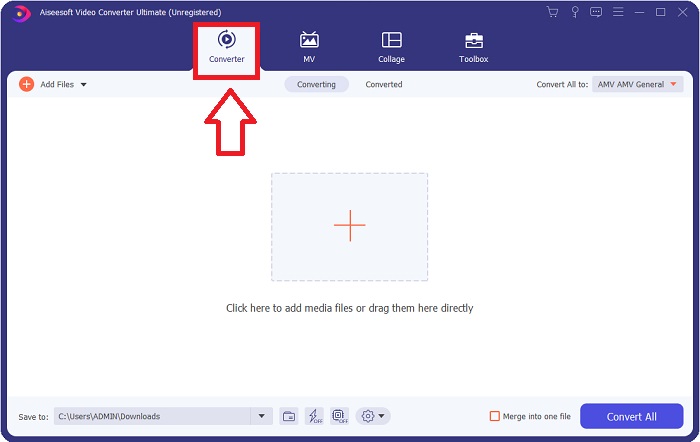
步骤 2: 其次,运行软件后,它会自动进入软件的主界面,即转换器菜单。
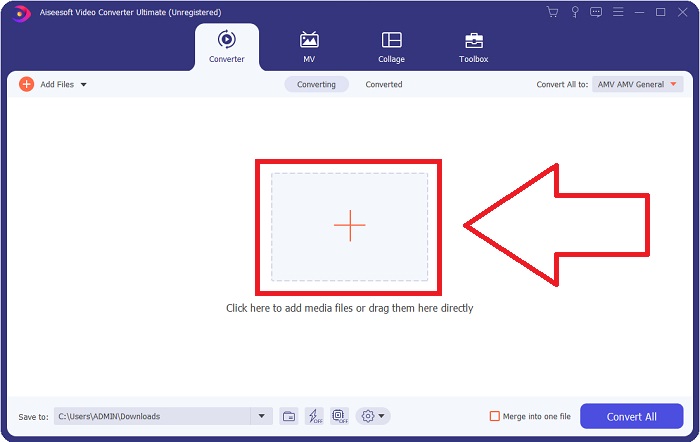
步骤 3: 要上传文件,请点击界面中间的 + 图标,或者你也可以直接从电脑中拖拽视频到界面中。
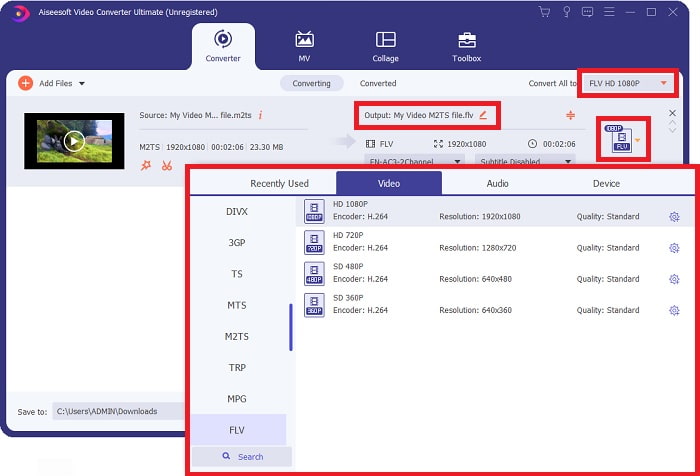
步骤 4: 将 M2TS 文件上传到转换器之后,前往窗口右上角的全部转换为菜单并点击。此时会弹出一个新窗口,展示软件支持的所有不同格式,然后在“视频”类别列表中选择 FLV 视频格式。
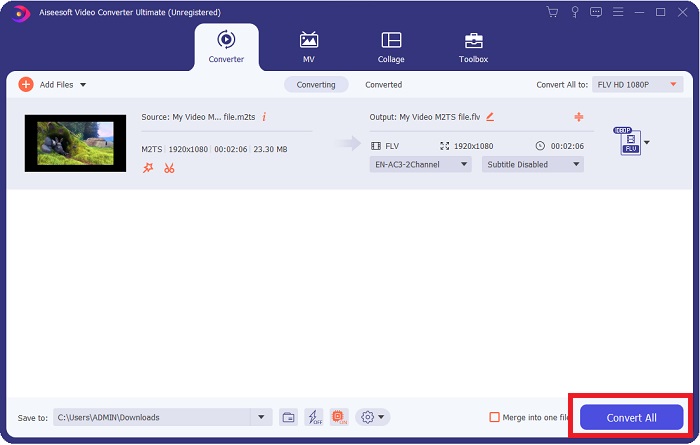
步骤 5: 如果你仍然不能确定应该使用哪种质量,因为选项中没有你想要的质量,可以点击齿轮图标,对比特率、分辨率、帧率等参数进行调整。当你对所有更改都满意后,就可以点击全部转换,开始转换你的视频文件。
第 2 部分。将 M2TS 在线转换为 FLV 的其他免费有效方法
Free Video Converter Online 是一款适用于转换 FLV、MP4、MOV、MKV、MTS、ASF、VOB 等视频格式的在线工具,其转换速度比其他转换平台更快。尽管转换过程很简短,这款在线工具导出的视频文件在质量方面几乎没有问题。话不多说,现在就来看看你需要遵循的所有步骤:
步骤 1: 点击此链接,进入 Free Video Converter Online 的官方网站。
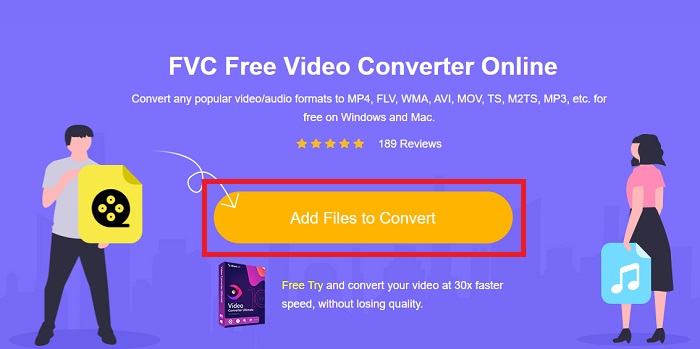
步骤 2: 然后点击添加文件进行转换按钮,上传你想要转换为 FLV 视频格式的 M2TS 视频文件。
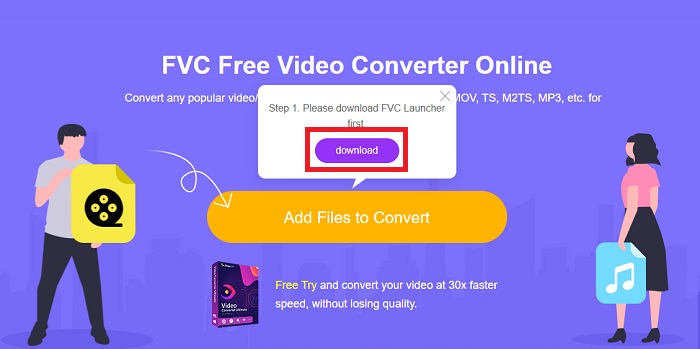
步骤 3: 上传文件后,你会在屏幕上看到一个弹出窗口,询问是否允许下载启动器,以便你使用此在线工具。点击已经下载好的启动器,在电脑上安装它,然后开始进行转换。
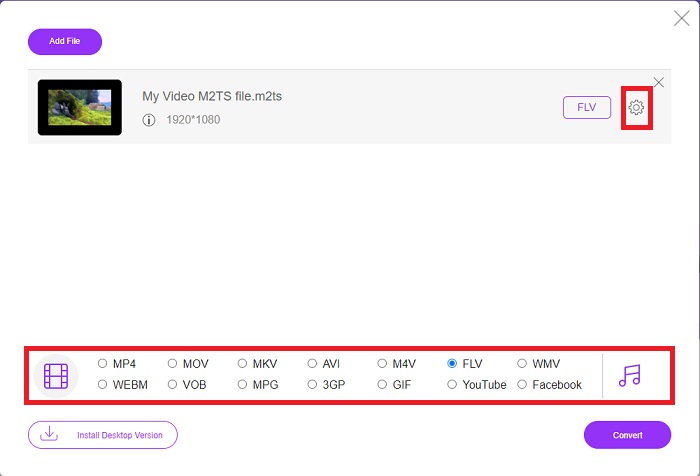
步骤 4: 在界面下方的格式选项中选择FLV视频格式。同时,你还可以点击所选视频格式旁边的齿轮图标来编辑视频输出质量。此时会弹出另一个窗口,其中包含比特率、分辨率和帧率等参数。开始调整这些参数,完成后点击确定,然后继续进行转换。
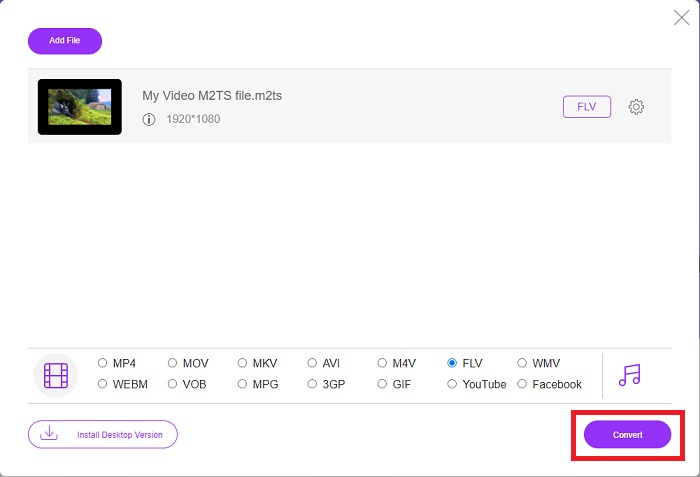
步骤 5: 现在,你可以点击窗口右下角的转换按钮来开始转换文件。
第 3 部分。 M2TS 和 FLV 之间的比较
视频容器格式 M2TS 用于在蓝光光盘、AVCHD、硬盘驱动器和其他支持 MPEG-2 传输流的设备上存储高清视频。蓝光光盘音频-视频 (BDAV) 是这种格式的名称,因为它在蓝光光盘中被广泛使用。为了减少数据的大小。由于 M2TS 文件中包含高质量的音频和视频内容,因此不使用 CBR 传输流,而是使用 VBR 传输流(恒定速率);会声会影 Pro 是一款出色的 M2TS 文件编辑应用程序。
| 文件扩展名 | M2TS | 轻型货车 |
| 文件类型 | 蓝光光盘音频-视频 MPEG-2 传输流 | Flash 视频文件 |
| 由开发 | 蓝光光盘协会 | 土坯系统 |
| 优点 | 一个基于 MPEG-2 传输流的高清蓝光 BDAV 视频文件;用于在蓝光光盘上存储视频数据;支持 720p/1080i 分辨率。 | FLV 是一种流行的视频格式,被数以万计的网站使用,提供了广泛的附加功能,并且生成的文件比大多数其他视频格式更小。 FLV 文件非常适合快速提供高质量视频。 |
| 缺点 | m2ts 文件不能包含章节。它们保存在 Bluray 文件夹结构中的其他位置。 | 需要安装flash插件才能在线播放flash文件。 |
| 程序打开视频格式 | ◆ALLPlayer ◆MPlayer ◆VLC媒体播放器 ◆PotPlayer | ◆VLC媒体播放器 ◆Adobe Flash Player |
第 4 部分。 有关将 M2TS 转换为 FLV 的常见问题解答
如何播放 M2TS 文件?
Windows Media Player、SMPlayer、5KPlayer、Splash 和 File Viewer Plus 可以播放 M2TS 文件。一些 M2TS 播放器兼容多种操作系统。例如,VideoLAN VLC 媒体播放器可以在 Windows、Mac 和 Linux 上播放 M2TS 文件。
FLV 是一种合适的录制格式吗?
FLV 文件格式由 Adobe Flash Player 使用。它是最流行、最通用的视频格式之一,支持所有视频平台和浏览器。像 YouTube 这样的在线视频流媒体平台都受益于 FLV 格式。由于文件体积较小,它们非常易于下载。点击这里了解更多可用的FLV 录制工具。
FLV 还在使用吗?
视频、横幅广告、动画和直播都是选项。 Flash 电影已经有很长时间了,他们使用互联网上的剪辑。然而,即使 FLV 格式即将淘汰,它仍然是全球互联网用户的视频标准。
结论
结束讨论,我们都认为没有一种转换器可用于将 M2TS 转换为 FLV。尽管如此,本文还是会通过介绍您需要考虑使用的两个最佳转换器(免费视频转换器在线或 Video Converter Ultimate)来纠正您。这两个转换器不是您可以要求的,因为它为您提供了所有可能的专业工具和功能,可以帮助您从转换文件到将文件转换为更好的外观。
-
 2 在 PC/Mac 上将 WMV 文件转换为 FLV 的最简单方法
 如何将 WMV 转换为 FLV?首先,您需要阅读我们的推荐并找到您喜欢的方法,然后按照我们的指南快速完成工作。
-
 3 如何无损地将 FLV 转换为 PSP 的解决方案
 如何将 FLV 转换为 PSP?在这里,您将获得在 Windows 和 Mac 上将 Flash 视频转换为 PSP 支持的格式(WMV、MP4、AVI、FLV 等)的分步指南。
-
 将 FLV 转换为 WMA 音频的 2 种方法 [免费和在线]
 想要从 FLV 视频中提取 WMA 音频吗?这里有 2 个免费的 WMA 音频提取器,可在 Mac OS X 和 Windows 10/8/7 上以快速的转换速度将 FLV(Flash 视频)转换为 WMA(Windows 媒体音频)。
