


 视频转换大师
 屏幕录影大师
 视频修复
视频修复
 安全下载
安全下载5 款最佳 M4A 修剪工具:删除不需要的音频部分
在软件和平台对诸如 M4A 音频文件等格式支持有限的情况下,想要获得无障碍的裁剪体验就变得颇为困难。从理论上讲,音频裁剪工具——在这里指对 M4A 文件进行裁剪——本该是件很简单的事,因为互联网上有大量软件和在线工具可供选择。虽然搜索一款M4A 裁剪器工具本身并不难,但要找到真正可靠且安全易用的工具却相对具有挑战性。别担心,我们已经从使用场景、功能特点及局限性等方面评测了一些业内标准的 M4A 裁剪工具。我们还综合考虑了它们在操作系统支持和价格方面的可用性,让你无需再费心筛选。

第 1 部分。最佳 5 款 M4A 修剪器
| 软件 | 操作系统 | 价钱 | 最适合 |
| FVC-视频转换器终极版 | 窗户 11/10/8/7 macOS X 10.12 或更高版本 | 免费计划(可用) 月度许可证($14.50) 终身许可证($49.96) | 高速无损导出质量和简单的修剪功能。 |
| Adobe 试镜 | Windows 11/10 macOS Big Sur v11.0 或更高版本 | 月度个人($22.99) | M4A 修复具有用于音频清理的专门功能和工具。 |
| Freemore 铃声制作器 | Windows 10/8/7 / Vista / XP | 自由 | 修剪 M4A 文件时具有最佳输出质量,该文件也可用作手机铃声。 |
| 河畔 | 基于网络的工具 Android 7.0 以上 iOS 16.0 以上 | 提供免费计划 标准计划($15/月) 专业计划($24/月) | M4A 音频质量增强器和噪音消除器。 |
| 音频微调器 | 基于网络的工具 | 免费使用 | 无需任何安装过程即可立即修剪 M4A 文件。 |
第 2 部分。FVC-精选 VCU
FVC-picked Video Converter Ultimate 是一款功能齐全的工具,以其简洁直观的界面而在 Windows 和 macOS 设备上广为人知。该工具可作为视频和音频文件的编辑软件使用,其对多种文件格式的广泛支持,使得在无需转换格式的情况下就能直接裁剪 M4A 文件。这款多功能工具只需通过左右拖动时间轴,就能在 M4A 文件中精准地进行剪切。
步骤 1:从其官网下载安装 FVC-picked Video Converter Ultimate。安装成功后启动软件,在界面中点击左上角的红色+ 添加文件按钮,导入你想要裁剪的 M4A 文件。
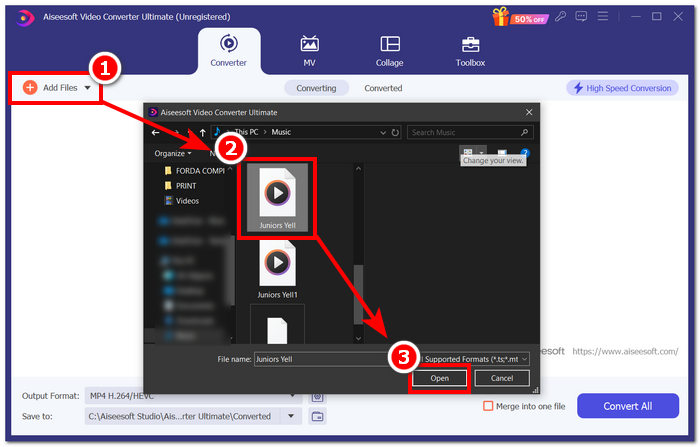
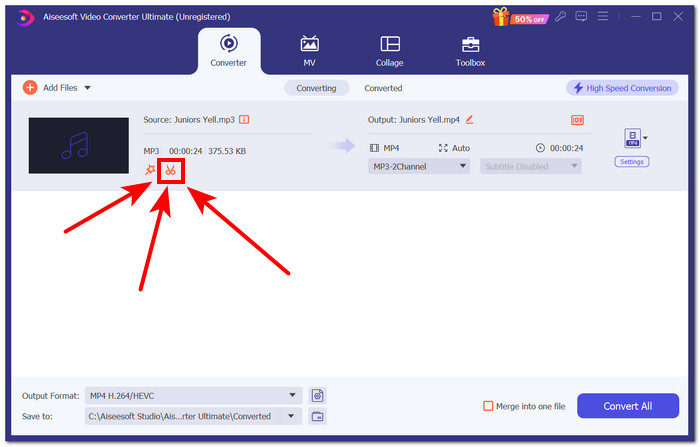
步骤 2:要开始裁剪 M4A 文件,请点击软件界面中剪刀形状的按钮。
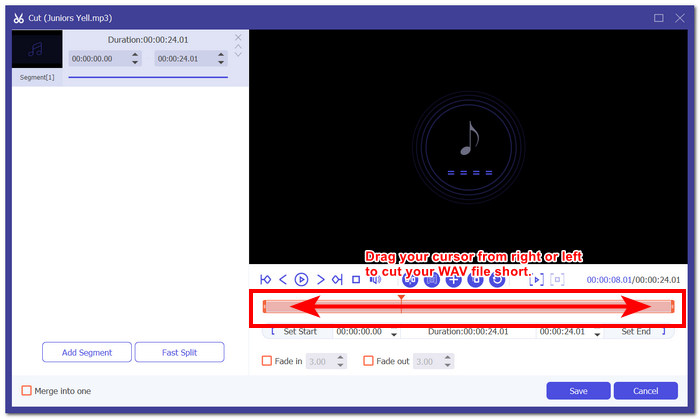
步骤 3:进入“剪辑”设置后,移动或拖动轨道光标的两端,从左到右调整,以圈定你希望在 M4A 文件中保留的具体片段。
在单击“保存”按钮之前,有必要检查 M4A 文件音频,以确保导出无误。您可以单击“播放”按钮进行预览,并根据需要进行相应调整。
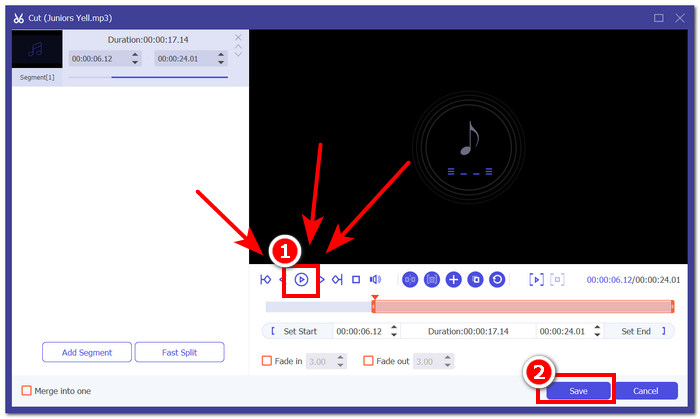
步骤 4:点击“保存”按钮,将新裁剪好的 M4A 文件下载到电脑桌面后,再点击全部转换按钮,开始导出与下载过程。
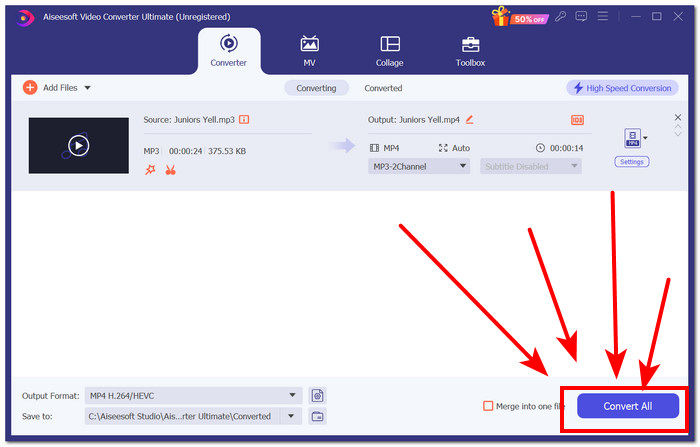
主要功能亮点
• 高速处理技术,实现更快的 M4A 导出。
• 提供精确的切割开始和切割结束输入功能。
• 支持 1000 多种音频和视频格式,例如 M4A、MP4、MP3、AAC、WAV 等。
• 其他 M4A 编辑器功能,如快速拆分、合并工具、淡入淡出效果等。
局限性
• 它不会自动扫描和修剪 M4A 文件中不必要的部分。
FVC 挑选的 Video Converter Ultimate 确实不负众望,因为在使用它时,它在导出 M4A 文件时无与伦比的高速处理速度让我们感到惊讶,这证实了他们的说法。虽然除了手动操作外,它没有扫描和修剪音频文件的自动功能,但它仍然是一款出色的工具,因为它不仅可以用作修剪工具,还可以用作 M4A 合并器、转换器等。
第 3 部分。Adobe Audition
作为一款业界标准的音频裁剪工具,Adobe Audition 不仅支持 MP3、M4A、WMA 等格式的裁剪,还能同时完成音频混音、录制和编辑等任务。它通过波形编辑器显示 M4A 音轨,为 M4A 文件编辑提供更精确的视图。这款程序不同于一般的 M4A 裁剪器,它是一套集成的音频创作套件,主要为音乐制作而设计,并且本质上是一款数字音频工作站(DAW)。
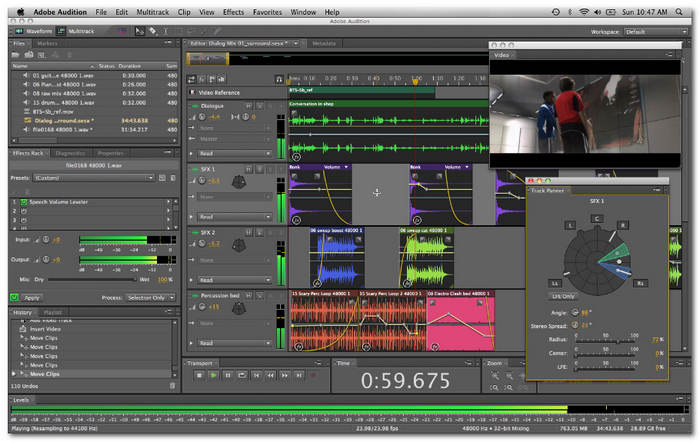
主要功能亮点
• 在混频器通道之间创建 M4A 文件的干净剪辑。
• 多轨道允许轻松同时修剪多个 M4A 文件。
• 它具有即时修剪 M4a 文件的命令功能。
局限性
• 对于新手来说,它的界面可能相当难以理解。
• 每月的费用相当昂贵。
该程序是一款专为商业和企业用途而设计的 M4A 音频剪切软件,可为您提供无缝体验,并保证提供出色的效果。但是,与提供相同服务的其他 M4A 剪切工具相比,其价格昂贵。
第 4 部分。Freemore 铃声制作器
Freemore Ringtone Maker 是一款免费的 M4A 裁剪工具,可在音频文件中剪切一个或多个片段,并提供添加音频特效的功能。这些特效包括倒放、静音轨道、淡入淡出、放大音量等,均可用于 M4A 文件。在裁剪 M4A 文件时,只需设定想要开始剪切和结束剪切的位置,即可删除或保留目标片段,然后导出并用你的M4A 播放器进行播放。
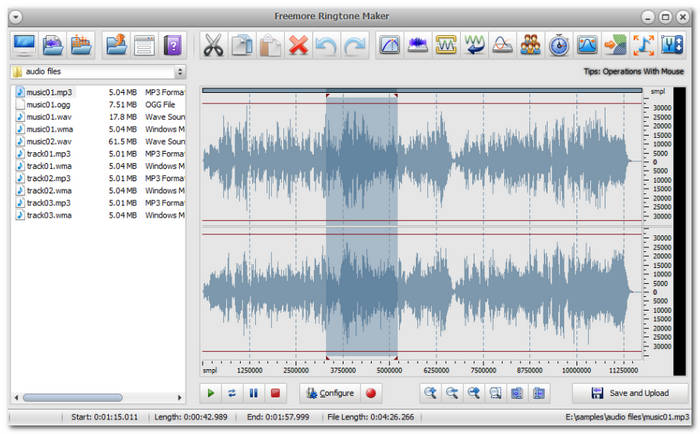
主要功能亮点
• 简单的软件界面。
• 实时可视化音频文件轨道,实现精确修剪。
• 可用于创建移动设备铃声。
局限性
• 对音频文件格式的支持有限。
• 仅能为有限的手机创建铃声。
• 仅适用于 Windows 设备。
与本指南中列出的其他软件一样,Freemore 铃声制作器的剪辑过程也类似,即设置特定的剪辑开始和剪辑结束,以有效地创建 M4A 文件的剪辑。虽然这有助于程序导航,但与本指南中列出的其他软件相比,此工具只能下载到 Windows 设备,对音频文件格式的支持有限。
第 5 部分。Riverside.fm
Riverside.fm 是一款在线 M4A 剪切工具,其移动应用程序版本集成了 AI,可产生 48kHz 的清晰效果。此工具用作 M4A 编辑器,允许用户修改 M4A 文件,包括无缝修剪或剪切音频文件。此外,使用云存储和访问 M4A 文件数据可让您拥有闪电般的速度。
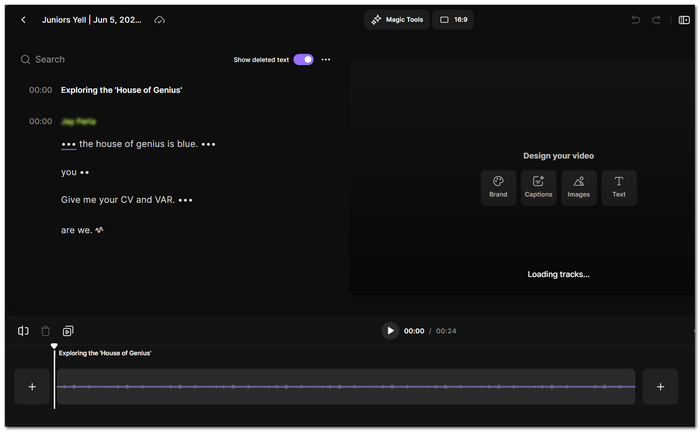
主要功能亮点
• 自动删除 M4A 文件的暂停。
• 人工智能可以消除填充词和不必要的噪音。
• 增强整体音轨的清晰度。
• M4A 文件分割工具并创建章节来标记分隔的片段。
局限性
• 缺少一些基本的 M4A 编辑功能,例如文件合并和淡入淡出效果。
• 免费计划仅具有有限的功能。
这款集成 AI 的工具并不是一个完整的 M4A 文件修剪器,而是一款专注于让您的 M4A 更清晰、音频流畅的工具。它缺少一些编辑功能,尤其是因为它只有一个修剪工具,但从这个意义上讲,它在缩短 M4A 文件方面做得不错。
第六部分:音频修剪器
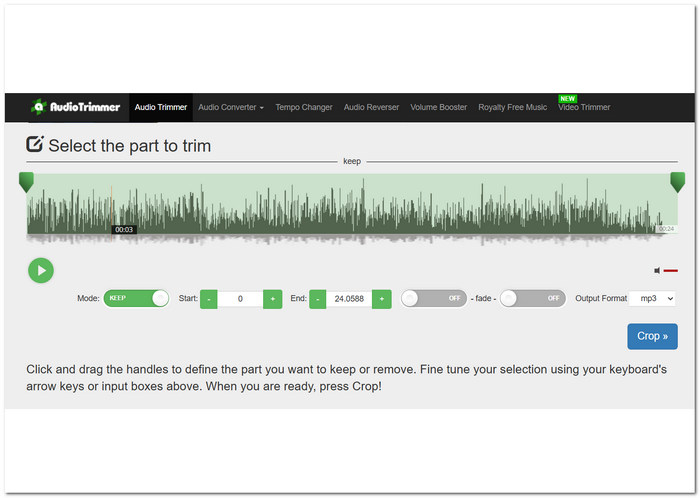
一款基于 Web 的 M4A 剪切工具 Audio Trimmer 可在所有浏览器上使用,无需订阅和安装。它具有直观的界面,因此对于急于剪切 M4A 音频文件的新手和业余音频编辑者来说,它立即成为他们的最爱。此外,这款直截了当的 M4A 剪切工具只需单击几下即可立即剪切您的 M4A 文件,并在其指定字段中输入所需的剪切开始和剪切结束。
主要功能亮点
• 指定按钮用于保留或删除 M4A 文件的一部分。
• 淡入淡出效果功能。
• 用户可以精确指定理想的切割开始和切割结束时间。
局限性
• 音频文件支持有限,仅支持 M4A、MP3 WMA、AAC、AC3、AIFF 和 WAV。
• 它不提供剪切 M4A 文件的高级功能。
• 它有一个弹出式广告。
由于这款直截了当的 M4A 剪切工具可能仅用于修剪任务,因此它允许用户快速导航并更快、更有效地执行修剪任务,因为它没有任何其他功能。它的缺点是其对音频文件的支持有限,这可能会给用户带来问题,尤其是在处理其他文件格式时。
第 7 部分。有关 M4A 修剪器的常见问题解答
M4A 的最高质量是多少?
M4A 文件的最高质量取决于其比特率和编解码器。320 kbps 的高比特率相当于出色的音质。
M4A 有什么缺点?
M4A 音频文件的缺点是它们与其他软件工具、程序或平台不兼容。用于 M4A 文件的 AAC 编解码器受到许可限制,这使其使用变得复杂。
M4A 比 MP3 更高效吗?
是的,M4A 在某些方面比 MP3 效率高得多。与 MP3 相比,M4A 确实提供了更好的音频质量,而且考虑到两种音频格式的文件大小差异,M4A 在音频质量方面仍然具有优势。
什么是 M4A 修剪器?
M4A 修剪工具是一种软件工具或应用程序,可以剪切 M4A 音频文件中的特定部分,或简单地缩短它以便于编辑和排序音频数据。
M4A 修剪器支持哪些格式?
如今,许多软件工具都支持多种音频文件格式,以使其更加实用和通用。就 M4A 修剪器而言,有些仅支持流行且最常用的音频格式,例如 MP3 和 WAV,而 FVC 精选的 Video Converter Ultimate 等软件则将其文件支持扩展到视频和音频格式。
结论
目前在线可用的基于软件和网页的M4A 裁剪器工具种类众多,功能和特色各不相同,以满足不同用户的需求。要从大量软件和在线工具中筛选出真正符合你使用习惯、操作便捷的 M4A 裁剪工具,确实很有必要。因此,我们建议你亲自尝试文中列出的五款软件和在线工具,这些工具是我们根据其功能、局限性、系统兼容性以及定价等因素综合挑选出来的。
-
 如何合并适用于 Windows 和 macOS 的 M4A 文件
 了解在 Windows 和 macOS 设备上合并 M4A 文件的最有效方法,并找到有效合并音频文件的最简单说明。
-
 如何编辑 M4A 文件:终极无忧指南
 学习使用软件、在线工具和移动应用程序以三种方式有效地编辑 M4A 音频文件,并了解无缝 M4A 编辑的步骤。
-
 Google Drive 会压缩照片吗?真相是什么?
 您是否还想知道 Google Drive 是否会压缩照片?阅读我们的全面评论以了解真相并了解它如何影响您的图像质量。
