


 视频转换大师
 屏幕录影大师
 视频修复
视频修复
 安全下载
安全下载免费将 FLV 转换为 MP4 - 适用于 Windows 或 Mac 的 5 款工具
FLV is one of the standard video formats that are most used to accommodate online videos and is also compatible with many web browsers. However, it is not currently available for mobile browsers and is not well suited for being uploaded into video editing software. In comparison, the MP4 format results in smaller file sizes and better compatibility. When we want to upload videos to YouTube, TikTok and other sites, it is still recommended to choose an MP4 container. It is essential to understand that to play FLV videos, you need Adobe Flash Player, but the tool has been deactivated. So, if you have FLV videos on hand, no matter which way you consider it, we suggest you convert FLV to MP4. In the following content, we will introduce five tools in total, and we believe there must be one that is suitable for you.

第 1 部分:如何在 Windows/Mac 上批量将 FLV 转换为 MP4
FVC Video Converter Ultimate
我们首先推荐使用 FVC Video Converter Ultimate 将 FLV 转换为 MP4。首先,该平台支持的输入和输出格式多达 1000 多种,并且可以批量转换,效率提升 30 倍。虽然这款软件的核心功能是转换格式,但它远不止于此。我们还可以使用它提供的全套视频编辑工具来裁剪视频长度、压缩文件大小、去除背景噪音等等。需要注意的是,FVC Video Converter Ultimate 提供五次免费转换,之后您需要额外支付月费才能解锁全部功能。不过,它非常划算,拥有这款程序后,我们可以把所有音频、图片和视频处理任务都交给它。
以下是使用 FVC Video Converter Ultimate 将 FLV 转换为 MP4 而不损失质量的方法。
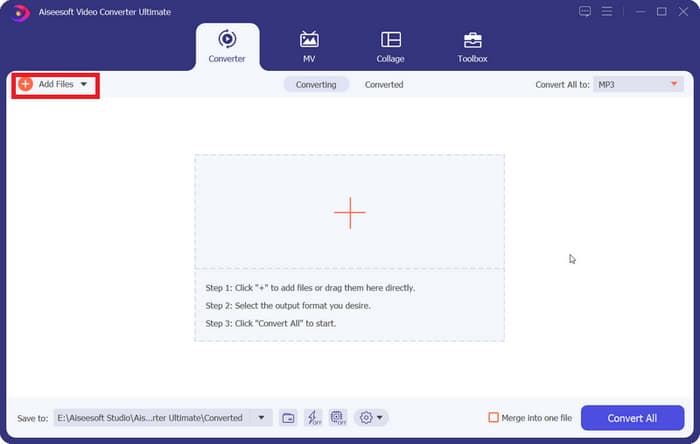
Step 1: Download and install FVC Video Converter Ultimate on your computer. When you open this software, you will be brought to the Converter interface. Click Add Files and choose your FLV file.
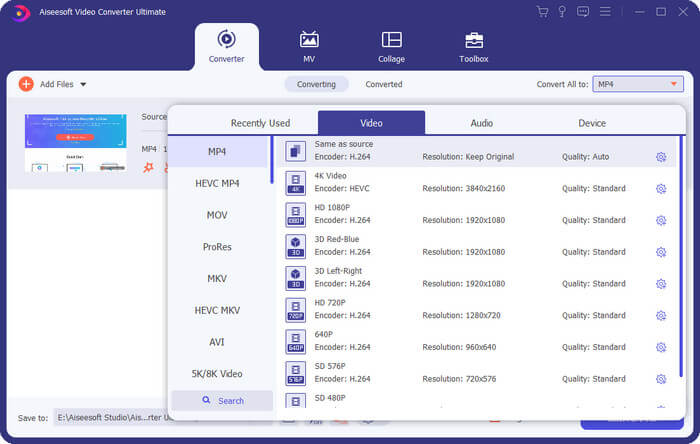
Step 2: After loading the video, you can click Convert All to and click Video > MP4. There are several options with different resolutions and bitrate. Choose the one that suits your needs.
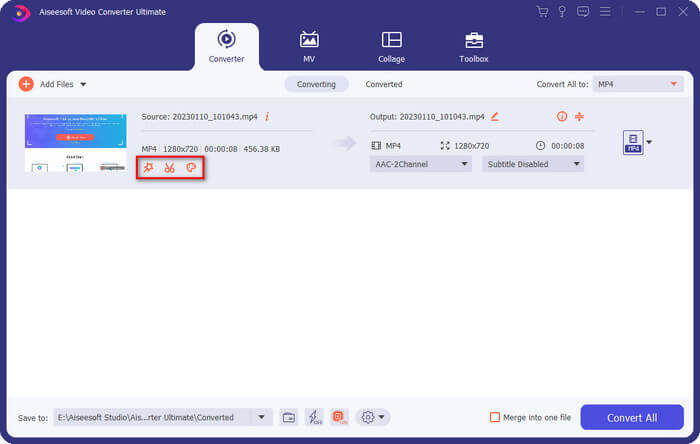
Before you export the result, you can edit the video by clicking on Cut.
Step 3: When you finish your edition, click Convert All to start converting format FLV to MP4.
第 2 部分:如何使用 VLC 免费将 FLV 转换为 MP4
无论您是 Windows、Mac 还是 Linux 用户,VLC Media Player 都是一款实用的 FLV 转 MP4 转换器。它完全免费,并且已经上市很长时间了。此外,它还保证 100% 安全。
以下是使用 VLC 媒体播放器将 FLV 转换为 MP4 的方法。
Step 1: Get the newest version of VLC Media Player on your computer.
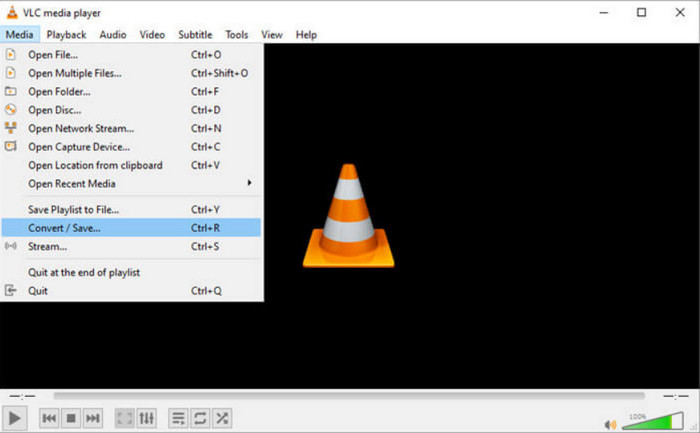
Open the main interface and click Media > Convert/Save.
Step 2: When you open the new window, choose File and click +Add to upload your FLV file. Then click the Convert/Save button on the bottom right corner.
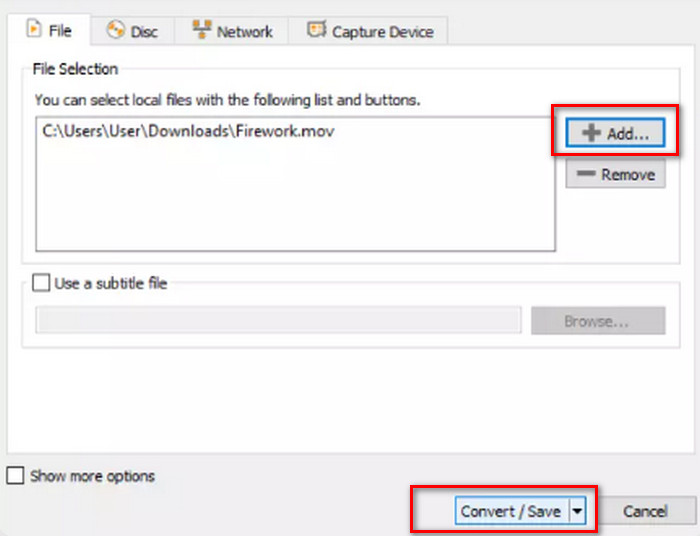
Step 3: Now you will go to another window. Navigate to Profile and choose Video - H.264 + MP3 (MP4) as the output version.
Step 4: Click Start.
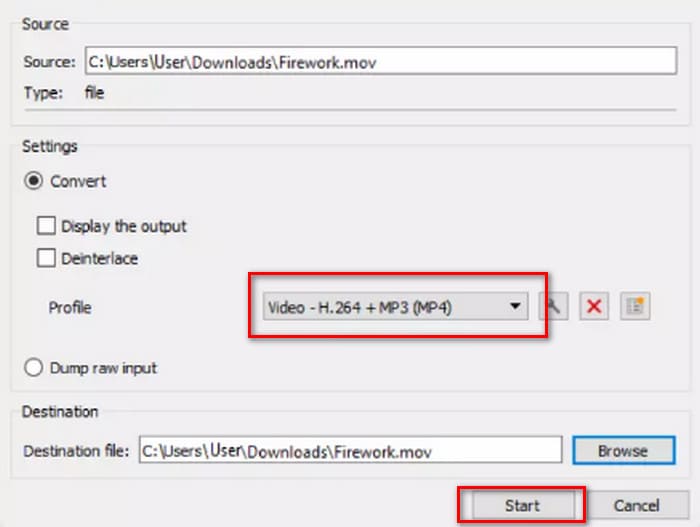
虽然 VLC Media Player 是免费开源的,但它的界面不太简洁。与专业的转换器相比,它的上传文件和转换按钮不太醒目。而且由于它只是一个多媒体播放器,所以视频编辑功能比较少。
第 3 部分:如何通过 FFepeg 将 FLV 转换为 MP4 且不损失质量
FFmpeg 是一款免费的桌面软件,用于编辑和转换音频和视频文件。它没有常见的上传、预览和设置输出格式的按钮或选项,而是完全基于代码运行。我们可以在网上找到每个操作的代码模板。我们需要准备好源文件的存储路径和转换后文件的存储路径,然后将它们填入模板中。
以下是使用 FFmpeg 将 FLV 转换为 MP4 的方法。
Step 1: Download and install FFmpeg on your computer. Launch this tool using the Command Prompt.
Step 2: Type in cd and cd FFmpegTool. Then enter cd bin and apply ffmpeg.exe.
Step 3: Prepare the command you will use to transfer FLV to MP4. The template is as below.
ffmpeg -i video.flv -c:v libx264 outputfilename.mp4
Fill in the i video.flv's with the storage path of your source file, and then enter the export file name in the outputfilename.mp4's.
Step 4: Type the command into FFmpeg and press the Enter key on your keyboard. The conversion process will begin.
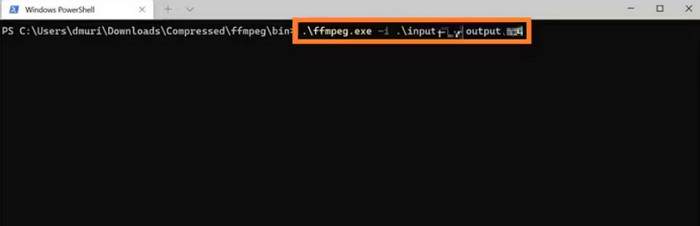
FFmpeg 适应性强,而且服务免费,但界面却很不寻常。在电脑上安装它本身就很麻烦,编写代码更是难上加难。代码经验不丰富的用户在使用时会感到茫然无措。
第 4 部分:如何在线将 FLV 转换为 MP4
这三个工具都需要下载并安装。如果我们有紧急的转换任务,或者想节省更多存储空间,在线平台是最佳选择。在本部分中,我们将挑选两款在线 FLV 转 MP4 转换器,除了展示使用步骤外,还会坦诚地告诉您它们可能存在的问题。
FVC 免费在线视频转换
这三个工具都需要下载并安装。如果我们有紧急的转换任务或想要节省更多存储空间,在线平台是最佳选择。在本部分中,我们将挑选两款在线 FLV 转 MP4 转换器,除了展示使用步骤外,还会坦诚地告诉您它们可能存在的任何问题。
在线视频转换器。
以下是使用 FVC 免费在线视频转换器在线将 FLV 转换为 MP4 的方法。
Step 1: Open FVC Free Video Converter Online with your browser. Click Add Files to Convert and select your target FLV file.
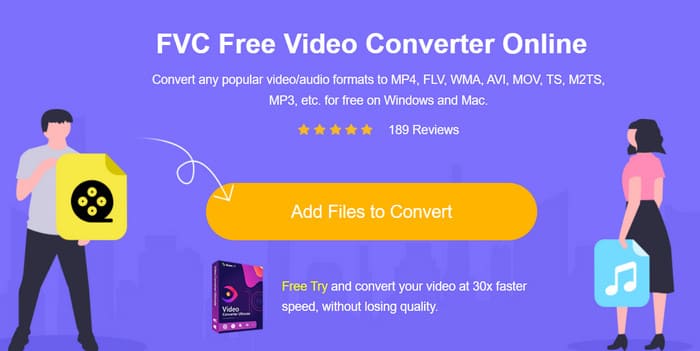
Step 2: On the bottom line of the page, set MP4 as the output format. If you want to adjust your uploaded video, click on the Settings icon.
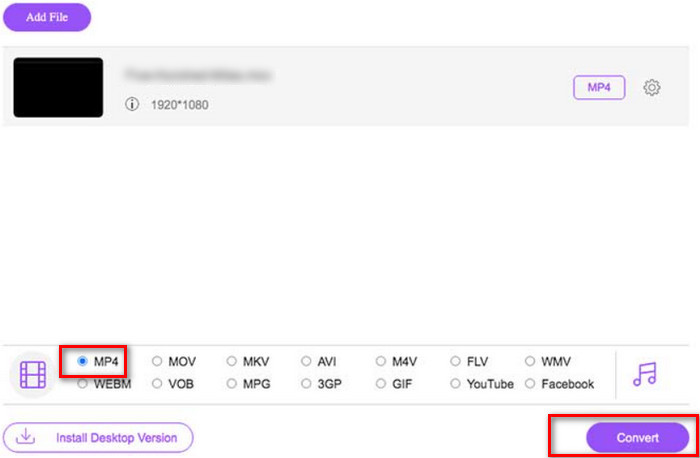
Step 3: Finally, click Convert. When the process is over, you can download the MP4 video to your computer.
FVC 免费在线视频转换器相比传统的在线转换器已经非常完美,但它不支持输出文件之间的预览效果。与桌面软件 FVC 终极视频转换器相比,它的编辑功能仍然略显不足,但这是在线转换器的通病,所以我们也不能要求太高。
云转换
Another online converter we'd like to recommend is Cloudconvert. Its simple interface makes it very likable. Below the convert button, we can find many buttons to adjust the video parameters. The audio and subtitles of the uploaded files can also be edited at will. If you want to put a personal logo on your video, you can also upload a picture as a reference to add a watermark to the video..
以下是使用 Cloudconvert 将 FLV 转换为 MP4 的方法。
Step 1: Open Cloudconvert FLV to MP4 converter within your browser.
Click Select File to upload your FLV file.
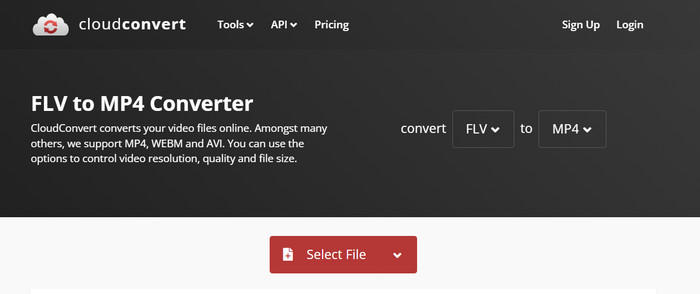
Step 2: Scroll down the page to edit the video’s parameters, audio, subtitle, or watermark. Then click Convert.
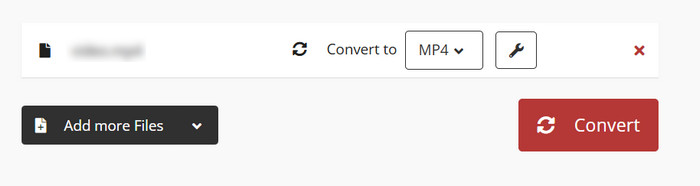
无论您想在两种格式之间进行转换,Cloudconvert 都会在网页上显示两种格式的详细说明,让您无需额外研究就能完全理解。不过,必须指出的是,Cloudconvert 不适合用于长视频,而且转换过程中可能会卡住。
第五部分:FLV 转 MP4 常见问题
如何打开 .FLV 文件?
We recommend VLC Media Player and Adobe Animate. Both FLV video players work well. If the player you are using doesn't support FLV, you can also consider converting it to another format.
FLV 过时了吗?
在Adobe Flash Player盛行的年代,FLV曾被广泛使用,但随着Flash被淘汰,FLV的地位也逐渐不如其他格式。
FLV 比 MP4 好吗?
不,MP4 是更好的选择。它压缩效率更高,兼容性也更广。MP4 的画质也不错,因为它总能在质量和大小之间找到良好的平衡。
部分6。结论
In this article, you will learn about five tools that can convert FLV to MP4. VLC Media Player is free, but it has too few video editing features; FFmpeg is not easy to use, and you need to prepare the code; the online tool is fast to start, but it depends a lot on the internet speed, and it is easy to lag when dealing with long videos. Combining all these elements, FVC Video Converter Ultimate is the perfect assistant.
-
 4将FLV视频文件转换为MP3格式的100%工作方法
 如何将 FLV 转换为 MP3 文件?这篇文章就是为您准备的。找到您最喜欢的方法并按照指南获得您想要的。
-
 MP4到FLV |前3个免费转换器(在线/ Mac / Windows)
 这篇文章是 MP4 到 FLV 转换的详细指南。使用前 3 个免费转换器,在 Windows 或 Mac 计算机上轻松在线将 MP4 转换为 FLV。
-
 2025 年适用于 Windows、Mac、iOS 和 Android 的十大 FLV 播放器
 FLV播放器可帮助您轻松地在Windows,Mac,Android,iOS设备上访问FLV文件。查看可以立即下载的最佳FLV文件播放器。

