


 视频转换大师
 屏幕录影大师
 视频修复
视频修复
 安全下载
安全下载如何在Windows / Mac /在线上将M2TS转换为WMV(完全免费使用)
某些佳能和索尼相机使用M2TS作为默认输出格式。 M2TS视频文件很大。 M2TS格式的兼容性也不佳。如果要将M2TS文件导入Windows Movie Maker进行进一步编辑,则需要先将M2TS转换为WMV视频。
本文将分步为你展示在线和离线两种方法,教你将视频从 M2TS 转换为 WMV 格式。这样,你就可以轻松地在手机或电脑上把 M2TS 视频格式转换为 WMV。

第1部分:如何在Windows和Mac上将M2TS转换为WMV
如果您只想更改视频格式,那么免费的M2TS到WMV视频转换器就足够了。您不需要为不需要的额外功能付费。这里是2 M2TS到WMV转换器免费软件,您可以选择。
在Windows上免费将M2TS转换为WMV
要在 Windows 电脑上将 M2TS 文件转换为 WMV,你可以使用FVC Free M2TS Converter。这是一款支持批量处理的 M2TS 转换器,可以一次性将多个 M2TS 文件转换成 WMV、MOV、MP4 以及其他视频和音频格式。内置的视频编辑工具也完全免费,你可以在转换前编辑和自定义 M2TS 视频文件。以下是这款免费 M2TS 转 WMV 转换软件的主要功能。

免费M2TS视频转换
112,356+下载- 在Windows 10/8/7 / Vista / XP上免费将M2TS转换为WMV。
- 支持从M2TS到WMV的批量转换。
- 转换速度快50倍。
- 压缩,合并其他视频效果并将其应用于M2TS文件。
- 向您的M2TS文件中添加特殊主题,例如家庭,生日,假期等。
步骤 1:免费下载、安装并启动 FVC Free M2TS Converter。点击Add File(s)导入一个或多个 M2TS 视频文件。

步骤 2:在输出格式(output format)列表中浏览并将 WMV 设为输出视频格式。

步骤 3:如果你想编辑 M2TS 视频,只需点击顶部的Edit。随后,你就可以在 FVC Free M2TS Converter 中编辑 M2TS 视频的标题、作者以及开头和结尾部分的时间。

步骤 4:点击Convert,即可在 Windows 上免费完成 M2TS 到 WMV 的转换。
在Mac上免费将M2TS转换为WMV
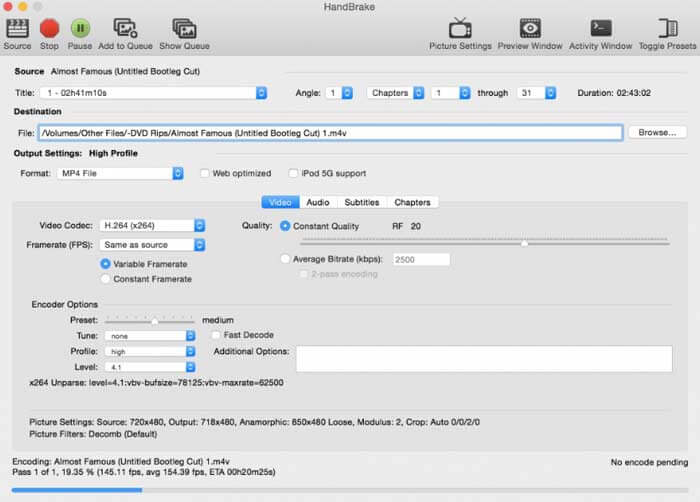
对于Mac用户,您可以将HandBrake用作M2TS到WMV的免费转换器。这是使用HandBrake在Mac上免费将M2TS转换为WMV的详细步骤。
步骤 1:运行 HandBrake。在弹出的 Source(来源)窗口中选择你的 M2TS 文件,然后点击Open。
步骤 2:展开Format列表,选择 WMV 作为视频输出格式。
步骤 3:点击Browse更改目标保存文件夹。
步骤 4:点击Start,在 Mac 上完成 M2TS 到 WMV 的视频转换。
第2部分:如何在线将M2TS转换为WMV
如果你不想在电脑上安装任何软件,也可以使用在线视频转换器。本部分将以FVC Free Online Video Converter为例。
步骤 1:在浏览器中访问FVC Free Online Video Converter。

步骤 2:如果你还没有下载FVC 启动器(launcher),请先点击Add Files to Convert进行下载,然后安装并更新该启动器。

步骤 3:打开并添加 M2TS 文件。然后选择格式为WMV,再点击Convert开始转换。

步骤 4:确认保存文件夹后,耐心等待生成 WMV 文件。
第3部分:将M2TS转换为WMV的常见问题解答
Android可以播放M2TS文件吗?
不可以。您可以将VLC Media Player用作M2TS播放器应用程序。或者,您可以将M2TS转换为WMV格式,以便在Android和iPhone上轻松播放。
MTS和M2TS有什么区别?
实际上,答案是否定的。MTS 和 M2TS 在功能上没有区别。它们都是与 AVCHD 相关的高清晰度视频文件。
M2TS是否比WMV更好?
M2TS是专为便携式摄像机设计的。因此,M2TS文件具有高清和大文件大小。您可以通过将M2TS转换为WMV来缩小视频。与M2TS相比,WMV是一种通用且得到广泛支持的视频格式。如果要压缩M2TS并更改为流行的视频格式,这是将M2TS转换为WMV格式的好方法。
以上就是将视频从 M2TS 转换为 WMV格式的全部内容。你可以在 Windows、Mac 以及在线环境下免费更改视频格式并应用基础视频效果。整个过程完全免费且安全,没有潜在风险或内购项目,因此你可以放心地将 M2TS 文件转换为 WMV 格式。
-
 如何在Windows / Mac上将M2TS转换为MOV
 是否需要将M2TS转换为MOV才能在许多播放器和平台上播放视频文件?本文将帮助您找到最佳的在线/离线方法,以在Windows / Mac上将M2TS转换为MOV。
-
 如何免费将M2TS文件转换为MP3
 M2TS文件可以转换为MP3吗?在这篇文章中,我们列出了6大免费和在线方法,可以帮助您将M2TS转换为MP3,AAC,AIFF和更多音频格式。
-
 在Windows / Mac上将TS转换为AVI / MKV / MOV / WMV的5种简便方法
 想要将TS文件快速转换为AVI / MKV / MOV / WMV?本文介绍了在线和离线视频转换器以及完整的指南。也许您可以在这里获得最好的免费TS转换器。
