


 视频转换大师
 屏幕录影大师
 视频修复
视频修复
 安全下载
安全下载免费的2种简单方法将MTS转换为MP3
对于不同的需求,您想从视频中提取音轨。例如,您可能想将视频转换为MP3以减小文件大小。在某些情况下,您只需要电影的背景音乐,就可以选择从中提取音频。

MTS 是一种高清视讯格式,支持 720p 和 1080i 高清。它是 AVCHD(Advanced Video Coding High Definition,高级视频编码高清)文件的扩展名。当你拿到一个 MTS 文件时,无法直接用媒体播放器、视频编辑器或便携式 iOS/Android 设备播放。因此,非常有必要将 MTS 转换为 MP3 或 MP4,以便更好地播放或编辑。本文将向你展示如何免费将 MTS 转换为 MP3。
第1部分。如何免费将MTS转换为MP3而又不损失质量
互联网上提供了许多MTS到MP3的转换工具,可以帮助您从MTS或M2TS视频中提取MP3音频。但您可能会注意到,其中许多文件(尤其是一些免费文件)更有可能输出低质量的MP3文件。
鉴于这种情况,在第一部分中,我们先向你推荐一款最好的免费 MTS 转 MP3 转换软件——Free Video Converter。它可以在完全保留原始音频质量的前提下,将 AVHCD 文件转换为 MP3。现在你可以免费下载此软件,并按照下述指南,从 MTS/M2TS 视频中提取 MP3 音轨。
步骤 1:首先,你需要在电脑上安装这款免费的 MTS 转 MP3 转换器,可通过双击上方的下载按钮开始安装。进入主界面后,点击Add File(s)(添加文件)以导入你想要转换的 MTS 文件。
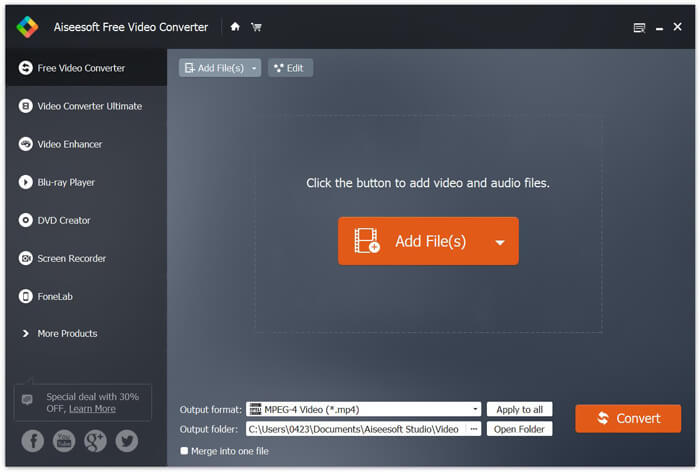
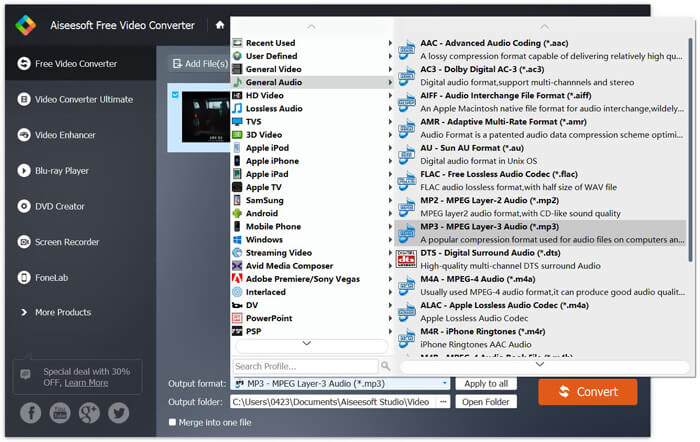
步骤 2:点击Output(输出)格式,然后选择MP3作为输出格式。在此步骤中,你还可以为转换后的 MP3 音频选择合适的目标文件夹。然后,点击Convert(转换)按钮,开始将 AVHCD 文件转换为 MP3。
通过采用先进的加速技术,它可以为您提供真正快速的MTS到MP3的转换速度。更重要的是,这种免费的MTS到MP3的转换可确保您在转换过程中不会有任何音频质量损失。它还具有编辑功能,可帮助您编辑视频音频文件和调整输出效果。
第2部分。如何使用在线转换器免费将MTS转换为MP3
如果你有一个体积较小的 AVHCD 文件,并且只想从中提取 MP3 音轨,可以使用免费的在线转换器。如上文所述,网上有许多在线转换工具可以帮助你把 MTS 转换为 MP3。如果你不知道该用哪一个,这里为你推荐一款比较热门的在线 MTS 转 MP3 转换器——FVC Free Online Video Converter。
FVC免费在线视频转换器是最受欢迎的视频和音频转换工具之一,可以帮助您轻松地将MTS免费转换为MP3。除了AVCHD文件转换外,它还允许您进行其他媒体文件转换。下一步将向您展示如何使用此在线视频转换器将MTS在线转换为MP3。
步骤 1:打开浏览器,进入 FVC Free Online Video Converter 的官方网站。它提供了一个专门的 MTS 转 MP3 转换页面:https://www.free-videoconverter.net/free-online-video-converter/。你可以直接访问该页面进行转换。
步骤 2:找到并点击Add Files to Convert(添加待转换文件)按钮,下载并安装启动器。启动器激活后,上传你要转换的 MTS 文件。

步骤 3:确认输出格式为 MP3,然后点击 Convert(转换)按钮,开始从 AVCHD 文件中提取 MP3 音频。之后,程序会自动开始执行 MTS 转 MP3 的转换过程。

阅读完本页内容后,你可以掌握两种简单且免费的MTS 转 MP3方法。如果你想在毫无音质损失的情况下,将大体积 AVCHD 文件转换为 MP3,可以选择使用Free Video Converter。如果只是处理小于 100MB 的 MTS/M2TS 小视频,则可以使用 FVC Free Online Video Converter。若你仍有其他疑问,欢迎给我们留言。
-
 如何在台式机和在线平台上将WMV转换为MP3
 您可以从FVC Studio中找到任何免费的视频转换器软件。支持任何视频/音频格式,包括MP4,MOV,TS,AVI,WMV,FLAC,MP3等。
-
 将M4A转换为MP3而不损失音频质量的4种最佳方法
 无法播放M4A,需要将其转换为MP3吗?有免费的在线在线将M4A转换为MP3的方法吗?这篇文章分享了4种免费方法来帮助您使用iTunes,在线和专业音频转换器将M4A转换为MP3。
-
 如何免费将M2TS文件转换为MP3
 M2TS文件可以转换为MP3吗?在这篇文章中,我们列出了6大免费和在线方法,可以帮助您将M2TS转换为MP3,AAC,AIFF和更多音频格式。
