


 视频转换大师
 屏幕录影大师
 视频修复
视频修复
 安全下载
安全下载如何将任何 FLV 视频文件转换和上传到 YouTube
“我刚上传了一个扩展名为 .flv 的视频文件,但收到提示信息说文件格式无效,如何把 FLV 上传到 YouTube?”FLV 不仅是一种文件扩展名,还是一种视频封装格式。这意味着一个 FLV 视频文件内部可以包含多种不同的视频和音频编码,其中有些编码并不被 YouTube 支持。本文将告诉你上传 FLV 到 YouTube 所需了解的一切内容,帮助你顺利完成上传。

第 1 部分:YouTube 支持哪些视频和音频编解码器
据谷歌称,YouTube 更喜欢广播格式以及带有 .mpg 扩展名的 DVD 兼容 MPEG-2 流。 YouTube 支持的编解码器包括:
- MPEG-2
- 音频编解码器: MPEG Layer II 或杜比 AC-3
- 音频比特率: 128 kbps 或更高
- MPEG-4
- 视频编解码器: H.264
- 音频编解码器: AAC
- 音频比特率: 128 kbps 或更高
此外,YouTube 仅支持带有 MP3 或 PCM 音频的 WAV 容器、带有 AAC 音频和 FLAC 音频的 MOV。 YouTube 通过正确的编解码器支持 WMV、AVI、MOV、MP4 和 FLV。
谈到 FLV,YouTube 可以访问使用 Adobe-FLV1 视频编解码器以及 MP3 和 AAC 音频编码的视频。如果您的 FLV 视频包含未压缩的音频或 ADPCM 音频,YouTube 将不接受。
此外,上传FLV到YouTube还有更多规则:
- 推荐帧率: 24 至 60
- 推荐分辨率: 1080p
- 最短持续时间: 33 秒
第 2 部分:将 FLV 转换为 YouTube 的最简单方法
方式 1:在桌面上将 FLV 转换为 YouTube
在将 FLV 上传到 YouTube 时出现错误,首先要做的是寻找一款 FLV 转换器,例如 FVC Free FLV Converter。它可以让你调整视频和音频编码格式以及其他参数,从而让 FLV 文件符合 YouTube 的规则。此外,它还支持硬件加速和多线程,以提升转换性能。
YouTube 最佳 FLV 转换器的主要功能
- 1.轻松调整FLV的视频和音频编解码器。
- 2.一次批量处理无限的FLV视频。
- 3.转换时自动保护视频质量。
如何在桌面上为 YouTube 转换 FLV
步骤 1:添加 FLV 文件
将最好的 FLV 转换器安装到计算机上后,启动它。单击左上角的添加文件菜单,然后添加要上传到 YouTube 的 FLV 文件。

步骤 2:更改编码格式
点击底部输出格式旁边的下拉菜单,打开格式配置对话框。在搜索配置文件框中输入 FLV,然后按键盘上的 Enter 键。接着选择一种包含合适视频和音频编码的 FLV 格式。
如果你的 FLV 视频太长,最好先把它分割为多个片段,再上传到 YouTube。你可以点击 编辑 菜单,打开视频编辑窗口。

步骤 3:转换适用于 YouTube 的 FLV
然后移动到底部,点击 打开文件夹 按钮,选择一个用于保存输出视频的具体文件夹。最后,点击 转换 按钮,立即开始将 FLV 转换为适合 YouTube 的格式。

方式 2:将 FLV 转换为在线 YouTube
如果你不想在硬盘上安装视频转换软件,FVC Free Online Video Converter 是一个不错的替代方案。它完全免费且没有任何限制,例如不会添加水印,而且对文件大小也没有限制。具体步骤如下:
步骤 1:在浏览器中访问 https://www.free-videoconverter.net/free-online-video-converter/,然后点击“Add Files to Convert(添加文件进行转换)”按钮以获取启动器。

步骤 2:点击 Add File(添加文件) 按钮上传多个 FLV 文件,然后点击 齿轮 图标打开格式配置对话框。在这里你可以调整 视频编码器(Video Encoder) 和 音频编码器(Audio Encoder)。点击 OK 确认设置。

步骤 3:在底部选择一种 YouTube 支持的输出格式,然后点击 Convert(转换) 按钮开始将 FLV 转换为适用于 YouTube 的格式。完成后,下载输出文件。
不要错过:
第 3 部分:如何将 FLV 上传到 YouTube
转换后,您现在可以将您的 FLV 文件上传到您计算机上的 YouTube。我们在这里分享步骤,以免您迷路。
步骤 1:打开 YouTube 首页并登录你的账号。
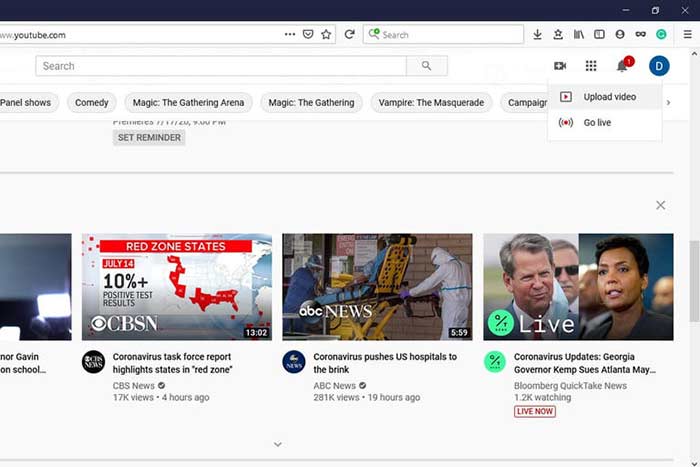
步骤 2:点击 摄像机 图标,并选择“上传视频(Upload video)”进入上传页面。
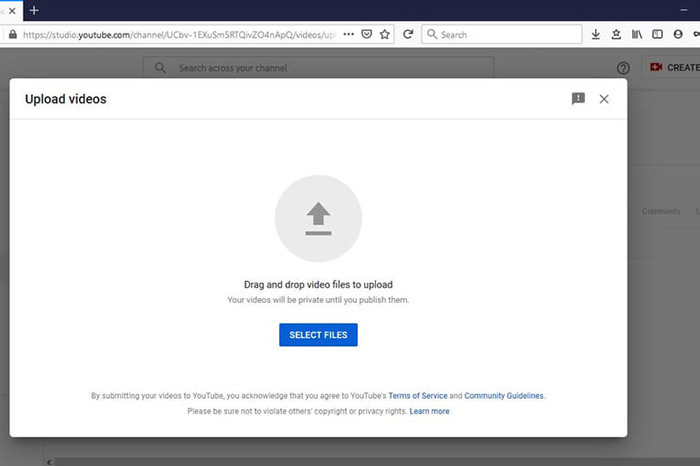
步骤 3:点击页面上醒目的 选择文件(Select Files) 按钮,然后选择之前转换好的适用于 YouTube 的 FLV 文件。或者,你也可以将 FLV 文件直接拖放到该页面中进行上传。
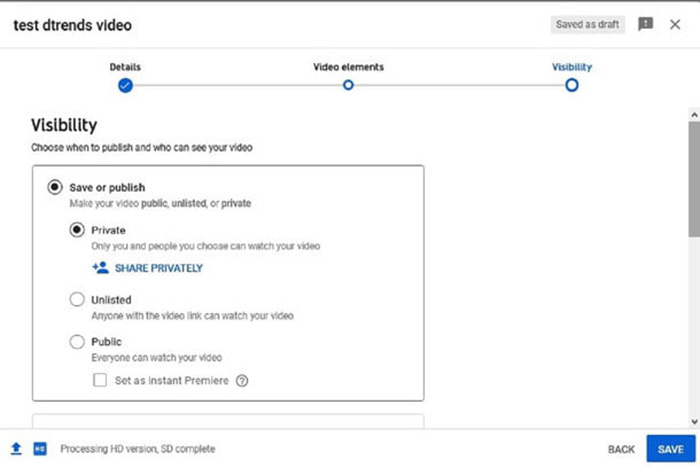
步骤 4:接着设置视频的隐私选项。默认是“公开(Public)”,你也可以将其改为“私人(Private)”“计划发布(Schedule)”或“非公开(Unlisted)”。
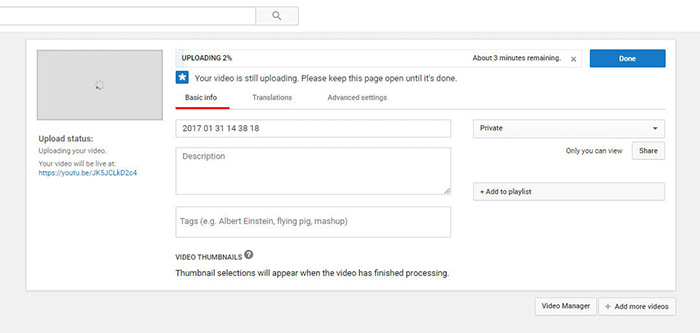
步骤 5:完成相关设置后,点击 保存(Save) 或 发布(Publish) 按钮。随后你会进入 仪表板(Dashboard) 页面,在这里可以看到已经上传到你 YouTube 账号中的 FLV 视频。
第 4 部分:关于 FLV 到 YouTube 的常见问题解答
您可以将 FLV 上传到 YouTube 吗?
是的,没有。 YouTube 支持 FLV 视频格式,但作为视频容器,您只能上传支持视频和音频编解码器的 FLV 文件;否则,将失败。
我可以下载 FLV 格式的 YouTube 视频吗?
如果 YouTube 视频提供下载按钮,您可以单击它并选择 FLV 作为输出格式。
哪种视频格式最适合 YouTube?
MP4 是 YouTube 的最佳视频格式。 Google 确实建议使用带有 H.256 视频编解码器和 AAC 音频编解码器的 MP4。那是因为它以较小的文件大小产生高质量。此外,YouTube 还支持 MOV、WMV、AVI、FLV 和 3GPP。
结论
本指南告诉您 YouTube 接受哪些视频格式以及如何将 FLV 上传到 YouTube 而不失败。 FVC Free FLV Converter 可以帮助您为 YouTube 转换 FLV,并使您能够轻松调整视频和音频编解码器。它甚至不需要任何技术技能,因此初学者可以快速掌握。如果您在上传视频到 YouTube 时遇到其他问题,请在此帖子下方留言。
-
 如何在不支付一分钱的情况下将FLV视频文件转换为MP4
 本指南共有四种免费方法,可将您的FLV视频文件在Windows 10/8/7 / XP和Mac OS X上转换为MP4格式,因此您可以在任何设备上欣赏视频。
-
 如何在台式机和在线平台上将FLV视频转换为MP3音频文件
 如何将FLV转换为MP3文件?您需要做的就是仔细阅读本文,找到您喜欢的方法,并按照我们的分步指南获得所需的内容。
-
 将 FLV 转换为 WAV 的 3 种免费方法
 如何转换 FLV 文件? VLC 可以将 YouTube FLV 转换为 WAV 吗?这篇文章讲述了 3 种将 FLV 转换为 WAV 且不会损失质量的免费方法。
