


 视频转换大师
 屏幕录影大师
 视频修复
视频修复
 安全下载
安全下载了解如何使用最好的免费转换器将 HEIC 转换为 GIF
想把你的 HEIC 图片变成会动的 GIF 吗?我们正好有适合你的解决方案。HEIC 文件是一种高质量且占用存储空间很小的图像格式。但 HEIC 图片本身只是静态图像。要把静态图像变成动图,就需要将 HEIC 文件转换成 GIF 格式。GIF 既可以是静态图像,也可以是动画图像。因此,请继续阅读本文,了解最好的HEIC 转 GIF方法,以无损方式转换你的文件。

第 1 部分。将 HEIC 转换为 GIF 的 4 种最佳工具
说到方便,在线转换器肯定是最好的,因为您不需要下载任何东西。如果您正在寻找最好的在线 HEIC 到 GIF 转换器,我们尝试了一些互联网上最好的 HEIC 到 GIF 转换器。因此,在这一部分中,您将了解三个最好的在线 HEIC 到 GIF 转换器。
Aiseesoft 免费在线图像转换器
如果你正在寻找最好用的在线 HEIC 转 GIF 转换器,这款工具正是你要找的。Aiseesoft 免费在线图片转换器是一款免费的在线工具,可以将 HEIC 图片转换为 GIF、PNG 和 JPG 格式。它被认为是目前网上速度最快的 HEIC 转 GIF 在线转换器之一。此外,与其他在线转换器不同,它没有广告,加载速度也非常快。
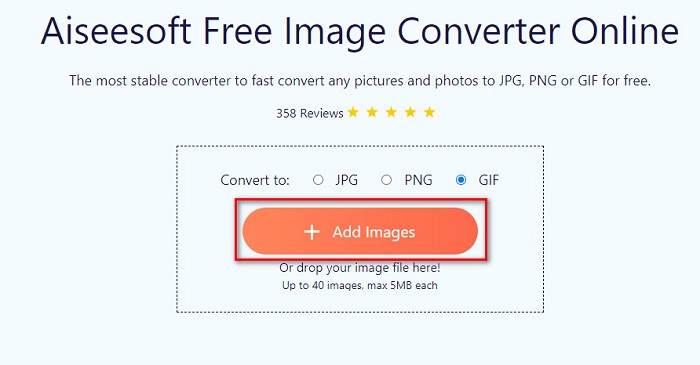
步骤 1:在浏览器中搜索 Aiseesoft 免费在线图片转换器,或直接点击该链接进入其网页。然后在首页界面上,点击添加图片按钮。
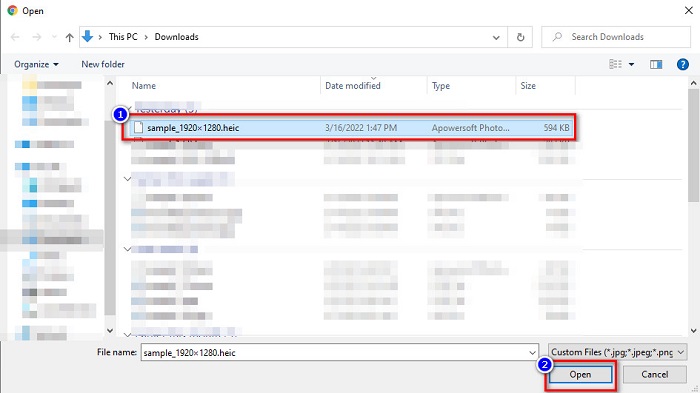
步骤 2:接着会弹出电脑文件窗口,找到你的 HEIC 图片并点击打开。
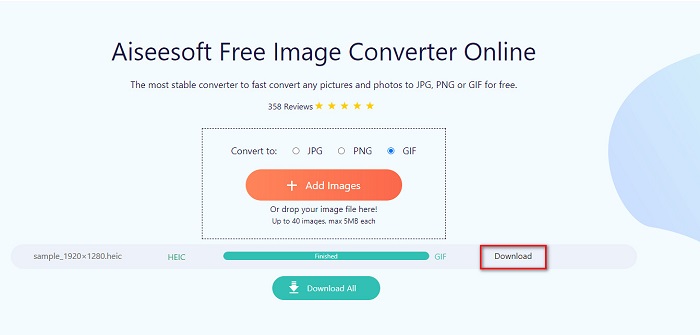
步骤 3:最后一步,点击下载按钮,将生成的 GIF 图片下载到本地。
优点
- 它具有超快的转换过程。
- 它不包含令人不安的广告。
- 它可以将任何图像文件转换为 PNG、JPG 和 GIF。
- 可在所有网络浏览器上访问,包括 Google、Firefox 和 Safari。
缺点
- 当您的 Internet 连接速度较慢时,您可能会遇到缓慢的转换过程。
云转换
CloudConvert是网络上使用频率最高的转换器之一。由于其界面简洁,它可以轻松实现 HEIC 到 GIF 文件的转换。此外,它还支持多种图像格式,包括 HEIC、GIF、BMP、JPG、ICO 等。你还可以调节图片的分辨率、文件大小和质量。尽管它是基于网页的应用程序,但并不包含广告。
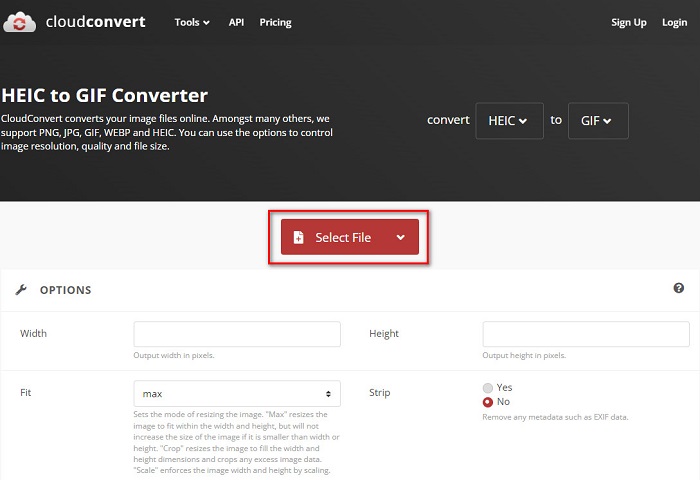
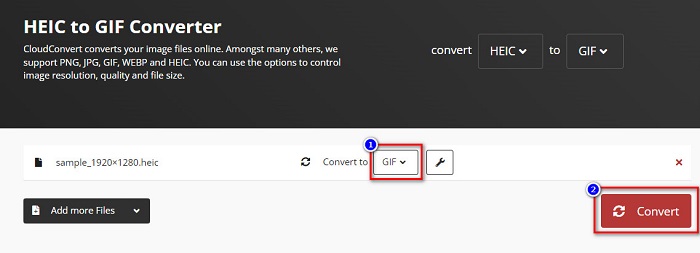
步骤 1:在浏览器中搜索 CloudConvert HEIC to GIF 转换器。然后在软件主界面上点击选择按钮。此时会弹出电脑文件窗口,选择你的 HEIC 文件进行上传。
步骤 2:接下来,点击“Convert to”(转换为)旁边的下拉按钮,选择你想要的输出格式。然后点击Convert按钮,开始将 HEIC 文件转换为 GIF 格式。
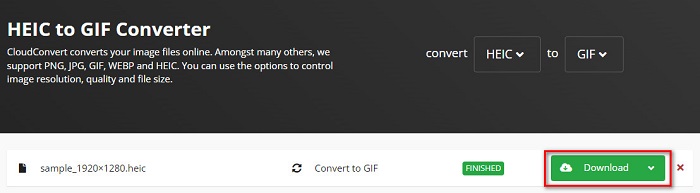
步骤 3:最后,当文件转换完成后,点击下载按钮,将 GIF 文件下载到本地。
优点
- 它有一个快速的转换过程。
- 它不包含讨厌的广告。
- 它支持各种文件格式,包括 HEIC、GIF、JPG、PNG 等。
- 可在几乎所有搜索引擎(如 Google 和 Safari)上访问。
缺点
- 当互联网连接速度较慢时,您可能会遇到转换过程缓慢的情况。
在线免费转换
另一款值得一试的在线 HEIC 转 GIF 转换器是 OnlineConvertFree。这个转换器拥有易于操作的界面,并且转换速度很快。此外,如果你正在寻找一款既能压缩又能调整文件尺寸的转换工具,这个网站也提供这些功能。
但是,它包含令许多用户感到不安的广告。尽管如此,这个转换器仍然可以方便地将 HEIC 转换为 GIF。
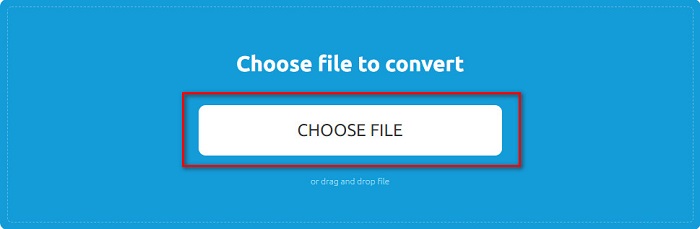
步骤 1:首先,在浏览器中搜索 OnlineConvertFree。在软件主界面上点击选择文件。随后会弹出电脑文件窗口,在其中选择你的 HEIC 文件并上传。
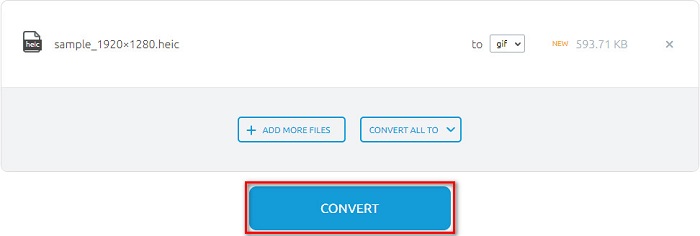
步骤 2:第二步,点击转换按钮,将 HEIC 文件转换为 GIF 文件。随后会跳转到一个新界面。
步骤 3:最后,向下滚动页面,点击下载按钮,将 GIF 文件保存到本地。

优点
- 它有一个简单的用户界面。
- 使用安全。
缺点
- 它包含广告。
CDKM
CDKM 是一个在线工具,可帮助您将 HEIC 转换为 GIF 文件。这个在线转换器是一个易于使用的工具,使其成为适合初学者的工具。此外,它还支持 HEIC、GIF、PNG、JPG 和 SVG 等标准文件格式。但是,此转换器包含可能会打扰您的广告。尽管如此,它可以快速转换您的文件,因此它是一个必须尝试的转换器。
步骤 1:在浏览器中搜索 CDKM 并进入其网页。在软件主界面点击选择文件按钮。当电脑文件夹弹出时,选择你的 HEIC 文件,然后上传到主界面。
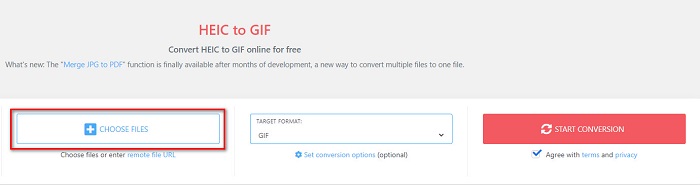
步骤 2:接着,点击开始转换按钮,将 HEIC 文件转换为 GIF 文件。然后进入下一步。
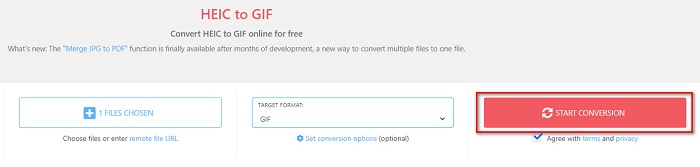
步骤 3:最后,在下方点击下载按钮,将 GIF 文件下载下来。

Part 2. HEIC 和 GIF 对比图
HEIC 是由 Apple 创建的一种图像文件格式。当你使用苹果设备拍照时,会发现照片的文件扩展名是 .heic。这类图像文件兼具高画质和小体积,因此非常流行。不过,HEIC 文件与许多设备并不兼容。在 Apple 设备上打开和查看 HEIC 文件非常方便,但如果想在其他平台上查看,就需要先将其转换为其他格式。
另一方面,GIF 文件是动画的无损图像格式。这些图像格式可以是动画或静态图像。此外,几乎所有媒体平台都支持 GIF 格式。
| HEIC | GIF | |
| 压缩/未压缩 | 压缩 | 压缩 |
| 可用性 | 在 Apple 设备上可用。 | 适用于所有媒体平台 |
| 无损/非 | 无损 | 无损 |
| 画面质量 | 高画质 | 与 HEIC 图像相比质量较低 |
| 最适合用于 | 最适合拍照 | 最适合用于动画短视频剪辑。 |
第 3 部分。关于将 HEIC 转换为 GIF 的常见问题解答
您可以在 Mac 设备上播放动画 GIF 吗?
是的,Mac 设备可以播放动态 GIF;但有时可能无法正常播放,这种情况下你需要借助在线查看器来播放 GIF。
我可以将 JPG 图像转换为 GIF 吗?
将 JPG 转换为 GIF的方法有很多。上文提到的这些在线转换器,都可以把 JPG 图片文件转换为 GIF。
你可以在你的 iPhone 上保存 GIF 吗?
幸运的是,iPhone 设备支持 GIF 文件。因此,您可以在 iPhone 上保存 GIF。但如果您无法保存 GIF 文件,请确保重新启动 iPhone 并再次尝试下载。
结论
综上所述,将 HEIC 转换为 GIF 的方法有很多。然而,并不是所有在线转换器都能提供超高速的转换体验。如果你正在寻找顶级的在线 HEIC 转 GIF 转换器,建议使用Aiseesoft 免费在线图片转换器。
-
 什么是 VOB 文件以及如何将 VOB 文件免费转换为 GIF
 您想了解更多关于 VOB 文件以及被翻录后如何分享的信息吗?或者为什么需要将 VOB 转换为 GIF?然后仔细阅读这篇文章。
-
 将 PNG 转换为动画 GIF 不容错过的前 3 个转换器
 您想让您的 PNG 栩栩如生吗?然后尝试使用可用的有用工具和步骤将 PNG 转换为 GIF 动画格式。
-
 将图像更改为动画 GIF 的 5 种最佳方法 [2022 年更新]
 需要将图像转换为 GIF 吗?本文将提供我们可以在市场上找到的五种最佳转换器。因此,让我们通过阅读本文找出这些工具。
