


 视频转换大师
 屏幕录影大师
 视频修复
视频修复
 安全下载
安全下载使用最佳和最快的转换器将 HEIC 惊人地转换为 SVG
HEIC 文件是一种在保持高分辨率图像质量的同时,文件体积又很小的图片格式。但是,如果你正在编写网站或为你的页面制作徽标,就可能需要考虑使用其他图片格式。其中最适合网站使用的图片格式之一,就是 SVG 图像文件。因此,在本文中,你将了解能够帮助你将 HEIC 转换为 SVG 图像格式的最佳工具。

第 1 部分。 HEIC 与 SVG
HEIC 是苹果公司开发的一种图像格式。由于它具有高质量分辨率且在设备中占用空间很小,如今已成为最常见的图像格式之一。此外,你可以在 iPhone、Mac 以及其他苹果设备上原生打开 HEIC 图片。然而,如果你使用的是 Windows 设备,则无法直接查看 HEIC 图片。与其他格式不同,SVG 图片格式是以矢量的形式存储图像。
这些图像格式可以扩展和缩小而不会降低其质量。此外,SVG 图像通常用于专业网站、徽标、图标和信息图表。此外,所有网络浏览器都支持 SVG 文件;因此,打开 SVG 文件对您来说并不困难。
第 2 部分。使用最佳在线转换器轻松将 HEIC 转换为 SVG
许多在线转换器可以将 HEIC 转换为 SVG;但是,并非所有转换器都易于使用且安全。因此,在这一部分中,您将了解用户友好且安全的最佳转换器。因此,请高枕无忧,因为您将学习如何轻松地将 HEIC 转换为 SVG。
Aconvert.com
Aconvert.com 是互联网上最受欢迎的在线转换器之一。该工具允许您将 HEIC 转换为 SVG,而无需担心质量。您可以通过其快速的转换过程轻松地将您的 HEIC 文件转换为 SVG。但是,由于它是基于 Web 的应用程序,它包含可能会打扰您的广告。尽管如此,许多人还是使用此在线转换器作为他们的第一选择。
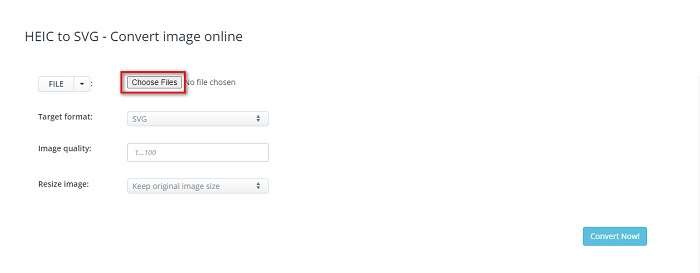
步骤 1. 在浏览器中搜索 Aconvert.com。然后在软件主界面点击“Choose Files(选择文件)”按钮。此时会打开电脑中的文件夹,选择你的 HEIC 图片后,点击 Open(打开) 上传。
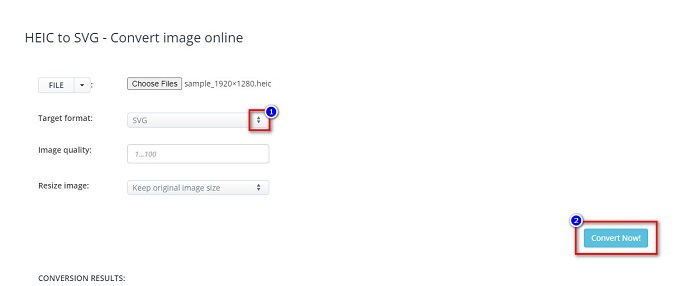
步骤 2. 上传 HEIC 文件后,点击 上下箭头 按钮选择你想要的输出格式。然后点击 Convert Now(立即转换) 按钮。
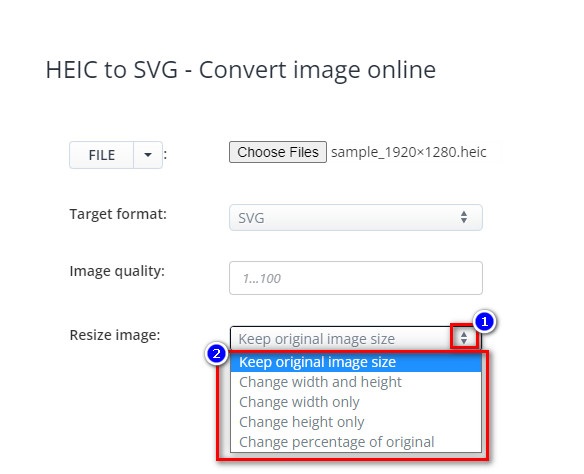
你可以点击 Resize Image(调整大小) 旁边的 上下箭头 按钮来调整图片尺寸。
步骤 3. 最后,点击 Save(保存) 图标以 下载 你的 SVG 图片。

优点
- 它可以快速将 HEIC 转换为 SVG。
- 它允许您调整图像大小并调整其质量。
- 可在几乎所有网络浏览器上访问,例如 Google、Safari、Firefox 和 Edge。
缺点
- 它包含广告。
FreeConvert.com
FreeConvert.com 是另一款可以将 HEIC 图片转换为 SVG 图片的在线工具。该转换器界面简洁,十分适合新手使用。此外,你还可以通过其高级功能调整图片的背景颜色和颜色数量。但如果你的网络连接较慢,转换过程可能会变得缓慢。
步骤 1. 首先,在浏览器中搜索 FreeConvert.com。在软件主界面,点击 Choose Files(选择文件) 按钮。当电脑文件夹打开后,选择你的 HEIC 图片。

步骤 2. 接着,点击 Output(输出) 旁边的下拉按钮,然后选择你想要的输出图片格式。
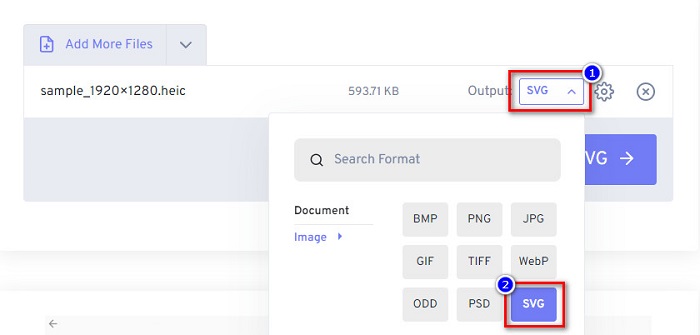
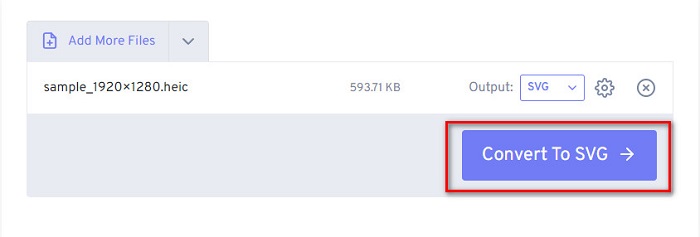
步骤 3. 最后,点击 Convert to SVG(转换为 SVG) 按钮,等待文件转换完成后,再点击 Download(下载) 按钮。
优点
- 使用安全。
- 它允许您快速将 HEIC 转换为 SVG。
- 它有一个简单的用户界面。
缺点
- 它包含讨厌的广告。
转换器
另一个值得使用的在线转换器是 MConverter。这个在线 HEIC 到 SVG 转换器有一个简单的软件界面。您无需担心您的数据,因为此工具使用安全。此外,它支持多种图像格式,包括 HEIC、SVG、BMP、GIF、PNG 等。但它只能转换 200MB 以下文件大小的图像。
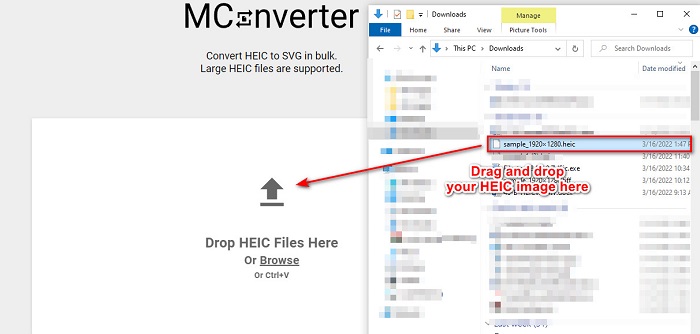
步骤 1. 在浏览器中搜索 MConverter。然后将你的 HEIC 图片拖放到软件主界面上。
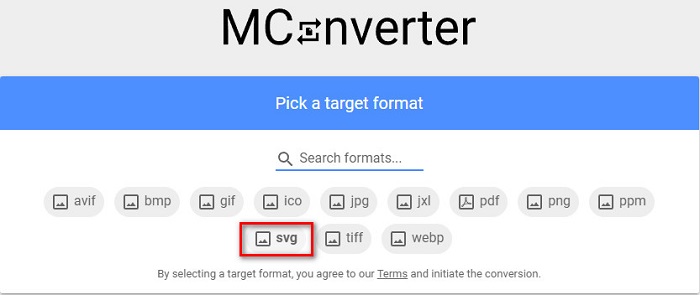
步骤 2. 在接下来的界面中,点击 SVG 图像格式作为输出格式,随后图片就会开始转换。
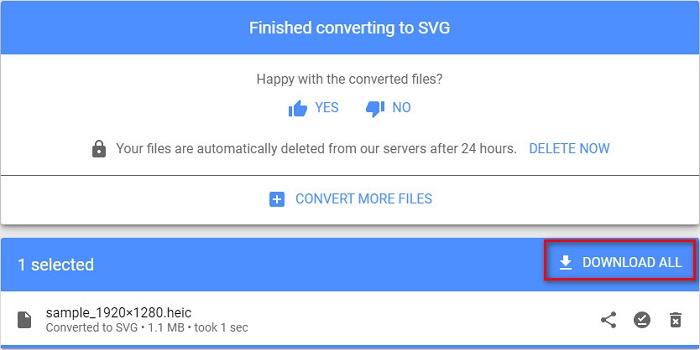
步骤 3. 然后点击 Download All(全部下载) 按钮,下载你的 SVG 图片。
优点
- 它有一个易于使用的软件界面。
- 它支持各种文件格式,包括 HEIC、SVG、BMP、JPG、PNG 等。
- 使用安全。
缺点
- 它包含令人不安的广告。
第 3 部分。建议:使用最佳 HEIC 转换器转换您的 HEIC 文件
上面提到的工具真的很棒。但是,如果您正在寻找不是基于 Web 且转换速度快的转换器,您可能需要下载此应用程序。 Aiseesfoft HEIC Converter 是一款离线 HEIC 转换器。它允许您将 HEIC 图像转换为最标准的图像格式,如 JPG 和 PNG。因此,如果您正在寻找一种在 Windows 上查看 HEIC 图像的方法,那么此转换器是最佳选择。此外,它还具有一项功能,可让您将 HEIC 文件批量转换为 JPG 和 PNG 图像。
更神奇的是,它可以在您转换时保留您的 EXIF 数据,这是其他转换器无法做到的。您还可以使用此转换器调整图像的质量。
Aiseesoft HEIC Converter 的功能:
- 它允许您将 HEIC 转换为 PNG 和 JPG 格式。
- 它具有超快的转换过程。
- 它可以保留您文件的EXIF数据。
- 可在所有跨媒体平台上下载,包括 Windows 和 Mac。
第 4 部分。关于将 HEIC 转换为 SVG 的常见问题解答
哪种图像格式更好,HEIC 还是 SVG?
HEIC 和 SVG 都具有高质量的分辨率和较小的文件大小。但是,HEIC 与 Apple 设备以外的其他设备不兼容。与 SVG 不同,它几乎兼容所有设备和图像编辑应用程序。
SVG 是无损文件吗?
是的。 SVG 图像具有无损文件压缩功能,因此在压缩它们时不会丢失数据。
使用 SVG 文件有什么缺点?
SVG 是一种矢量化图像格式,这意味着它们不是像素化的,而是使用图像作为矢量。但是,由于它依赖于点和路径而不是像素,因此它们不会描绘图像的细节。
结论
以上信息均客观可靠。所有这些在线 HEIC 转 SVG 转换工具都能帮助你轻松将 HEIC 转换为 SVG 图像格式。不过,这些转换器所提供的功能并不完全相同,如何选择取决于你的具体需求。如果你正在寻找一款可以在离线状态下免费将 HEIC 转换为 JPG 或 PNG 的工具,那么 Aiseesoft HEIC Converter 将是你的最佳选择。立即下载,享受它独特的功能体验。
-
 使用 2022 年的前 4 种改进方法将 HEIC 转换为 PDF
 要了解有关最佳 HEIC 到 PDF 转换器的更多信息,您可以下载此 2022。您可以阅读本文,因为我们提供了对它们的评论。
-
 2022 年精选的 5 个最佳 HEIC 到 JPG 转换器
 使用 HEIC 到 JPC 转换器,您可以轻松地将图像格式更改为便携式 JPG。想知道这5个工具是什么?阅读这篇文章。
-
 您必须知道的最佳免费和付费 HEIC 转换器 [2022 年更新]
 你想知道HEIC转换器是什么吗?如果是这样,我们将包括可用于更改 HEIC 格式的前 5 个免费和付费 HEIC 转换器。
