


 视频转换大师
 屏幕录影大师
 视频修复
视频修复
 安全下载
安全下载如何免费将MP4转换为FLV Online / Mac / Windows
FLV是使用HTML5在Internet上流式传输媒体的标准,用于在Facebook,YouTube等上嵌入视频和视频帖子。当您要在某些网站上上传或嵌入视频时,建议的格式是FLV,而不是MP4尽管MP4被认为是Mac,Windows,智能手机,HDTV,游戏机,流媒体服务等上最受欢迎的格式。
但好的一面是,你可以将 MP4 转换为 FLV。
这里精选了 3 款适用于在线、Windows 和 Mac 的免费 MP4 转 FLV 转换器,你可以按照简单的教程学习如何将 MP4 转成 FLV。

第1部分。使用免费的视频转换器将MP4转换为FLV
要把 MP4 转换为 FLV,不需要任何专业技术知识,你只需要一个 MP4 转 FLV 的转换器。Free FLV Converter 是一款易于使用的视频转换软件。它能处理 FLV、MP4、MOV、MKV、MTS、M2TS、ASF、WMV、AVI 等在内的多种格式,既可以将 MP4 转成 FLV,也可以把 FLV 转回 MP4。

- 将MP4批量转换为FLV / SWF / ASF,以节省时间。
- 借助H.264支持将MP4转换为FLV。
- 调整FLV参数,例如分辨率,比特率等。
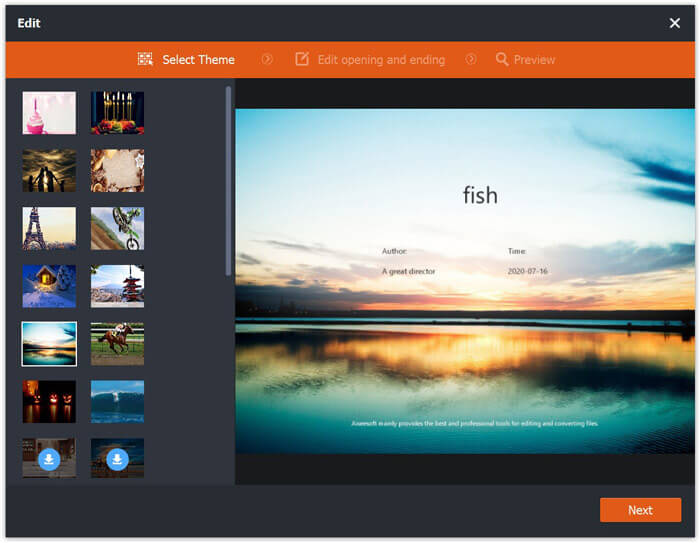
- 编辑FLV文件的开始和结束主题。
现在,请按照下面提到的简单步骤进行操作。
步骤 1:下载免费的 MP4 转 FLV 转换器
从下面的下载链接中下载免费的视频转换器。
此免费软件与 Windows 10/8/7 和 macOS X 10.7 及更高版本兼容。按照屏幕上的说明下载并安装它。
步骤 2:添加 MP4 文件
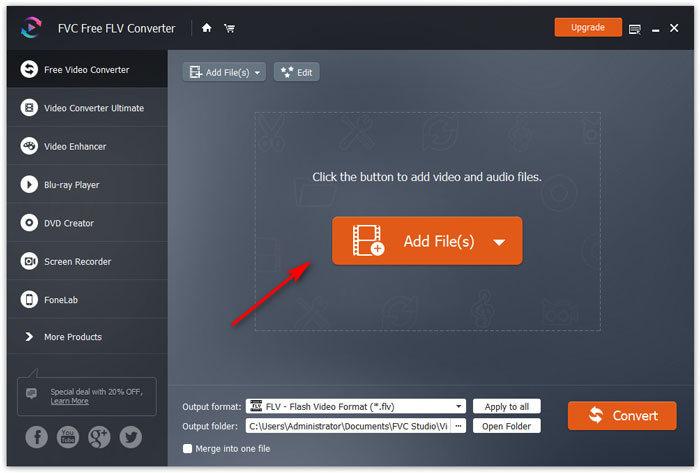
启动程序窗口,点击中间或左上角的添加文件按钮来导入 MP4 文件。它支持批量转换,你可以一次加入多个 MP4 文件。
步骤 3:将 MP4 转换为 FLV
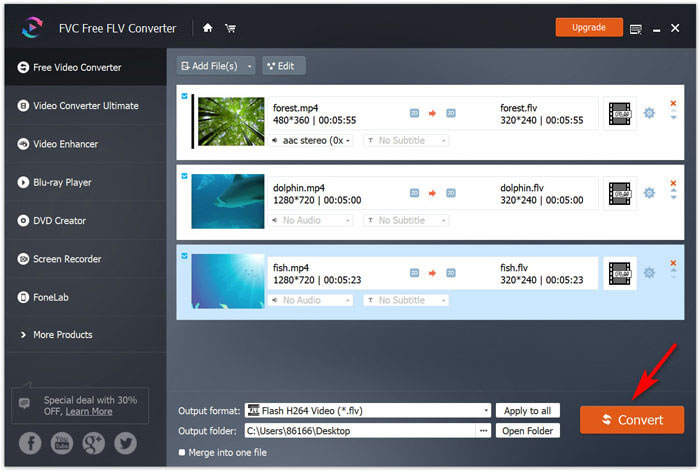
在底部的输出格式下拉列表中选择FLV。点击输出文件夹旁边的三点按钮,指定程序保存转换后 FLV 文件的文件夹。
最后,点击转换按钮,开始将 MP4 转为 FLV。
你也可以在主界面中使用编辑选项,为你制作的视频添加片头和片尾,再分享到网上。
这样,您可以将所有MP4文件安全地转换为FLV视频。
第2部分。通过免费的在线视频转换器将MP4更改为FLV
将MP4转换为FLV的第二种方法是使用免费的在线转换器。
无需下载大exe或dmg文件,您就可以通过浏览器在线完成整个转换。
Free Online Video Converter 是一款在线免费工具,可以将 MP4 转换为 FLV 以及其他主流格式。不仅能把 MP4 转成 FLV,还能直接将 MP4 转换成适用于 YouTube 和 Facebook 的格式。上传 MP4 到这些视频网站时,无需再手动设置参数以满足平台要求。
在线将MP4更改为FLV的步骤非常简单。
步骤 1:在电脑浏览器中打开这个在线网站。点击添加文件进行转换按钮下载安装启动器,它可以把转换与下载过程结合在一起,减少多余点击。
下载桌面版以批量转换文件。
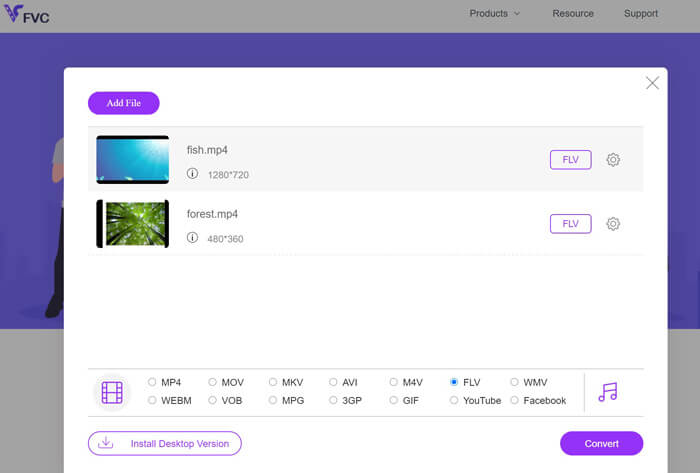
步骤 2:在弹出的对话框中,选择你想要转换为 FLV 的 MP4 文件。
步骤 3:勾选FLV复选框,然后点击转换来选择保存已转换 FLV 文件的位置。再次点击“转换”按钮,开始转换 MP4 并将转换好的 FLV 文件下载到你的硬盘。
您可以根据自己的喜好,通过FLV输出格式旁边的齿轮图标来调整编解码器,分辨率,比特率等。
使用这种方法的额外好处是,当你想在 Facebook、Instagram 等平台上传动画时,还可以将 MP4 转换为 GIF。
当然,如果您想进一步编辑 FLV 效果,建议您使用 Video Converter Ultimate。
- 将MP4转换为FLV和其他500多种格式。
- 将任何其他视频转换为 FLV、SWF 和 ASF 以进行在线流式传输。
- 编辑视频效果(修剪,修剪,过滤,旋转,合并,水印等)
- 压缩视频,编辑ID标签,创建GIF并提高视频质量。
第3部分。通过VLC将MP4转换为FLV
VLC以免费的媒体播放器而闻名。在这里,它可以是免费的MP4到FLV转换器。但是,有人可能会抱怨他们无法从VLC中找到FLV输出格式。不用担心,现在请按照以下步骤使用VLC从MP4文件中获取FLV文件。
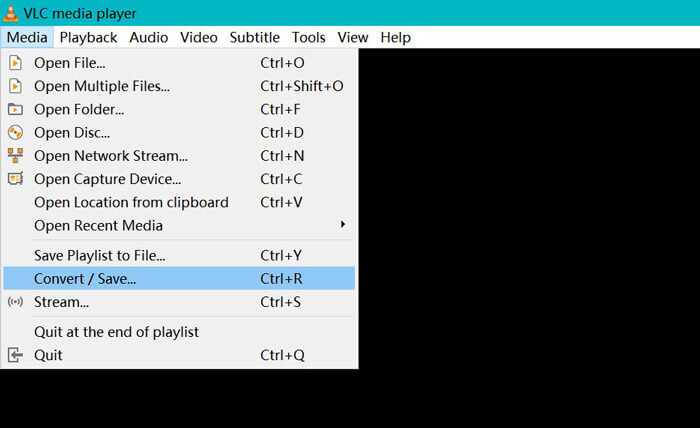
步骤 1:在电脑上下载并安装 VLC。打开该软件,在菜单中进入媒体,选择转换 / 保存选项。
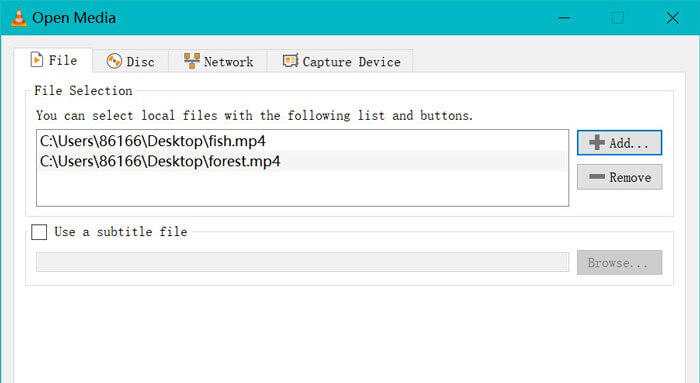
步骤 2:点击添加按钮打开对话框,在其中找到并添加要导入 VLC 的 MP4 文件。
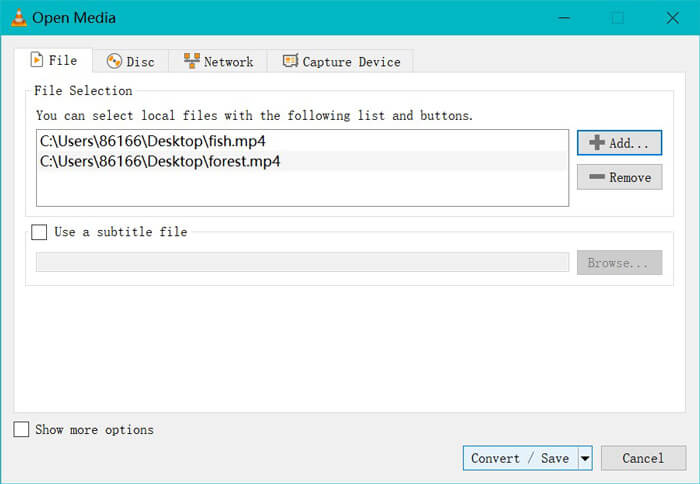
步骤 3:MP4 文件加载完成后,点击底部的转换 / 保存按钮。
步骤 4:首先,选择Dump Raw input,然后点击'浏览'来选择保存转换后 FLV 文件的目标位置。最后,点击开始,将 MP4 文件转换为 FLV。
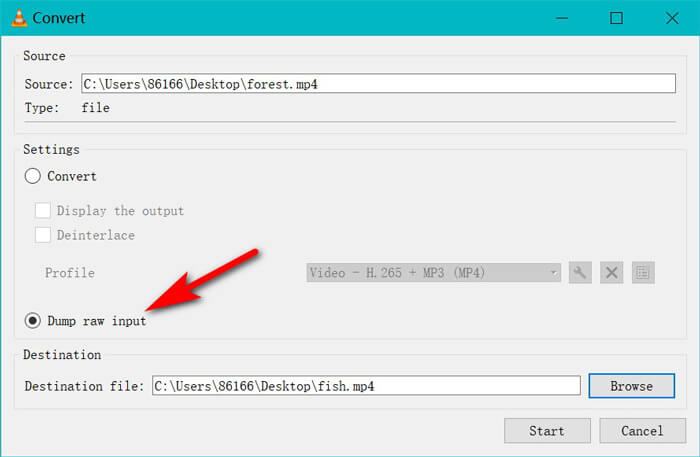
转换完成后,您可以找到转换后的文件是.flv的扩展名。 (通常在计算机上的“视频”文件夹中)。
如果你想转换其他格式,比如将 SWF 转换为 MP4,只需在配置文件的下拉选项中选择 MP4 即可。
需要明确的是:VLC不是专业的MP4到FLV转换器,并且转换器界面不是用户友好的。
MP4 与 FLV
第4部分。MP4到FLV的常见问题解答
什么是FLV?
Flash视频是一种容器文件格式,可使用Adobe Flash Player通过Internet传递视频。 FLV文件可通过Adobe Flash Player或Web浏览器插件在大多数操作系统上播放。
手刹可以将MP4转换为FLV吗?
不可以。HandBrake可以打开FLV,WebM,MP4和许多其他格式的Web视频。但是它不能将其他视频转换为FLV。支持的输出视频格式为MP4和MKV。
FLV是否小于MP4?
否。FLV和MP4都是媒体容器。虽然它们具有相同的视频和音频编解码器,但FLV文件比MP4文件大一点。
Free Online Video Converter是否将MP4转换为有限大小的FLV?
否。没有使用免费的在线视频转换器将MP4转换为FLV的文件大小限制或时间限制。
结论
尽管MP4是Windows,Mac,手机和流媒体平台的通用格式,但是当您要在线上传MP4视频时,FLV是某些网站推荐的格式。这篇文章收集了前3个免费的MP4到FLV转换器,以便您可以在Mac和Windows计算机上在线将MP4更改为FLV。
您首选哪种方式?
-
 如何在Windows / Mac上将MKV转换为MP4
 无法播放 MKV 视频?想在不支持 MKV 的设备上观看 MKV 视频吗?这里有 2 种免费方法可以将 MKV 转换为 MP4 而不会降低质量。
-
 WTV到MP4转换器:如何将WTV转换成MP4
 怎么把WTV转换成MP4?这里有2个免费的WTV到MP4转换器,您可以使用它们将Windows录制的WTV文件转换为在线和桌面上免费的MP4视频。
-
 如何免费将RM / RMVB转换为MP4在线和计算机
 怎么把RM转换成MP4?这里有2 100%免费的RM / RMVB到MP4转换器,可以在线和在Windows和Mac计算机上将RM更改为MP4。

