


 视频转换大师
 屏幕录影大师
 视频修复
视频修复
 安全下载
安全下载如何在Windows / Mac上将MP4转换为M4A(免费和在线)
MP4是一种广泛使用的文件格式,可与多个电台和视频播放器一起使用。 MP4文件可以存储视频,音频和其他内容。现在,许多人都喜欢听MP4视频的音轨。为了保持质量,将MP4转换为M4A是个好主意。 M4A代表MPEG 4音频。大多数程序都可以播放M4A文件,包括iTunes,QuickTime,Windows Media Player等。

你也许想知道如何从 MP4 文件中提取音频。将 MP4 文件转换成 M4A 文件的方法有很多。请查看这篇文章,了解如何将 MP4 转换为 M4A,以便今后在手机等移动设备上收听。
第1部分。最佳的免费在线方法,将MP4转换为M4A而没有质量损失
FVC Free Online Video Converter 是一款免费的 MP4 转 M4A 文件转换器,不仅可以将 MP4 格式转换为 M4A,还能转换成 MP3、WAV、M4R、WMA、AIFF、AC3 等其他格式。它支持批量转换,因此你可以一次性将多个 MP4 视频转换为 M4A。此外,这个免费在线工具还允许你将 MP4 视频转换为 MOV、AVI、FLV 及其他视频格式。
步骤 1. 在浏览器中打开 https://www.free-videoconverter.net/free-online-video-converter/。点击Add Files to Convert(添加要转换的文件)按钮,然后下载并安装其启动器。

步骤 2. 上传你想要转换的 MP4 视频,然后点击Open(打开)继续。
步骤 3. 将视频文件上传到该应用后,点击Audio(音频)图标,并选择M4A作为输出格式。
步骤 4. 最后,点击右下角的Convert(转换)按钮。稍等片刻,你就能从 MP4 文件中得到 M4A 音频。
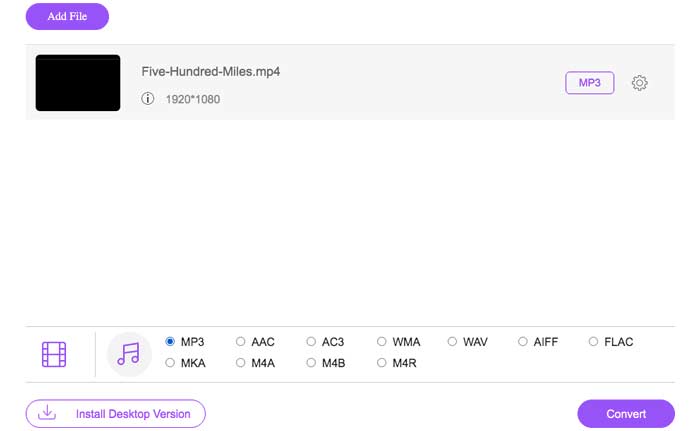
第2部分。如何使用免费的音频转换器将MP4转换为M4A
FVC Free Audio Converter 是一款免费软件,可让您毫不费力地将 MP4 文件转换为 M4A。它能够将任何视频或音频文件更改为 M4A、MP3、WAV 等。您可以在 Windows PC 上下载并安装它以开始转换。
步骤 1. 在电脑上启动此音频转换器。点击Add File(s)(添加文件)按钮,将 MP4 文件上传到该程序。

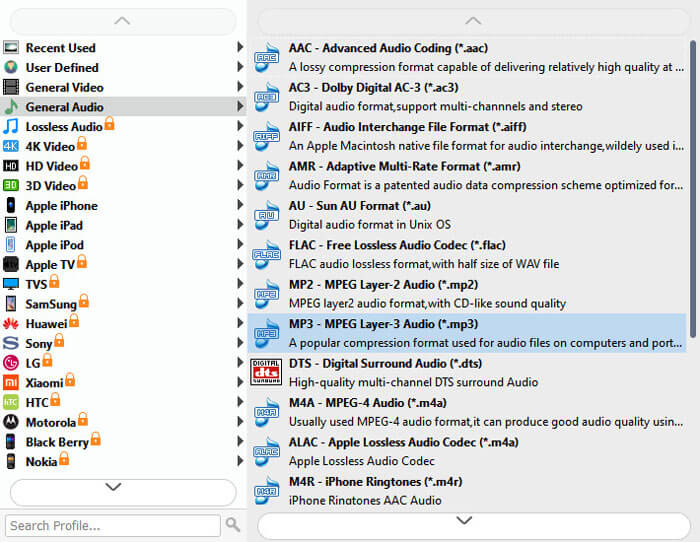
步骤 2. 找到Output formats(输出格式)选项,并在下拉列表中选择M4A作为输出格式。
步骤 3. 点击Convert(转换)按钮,开始将 MP4 文件转成 M4A。
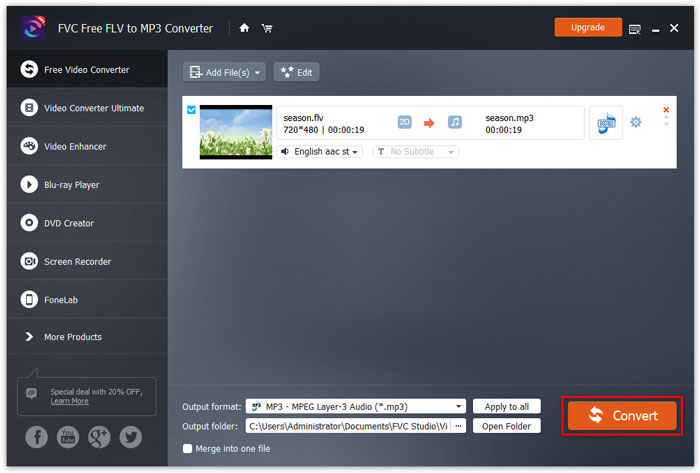
除了 M4A 之外,你还可以用它将 MP4 转换为 MP3、AAC 或其他音频格式。
第3部分。如何使用iTunes将MP4转换为M4A
要使用Windows或Mac版iTunes将MP4转换为M4A,您需要更改iTunes导入设置,然后使用“转换”菜单选项制作M4A副本。
步骤 1. 在 Windows 电脑或 Mac 上打开 iTunes。
步骤 2. 在菜单栏中选择Edit(编辑),然后点击Preferences(偏好设置)。接着,进入General(通用)选项卡,并点击Import Settings(导入设置)。
步骤 3. 找到并点击Import Using(导入使用)旁边的菜单,然后选择你希望将视频转换成的编码格式。之后点击OK(确定)。
步骤 4. 选择资料库中你想转换的歌曲。然后依次选择File(文件),点击Create New Version(创建新版本),再选择创建 M4A 版本。
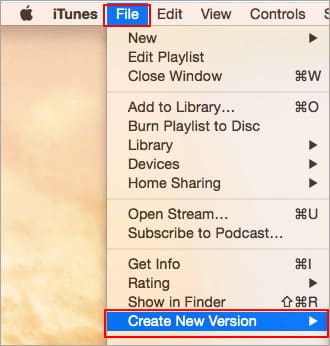
转换后的音频文件将显示在库中原始文件旁边。
第4部分。MP4到M4A转换的常见问题解答
1.什么是M4A文件?
带有M4A文件扩展名的文件是MPEG-4音频文件。 M4A通常可以在Apple的iTunes Store中找到,作为歌曲下载的格式。
2.如何打开M4A文件?
打开M4A文件的程序包括iTunes,QuickTime,Windows Media Player等。Android平板电脑和电话,iPhone,iPad和iPod touch也支持播放M4A文件。
3.如何在线合并MP4文件?
FVC Free Online Video Merger 可以帮助你在线合并或拼接多种 MP4 或其他视频格式,如 MOV、AVI、FLV 等。
4. Windows Media Player可以将MP4转换为M4A吗?
否。WindowsMedia Player仅支持将视频文件转换为MP3或WAV。
结论
以上三种方式可以帮助您轻松地将MP4免费转换为M4A。如果您希望在线进行转换,那么FVC Free Online Video Converter应该是一个不错的选择。如果您的MP4文件很大,则FVC Free Audio Converter或iTunes将更可靠地将MP4文件转换为M4A。
-
 如何在Mac / Windows上将MP4转换为WMV
 这篇文章分享了如何在Mac或Windows上将MP4视频转换为WMV格式。我们还将为您提供多种选择,包括桌面软件和基于Web的在线转换器。准备知道最好的MP4到WMV转换工具了吗?
-
 如何在台式机和在线平台上将WMV转换为MP3
 您可以从FVC Studio中找到任何免费的视频转换器软件。支持任何视频/音频格式,包括MP4,MOV,TS,AVI,WMV,FLAC,MP3等。
-
 如何在Windows / Mac /在线上免费将AVCHD转换为MP4视频
 有5种简单的方法可以将AVCHD转换为计算机上的MP4视频。您可以在此处使用任何转换器将AVCHD视频批量转换为MP4,而不会损失质量。
