


 视频转换大师
 屏幕录影大师
 视频修复
视频修复探索如何在 PS4 上播放 MKV 文件
不只有 Xbox One S 支持影片播放,现在 PS4 也开始紧跟这一趋势。通过 USB 数据线和 DLNA,PS4 现在可以播放 MKV、MP4、AVI 等多种格式。这意味着 MKV 也是你可以播放的文件之一。想查看完整的支持格式列表,请访问 PS4 官方网站。既然你会继续阅读这篇文章,就说明你对在 PS4 上播放 MKV 文件很感兴趣。继续往下看,随着阅读进度,你会了解到如何在 PS4 上播放 MKV。

第 1 部分。可以在 PS4 上播放所有 MKV 文件吗?
我可以在 PS4 上播放 MKV 文件吗?你当然可以。 PS4 支持 MKV 文件格式。但并非所有 MKV 文件都能正常播放。您可能会在播放时遇到失败。这是因为您需要满足 PS4 设定的标准。大多数情况下,支持 H.264/MPEG-4 AVC。如果您要从 USB 驱动器播放 MKV 文件,则适用相同的规则。同时支持音频 MP3、AAC LC、AC-3。大多数这些格式都是杜比数字格式。如果您认为自己已达到标准,则可以继续执行有关如何直接在 PS4 上播放 MKV 的步骤。
步骤 1: 下载并安装 DivX Media Server 并启动播放器,然后在电脑上启用共享功能。
步骤 2: 将 MKV 文件上传或导入到服务器中。
步骤 3: 在进行下一步之前,确保电脑和 PS4 连接在同一个 Wi-Fi 网络下。接着在 PS4 上下载并安装 DivX 媒体播放器。之后,打开 PS4 的媒体播放器应用,在出现的设备列表中选择 DivX 媒体服务器。
步骤 4: 最后,找到“Video(视频)”,勾选你想播放的视频并开始串流。
第 2 部分。 关于如何从 USB 在 PS4 上播放 MKV 的分步指南
同时,如果您使用的是 USB 存储设备,请确保它是 FAT 或 exFAT 格式,否则将不会被检测到。如果您认为自己已准备好并且闪存驱动器兼容,请查看下面的分步指南。
步骤 1: 打开 PS4 并插入 U 盘。进入主菜单(Menu)。然后选择视频(Video),继续查找你的 USB 驱动器名称。
步骤 2: 当你看到文件名列表时,点击显示全部(Display All),即可查看 U 盘中保存的全部文件。将文件复制并传输到 PS4。
步骤 3: 最后,确保你还有足够的存储空间以完成传输。
第 3 部分。 通过 Plex 服务器在 PS4 上播放 MKV 的替代方法
除了 DivX 以外,还有另一款可以在 PS4 上播放 MKV 的替代播放器——一款名为 Plex 的串流媒体服务器。该媒体服务器可以让你从电脑上串流高质量的视频、音乐、电视节目以及播客。虽然有些人播放部分 MKV 文件时会遇到问题,但你仍然可以把它当作备选方案。同时,如果你确实想用 Plex 来播放某些不兼容的文件,就需要考虑先转换视频。有一些转换器可以把 MKV 文件转成 Plex 支持的格式。通过调整视频编码、帧率、比特率以及其他参数,这是可以实现的。有没有能够做到这一点的工具?答案是有的,你可以试试Video Converter Ultimate。是的,这个工具完全能够胜任。用它来解决这个问题吧。
步骤 1: 在电脑上下载并安装 Video Converter Ultimate。
步骤 2: 点击添加文件(Add files)来添加你想转换的文件,或者直接拖拽文件(drag and drop)到界面中。
步骤 3: 接着,点击全部转换为(Convert to All)下拉菜单,选择 Plex 支持的格式。
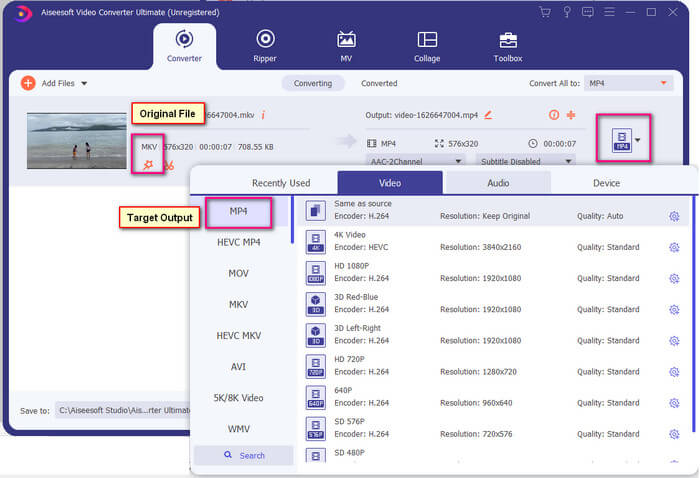
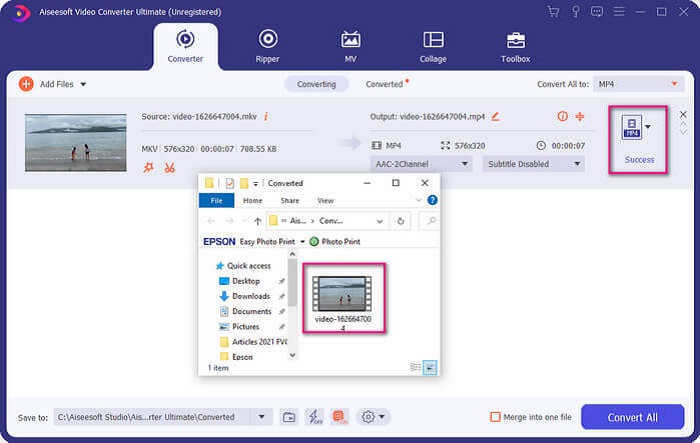
步骤 4: 选好格式后,点击全部转换(Convert All)按钮开始转换。转换完成后,保存文件的文件夹会自动弹出。
Ultimate 视频转换器还有更多功能。您可以查看下面的优缺点列表,以了解它提供的其他优秀功能。
● 此工具的转换速度快至三秒。
● 具有加速技术,可以增强转换后的文件。
● 支持高清画质。
● 具有添加滤镜和基本效果等编辑功能。
● 您可以调整字幕和音轨。
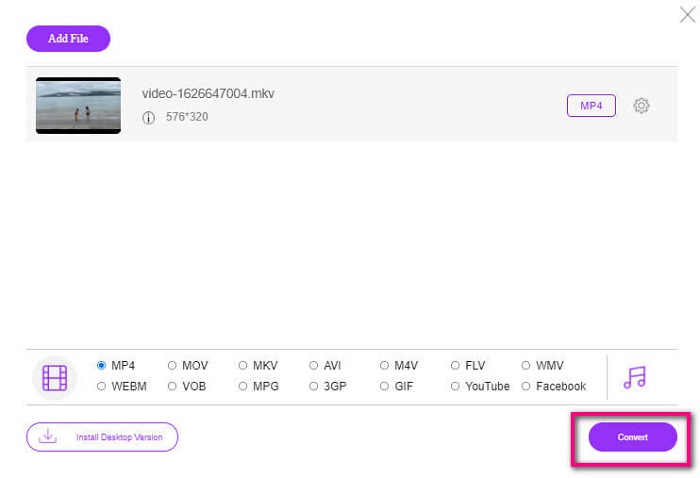
如果你在找免费的转换器,也可以考虑使用 FVC 免费在线视频转换器。虽然它可能不如 Ultimate Video Converter 那样强大,但依然能基本跟上需求。它完全可以转换文件,让其与 Plex 或 DivX 兼容。你只需要……
步骤 1: 通过访问说明中的官网链接打开此工具。
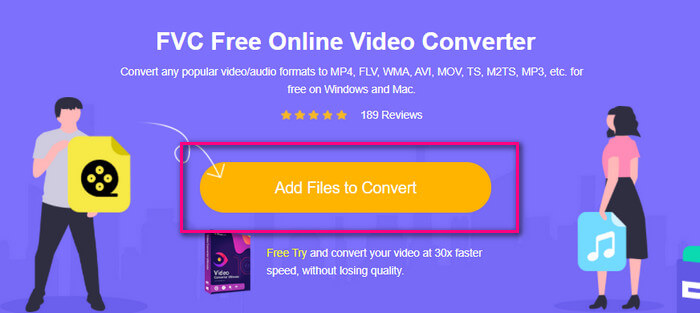
步骤 2: 点击添加待转换文件(Add Files to Convert)上传视频。
步骤 3: 通过勾选下方的圆圈来更改输出格式。
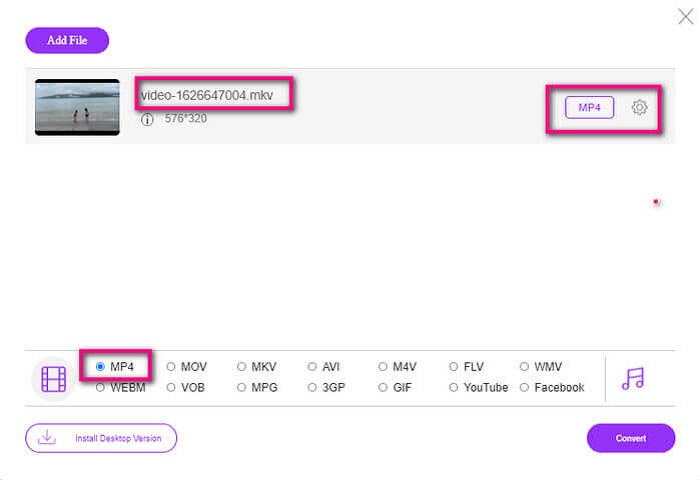
步骤 4: 最后,点击转换(Convert)按钮,并选择你希望保存文件的位置,然后点击确定(Okay)。你可以点击文件夹(Folder)图标查看转换后的视频文件。
延伸阅读
在 Windows Media Player 中播放 MKV
第 4 部分。有关在 PS4 上播放 MKV 文件的更多信息
一台 PS4 多少钱?
美国的市场零售价为 399.99 美元,加拿大为 399.99 加元。价格可能会因您所在国家/地区的零售价而异。
是否有可能在 PS4 上播放 CC 或 Close Caption MKV?
有的。它位于辅助功能设置(Accessibility Settings)中。路径为:进入 PS4 的设置(Settings),选择辅助功能(Accessibility),然后选择显示隐藏式字幕(Display Closed Captions)。在那里点击选项(Options)即可启用隐藏式字幕。
如果 PS4 支持 MKV,为什么我的文件不能播放?
如上所述,您需要确保 MKV 文件符合您使用的播放器的标准。您只需要检查 PS4 或其他媒体流服务器的要求。大多数媒体服务器也有分类播放 MKV 文件。
PS4 支持哪些格式?
PS4 支持多种文件格式。但是您会注意到大多数格式都是未压缩的并且保存了一个大文件。虽然它也支持像 Mp4 这样的未压缩的。同时,这里是我们正在讨论的格式列表:MKV、AVI、MPEG-2 PS、MPEG-2 TS、AVCHD 以及 XAVC 和 MP4。
结论
总而言之,您可以通过多种方式直接或间接在 PS4 上播放 MKV 文件。列出的是最常用的介质。 DivX Stream Server 和 Plex 只是您可以使用的一些替代方案。强烈建议转换文件,以避免麻烦和过多的过程。
-
 [已解决] VLC 播放器无法播放 MKV,如何修复
 VLC 播放器是否支持 MKV 文件?为什么 VLC 不能播放 MKV?这篇文章分享了 4 个有用的技巧,可帮助您修复 VLC 播放器无法播放 MKV 文件的问题。
-
 如何在 iPad 2025 上播放 MKV 文件
 如何在iPad 2上播放MKV文件?我可以将MKV转换为MP4以便在iPad Pro / Air / 2上播放吗?这篇文章分享了2种在iPad上播放MKV的简单方法。
-
 如何在 Windows Media Player 中下载 MKV 编解码器以实现流畅播放
 无法在 Windows Media Player 中播放 MKV 视频?您可以免费下载 Windows Media Player 的 MKV 编解码器。相反,转换 MKV 使其可在 Windows Media Player 中播放。
