


 视频转换大师
 屏幕录影大师
 视频修复
视频修复
 安全下载
安全下载0xc00d36e5 错误的快速修复,让您的视频再次播放
尝试播放视频时出现错误代码0xc00d36e5,并提示文件无法播放。确实让人抓狂,尤其是你已经准备好要工作或观看视频的时候。不过别紧张!我们已经为你准备好了可行的解决方案。无论是使用自动视频修复工具,还是手动排查解决,本文都为你做了全面整理。接下来,我们会在后文中分别介绍自动和手动两种方法,确保你有多种选择。现在就一步步来探索这些解决方案,帮你恢复流畅播放,不再被卡顿打断观影体验。

第 1 部分。为什么您的视频出现错误代码 0xc00d36e5
错误代码 0xc00d36e5 与 Windows 上的媒体播放问题有关。此错误通常表示您尝试播放的媒体文件与媒体播放器不兼容,或者文件本身存在问题。它可能表明文件已损坏、不支持格式,或者播放所需的编解码器存在问题。
以下是视频出现错误代码 0xc00d36e5 的一些常见原因:
文件格式兼容性。
视频格式的不兼容会影响您正在播放的视频或音频文件的可播放性。
文件损坏。
损坏的媒体文件可能会导致其无法播放。
编解码器问题。
编解码器是用于对多媒体文件进行编码和解码的软件组件。如果缺少必要的编解码器或编解码器已过时,则可能会导致播放错误。
媒体播放器故障。
媒体播放器本身可能已过时或配置不正确。
第 2 部分。修复 0xc00d36e5 错误的快速方法
使用视频修复工具是解决错误代码 0xc00d36e5 的一种快速且高效的方式。这类工具通过自动修复流程,能够迅速识别并修复视频文件中的常见问题,配合其友好的操作界面,即便是不懂技术的用户也能轻松上手。目前我们可以使用的最佳、最通用的视频修复工具之一就是FVC Video Repair。该工具在修复遭遇 0xc00d36e5 错误代码的视频方面表现出色,专门用于修复因设备损坏、系统崩溃等问题导致无法播放的视频,并支持多种视频格式。此外,借助最新的 AI 算法,FVC Video Repair 能够实现全自动修复流程,界面友好且修复成功率高。使用此工具时,请按照以下步骤操作:
步骤 1. 首先,点击“免费下载安装”按钮下载软件。
步骤 2. 安装完成后运行软件。点击红色加号按钮添加含有 0xc00d36e5 错误的视频,再点击蓝色加号按钮添加示例视频。

步骤 3. 点击修复按钮,开始执行修复过程。
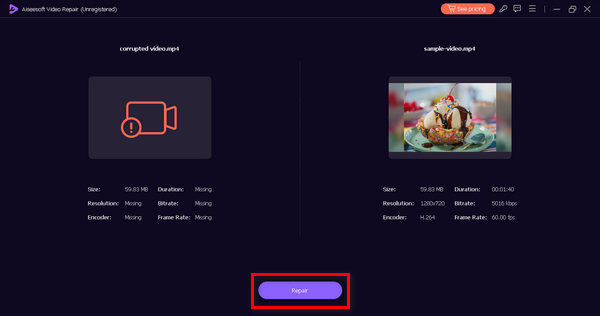
步骤 4. 最后,点击预览按钮,检查 0xc00d36e5 错误是否已消除、视频是否可以顺畅播放。如果一切正常,就可以将文件保存下来。
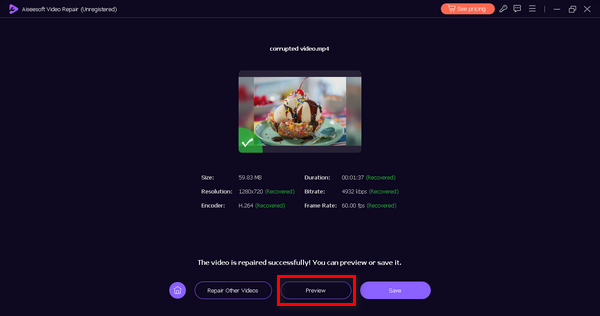
FVC Video Repair 的确是解决视频无法播放或视频错误代码 0xc00d36e5、恢复流畅播放的可靠且高效的选择。
第 3 部分。2 种手动方法修复 0xc00d36e5 错误
以下是可以有效修复视频错误代码 0xc00d36e5 的手动方法:
方法 1:更新 Windows
更新 Windows 操作系统还可以更新 Windows Media Player,并有助于解决错误代码 0xC00D36E5。Windows Media Player 与整个系统架构紧密集成,操作系统的更新通常包括增强功能、错误修复和各种组件的新功能,包括媒体播放。以下是更新 Windows 的分步过程:
步骤 1. 首先,进入“设置”,然后点击系统。
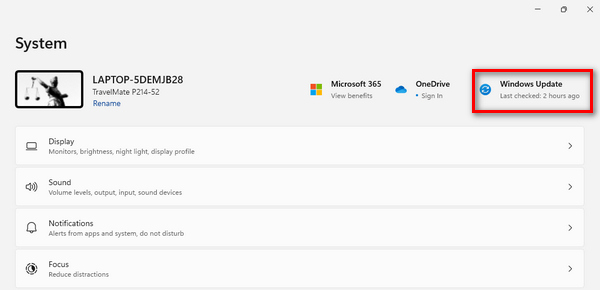
步骤 2. 在屏幕右侧你会看到Windows 更新选项,点击它。
步骤 3. 随后你会看到一个检查更新的按钮,点击该按钮。
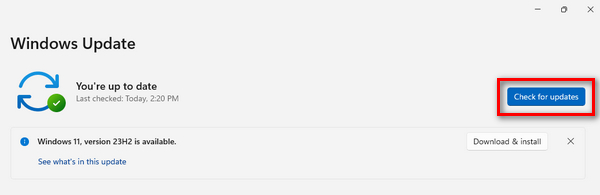
步骤 4. 现在,下载并安装新的更新。
通过 Windows 更新使 Windows 保持最新状态,您可以确保 Windows Media Player 获得最新的改进,包括更新的编解码器、兼容性增强和整体性能优化。
方法 2:更新显示适配器驱动程序
更新显示适配器驱动程序至关重要,因为视频播放严重依赖于正确的图形处理。过时或不兼容的显示驱动程序可能会导致视频播放过程中出现错误。以下是更新显示适配器驱动程序的分步过程:
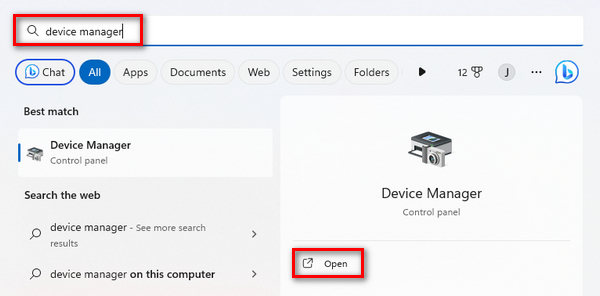
步骤 1. 先进入开始菜单。你会看到搜索框,在其中输入设备管理器,然后点击打开。
步骤 2. 接着,点击显示适配器。然后右键单击,选择扫描检测硬件改动。
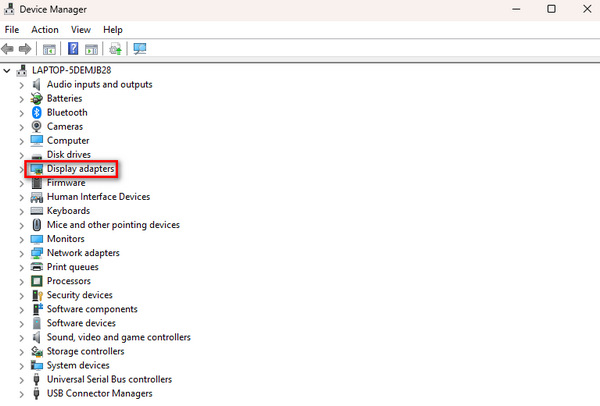
如果您的显示适配器硬件没有变化,则可以跳过以下步骤。
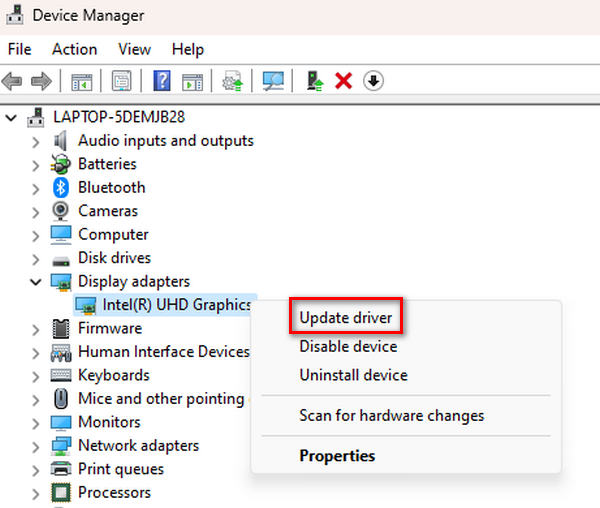
步骤 3. 若要更新显示适配器,右键单击它并点击更新驱动程序。
步骤 4。 然后点击自动搜索驱动程序。
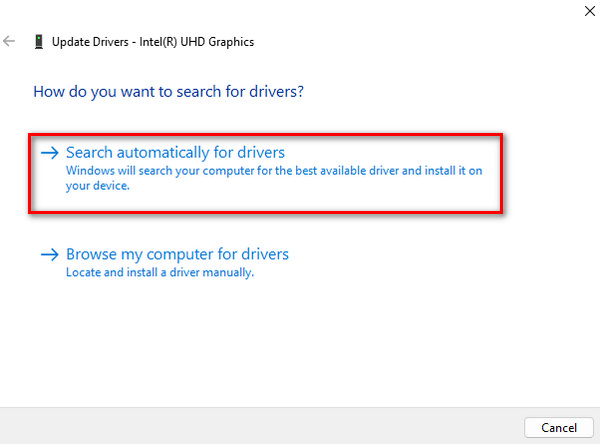
通过更新驱动程序,用户可以解决与视频内容渲染和显示相关的问题,包括视频缓冲、视频错误代码 0xC00D36E5 等,从而整体提升系统的多媒体播放体验。
第 4 部分。有关 0xcd00d36e5 错误的常见问题
为什么视频无法观看?
视频可能因各种原因而不可用,例如文件损坏、格式不兼容、存储介质损坏或媒体播放器出现问题。此外,网络问题、下载不完整或文件传输中断也可能导致视频不可用。
为何我的视频无法播放?
您的视频可能由于损坏、缺少编解码器或格式不兼容等因素而无法播放。设备损坏、系统崩溃或病毒攻击也会导致视频无法播放。在这种情况下,使用视频修复工具或更新媒体播放器和系统组件通常可以解决问题。
如何恢复无法播放的视频?
可以通过多种方法恢复无法播放的视频。使用视频修复工具是一种常见的方法;这些工具会自动分析并修复视频文件中的问题。或者,您可以尝试更新媒体播放器、检查文件兼容性或使用命令或专用软件手动修复文件。如果您有备份,也可以选择从以前的版本恢复。
文件传输中断在视频不可用中起什么作用?
文件传输中断是导致视频无法播放的重要原因。如果传输过程中出现中断,则可能导致下载不完整或视频文件损坏。在将视频复制或移动到不同存储位置时出现网络问题或突然停止可能会导致数据完整性受损,从而使视频无法播放。确保文件传输稳定且不间断可以缓解此问题。
结论
总之,只要掌握正确的解决方法,处理0xc00d36e5错误并不困难。不过,具体的修复方式取决于错误产生的原因类型,因此首先了解错误的成因非常重要。
-
 使用这 3 种行之有效的方法修复错误 0xc00d36c4 [2024]
 播放视频时遇到 0xc00d36c4 视频错误代码?按照我们的指南快速解决问题并享受不间断的视频播放。
-
 如何快速有效地修复视频错误代码 224002
 您是否很难找到快速修复错误代码 224002 的最佳解决方案?在本文中了解它们并轻松自行修复它们。
-
 如何快速手动修复错误代码 102630
 不要让错误代码 102630 毁了您的观看体验!通过我们的实用指南了解如何修复它。遵循这些全面的指南可快速修复
