


 视频转换大师
 屏幕录影大师
 视频修复
视频修复
 安全下载
安全下载找到修复视频错误代码 224002 的快速解决方案
在尝试播放视频时遇到视频错误代码了吗?虽然这种不太走运的情况并不常见,但一旦出现,就说明存在某些需要及时处理的潜在问题。如果你正在寻找快速解决视频错误的方法,比如恼人的错误代码 224002,那么你来对地方了。我们明白,视频播放错误会打断你的娱乐或工作体验,十分让人沮丧。因此,了解问题的根源,是找到有效解决方案的第一步。话不多说,在接下来的内容中,你将学到解决这一类视频问题所需了解的一切,尤其是如何快速定位并修复这类视频错误。

第 1 部分。错误代码 224002 是什么
错误代码 224002 是用户在尝试观看在线内容时可能遇到的视频播放问题的特定名称。此错误代码通常与流媒体服务和视频平台有关,表示流媒体过程中正常数据流中断。
以下是触发视频错误代码 224002 的一些潜在原因:
网络连接问题。
网络连接不稳定或不稳定是常见原因。如果您的网络出现中断或波动,则可能导致流媒体服务无法流畅地传输视频内容,从而触发错误代码 224002。
兼容性问题。
您使用的视频播放器或流媒体服务可能与您的浏览器或设备存在兼容性问题。这些兼容性问题可能会导致错误代码(如 224002)。检查更新并确保播放器与您的系统兼容至关重要。
服务器端故障。
在某些情况下,错误可能是由于流媒体平台服务器端的临时故障或维护问题造成的。这超出了用户的控制范围,耐心是关键,因为技术团队会解决这些与服务器相关的问题。
软件版本过旧。
如果您的操作系统、浏览器或视频播放器已过时。这将导致与最新流媒体协议不兼容。定期更新软件有助于确保更流畅的视频播放体验。
缓存和 Cookie。
浏览器中累积的缓存和 Cookie 可能会干扰流媒体播放过程。清除这些存储的文件是解决视频播放错误的简单而有效的解决方案。
移动网络切换。
对于移动用户,在视频播放期间在 Wi-Fi 和移动数据之间切换可能会导致中断。这可能是移动设备上出现错误代码 224002 的潜在原因。
第 2 部分。快速修复 - 修复 xc00d36e5 错误
如果你正在寻找快速且有效的方法来解决 xc00d36e5 错误代码,那么强烈建议使用视频修复工具。FVC Video Repair是在处理此类视频问题时的优秀选择。该工具的突出之处在于,它拥有先进功能,可以对受损的视频文件进行深度分析并无缝修复。其一大亮点是由 AI 驱动,能够自动修复各种视频问题,并支持多种主流视频格式。要使用这款工具,请按照以下步骤操作:
步骤 1。 首先,通过下载来获取这款软件。只需点击“免费下载”按钮。下载完成后,在电脑上进行安装。
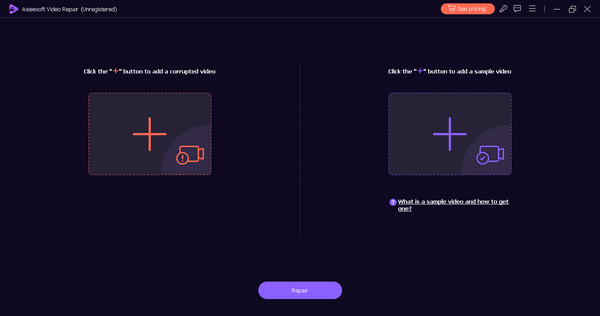
步骤 2。 现在,运行该工具。请不要被界面中的两个按钮搞混。你会在屏幕左侧看到红色加号按钮,在右侧看到蓝色加号按钮。现在,点击红色加号按钮,添加包含 xc00d36e5 错误代码的视频;再点击蓝色加号按钮,添加示例视频。
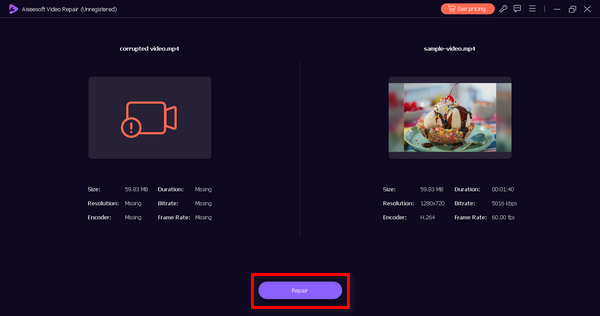
步骤 3。 之后,点击修复按钮。软件会开始处理你的视频文件修复。
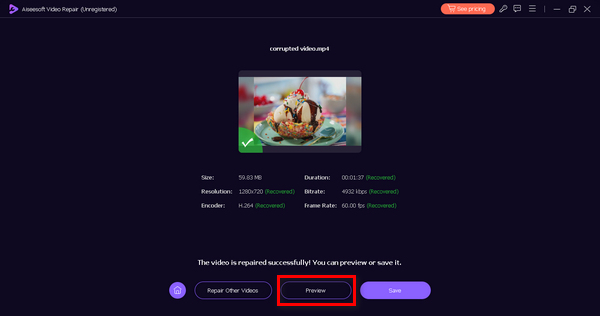
步骤 4。 最后,点击预览按钮,检查 xc00d36e5 错误代码是否已成功解决。如果你对结果满意,就可以将文件保存下来。
除了使用视频修复工具之外,没有其他方法可以快速修复错误代码 xc00d36e5,强烈建议使用 FVC Video Repair。凭借其顶级功能和能力,毫无疑问,您可以使用此软件有效修复任何类型的视频问题。
第 3 部分。修复 0xc00d36e5 错误的手动解决方案
除了使用视频修复工具修复 xc00d36e5 错误外,还有手动方法来解决此类视频问题。
方法 1:更新您的 Google Chrome
更新您的 Google Chrome 浏览器是解决视频播放期间出现 0xc00d36e5 错误的主动方法。此错误可能源于兼容性问题或过时浏览器版本中存在的错误。通过使 Chrome 保持更新,您可以确保与最新的 Web 标准兼容,受益于可增强稳定性的错误修复,并接收安全补丁以防范潜在威胁。为此,请按照以下步骤操作:
步骤 1。 打开你的 Chrome 浏览器。
步骤 2。 然后,点击右上角的三个小点,也就是自定义及控制按钮。
步骤 3。 前往帮助。
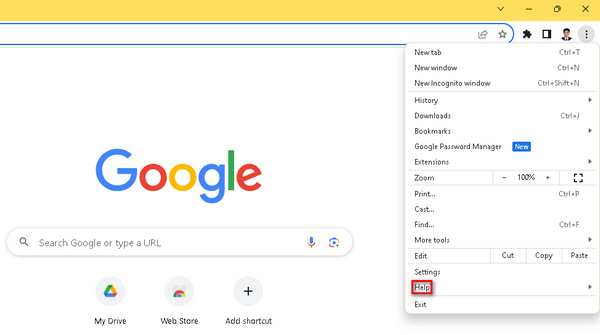
步骤 4。 接着,选择关于 Google Chrome。如果有新版本可用,你会看到更新 Google Chrome选项。点击它,按照屏幕提示完成操作。如果没有,则会看到重新启动按钮。
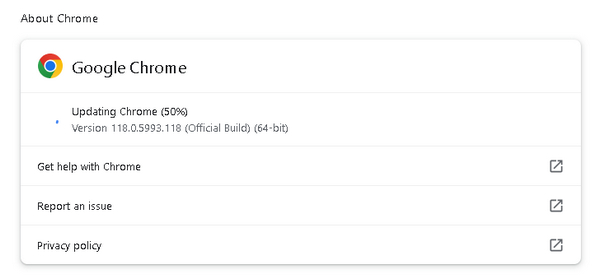
更新 Google Chrome 不仅能降低遇到 0xc00d36e5 错误的几率,也有助于提升整体浏览安全性和流畅度。此外,当视频在 Chrome 上无法播放时,这一方法同样适用。
方法 2:清除 Cookie 和缓存
清除 cookie 和缓存是解决 0xc00d36e5 错误的另一种有效方法。此手动过程有助于消除可能中断视频播放的潜在数据干扰源。损坏或过时的 cookie 和缓存文件可能会导致播放错误,通过清除这些文件,您的浏览器会从服务器获取新数据,从而降低遇到 0xc00d36e5 错误的可能性。为此,请按照以下步骤操作:
步骤 1。 首先,在主屏幕的搜索栏中输入控制面板并将其打开。
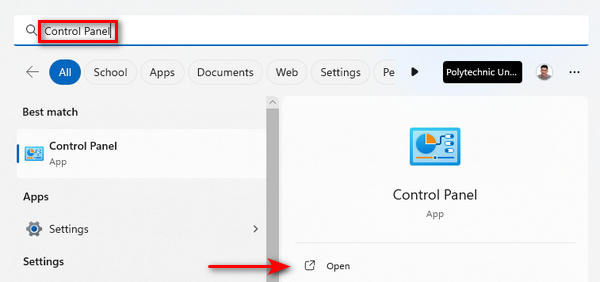
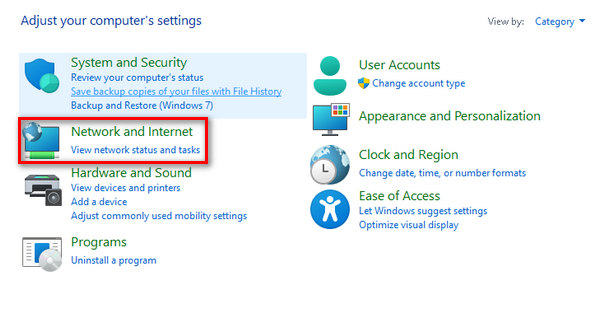
步骤 2。 然后,点击网络和 Internet选项。
步骤 3。 接着,点击删除浏览历史记录和 Cookie。
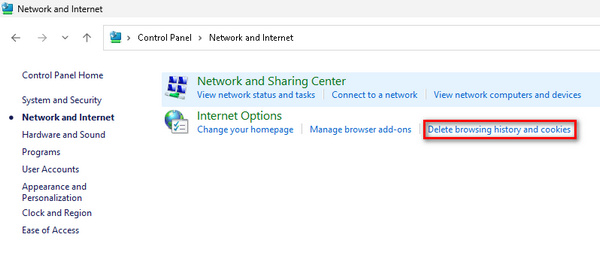
步骤 4。 然后,在新窗口中勾选你希望清除的项目。完成选择后,点击删除按钮以结束该过程。
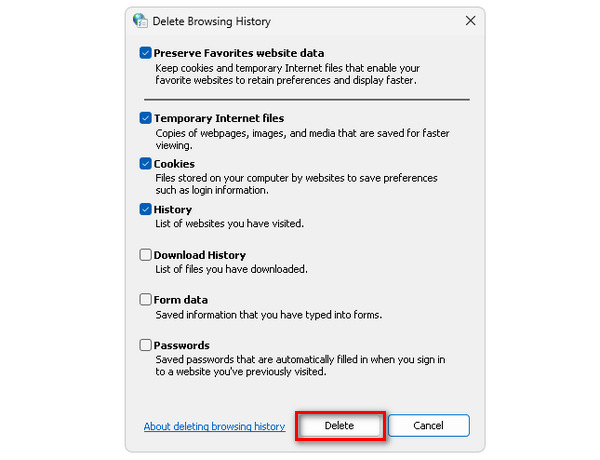
定期清理浏览器的 Cookie 和缓存,有助于提升浏览器性能,清除累积垃圾,并在视频流播放时高效获取干净、最新的数据。这也是在视频由于各种原因无法播放时的一种可行解决方案。
第 4 部分。有关错误代码 224002 的常见问题
Kickassanime 上的错误代码 224002 是什么?
Kickassanime 上的错误代码 224002 通常表示视频播放存在问题。此错误可能归因于互联网连接不良、浏览器设置或兼容性问题等问题。要解决此问题,请考虑检查您的互联网连接、清除浏览器缓存和 cookie,并确保您的浏览器和系统软件是最新的。
如何修复 Mac 上的错误代码 224002?
要解决 Mac 上的错误代码 224002,请先检查互联网连接的稳定性。清除浏览器的缓存和 Cookie 并进行更新。此外,请确保 Mac 的操作系统是最新的,因为过时的软件可能会导致视频播放问题。此外,请考虑关闭任何可能干扰流媒体的浏览器扩展,并尝试调整视频质量设置。
Wii 上的错误代码 244002 是什么?
Wii 上的错误代码 244002 表示视频播放存在问题,与其他平台上与错误代码 224002 相关的问题类似。通过检查您的互联网连接、更新 Wii 的浏览器或相关软件以及检查是否存在任何兼容性问题来排除故障。清除 Wii 浏览器上的 cookie 和缓存也可能有助于缓解错误。如果问题仍然存在,请查阅 Wii 平台提供的支持资源或寻求其客户支持的帮助。
结论
总而言之,在视频播放时遇到错误代码 224002的确会令人烦躁。不过,本指南为你提供了一系列行之有效的解决方案,帮助你快速排查并修复这些问题。从了解错误代码 224002 的根本原因,到尝试更新 Google Chrome、清理 Cookie 和缓存等手动方法,你现在已经掌握了切实可行的步骤,可以用来改善和提升你的视频流播放体验。
-
 如何快速手动修复错误代码 102630
 不要让错误代码 102630 毁了您的观看体验!通过我们的实用指南了解如何修复它。遵循这些全面的指南可快速修复
-
 快速有效地修复视频 0xc00d36e5 错误
 尝试播放视频时遇到 0xc00d36e5 错误?了解简单而有效的方法来修复此错误,获得流畅的视频播放体验。
-
 如何通过 3 种方法修复 0xC10100BE 错误(100% 有效)
 通过我们全面的故障排除指南了解如何解决 0xC10100BE 错误并让计算机恢复正常运行
