


 视频转换大师
 屏幕录影大师
 视频修复
视频修复
 安全下载
安全下载如何轻松地将 HEIC 转换为 RAW
HEIC file is a file format that has high quality but does not take much space on your device. But if you want to edit your HEIC image on editing software such as Adobe Photoshop, Microsoft Windows Photos, and Canva, you need to convert your HEIC file to a RAW file because most editing software does not support HEIC files. Therefore, read this article until the end about converting HEIC to RAW and about HEIC vs. RAW.

第 1 部分。 HEIC 和 RAW 文件之间的差异
HEIC files are file formats that Apple develops. It is an image file format with great quality while maintaining a small file size. In addition, HEIC files have an advanced compression method, making them 50% smaller in file size compared to other image file formats. Also, you can easily open HEIC files on your Apple devices. In contrast, RAW files are image file formats that are used to transfer images through other applications. As the name implies, RAW files are image file formats that are uncompressed and unprocessed. The downside of this file is that it takes up too much space on your device. Nonetheless, it is viewable and compatible with other editing applications and media platforms.
如果您还在犹豫是否要将 HEIC 转换为 RAW 文件,那么在这一部分中,我们将为您提供这两个文件之间的更多见解。这部分将比较 HEIC 和 RAW 文件的特性和最佳功能。
| HEIC | 生的 | |
| 压缩/未压缩 | 压缩 | 未压缩 |
| 可用性 | 适用于所有 Apple 设备 | 适用于几乎所有跨媒体平台和图像编辑应用程序。 |
| 画面质量 | 高画质 | 画质一般 |
| 处理/未处理 | 处理 | 未加工 |
| 最适合用于 | 用于拍摄美丽的风景,并生成高质量的图像。 | 用于使用图像编辑应用程序编辑图像文件。 |
第 2 部分。 如何在线将 HEIC 转换为 RAW
只有少数工具可以帮助您将 HEIC 转换为 RAW。在这种情况下,我们寻找最好的 HEIC 到 RAW 转换器,这些转换器易于使用,可以立即将您的 HEIC 文件转换为 RAW。因此,请全面阅读此部分,以在线将您的 HEIC 文件转换为 RAW。
转换 365
Convert 365 是一个在线 HEIC 到 RAW 文件转换器。它可以帮助您通过其快速的转换过程立即将 HEIC 转换为 RAW。此外,它是一个用户友好的工具,因为它具有简单的用户界面。该工具还支持各种图像文件格式,如 HEIC、RAW、ARW、DNG、JPG 等。但是,它包含可能会让您感到不安的广告。然而,许多人将此作为 HEIC 到 RAW 在线转换器的首选。
Step 1. On your browser, search Convert 365. Then on the software’s main interface, click the Add Files button. Your computer folders will appear, then select your HEIC file to upload.

Step 2. Next, click the drop-down button to select the output format you want, RAW format.
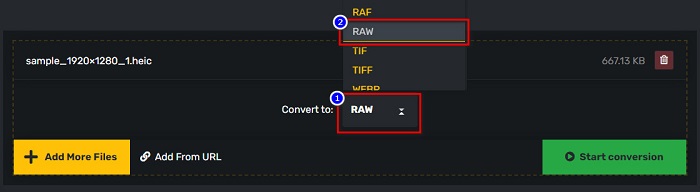
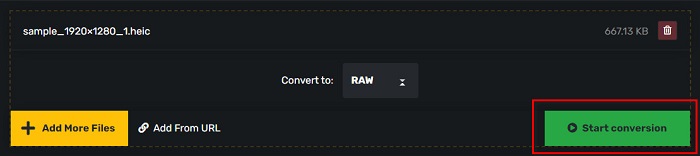
Step 3. Lastly, click the Start conversion button to convert your HEIC file to a RAW file.
优点
- 它有一个简单的用户界面。
- 它支持多种图像文件格式,如 HEIC、RAW、ARW、DNG、JPG、GIF 等等。
- 几乎所有网络浏览器都可以访问它,包括 Google、Firefox 和 Safari。
缺点
- 当您的互联网连接速度较慢时,您可能会遇到转换过程缓慢的情况。
PDF商城
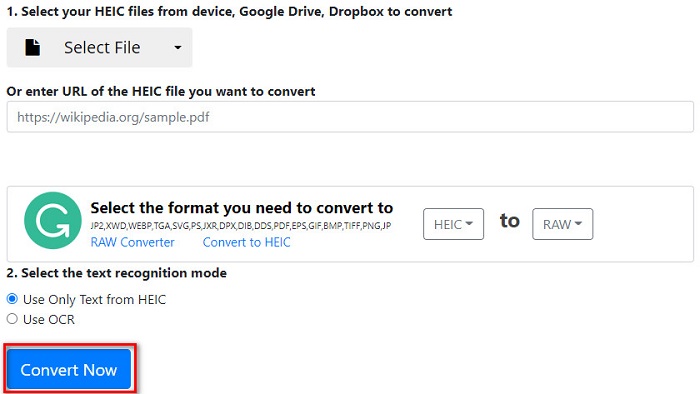
另一个可以帮助您将 HEIC 转换为 RAW 的工具是 PDFMall。此在线转换器免费使用且易于使用。它还支持标准图像格式。但是,一些用户会看到一个防病毒威胁保护弹出窗口,而人们怀疑这个在线转换器是否可以安全使用。此外,它包含可能会打扰您的广告。
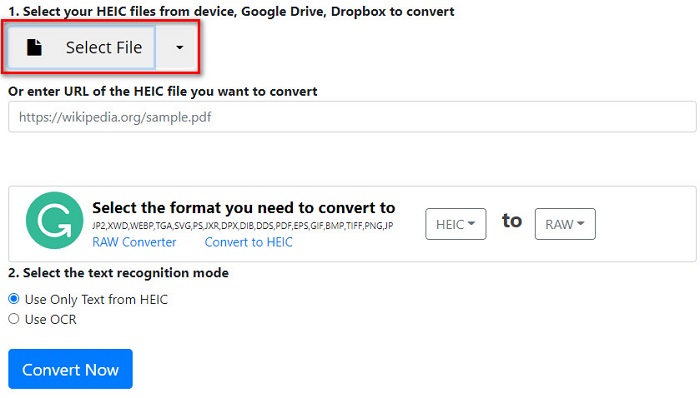
Step 1. Search PDFMall on your browser, then click PDFMall on your search result page. And then, on the software’s main interface, click the Select File button to upload your HEIC file.
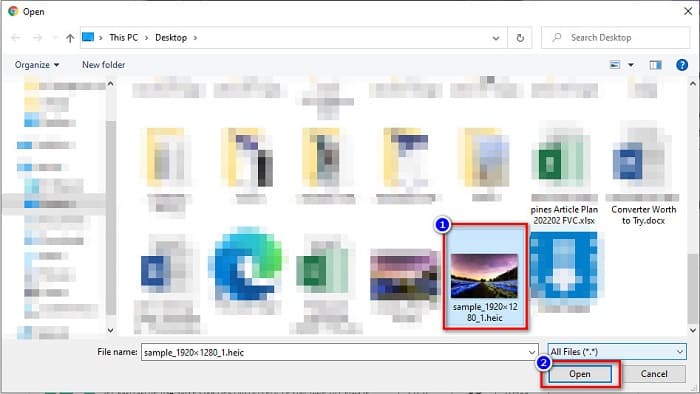
Step 2. And then, your computer files will appear. Locate your HEIC file, then click Open to upload your HEIC file on the software interface.
Step 3. To finish, click the Convert Now button to convert your HEIC file to a RAW file. Just wait for a couple of seconds, and your file will be ready to download.
优点
- 它可以免费使用。
- 它支持其他文件格式。
- 它有一个易于使用的软件界面。
缺点
- 它包含其他 HEIC 到 RAW 转换器没有的广告。
- 这可能是对您设备的病毒威胁。
第 3 部分。推荐:转换 HEIC 文件的终极 HEIC 转换器
不可否认,使用离线 HEIC 转换器是一种更有效的工具,因为您不会遇到缓慢的转换过程。如果您想将 HEIC 文件批量转换为其他标准文件格式,这款转换器最适合您。此外,即使您将 HEIC 文件转换为不同的文件格式,它也可以保留 EXIF 数据并调整图像输出的质量。更重要的是,它具有一项功能,您可以在设备上恢复丢失或删除的 HEIC 文件。因此,如果您有兴趣使用此转换器,请阅读以下说明。
Aiseesoft HEIC 转换器的特点:
- 这是一个用户友好的软件应用程序,因为它有一个简单的用户界面。
- It allows you to batch convert HEIC files to JPG or PNG file formats.
- 它可以保留您的 HEIC 文件的 EXIF 数据。
- 它没有文件大小限制。
- 适用于所有媒体平台,包括 Windows 和 Mac。
第 4 部分。关于 HEIC 和 RAW 的常见问题解答
RAW文件是无损的吗?
是的。尽管 RAW 文件未经处理和压缩,但 RAW 文件使用无损数据压缩。
将 HEIC 转换为 RAW 会影响图像的文件大小吗?
是的。当您将 HEIC 转换为 RAW 文件时,它的文件大小会更大,因为您的 HEIC 在转换为 RAW 文件后将被解压缩。
您可以在 Mac 设备上查看 RAW 文件吗?
绝对地!由于 Mac 支持 RAW 文件图像格式,因此您可以在 Mac 设备上本地查看 RAW 文件。
结论
使用上述所有 HEIC 到 RAW 转换器,将 HEIC 转换为 RAW 文件格式非常容易。此外,这两个在线转换器显示出可喜的结果,并且在将 HEIC 文件转换为 RAW 文件格式时,您可能会在互联网上找到它们。因此,如果您想使用可以将 HEIC 转换为其他常见文件格式(如 JPG 和 PNG)的转换器,Aiseesoft HEIC 转换器是您的最佳工具。
-
 如何在 Windows、Mac 和在线上打开 HEIC 文件
 您是否正在寻找一种如何打开 HEIC 文件的方法?本文为您提供在 Windows、Mac 和 Online 上打开 HEIC 文件的最佳解决方案。
-
 如何在 Mac、iPhone 和在线上将 HEIC 批量转换为 PNG
 寻找如何将 HEIC 转换为 PNG 的方法?本文为您提供了在线和离线轻松将 HEIC 更改为 PNG 的最佳方法。
-
 适用于 PC 和 Mac 的最佳 9 HEIC 到 PNG 转换器 [在线和离线]
 在这里找到最好的在线和离线转换器。我们向您展示适用于 Windows 和 Mac 的顶级免费 HEIC 到 PNG 转换器。
