


 视频转换大师
 屏幕录影大师
 视频修复
视频修复
 安全下载
安全下载如何在 Windows 和 Mac 上的 Lightroom 中有效导入 HEIC 文件
Suppose you are interested in improving the HEIC image or organizing it. In that case, you can import HEIC to Lightroom and do all of the arranging and editing at ease. You can easily upload it here without downloading an additional codec for HEIC to view or edit with this software. So if you need a guide that will teach you how to import the HEIC file in this software, you can read and follow the Windows and Mac ways we include in this write-up.
事不宜迟,让我们阅读以下详细信息以了解如何操作,如果 Lightroom 无法导入 HEIC,我们也可以在此处添加它。但在此之前,您必须先在 Windows 或 Mac 上下载该软件,然后才能阅读以下详细信息。

第 1 部分。如何将 HEIC 导入 Windows 10/11 上的 Lightroom 或更新
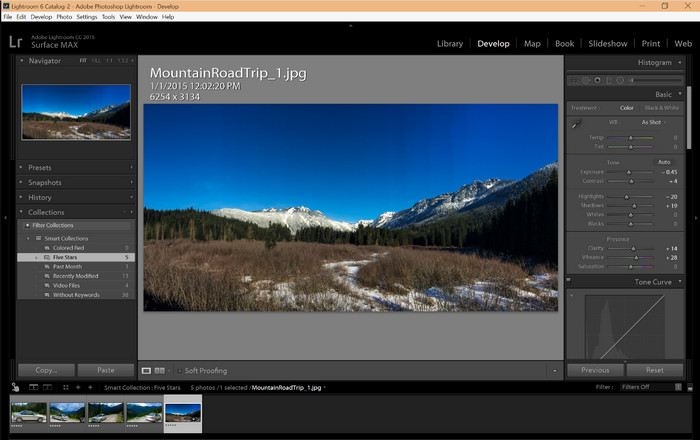
Lightroom 支持更新的 Windows 版本;如果您在 Windows 操作系统上下载该软件,则此部分适合您。您无需担心,因为 Lightroom 可以按照以下教程轻松打开 HEIC 文件。
Step 1. Download the software on your Windows 10/11, then install it and open it to proceed.
Step 2. When the software is already running on your system, click the + button, press the Browse, and select the HEIC file you want to import here.
Step 3. After selecting them, you can now view the HEIC files using Lightroom on your Windows 10/11.
第 2 部分。如何在 Mac 10.13 或更高版本的 Lightroom 中打开 HEIC 照片
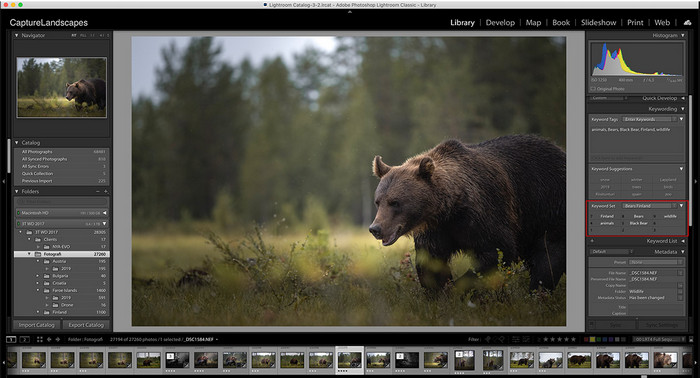
即使没有 Lightroom,您也可以轻松查看 HEIC 文件,尤其是在您的 Mac 版本是 High Sierra 10.13 或预览版的更新版本时。虽然 Preview 支持编辑功能,但不足以用于复杂的编辑,例如 Lightroom 可以为您提供的功能。此外,您无需担心,因为 Lightroom 确实支持 HEIC 文件以在您的 Mac 上编辑或组织它们。
Step 1. Install the software on your macOS 10.13 or higher; if the version of your operating is lower, then expect that the software won't open. After you download Lightroom on your desktop, you must now open it.
Step 2. In the upper part section, you will find different menus and the name of Lightroom on the upper-left side, which means the software is already open. Press the File menu and proceed to the Add Photos, or you can use a hotkey on your keyboard instead by pressing Command + Shift + I.
Step 3. A folder will show on your screen; select the image you want to import and click Review for Import.
第 3 部分。 Lightroom 无法导入 HEIC 文件 |解决不受支持的 HEIC 问题的最佳解决方案
由于与 Windows 和 Mac 上的 Lightroom 等软件的兼容性,许多用户无法上传 HEIC 文件;即使借助上述方法,仍然是不可能的。但不必感到难过,因为有一种方法可以通过网络上最好的工具将 HEIC 转换为 JPG,从而在 Lightroom 上导入 HEIC 文件。
FVC Free HEIC to JPG Converter is the solution you must use to convert the HEIC file on your Windows and Mac without the software downloaded. A web tool like this can turn your un-supported format into a standard one like the JPEG. You can upload the image efficiently on Lightroom without experiencing an unsupported format. In addition to converting HEIC to JPG, you can also upload multiple HEIC images here and convert them all simultaneously to support batch conversion. Amazing right? Do you want to know what amazes us more? Well, you can do a speed-up conversion for free. If you want to fix the unsupported problem you encounter on HEIC, follow the indicated steps below to know how to convert the format.
如何使用 Web 工具将 HEIC 格式更改为 JPG 的简单步骤:
Step 1. FVC Free HEIC to JPG Converter by clicking this link, you can open the main website of the converter on your favorite search engine. No need to worry because it is safe to use, and there aren't any ads that could be pesky on the web interface.
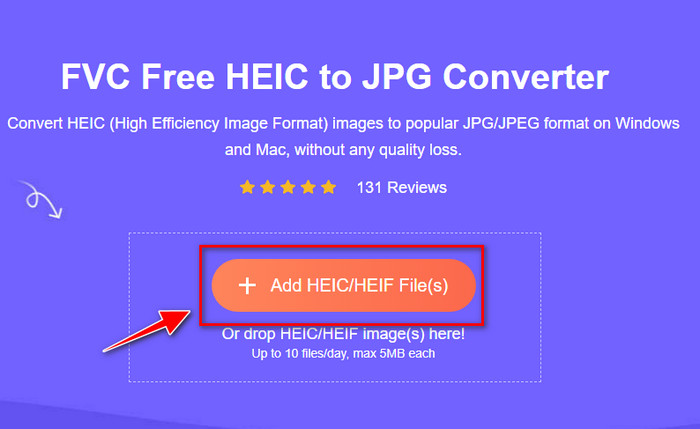
Step 2. Click the Add HEIC/HEIF Files to upload the HEIC image that Lightroom can't open here. Alternatively, you can drag and drop the file here instead of selecting them in the file folder.
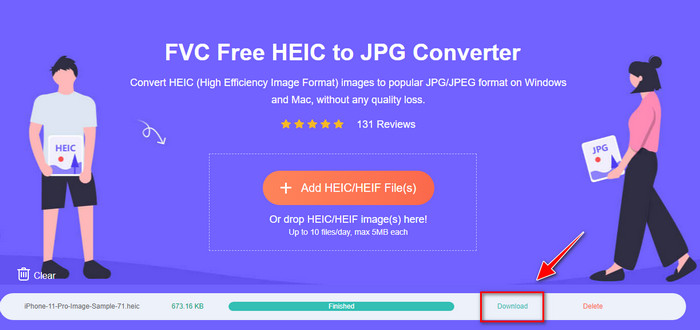
Step 3. A Download button will show up if the progress bar is complete; click it to save the newly converted HEIC file on your desktop. After that, you can now import the file on Lightroom without accepting a dialogue box that says unsupported or corrupted.
第 4 部分。在 Lightroom 中导入 HEIC 的常见问题解答
在 Lightroom 上导入 HEIC 文件是否有任何限制?
到目前为止,您可以在 Lightroom 上导入任意数量的 HEIC 文件。在 Lightroom 上上传此类格式没有任何限制。
Lightroom 在 Windows 和 Mac 上是否免费?
不幸的是,Windows 和 Mac 上的 Lightroom 不是免费的,但您可以在 Windows 和 Mac 上免费下载。尽管该软件不是免费的,但您可以利用它支持的 7 天免费试用。如果您觉得需要该软件的时间较长,您可以在试用期后订阅。
在 Lightroom 上导出 HEIC 文件会留下水印吗?
Luckily, Lightroom doesn't add a watermark to the image you've uploaded here. But you can add a watermark if you want to add one. So, if you are going to post the picture on the internet, then we suggest that you add a watermark on it so that it has protection from the people who will try to steal it.
哪个更适合图像编辑? Photoshop 还是 Lightroom?
这取决于您的要求;在 Adobe 编辑器 Photoshop 和 Lightroom 的帮助下,您可以轻松地使您的图像看起来更好。假设您想要一个易于处理的图像编辑器。在这种情况下,Lightroom 是您必须选择的选择,因为它是增强您拥有的图像的最佳图像编辑器。但是,如果您想做更详细的图像编辑,Photoshop 是您的编辑器,可以满足每个专业编辑器的需求。
结论
在 Lightroom 的帮助下,您可以轻松地编辑您拥有的图像或相应地组织它们以使它们看起来整洁。因此,如果您想在 Lightroom 上导入 HEIC 文件,无论您是 Windows 还是 Mac 用户,都可以按照我们添加的步骤进行操作。但是,如果您在导入 HEIC 文件时遇到问题,请阅读第三部分,因为我们会解决它以使其与 Lightroom 兼容。您现在可以继续编辑它。我们希望这篇文章能让您了解如何导入文件;如果您有其他建议或建议,可以给我们留言。
-
 iMazing HEIC 转换器 |功能,优点和缺点以及如何使用它
 本文将回顾 iMazing HEIC 转换器功能及其替代方案,因此如果您想了解更多信息,请谨慎阅读
-
 像专家一样在 iPhone 上将 HEIC 转换为 JPG 的 3 种最简单方法
 不知道如何在 iPhone 上将 HEIC 更改为 JPG?如果您是 HEIC 有问题的用户之一,请阅读此内容。
-
 为什么我的 iPhone 照片是 HEIC 格式 [原因及解决方法]
 你想知道为什么我的 iPhone 照片是 HEIC 格式吗?这篇文章提供了可靠的证据来证明 HEIC 是什么成为最好的。
