


 视频转换大师
 屏幕录影大师
 视频修复
视频修复
 安全下载
安全下载MKV与MP4:有什么区别以及如何转换
MP4 和 MKV 是两种最常用的视频文件格式,也称为“容器格式”。容器是由多个文件组成的集合,包含视频的所有组成部分,包括视频流、元数据信息(如标题、版权持有人、创建日期等)以及更多内容。作为容器格式,它们都很流行且画质表现良好。那么,MKV 和 MP4 哪个更好?MKV 与 MP4 有哪些区别?想要找到上述问题的答案,你可以阅读这篇关于MKV vs MP4对比的文章。

什么是MKV?
MKV,也称为Matroska(Matroska多媒体容器),由Steve Lhomme于2002年开发。它是一种免费且开放标准的容器格式,不需要任何许可证要求。 Matroska能够包含视频,多个轨道,图像,字幕等,因此您可以在Matroska视频文件,Matroska音频文件,Matroska字幕文件和Matroska立体/ 3D视频文件中找到Matroska。此外,WebM文件是Matroska的主要子集。
Matroska具有一般的加密功能,因此可以用于DRM。 MKV容器使用面向块的结构,因此软件可以加密受DRM保护的文件的结构并对其执行操作。如果您打算使用视频容器格式进行长期保留,那么MKV格式将是一个更好的选择。
什么是MP4?
带有MP4文件扩展名的文件是MPEG-4视频文件的缩写,该文件由运动图像专家组(MPEG)于1998年末创建,作为标准的视频编码格式。由于其用途广泛且变化多样,它成为最受欢迎的容器格式之一,可以将视频,音频和字幕图像以及章节保存在一个文件中。与MKV相似,它还可以存储高级内容,例如3D图形,菜单和用户交互性。
许多编解码器已正式注册用于MP4,如H.264(与MPEG-4,第10部分相同)和H.265。可以下载其他编解码器并将其添加到软件中。同样,MP4文件可以包含DRM。这意味着软件可以有效地识别其内容。
现在,您可以转到下一部分,了解MKV和MP4之间的区别。
MKV和MP4之间的区别
MKV与MP4:质量
比较MP4的MKV质量,哪个更好?事实上,决定质量的是编解码器,而不是容器。尽管MKV的大小比MP4大,但这并不意味着MP4的质量比MKV低。 MKV和MP4都可以封装相同的视频和音频,并保留几乎所有原始质量。
MKV和MP4:大小
鉴于其与其他功能,多个音轨和字幕的兼容性,MKV比MP4大。 MP4视频具有出色的压缩效果,因此文件大小比其他视频格式小得多。这也使MP4成为可移植且网络友好的视频格式。
MKV与MP4:兼容性和用法
在视频编辑和播放方面,MP4具有比MKV更好的兼容性。您可以轻松地在媒体播放器,iPhone,iPad,Android手机等许多设备上播放MP4视频。但是对于播放MKV,通常预装的媒体播放器无法播放MKV文件。您需要使用第三方工具来执行此操作。
如何在MKV和MP4在线之间进行转换
要将视频从 MKV 转换为 MP4,或从 MP4 转换为 MKV,你可以使用在线视频转换器,通过几次点击就能轻松完成视频格式转换。FVC 免费在线视频转换器是一款易于使用的视频转换工具,支持将 MKV、MP4、MOV、WMV、AVI 等任意常见视频格式进行高质量转换。你还可以用它来将 MP4 转换为 AVI、导出 TS 为 AVI等。
它是基于Web的工具,因此您可以从任何浏览器在线进行视频转换。在这里,我以从MKV到MP4的转换为例,向您展示进行转换的详细步骤。
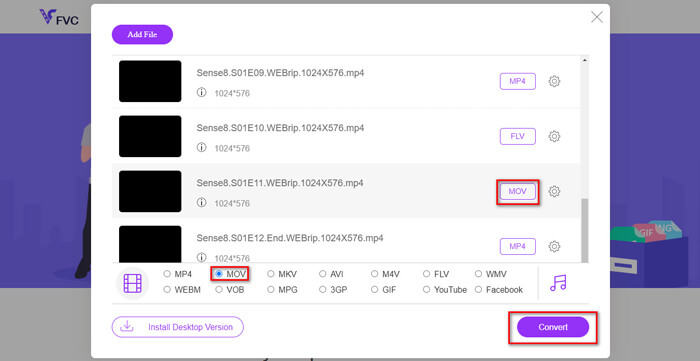
步骤 1: 打开 https://www.free-videoconverter.net/free-online-video-converter/,然后点击添加文件进行转换(Add Files to Convert)按钮,下载并启动启动器。

步骤 2: 安装完成后,你会看到打开文件(Open File)窗口。在这里选择你想要转换的 MKV 视频。你可以向该程序添加多个 MKV 文件,以进行批量转换,从而节省时间。
步骤 3: 接着,选择MP4作为输出格式,然后点击转换(Convert)按钮开始转换。
MKV vs MP4的常见问题
1.什么播放器将播放MKV文件?
对于播放MKV文件和其他格式,我建议您使用VLC Media Player,它可以免费播放几乎所有格式。
2.我可以使用VLC Media Player将MKV转换为MP4吗?
是。您可以使用VLC Media Player将MKV文件转换为MP4格式。如果您的计算机上已经装有VLC,则可以尝试一下。
3. MKV文件大于MP4文件吗?
通常,由于支持附加功能,多个音频轨道和字幕轨道,因此MKV的文件大小大于MP4视频。
结论
通过以上MKV与MP4的比较,您可能对MKV和MP4之间的差异有一个大概的了解。至于应该选择哪种格式,很大程度上取决于您的实际需求。如果您有任何相关问题,请随时与我们联系。
-
 如何将MTS文件转换为MP4
 不知道如何将MTS文件转换为MP4?在本指南中,您将找到6种免费且简便的方法,可以在Windows或Mac上将MTS格式更改为MP4,而不会降低质量。
-
 如何在Windows / Mac上将MKV转换为MP4
 无法播放MKV视频?是否想在不支持MKV的设备上观看MKV视频?这是2种免费的方法,可以在不损失质量的情况下将MKV转换为MP4。
-
 WTV到MP4转换器:如何将WTV转换成MP4
 怎么把WTV转换成MP4?这里有2个免费的WTV到MP4转换器,您可以使用它们将Windows录制的WTV文件转换为在线和桌面上免费的MP4视频。
