


 视频转换大师
 屏幕录影大师
 视频修复
视频修复
 安全下载
安全下载加入MKV文件以连续观看电影的2种最佳方法
通常,从互联网上下载的电影会分成2个或3个MKV文件,因为电影文件总是很大,尤其是高质量的文件。从DVD光盘复制的电视剧总是分成几个MKV文件。如果您是电影发烧友,那么您一定很好奇要学习如何加入MKV文件。您可能已经尝试根据FFmpeg的说明更改原始编码以加入MKV文件,但是它太复杂且难以学习。在这种情况下,以下2个专业工具将帮助您轻松有效地加入MKV文件。

第1部分:如何免费在线加入MKV文件
FVC Free Online Video Merger is the most efficient video joiner to help you combine MKV files free online. Within 3 steps, you can get a complete MKV movie file with subtitles in order.
- 1.通过三个简单的免费在线步骤将两个或多个MKV文件合并为一个。
- 2.使用所有功能,包括加入MKV文件,而无需下载任何软件。
- 3.支持各种输入和输出格式,包括MKV电影文件。
- 4.上传的文件将在24小时内删除,以保护您的隐私。
Step 1: Open FVC Free Online Video Merger and click the Upload Files to Merge button to launch the plugin, and then click the button again to choose the MKV files you want to merge.

Step 2: Click the insert new button to choose other MKV files. Then choose 1920x1080 resolution to keep high quality and choose the original MKV format to retain the original encode, which will ensure the subtitles play well.

Step 3: Click the Merge Now button and choose the desired folder to save.

第2部分:使用视频转换器加入MKV文件
Free Online Merger can satisfy your requirement in simple clicks without downloading software. However, if you also have troubles in disordered subtitles or low quality. FVC Video Converter Ultimate is more professional than online tools to combine MKV files with high image and audio quality. What’s more, it supports higher resolution including HD 1080P, 4K, and even 8K.
- 1.将多个MKV文件合并为一个文件,而又不损失质量,以保持观看体验。
- 2.使用任何编码(包括H.264,HEVC和XVID)将MKV文件连接到原始MKV格式。
- 3.选择适合您的不同字幕和音频频道。
- 4.通过添加效果,滤镜,水印和裁剪区域,支持编辑MKV视频。
Step 1: Download FVC Video Converter Ultimate for Windows/Mac and launch it. Then click the Add Files button in the converter tool to choose all the MKV files you want to combine in the correct order.

Step 2: Click the arrow beside Convert All to and choose MKV format in the video list. Then choose the same as source settings, which will keep the original image and audio quality. If you want to play MKV videos on other devices, you can also choose other compatible formats, such as MP4, AVI, and so on.
Encoder: You’d better choose H.264/HEVC encoder in the settings to ensure that movies play well on computers or television.
Subtitle and Audio Track: If the original MKV movie files have several subtitles and audio track, you can also choose the desired language at the bottom of every file or remove subtitle from MKV.
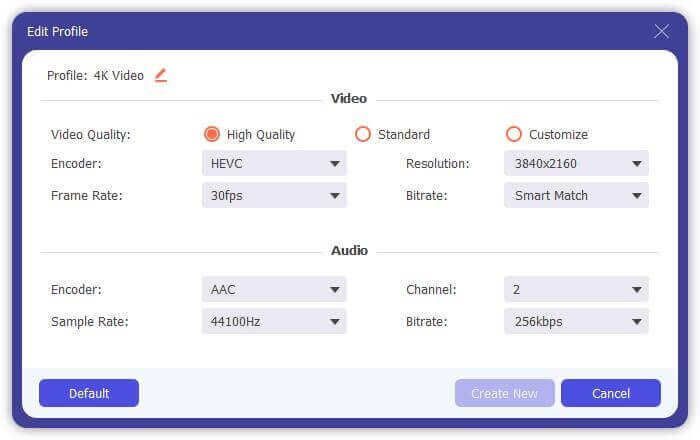
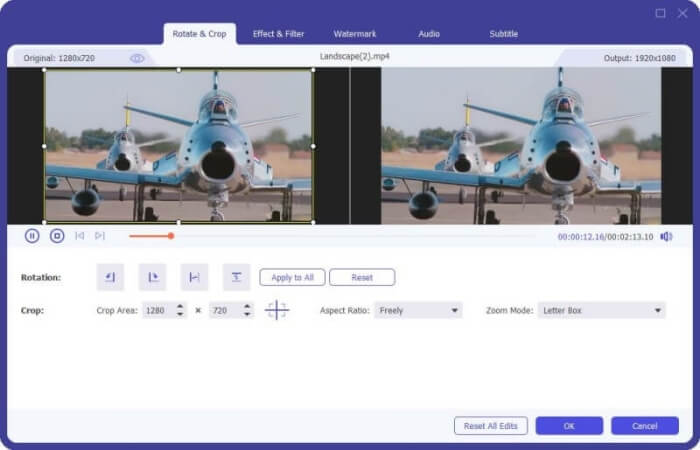
Step 3: Click the Edit button at the bottom of files, you can find 5 editing tools including rotating or crop videos, and adding effects and filters. In this way, you can create a better movie with special effects. Its toolbox can compress MKV, edit metadata information for MKV, convert MKV from 2D to 3D and more.
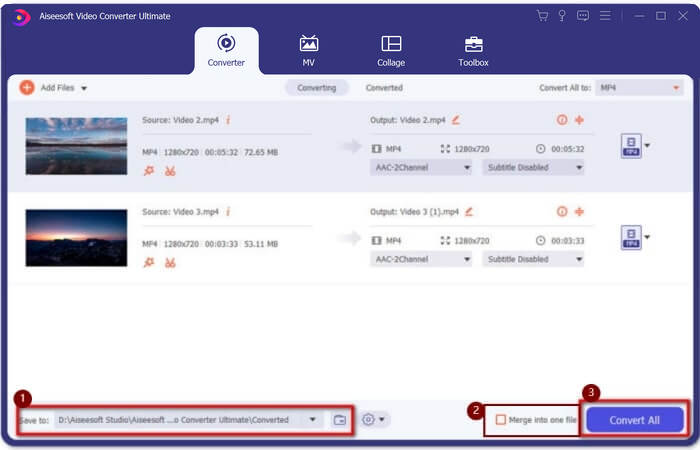
Step 4: Before combining all the MKV videos together, you can drag the video files up and down and place them in the right position to adjust the order. Then tick the Merge into one file box and click the Convert All button to join MKV files and save it in the set storage path.
第3部分:如何加入MKV文件的常见问题解答
1.什么是MKV?
通常,MKV被认为是一种视频格式,但实际上,MKV是一种多媒体容器格式,可以将具有不同代码的音频,视频和字幕文件合并到单个文件中。因此,几乎所有电影都保存为MKV格式的文件。
2.我可以使用手刹来加入MKV文件吗?
不,你不能。 Handbrake 只是一种用于视频转换以转换 MKV 文件的软件。如果您想加入 MKV 文件,您可以尝试使用免费的在线视频加入者或其他视频转换器来解决您的问题。
3.哪个视频播放器支持MKV电影文件?
MKV格式的电影不需要专门的视频播放器即可播放。但是,您需要安装相应的MKV解码插件。这样,几乎所有的视频播放器(包括计算机上的原始视频播放器)都可以播放MKV电影文件。
结论
当您下载电影观看时,发现那些MKV电影文件被分成几个文件。为了不断观看,您可以使用视频连接器免费在线组合MKV文件。此外,使用视频转换器还可以帮助合并具有高图像和音频质量的MKV文件。欢迎在下面留下您有关合并MKV文件的问题。
-
 如何在计算机上无损地将WebM文件合并为一个文件
 当您要合并WebM视频文件以连续观看视频或要根据WebM文件创建新视频时,有两种有效的方法可以在不损失质量的情况下加入WebM文件。
-
 顶级8 MKV播放器以所需的字幕播放MKV文件
 当您想要以所需字幕播放MKV视频时,可以了解有关PC / Mac排名前8位的MKV文件播放器的更多信息,并根据需要选择所需的播放器。
-
 MKV到MOV-如何将MKV转换成MOV
 如何在Mac上将MKV转换为MOV? iMovie可以读取MKV吗? MOV格式是什么意思?这篇文章介绍了2种简单的方法来帮助您使用免费的在线和专业视频转换器将MKV转换为MOV。
