


 視頻轉換大師
 屏幕錄影大師
 影片修復
影片修復
 安全下載
安全下載以下是您需要了解的有關 MPG 轉換器到 MP4 的信息
Choosing the best format for your videos is a crucial thing. The wrong format may break your momentum in watching or halt your workflow, especially if your built-in player does not recognize it. While MP4 and MPG are quite similar formats, there are specific circumstances when you have to choose one over the other. MPG files are usually considered when burning videos on a DVD or CD but utilize less modern compression technology. However, if you need to break incompatibility issues and better quality, MP4 is your ultimate solution. This post will walk you through the best MPG to MP4 converter programs using a desktop, online, and mobile application.

為了便於閱讀,您可以查看下表,該表比較了本文中的程序。
| 安裝尺寸 | 最佳用戶 | 價錢 | |
| 視頻轉換大師 | 23.8MB | 平均到專業人士 | $55.20/壽命 |
| 任何視頻轉換器 | 55.7 MB | 初學者到平均水平 | $49.95 / 壽命 |
| 免費在線視頻轉換 | 沒有 | 初學者 | 自由 |
| 雲轉換 | 沒有 | 平均的 | 自由 |
| 視頻格式工廠 | 15MB | 平均水平到初學者 | 在應用程序內購買 |
| 視頻轉換器 | 28.43 MB | 平均的 | 在應用程序內購買 |
第 2 部分。適用於 Windows 和 Mac 的 MPG 到 MP4 轉換器
1. Video Converter Ultimate
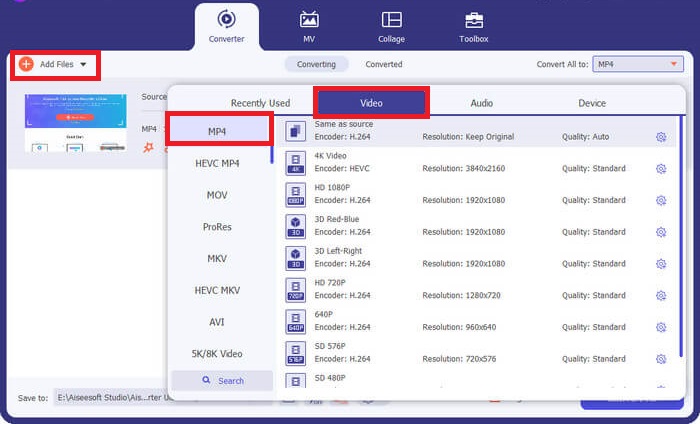
If you wish to maximize your conversion needs, Video Converter Ultimate might be the one for you. This program works out the conversion up to 50x speed thanks to the utilization of the GPU hardware acceleration feature. Moreover, it allows users to modify the output quality parameters to match their desired video quality. On top of that, Video Converter Ultimate allows you to choose from its wide selection of output formats like FLV, MOV, including MPG and MP4. For your advantage, here is a quick run-through on how to use this MPG converter to MP4.
Step 1. Begin by clicking the suitable Download button below. Head on the right button if you use a Mac device and the left button for Windows. Afterward, run the software and follow the installation procedure to launch it on your device.
Step 2. To import the MP4 file, click the Plus sign in the center. Select the MP4 file or a folder and wait for the thumbnail to load on the screen to complete the uploading process.
Step 3. Next, drop down the Profile to access the list of output formats. From there, go to the video panel and select MP4. You can also adjust the quality on the Settings as needed.
Step 4. Once your output requirements are set, you can proceed to the conversion. To initiate the process, click the Convert All button.
主要功能特色
◆ 這款最好的 MPG 到 MP4 轉換器讓用戶享受批量轉換功能。
◆ 提供超過1000+預選的音頻和視頻輸出格式。
◆ Video Converter Ultimate 提供了一個用於數字文件編輯的工具箱,如視頻增強器、壓縮器、GIF 製作器等。
◆ 該程序有一個免費的 MPG 到 MP4 轉換器 Windows 10 及其 14 天試用版。
優點
- 該程序最適合初學者、普通用戶和專業用戶。
- 該界面美觀,易於導航。
缺點
- 該工具的視頻編輯功能僅提供基本功能。
- 無法通過 URL 進行視頻轉換。
2.任何視頻轉換器
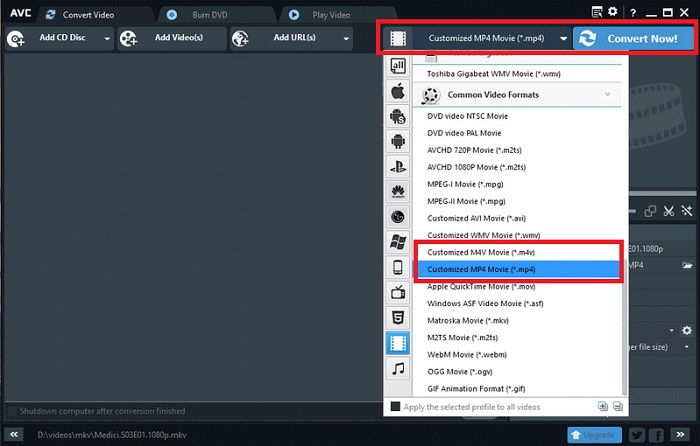
另一個值得認可的工具是 Any Video Converter。在轉換您喜歡的任何視頻時,該程序會產生奇蹟。然而,升級到專業版的用戶除了轉換文件之外還可以使用無限的屏幕錄像機功能和網絡攝像頭錄像機。以下是如何使用該程序將 MPG 轉換為 MP4 的詳細信息。
Step 1. First, head to the Convert Video panel to turn MPG files into MP4 format. Then, click the Add Video button and select your target file.
Step 2. After importing the file, drop down the Output Profile and choose MP4.
Step 3. In the next step, choose the folder to save your output. Finally, click Convert Now to start the conversion process.
主要功能特色
◆ 該程序的免費版本不包含不需要的和討厭的廣告。
◆ Any Video Converter 致力於在轉換後的輸出上不留下任何品牌水印。
優點
- 該程序為您的 MPG 文件提供視頻編輯工具。
缺點
- 對於初學者來說,任何視頻轉換器可能都很難駕馭。
第 3 部分. MPG 到 MP4 在線轉換器
1. 免費在線視頻轉換器
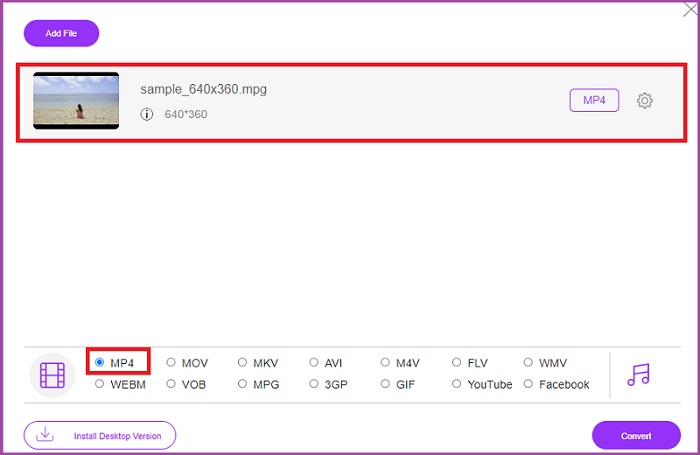
If you have a limited storage to cater software installation, some online tools can help you too. By far, the Free Video Converter Online is a well rounded program to meet your MPG to MP4 video conversion. This program offers more than 50+ popular formats we are acquainted with. On top of that it allows users as well to control their output quality requirements by adjusting the parameters. Should you wish to have this best free MPG to MP4 converter, follow the simple steps created beneath.
Step 1. Open the online program on your search engine. Once it appears, Add Files to Convert button and launch the program.
Step 2. Next, hit the same button again to add your raw video to the program. When your file is uploaded, choose MP4 in the output formats selection.
Step 3. Finally, tap the Convert button and wait for the output to download.
優點
- 此 MPG 到 MP4 在線轉換器允許批量轉換功能。
- 它可以滿足高達 300 MB 的大文件大小。
缺點
- 免費在線視頻轉換器不提供視頻編輯工具。
2. CloudConvert
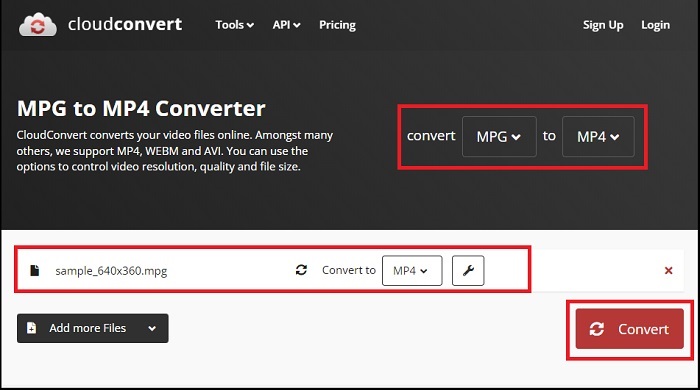
CloudConvert 支持超過 200 種輸出格式,我們認為它是多功能的。該工具不僅可以幫助您轉換視頻,還可以將電子書、檔案、圖像和音頻文件轉換為其他文件擴展名。此外,該程序還允許質量改變以最大化最佳結果。請參閱下面我們創建的指南,使用下面下載的最佳 MPG 到 MP3 轉換器之一來轉換視頻格式。
Step 1. Land on the website of Convert files using your search engine. In the center, click the Browse button to access your local folder.
Step 2. After uploading, expand the Output Format box and select MP4 in the list.
Step 3. For the last step, hit Convert and wait for our file to download.
優點
- 提供數據安全保護,保護用戶信息。
- 該程序提供超過 1000 種媒體輸出格式。
缺點
- 互聯網斷開時轉換會中斷。
第 4 部分:適用於 Android 和 iOS 的 MPG 到 MP4 轉換器應用程序
1.音像工廠
技術創新使得 MPG 到 MP4 的轉換可以在手持移動設備中實現。使用 Audio Video Factory,您可以在一個應用程序中轉換音頻和視頻格式。此外,它允許您在轉換文件之前編輯視頻參數,例如編解碼器和比特率。
Step 1. On the application screen, click the Plus button and select Video to access your file folder.
Step 2. After selecting your MPG file, tap the Convert button and expand the Output tab to see the list of formats.
Step 3. After selecting MP4 from the list, you can modify the other information in your file. Afterward, hit the Convert button to initiate the conversion.
優點
- 一款全能的 Android 和 iOS 應用程序,允許用戶編輯元數據信息,例如歌曲標題、專輯封面和藝術家。
- 它有一個本地媒體播放器可以直接播放轉換後的文件。
缺點
- 在設計方面,界面需要升級。
2.Technorazer 的視頻轉換器
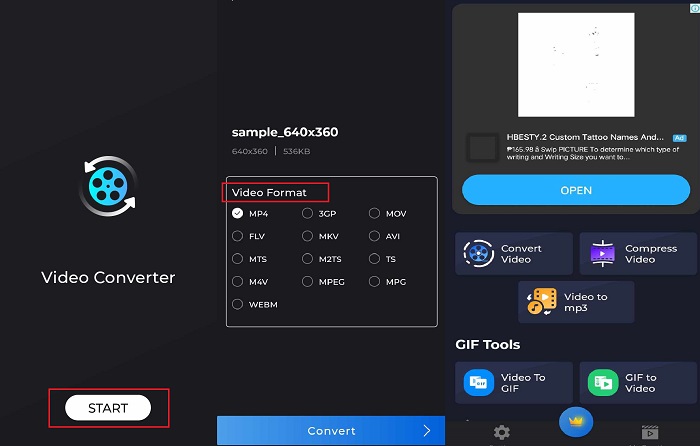
轉換、壓縮視頻並將其轉換為音頻 - 這些是 Video Converter 提供的強大功能。 Technorazer 公司開發的一款應用程序在 Playstore 上的評論超過 4.8/5。該應用程序將快速轉換速度提高至 70 倍。此外,它允許用戶將 MPG 轉換為任何格式,如 VOB、MPP4、3GP、FLV 等,而不會影響質量。最重要的是,Tehcnorazer 的 Video Converter 可以提取 GIF 文件並使用內置修剪器從音頻中創建鈴聲。
Step 1. Tap the Convert Video button to activate the specific activity. Afterward, tap the Select Video button and import your MPG.
Step 2. Once the file loads on the screen, the output formats will automatically show, and choose MP4.
Step 3. Finally, hit the Convert button. Once the process is done, you can rename your file and save it to a local folder on your device.
優點
- 黑色的皮膚界面給程序增添了時尚的外觀。
- 滿足無限的視頻文件大小。
- 付費版本包含反向視頻功能。
缺點
- 免費版本包含太多廣告。
延伸閱讀:
Effortless MPG to MP3 Conversion to Preserve Audio Quality
Best Software to Convert MKV to MP4 Effortlessly in Minutes
部分 5. MPG 轉換器到 MP4 的常見問題解答
我可以免費將 MPG 轉換為 MP4 嗎?
絕對是的!如果您希望將視頻文件轉換為其他格式,許多在線平台都可以提供幫助,例如免費視頻轉換器在線。
MPG 比 MP4 好嗎?
就質量而言,儘管比特率相同,MP4 仍優於 MPG。但是,如果您的目標是採用更有效的格式通過 Internet 分發文件,那麼 MP4 具有優勢。
MP4有什麼優點?
鄭重聲明,MP4 是我們的標準格式。該格式是一種有損壓縮,旨在減小文件的大小。就質量而言,MP4算是一般,對任何平台的兼容性都很高。
將 MPG 轉換為 MP4 安全嗎?
絕對沒錯!大多數平台,無論是在線還是離線軟件,在使用前都不需要用戶提供個人信息。另一方面,將 MPG 轉換為 MP4 不會導致媒體播放器不兼容的問題。
為什麼我無法播放 MPG 文件?
MPG 文件大多數時候在任何視頻播放器上都是兼容的。如果您遇到任何問題,可以檢查您的媒體播放器是否支持 MPG 文件或者您的文件是否已損壞。
結論
Under specific circumstances, both MPG and MP4 will serve your needs. With all the above mentioned tools, offline tools can perform video format conversion alongside editing and compression. The MPG to MP4 converter free online programs offer bulk conversion and audio parameter modification. As for the mobile app, it has the advantage when transforming any large file alone, and you do not need to edit the file further.
-
 適用於 Windows/Mac/Android/iPhone 的 4 款最佳 MPG/MPEG 播放器 [2025]
 如果您想流暢地播放自己喜歡的MPG或MPEG文件,則可以從本文中了解有關用於計算機和手機的排名前4位的MPG / MPEG播放器的更多信息。
-
 使用在線/離線轉換器將 MPG 轉換為 MKV 的 4 種方法
 您是否正在尋找可以將 MPG 文件轉換為 MKV 的易於使用的轉換器?本文列出了快速將 MPG 轉換為 MKV 文件的最佳和最簡單的方法。
-
 確實:減慢 MP4 視頻速度的最佳實踐
 除了提高視頻的速度和 #039;s 速度外,放慢速度是實現視頻最佳輸出所需的眾多實踐之一。通過閱讀本文的其餘部分,渴望成為最好的編輯。
