


 屏幕錄影大師
 影片修復
影片修復
 安全下載
安全下載如何將 GIF 轉換為 APNG:格式比較和綜合指南
GIF 一直是表達情緒與反應的經典首選格式,但它的畫質並非最佳,為何要將就?把 GIF 轉換成 APNG 格式,就能享有更順暢的轉場、更鮮豔的色彩與更卓越的品質。請繼續閱讀不同的GIF 轉 APNG方法。在這裡,我們將先了解 GIF 與 APNG 的差異,並介紹三款創新的工具,幫你把檔案順利完成轉換。

第 1 部分:將 GIF 轉換為 APNG 的必要性
GIF vs APNG:兩者有何差異?哪一個更好?
圖形交換格式 (GIF) 透過以比文字更好的喜劇方式傳達感情,在網路文化中確立了自己的地位。從熱門電視劇中的標誌性台詞、您最喜歡的電影中的幽默場景以及喜劇模因,您可以使用 GIF 以有趣且富有創意的方式表達您的情感和觀點。然而,您可能已經注意到,大多數 GIF 像素化且粗糙,因為 GIF 檔案無法提供最高品質。這就是動畫 PNG(APNG) 的用武之地! APNG 是一種方便的檔案格式,可用作 GIF 的替代品。
那麼,GIF 和 APNG 到底有什麼差別呢?這是一個直觀的表示,可以幫助您快速了解兩者之間的差異。
| GIF | 澳洲巴布亞紐幾內亞 |
| 每像素 8 位元:單幀支援 256 種顏色。 | 支援 24 位元:更廣泛、更鮮豔的調色板範圍。更好的品質 |
| 1 位透明度。像素要么完全不透明,要么完全透明。 | APNG 格式支援 alpha 透明度。 |
| 無損壓縮會產生更大的檔案大小。 | 無損或接近無損壓縮:產生的檔案大小比 GIF 更小。 |
| 支援並相容於大多數程式和主要瀏覽器。 (火狐、Safari、Chrome 等)。 | APNG 格式主要受最新程式和重要瀏覽器的支援:Chrome、Safari 和 Firefox;但是,您可能需要擴充功能才能透過瀏覽器開啟 APNG 檔案。 |
第 2 部分. 如何將 GIF 轉換為 APNG

視頻轉換大師
356+ 下載- 將您的影片轉換為流行格式,如 AVI、MOV、5K/8K 影片等。
- 支援幾乎所有格式,並與 Windows 和 Mac 相容。
- 只需點擊幾下即可編輯、增強、拼貼和美化影片。
- 提供無水印的高品質輸出。
1.EXGIF
EZGIF 是一個線上平台,可讓您建立、編輯和轉換 GIF 及其他圖像。假設您希望將 GIF 轉換為 APNG。在這種情況下,這個線上工具集是輕鬆在線將 GIF 轉換為 APNG 的絕佳選擇,因為它為用戶提供了一個簡單方便的工具來優化 GIF 編輯的品質。
使用EZGIF將GIF轉換為APNG相對容易;請依照以下快速簡單的步驟操作:
步驟 1。 先開啟你慣用的瀏覽器,在網址列輸入並搜尋 EZGIF,然後在搜尋結果中點選出現的第一個連結。
步驟 2。 接著,在上方選單列中尋找 APNG,並點擊它。
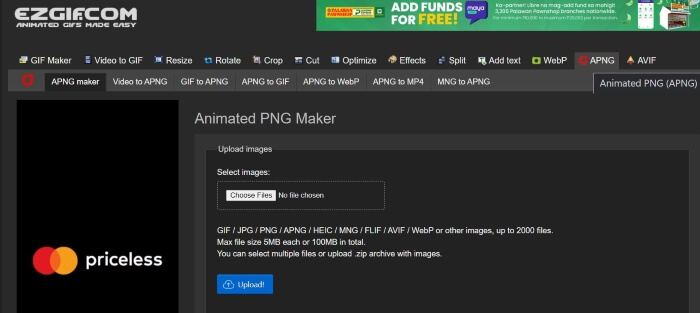
步驟 3。 重新導向至 EZGIF 的 Animated PNG 製作頁面後,按一下Choose Files按鈕並選取你要轉換的檔案。檔案載入完成後,點擊Upload按鈕上傳你的檔案。
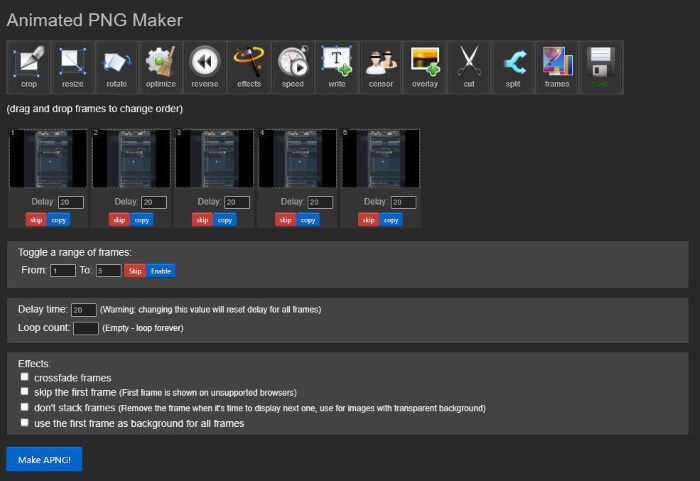
步驟 4。 接著會跳出新的網頁,你可以依照個人喜好修改與編輯 APNG 檔案。然後,若要繼續進行轉檔,向下捲動直到看到Make APNG按鈕並點擊它;EZGIF 會顯示 APNG 檔案的預覽。如果你對結果感到滿意,再往下捲動並點擊Save按鈕下載 APNG 檔案,就完成了!你已成功將 GIF 轉換為 APNG!
2. 維托帕爾
步驟 1。 打開你偏好的瀏覽器並搜尋 Vertopal,在搜尋結果中選擇第一個連結。
步驟 2。 當你被帶到 Vertopal 首頁後,按下Choose your File按鈕,或將檔案拖放到頁面上以上傳。
步驟 3。 檔案上傳後,選擇你想要轉換成的輸出格式。你可以從多種選項中挑選,或直接搜尋想要的格式並點擊它。選定格式後,畫面會跳出確認訊息,詢問你是否要新增更多檔案、變更輸出格式,或是直接繼續轉換。點擊Continue按鈕以繼續轉檔。
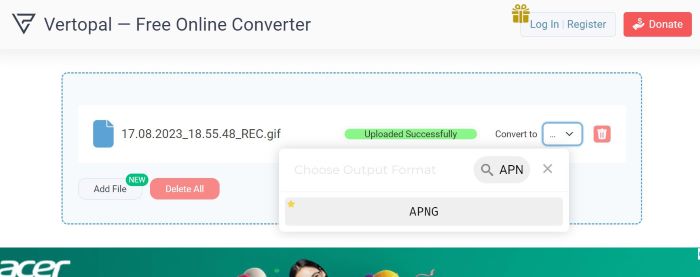
步驟 4。 上傳完成後,Vertopal 會預覽轉換後的檔案。在左上角找到並點擊Convert按鈕以繼續。轉換完成後,新的頁面會出現;按下Download按鈕即可儲存你的 APNG 檔案。就這麼簡單!你現在已擁有成功轉檔的 APNG 檔案!
3.RedKetchup GIF 轉換器
RedKetchup 是另一個適用於影片編輯器、照片編輯器和內容創作者的實用線上工具包。它提供了許多工具來幫助用戶創建、修改和潤色他們的圖像、動畫和影片。除此之外,它還有一個 GIF 轉換器工具,可用於將 GIF 檔案轉換為 APNG、WEBP 和 MP4。以下是如何利用 RedKetchup 的 GIF 轉換器將 GIF 轉換為 APNG:
步驟 1。 打開你慣用的瀏覽器,搜尋 RedKetchup GIF Converter,然後點擊在搜尋結果最上方出現的連結。
步驟 2。 當你被帶到該網頁後,按一下Browse按鈕上傳檔案,並選擇你想上傳的檔案。
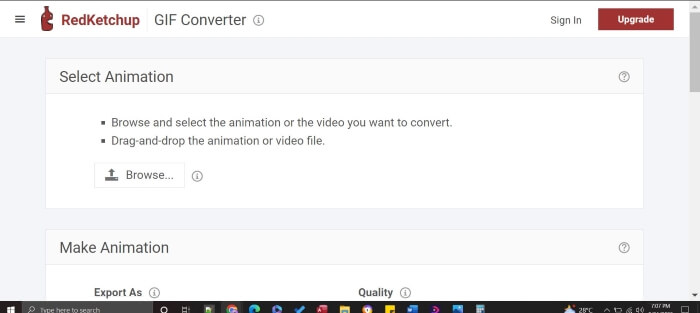
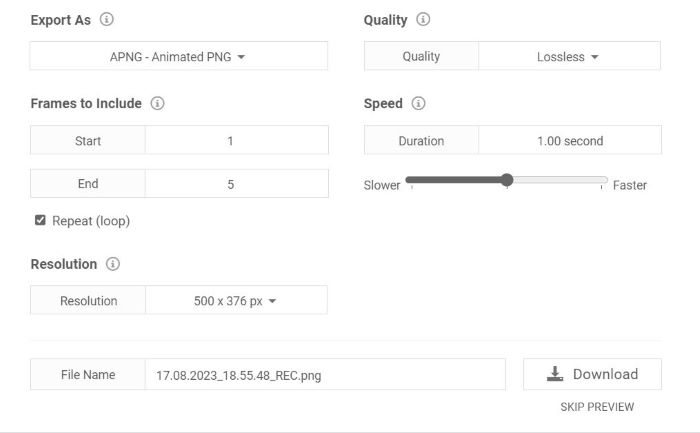
步驟 3。 RedKetchup 會立即顯示輸出預覽。向下捲動查看設定;你可以調整與修改品質、影格、解析度以及速度。接著,找到Export As,並將格式設定為 APNG。完成調整且確認無誤後,按下Download按鈕。然後將成品儲存起來,你就能只用幾個點擊,就得到高畫質的 APNG 檔案!
延伸閱讀:
第 3 部分:有關將 GIF 轉換為 APNG 的常見問題解答
我可以將 APNG 轉換回 GIF 嗎?
是的你可以!上面提到的大多數轉換器都有將 APNG 檔案轉換為 GIF 的工具。
所有瀏覽器都支援 APNG 嗎?
最新的瀏覽器版本可以支援 APNG,尤其是 Chrome、Edge、Safari、Firefox 和 Opera 等流行瀏覽器。但是,其他瀏覽器可能需要擴充功能才能透過瀏覽器從您的電腦開啟 APNG。
將 GIF 轉換為 APNG 是否可以提高品質?
不,將 GIF 轉換為 APNG 不一定會提高質量,除非轉換器允許您調整設定以進一步提高輸出品質;但是,與僅具有 8 位元透明度的 GIF 相比,它可以提供更流暢的動畫,因為它使用 24 位元透明度。
所有工具都支援將 GIF 批量轉換為 APNG 嗎?
是的,所有提到的工具都支援批量轉換。
APNG 比 GIF 好嗎?
雖然GIF比APNG使用更廣泛,但就視訊品質而言,APNG比GIF更好,因為它可以支援更多顏色。它可以提供比 GIF 更生動、更流暢的動畫。關於相容性,大多數現代瀏覽器現在都支援 APNG 格式,但某些瀏覽器可能需要副檔名才能開啟 APNG 檔案。
結論
雖然 GIF 長期以來都是用來傳達幽默與情感的常用格式,但畫面往往較為像素化、畫質也有限。因此,APNG 成為極具價值的替代方案,能提供更豐富的色彩、更順暢的轉換效果與更優異的品質。這篇文章特別為正在尋找簡單又有效方法、想知道如何將 GIF 轉換為 APNG的你而寫,我們會協助你輕鬆完成 GIF 轉 APNG 的整個流程!
-
 使用適用於 PC 和 Mac 的 GIF 錄製器錄製 GIF 格式的 5 個最佳選項
 您應該用來錄製 GIF 的最佳 GIF 錄製器是什麼?下面的列表提供了關於哪一個是最好的屏幕錄像機的證據。
-
 [2023 更新] 適用於 PC、Mac、iOS 和 Android 的 9 個最佳 GIF 編輯器
 需要為您的 GIF 添加個人風格以使其更具表現力嗎?繼續閱讀本文以了解如何編輯以及最適合該工作的工具。
-
 將 GIF 轉為視頻格式:將 GIF 模因轉換為視頻 [2023]
 想了解如何使用下面列出的工具將 GIF 轉換為視頻。選擇一個並學習如何做以獲得足夠的證據。
