


 視頻轉換大師
 屏幕錄影大師
 影片修復
影片修復
 安全下載
安全下載了解 Twitter、Instagram 和 TikTok 視頻長度標準
Do you want to know the video length standard of each platform, like TikTok, Twitter, and Instagram? Then the best you can do is to read this informative post. We will provide all the details you can discover regarding the maximum video length for each platform. In addition, this post will provide the methods to cut the video length using video editing software. This way, you will know how to cut your videos before posting them on various social media platforms. To learn all the details, read this post from start to end.

第 1 部分。Instagram 的視頻長度標準
Instagram 是當今最常用的社交媒體平台之一。它適合發布照片、故事等。它也是一個交流平台,可以讓您與其他用戶進行交流。在這一部分中,您將了解有關 Instagram 視頻長度標準的所有詳細信息。請參閱下面的其他信息。
IG Post Video Length
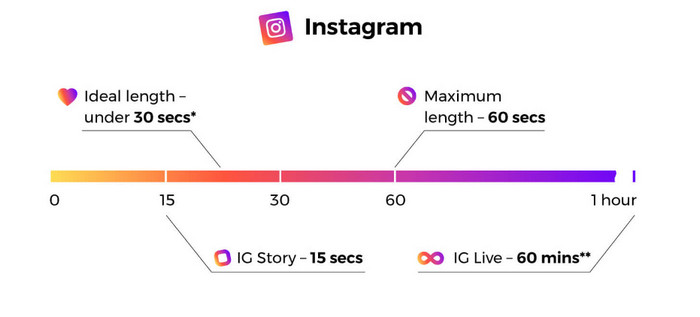
當我們談論信息流視頻帖子時,這些是您在滾動時可以看到的視頻。 instagram 視頻長度最長為 60 秒或 1 分鐘。
Instagram Stories
如果您想在 Instagram 快拍中上傳或發布視頻,您可以上傳最長 15 秒的視頻。如果您想在您的 Instagram 故事中發布更長的視頻,您可以上傳許多 15 秒的視頻剪輯。也可以在IG故事上發各種廣告,不過視頻長度還是15秒。
Instagram Live Videos
您還可以在 Instagram 上分享直播視頻。 Instagram 直播視頻長度長達 1 小時。
Instagram TV
您現在可以使用 Instagram 的最新功能,即。 Instagram TV,即 IGTV,是一個取代傳統電視的平台。因此,您可以提交最長 60 分鐘的長視頻。用戶可以在啟動子應用程序後立即開始觀看視頻。此外,IGTV 上的所有視頻都是垂直的,因為這種格式對純移動平台最有效。
這些是關於快拍、信息流視頻帖子、在線視頻和 IGTV 的 Instagram 最大視頻長度。
第 2 部分。TikTok 的視頻長度標準
以前,TikTok 視頻的平均長度只有 15 秒。該應用程序的早期吸引力包括一個簡短的視頻。他們不斷滾動查看更多內容,因為它提供了快速、引人入勝的視頻。然而,15 秒的時間限制僅持續了大約一年。字節跳動公司旗下的應用程序在 2017 年將其最長視頻時長增加到一分鐘,在 2021 年增加到三分鐘。
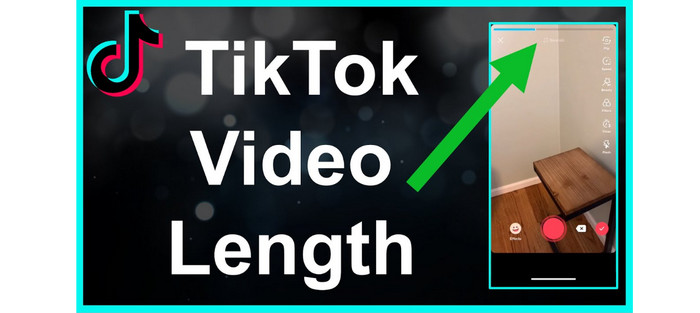
現在,TikTok 的視頻長度上限為 10 分鐘。這樣,用戶可以上傳更長的視頻。但是,您需要考慮很多事情。永遠記住,用戶更喜歡一口大小的內容。這意味著發布短視頻比長視頻更好。
第 3 部分。Twitter 的視頻長度標準
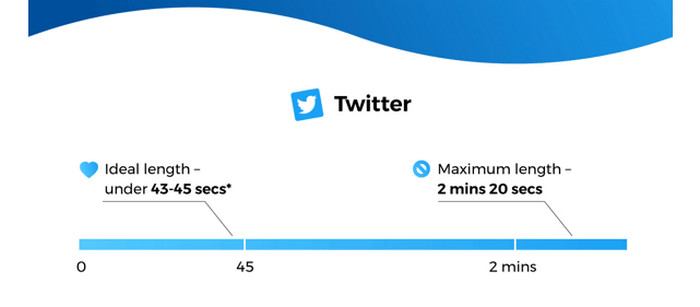
The Twitter application is the perfect platform if you prefer posting shorter videos. The maximum video length it can provide is up to 140 seconds or 2 minutes, and 20 seconds long. Posting video ads have the same duration. For additional information, the video will automatically loop when posting a video with less than 7 seconds. It means that your video will turn into GIF. One of the keys to audience minds and hearts is GIFs. Furthermore, the best video length for Twitter is around 44 seconds. It is enough time to grab viewers’ attention.
第 4 部分。如何為這些平台削減視頻長度
After knowing the maximum length of each social media platform, you can already know the length requirement when posting a video. But the question is, how to cut a video to the desired length? We will introduce you to the Video Converter Ultimate if that concerns you. Video Converter Ultimate is a program to shorten a video for TikTok, Twitter, Instagram, and other platforms. It lets you cut or trim your video to your desired length. Also, the program allows you to cut videos with straightforward methods during the cutting process. This way, skilled and non-professional users can operate this video editing software. It also has an easy-to-understand interface, which is easier to comprehend.
此外,Video Converter Ultimate 可在任何設備上使用,主要是 Windows 和 Mac 計算機。因此,無論您是 Mac 還是 Windows 用戶,都可以輕鬆下載並使用它來剪切視頻。此外,該程序支持各種輸出格式。您可以將最終輸出保存為 MP4、MKV、AVI、MOV 等格式。您還可以調整視頻的分辨率和質量,使其更具吸引力。除此之外,在保存編輯後的視頻時,該程序不會在您的視頻上添加令人不安的元素,如水印、徽標、貼紙等。
Step 1. Click the Download button below to access the Video Converter Ultimate on your Mac or Windows computers. After that, run the program when the installation process is done.
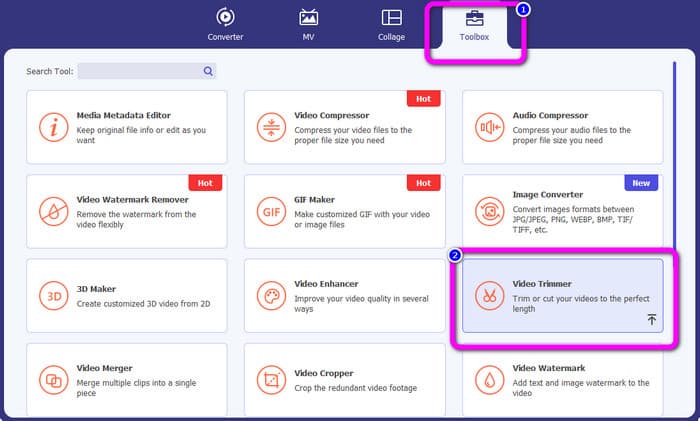
Step 2. Afterward, the main interface will pop up on the computer screen. Click the Toolbox option on the top part interface. Then, various tools will show up and select the Video Trimmer tool.
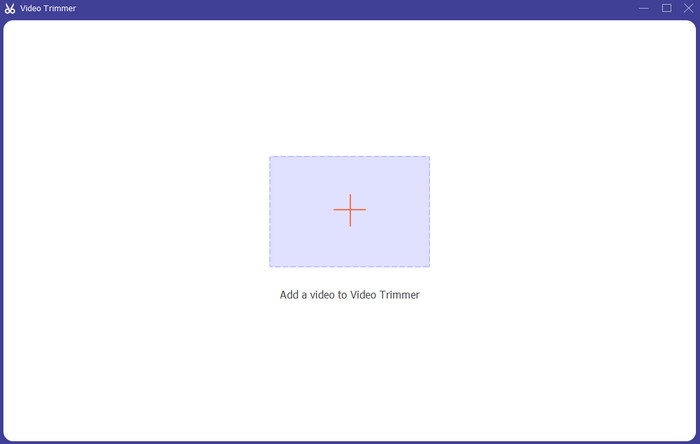
Step 3. Then, another interface will appear on the computer screen. To add the video you want to shorten, click the + icon. This way, the file folder will appear and select the video.
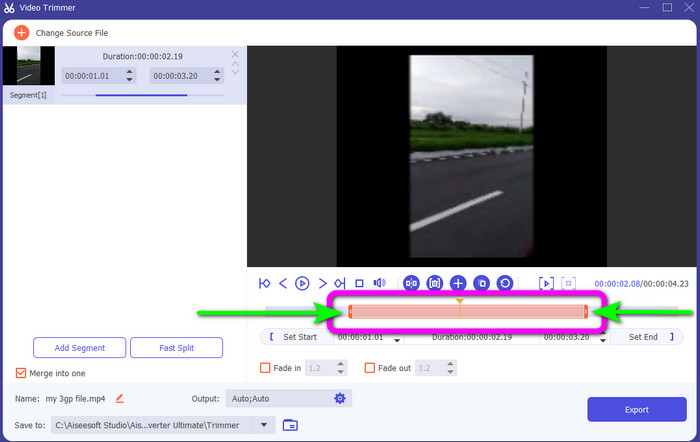
Step 4. You can freely cut your video by adjusting or dragging the video play head. Adjust the edge of the video based on your preference.
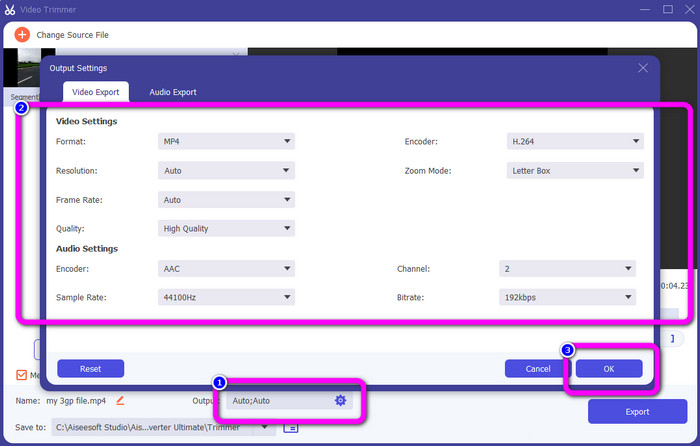
Step 5. To make other changes to the video, go to Output Settings. This setting allows you to change the video’s resolution, quality, frame rate, output formats, and other parameters. Then, click OK.
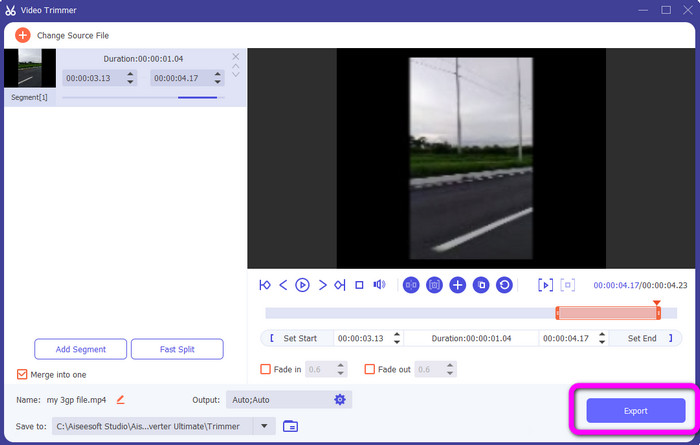
Step 6. When you are satisfied with your video, click the Export button. After the exporting process, you can save the video from this video trimmer on your computer. Then, you can use the video to post on various social media platforms.
Part 5. 社交網絡服務平台視頻時長FAQ
1. Snapchat 視頻應該多長?
如果您指的是常規帖子,則 10 秒是最大視頻長度。但是如果要買廣告的話,最長的視頻是3分鐘。
2. Facebook 視頻的最大長度是多少?
Facebook 的視頻長度限制(包括廣告)為 240 分鐘(4 小時)。就最佳視頻長度而言,它是 15 秒到 3 分鐘以上。
3. TikTok 視頻的最佳長度是多少?
TikTok 視頻的理想長度是 10 到 15 秒。足以引起觀眾的注意。
結論
With the help of this article, you have discovered the video length standard for each social network service platform. It includes TikTok, Twitter, and Instagram. In addition, the article taught you how to cut video length using Video Converter Ultimate. So, if you want to shorten the length of your video for social media, use this offline program. Its simple interface and steps will help you cut your videos easily and quickly.
-
 如何使用 TikTok 剪輯視頻 [詳細說明]
 您想知道如何使用 TikTok 縮短視頻嗎?然後,我們將提供簡單的方法。此外,您還將學習使用離線應用程序/程序的其他方法。
-
 如何使用和為 Snapchat 修剪視頻 [一步一步]
 這篇內容豐富的帖子將提供使用 Snapchat 剪輯視頻的方法。此外,我們還將推出出色的應用程序來為 Snapchat 剪輯視頻。閱讀更多以找出答案。
-
 如何有效分割視頻的傑出方法
 本文將解釋如何將視頻拆分成多個部分。因此,如果您有興趣,請點擊這篇文章,因為我們為您提供了最直接的嘗試方法。
