


 محول الفيديو النهائي
 مسجل الشاشة
 إصلاح الفيديو
 تنزيل آمن
كيف تبطئ الفيديو على Tiktok؟ 2 أفضل الطرق المجانية
في الوقت الحاضر، ستجد العديد من مقاطع الفيديو المتداولة على الإنترنت قادمة من تيك توك. هذا التطبيق رائج جدًا ويضم العديد من الميزات والأدوات لإنشاء محتوى الفيديو، من الميمات المضحكة، ومقاطع الفيديو التعليمية، وتغطيات الرقص، وغير ذلك الكثير. وإذا كنت جديدًا على تيك توك، فربما تريد أن تتعلم كيفية إبطاء الفيديو على تيك توك. لحسن الحظ، يحتوي تيك توك على أداة مدمجة لتقليل أو زيادة السرعة تتيح لك الحصول على فيديو بطيء الحركة (سلو موشن). أنت في المكان الصحيح لأنك ستتعرف على كيفية إبطاء الفيديو على تيك توك.

الجزء 1. قم بإبطاء مقطع فيديو بسهولة على Tiktok
يحتوي تطبيق Tiktok على أداة حركة بطيئة مضمنة يمكنك استخدامها لإبطاء أو تسريع الفيديو الذي تقوم بتسجيله. وإذا كان لديك بالفعل مقطع فيديو محفوظ في معرض الصور الخاص بك وتريد نشره على TikTok ، فلا يزال بإمكانك إبطائه على تطبيق Tiktok. في هذا الجزء ، ستعرف كيفية إبطاء الفيديو الخاص بك على TikTok.
قم بإبطاء الفيديو أثناء التسجيل
إليك الإجابة إذا كنت تتساءل عن كيفية إبطاء مقطع فيديو TikTok أثناء التسجيل. اتبع الخطوات البسيطة أدناه لتسجيل فيديو بالحركة البطيئة.
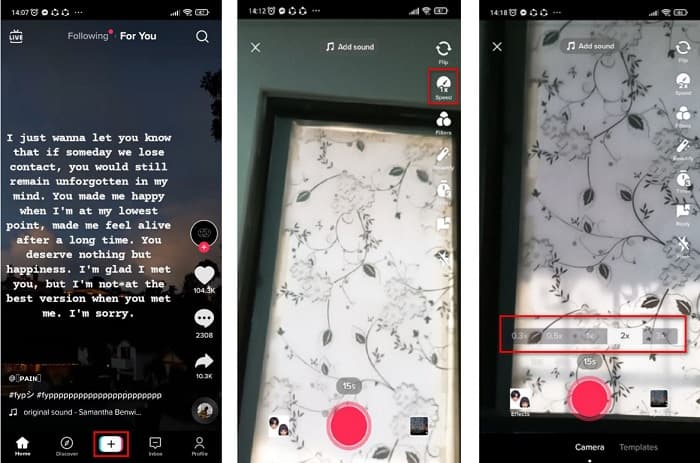
الخطوة 1. أولاً، افتح تطبيق تيك توك واضغط على علامة + الموجودة في منتصف الشاشة.
الخطوة 2. وعندما تكون في واجهة الكاميرا، اضغط على خيار Speed (السرعة).
الخطوة 3. أخيرًا، اختر السرعة التي تريدها. يؤدي الخياران 0.3X و0.5x إلى جعل الفيديو أبطأ، بينما تجعل السرعتان 2x و3x الفيديو أسرع.
ثم اضغط فقط على زر التسجيل لبدء تسجيل الفيديو الخاص بك ، وعند الانتهاء ، اضغط على زر التوقف. سترى أن سرعة الفيديو الذي سجلته قد تغيرت.
إبطاء مقطع فيديو تم تسجيله
إذا كان لديك مقطع فيديو مسجل بالفعل ، فلا يزال بإمكانك إبطاء أو تسريع الفيديو الخاص بك على TikTok. اتبع الخطوات البسيطة أدناه لحركة بطيئة لفيديو مسجل. ومع ذلك ، عندما يتم تسجيل الفيديو الخاص بك بالفعل ، فإن خيارك الوحيد هو إبطاء الفيديو بدون خيارات السرعة.
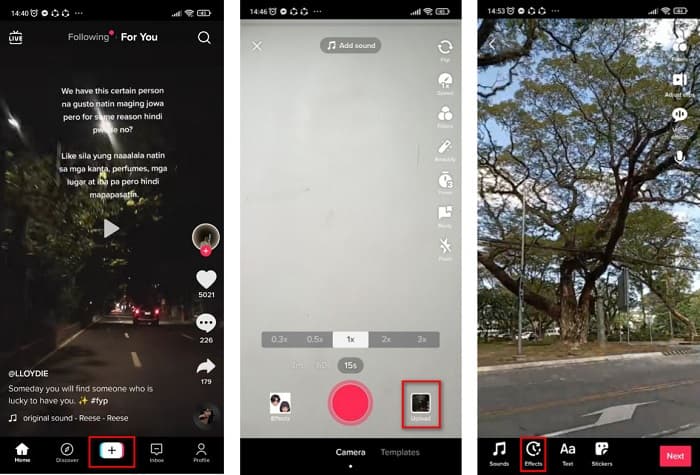
الخطوة 1. افتح تطبيق تيك توك، ثم اضغط على زر علامة + في منتصف واجهة البرنامج.
الخطوة 2. بعد ذلك، اضغط على خيار Upload (تحميل) بجانب زر التسجيل. ثم اختر الفيديو المسجّل لديك، واضغط على Next (التالي).
الخطوة 3. أخيرًا، اضغط على Effects (التأثيرات) ثم اضغط على خيار Slow-mo (البطيء). وبعدها اضبط السرعة التي تريدها.
بعد ضبط سرعة الفيديو الخاص بك ، اضغط على زر حفظ لحفظ تسجيل الفيديو الخاص بك.
بسيط ، أليس كذلك؟ باستخدام تطبيق Tiktok ، يمكنك الحصول على فيديو بالحركة البطيئة دون استخدام أي أداة أخرى.
الجزء 2. قم بإبطاء مقاطع فيديو TikTok المسجلة باستخدام أفضل أداة لتغيير سرعة الفيديو
يعد استخدام مغير السرعة في تطبيق TikTok أمرًا سهلاً وبدون متاعب. ومع ذلك ، يمكنه فقط إبطاء الفيديو الخاص بك إلى سرعة 0.3x ويمكنه فقط تسريع الفيديو الخاص بك حتى 3x. إذا كنت ترغب في إبطاء الفيديو الخاص بك حتى 0.125x ، فلدينا أدوات بديلة عبر الإنترنت وغير متصلة بالإنترنت.
FVC Video Converter Ultimate
FVC Video Converter Ultimate هو أداة تعمل بدون اتصال بالإنترنت تتيح لك تغيير سرعة الفيديو الخاص بك. باستخدام هذه الأداة، يمكنك إبطاء الفيديو أو تسريعه كما ترغب. يمكن لهذه الأداة ضبط سرعة الفيديو إلى 0.125x، 0.25x، 0.5x، 0.75x، 1.25x، 1.5x، 2x، 4x، و8x.
علاوة على ذلك ، تحتوي هذه الأداة على واجهة برمجية سهلة الاستخدام ، مما يسهل على المبتدئين استخدامها. هذه الأداة رائعة لأنها تحتوي على ميزات أكثر تقدمًا ، مثل محرر البيانات الوصفية للوسائط ، وضاغط الفيديو ، وصانع ثلاثي الأبعاد ، وغير ذلك الكثير. بالإضافة إلى ذلك ، عندما تقوم بتغيير سرعة الفيديو الخاص بك ، فلن تفقد جودته على عكس الأدوات الأخرى. لذلك ، إذا كنت مهتمًا باستخدام هذا المحول ، فاتبع الخطوات أدناه.
الخطوة 1. قم بتنزيل FVC Video Converter Ultimate بالضغط على زر Download (تنزيل) أدناه. اتبع عملية التثبيت، ثم شغّل التطبيق.
تحميل مجانيلنظام Windows 7 أو أحدثتنزيل آمن
تحميل مجانيلنظام MacOS 10.7 أو أحدثتنزيل آمن
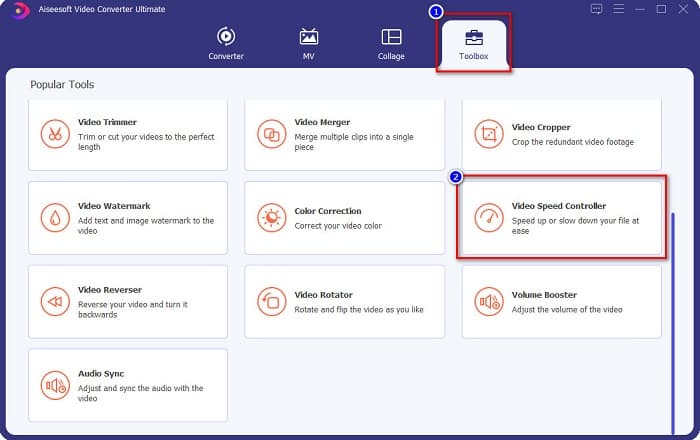
الخطوة 2. ثم في الواجهة الرئيسية للبرنامج، انقر على لوحة Toolbox (صندوق الأدوات). وفي واجهة لوحة الأدوات، انقر على Video Speed Controller (متحكم سرعة الفيديو).
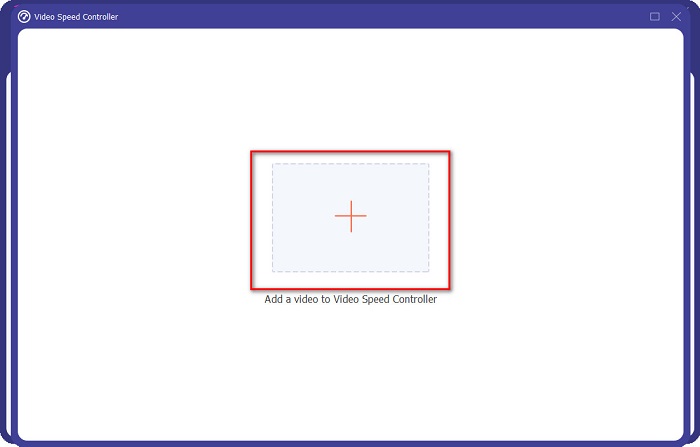
الخطوة 3. انقر على زر علامة + لرفع الفيديو الذي تريد إبطاءه في الواجهة التالية.
الخطوة 4. ثم اختر سرعة الفيديو التي تريدها، ثم انتقل إلى الخطوة الأخيرة.
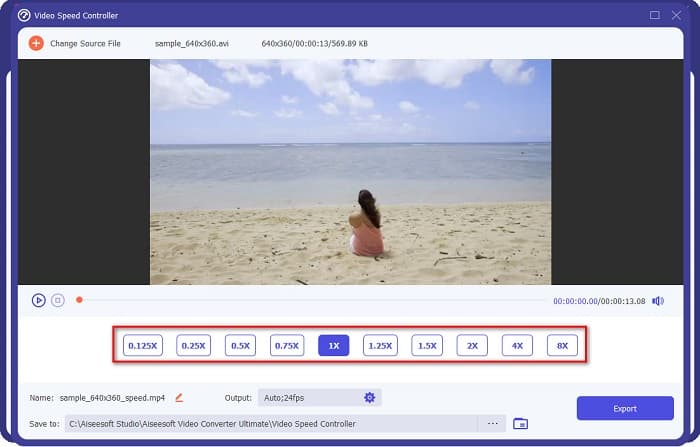
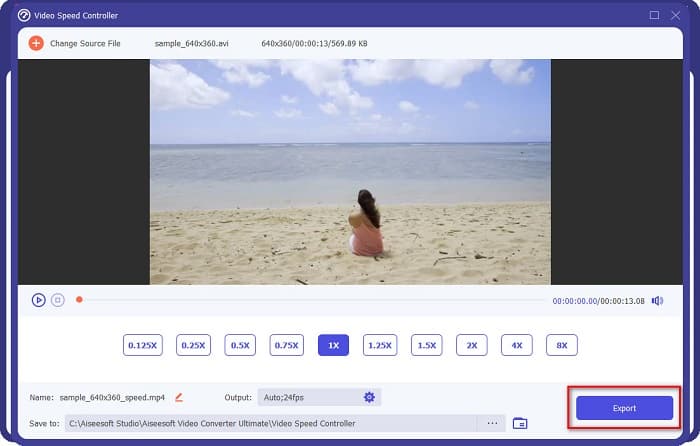
الخطوة 5. أخيرًا، انقر على زر Export (تصدير) لتطبيق سرعة الفيديو على ملفك. سيتم حفظ ملف الفيديو الناتج تلقائيًا في مجلدات جهاز الكمبيوتر لديك.
الايجابيات
- يمكنه ضبط سرعة الفيديو من 0.125x إلى 8x.
- يحتوي على واجهة مستخدم سهلة الاستخدام.
- يحتوي على ميزات تحرير متقدمة مثل صانع GIF وصانع ثلاثي الأبعاد وعلامة مائية للفيديو والمزيد.
- متاح على جميع منصات الوسائط المتعددة ، بما في ذلك Windows و Mac.
سلبيات
- يجب عليك شراء التطبيق قبل الوصول إلى ميزاته الفريدة.
كابوينج
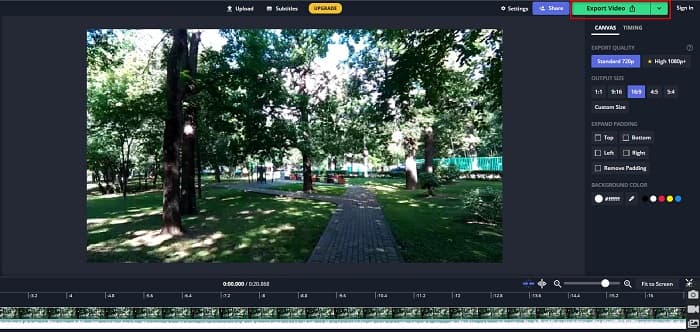
يُعد Kapwing أداة إلكترونية عبر الإنترنت وهو من أكثر أدوات تغيير سرعة الفيديو استخدامًا. تتميز هذه الأداة بواجهة مستخدم بسيطة مما يجعلها سهلة الاستخدام. كما تتيح لك قص وتقطيع الفيديو بسهولة. بالإضافة إلى ذلك، يمكنها تغيير سرعة الفيديو إلى 0.25x، 0.5x، 0.75x، 1.15x، 1.25x، 1.75x، 2x، و4x. علاوة على ذلك، يمكنك تغيير حجم مخرجات الفيديو. ومع ذلك، نظرًا لأنها أداة تعمل على الويب، فقد تواجه بطئًا في التحميل عند استخدامها. ومع ذلك، لا يزال الكثير من الأشخاص يستخدمون هذا المحوّل لتغيير سرعة الفيديو الخاص بهم.
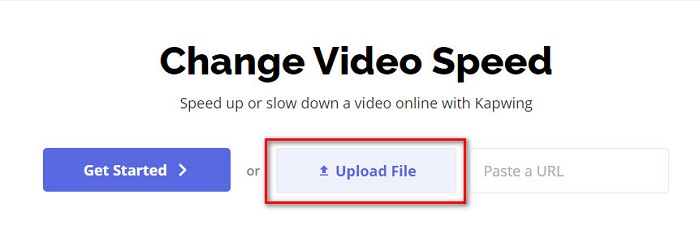
الخطوة 1. أولاً، ابحث عن Kapwing في متصفحك، ثم انقر على زر Upload File (رفع ملف). ستظهر لك ملفات جهاز الكمبيوتر لتختار الفيديو الذي تريد تغيير سرعته.
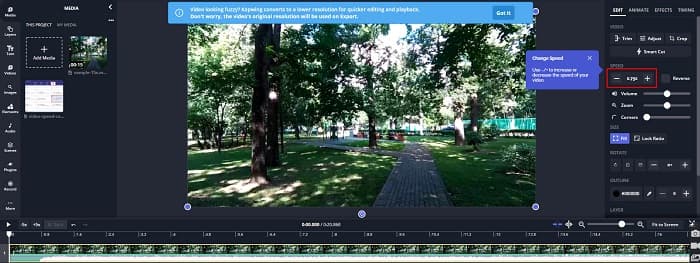
الخطوة 2. بعد ذلك، اضبط سرعة الفيديو في الواجهة التالية عن طريق الضغط على علامة - أو + في لوحة السرعة.
الخطوة 3. انقر على زر Export (تصدير) لتغيير سرعة الفيديو الخاص بك. ثم انتظر بضع دقائق، وهكذا فقط!
الايجابيات
- يحتوي على واجهة برمجية سهلة الاستخدام.
- يسمح لك بقص إخراج الفيديو الخاص بك.
سلبيات
- عندما يكون الاتصال بالإنترنت بطيئًا ، تكون عملية تحميل التطبيق بطيئة.
الجزء 3. أسئلة وأجوبة حول كيفية إبطاء مقطع فيديو على Tiktok
هل يؤدي إبطاء مقطع فيديو على Tiktok إلى تقليل الجودة؟
لا. نظرًا لأن Tiktok يحتوي على مغير سرعة فيديو مدمج ، فلن يؤثر ذلك على جودة الفيديو الخاص بك عندما تبطئ مقطع فيديو على TikTok.
هل يحتوي تصدير فيديو بالحركة البطيئة على TikTok على علامة مائية؟
نعم. كل فيديو يصدره تيك توك يحتوي على علامة مائية. ولكن إذا كنت تريد إزالة العلامة المائية من فيديو تيك توك الخاص بك، فاقرأ هذه الـمقالة لمعرفة كيفية القيام بذلك.
كم من الوقت يمكنك تصوير فيديو Tiktok؟
يبلغ الحد الأقصى لمدة تسجيل فيديو Tiktok الواحد 15 ثانية. ومع ذلك ، إذا قمت بربط أربعة مقاطع فيديو مدتها 15 ثانية ، فسيكون الحد الأقصى لها 60 ثانية.
خاتمة
مع كل ما سبق، أصبحت مهمة كيفية إبطاء الفيديو على تيك توك محلولة. والآن تعرف كيفية إبطاء الفيديو أو تسريعه في تطبيق تيك توك. ولكن إذا كنت ترغب في ضبط سرعة مقاطع الفيديو الأخرى لديك، فإن FVC Video Converter Ultimate هو الأداة التي يمكنها مساعدتك في ذلك.
-
 أهم الحقائق التي يجب أن تعرفها عن QuickTime Slow Motion
 هل حاولت استخدام QuickTime Media Player لتشغيل الفيديو بالحركة البطيئة؟ اقرأ هذه المقالة لمعرفة المزيد عن الخدمة الممتازة التي يقدمها مشغل الوسائط هذا.
-
 5 أجهزة تصوير فيديو بطيئة الحركة متاحة لنظام التشغيل Windows / Mac / عبر الإنترنت
 هل تريد معرفة كيفية تشغيل الفيديو بالحركة البطيئة؟ ثم اقرأ هذه المقالة لمعرفة ماهية 5 من صانعي الفيديو بالحركة البطيئة المحترفين.
-
 أفضل الطرق لاستخدام iMovie في عمل مقاطع فيديو بطيئة الحركة [محلول]
 هل سبق لك استخدام تطبيق iMovie لتحويل فيديو السرعة العادية إلى حركة بطيئة؟ هذه هي الفرصة لمعرفة المزيد عن هذا التطبيق ، لذا استمر في القراءة.
