


 Video Converter Ultimate
 Screen Recorder
 Oprava videa
Nejlepší bezplatné a snadno použitelné konvertory, které převádějí WMV na MOV, které byste si neměli nechat ujít
Microsoft Windows Media Audio (WMA) a Microsoft Windows Media Video (WMV) jsou komprimované formáty zvuku a videa vyvinuté společností Microsoft v kontejneru ASF. Jakmile jsou soubory WMV nebo WMA zakódovány kodeky Windows Media Video a Windows Media Audio, používají příponu .asf. Tyto dva video formáty vytvořené Microsoftem lze přehrávat pouze ve vybraných přehrávačích videa nebo převádět jen v omezeném počtu programů či online konvertorů. Pokud ale hledáte důvěryhodné a spolehlivé převodníky, jak převést WMV na MOV, tento článek je pro vás ideální. Pokračujte ve čtení a dozvíte se víc.
Část 1. Stručné představení WMV a MOV
Přípona souboru WMV představuje soubory Windows Media Video komprimované pomocí jednoho nebo více formátů komprese videa společnosti Microsoft. Například některé programy třetích stran jej využívají k ukládání krátkých animací, protože je to typický formát pro ukládání videa ve Windows. Přestože se vzhledově podobají souborům Windows Media Video, soubory Windows Media Audio obsahují pouze zvuková data a neobsahují video. Pro tyto soubory se používá přípona WMA.
Formát souboru QuickTime (QTFF) je multimediální formát kontejneru a soubor MOV je video soubor uložený ve formátu QuickTime File Format (QTFF). Ukládá se v něm jedna nebo více stop, z nichž každá obsahuje různá mediální data (například video, zvuk a text – titulky). Soubory MOV se běžně používají k ukládání filmů a dalších video souborů a je snadné je najít.
Část 2. Nejlepší způsob, jak převést WMV na MOV na Mac a Windows
Tento článek doporučuje program Video Converter Ultimate pro uživatele Macu, kteří chtějí převést WMV na MOV. Bezplatná verze tohoto softwaru je k dispozici jak pro Windows, tak pro Mac. Díky uživatelsky přívětivému rozhraní a snadno dostupným nástrojům jej může používat široké spektrum lidí. Software obsahuje video konvertor, který podporuje širokou škálu video formátů a dokáže převést soubory za méně než minutu, na rozdíl od jiných aplikací a webových nástrojů. Kromě toho tento software nabízí řadu dalších funkcí, které vám pomohou video dále vylepšit. Předpokládáme, že jste si popis softwaru přečetli, a můžeme začít:
Krok 1. Pro zahájení stahování klikněte pravým tlačítkem na ikonu Free Download (Bezplatné stažení) uvedenou níže. Tento software lze spustit jak na počítačích s Windows, tak na počítačích Macintosh. Po stažení jej lze okamžitě nainstalovat a začít používat kliknutím na možnost Start Now (Spustit nyní).
Zdarma ke staženíPro Windows 7 nebo novějšíBezpečné stažení
Zdarma ke staženíPro MacOS 10.7 nebo novějšíBezpečné stažení
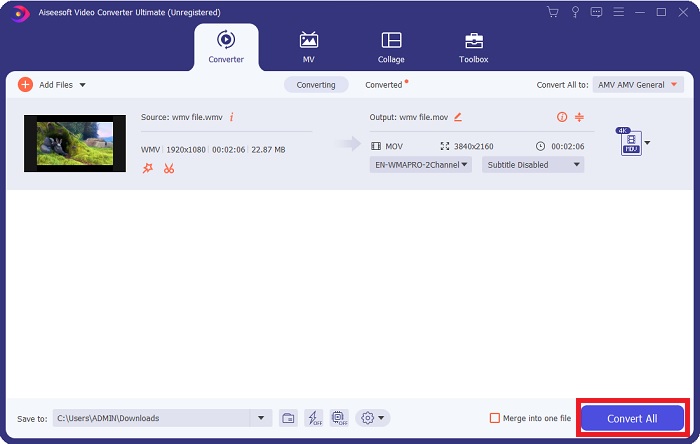
Krok 2. Po stažení softwaru jej spusťte. Při prvním otevření softwaru se zobrazí okno s informacemi. Zadejte video soubor, který chcete převést, abyste spustili proces konverze.
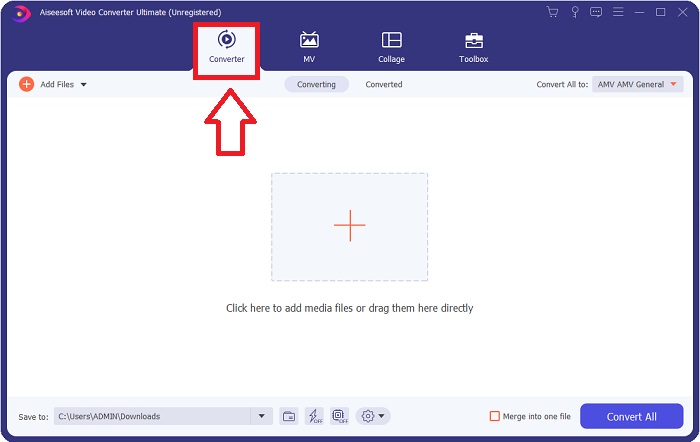
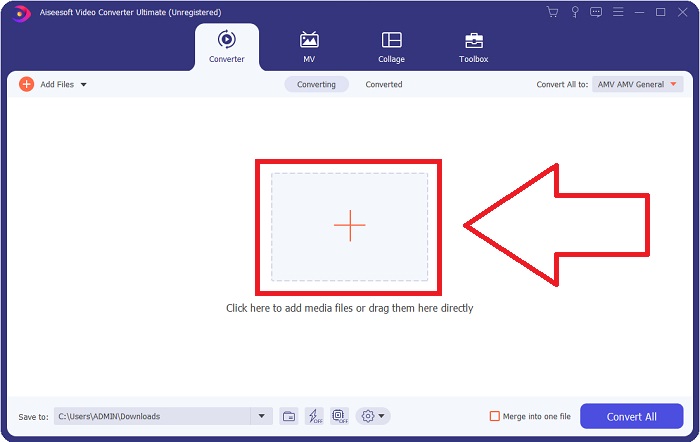
Krok 3. Začněte načtením souborů, které chcete převést – přetáhněte video soubor, který chcete konvertovat, na znak + a spusťte tak proces převodu.
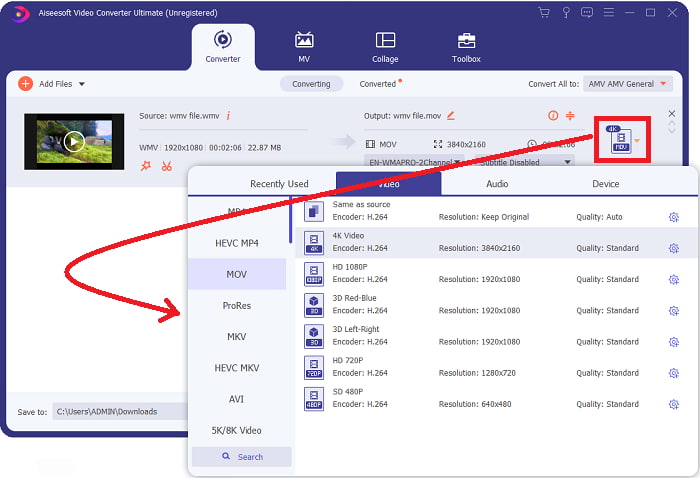
Krok 4: V pravé horní části obrazovky se zobrazí nabídka možností, ve které můžete zvolit výstupní video formát. Z rozevíracího seznamu vyberte jako formát videa MOV. Podle zvoleného souboru MOV je možné vybrat z různých úrovní kvality videa. Pokud požadovaný výstupní formát neodpovídá předvoleným možnostem, můžete v systému Windows upravit nastavení kvality. Kliknutím na ikonu ozubeného kola v pravém horním rohu můžete upravit snímkovou frekvenci obrazu a kvalitu zvuku. Po provedení změn je uložte pomocí tlačítka Create New (Vytvořit nový).
Krok 5. Jakmile dokončíte úpravy videa a je připravené k převodu, klikněte na Convert All (Převést vše) a spusťte proces převodu souborů.
Část 3. Další účinný způsob převodu WMV na MOV na Mac a Windows
Metoda 1. Použijte Free Video Converter Online
Pomocí FVC Free Video Converter Online můžete zdarma převádět širokou škálu multimediálních souborů. Máte‑li video ve vysokém rozlišení, můžete jej snadno převést do formátů jako MP4, FLV a WMV bez ztráty kvality. Bez ztráty kvality lze převést i velké množství video či audio souborů najednou. Tento bezplatný nástroj pro převod videa poskytuje uživatelům rozsáhlé možnosti úprav, díky nimž mohou svá videa doladit. Podívejme se tedy na jednotlivé kroky:
Krok 1: Kliknutím na tento odkaz přejděte na úvodní stránku webu konvertoru FVC a začněte soubory převádět online.
Krok 2: Chcete‑li do počítače stáhnout spouštěč, klikněte na tlačítko Add Files to Convert (Přidat soubory k převodu) vpravo na obrazovce. Po opětovném stažení se spouštěč automaticky spustí. Otevřete soubor ve své složce a znovu zahajte proces stahování.
Stáhněte si desktopovou verzi a převádějte soubory hromadně.
Krok 3: Ještě před samotným zahájením převodu vyberte níže formát MOV.
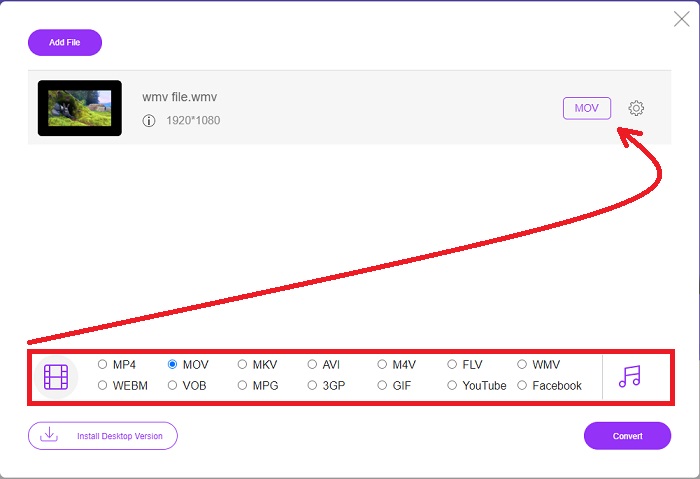
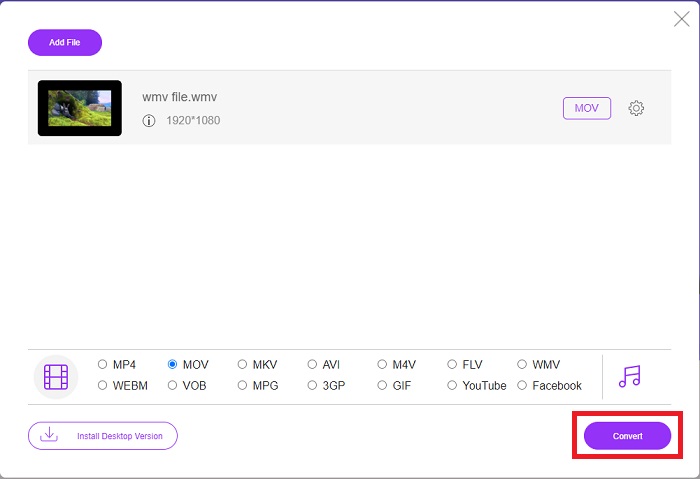
Krok 4: Po výběru formátu, do kterého chcete převádět, klikněte na Convert (Převést) a spusťte proces konverze.
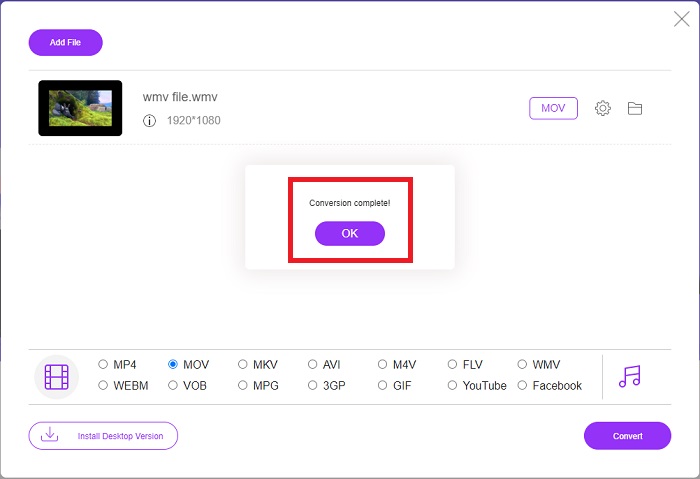
Krok 5: Po několika minutách byste měli vidět složku obsahující převedený soubor, kterou můžete otevřít a začít s ním pracovat.
Metoda 2. Použijte Video Converter
Snažíte se najít bezplatný převodník WMV na MOV? Nejrychlejší metodou je použít webovou službu k převodu souborů WMV do formátu MOV. Až budete s videi hotovi, můžete je přenést do jakéhokoli zařízení a užít si je později s pomocí tohoto online nástroje pro převod médií! Zde je návod, jak se to dělá.
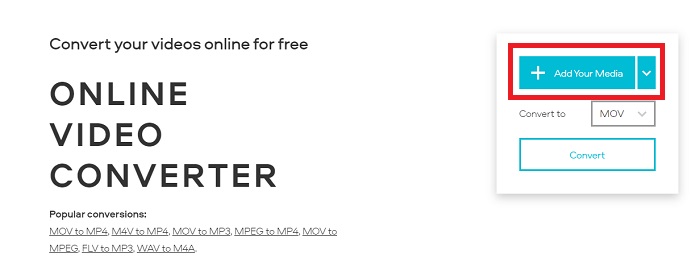
Krok 1: Kliknutím na tlačítko Add Your Media (Přidat média) můžete importovat svůj soubor WMV z počítače, Dropboxu nebo Google Disku a převést jej do formátu MOV.
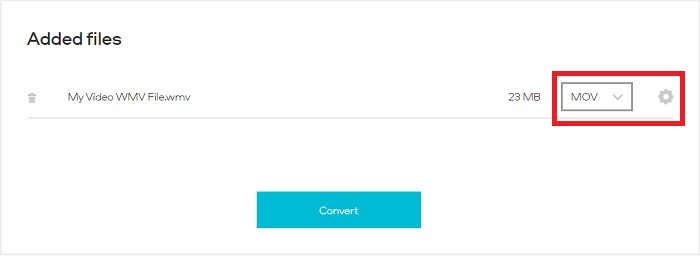
Krok 2: Jako požadovaný výstupní formát zvolte MOV. Využijte rozšířená nastavení k vylepšení celkové kvality videa.
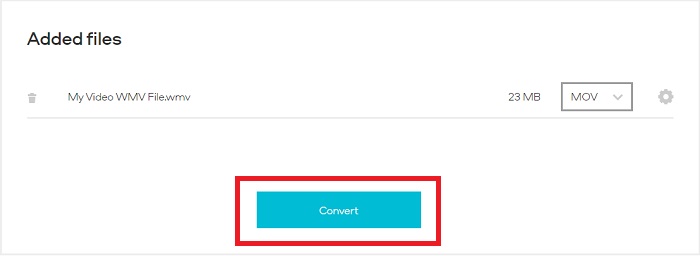
Krok 3: Po provedení všech úprav můžete kliknout na tlačítko Convert (Převést).
WMV vs. MOV
WMV, produkovaný společností Microsoft, byl jedním z nejběžnějších video formátů v roce 2000. Lze jej vidět na webu a přehrávat v různých přehrávačích médií ve Windows. A je to také výchozí formát souboru videa programu Windows Media Player. V poslední době ji ale přebírají jiné formáty.
Formát MOV lze použít pro uložení filmu, televizního pořadu, krátkého videoklipu nebo domácího filmu. Ve skutečnosti je uložen ve formátu QuickTime File Format (QTFF), který byl představen společností Apple v roce 1991. Soubory MOV se často používají, když lidé chtějí uložit video ve vysoké kvalitě.
Část 4. Nejčastější dotazy o převodu WMV na MOV
Jsou MOV a WMV totéž?
Soubory MOV využívají kódování MPEG-4 pro přehrávání s QuickTime pro Windows, vyvinutým společností Apple pro QuickTime Player. Kromě podpory Facebooku a YouTube funguje MOV dobře i pro sledování televize. Soubory WMV (Windows Media Viewer) jsou kvalitou a velikostí srovnatelné s MOV (formát videa Mozilla). Microsoft vytvořil WMV pro použití ve Windows Media Player.
Jaké jsou výhody a nevýhody MOV?
Soubory MOV se primárně používají pro editaci a téměř vůbec ne pro běžné praktické použití. Kromě QuickTime Playeru tento formát podporuje jen malé množství multimediálních přehrávačů. Profesionální editoři videa tuto vlastnost využívají jako výhodu. Nevýhodou je slabé rozšíření na běžných zařízeních.
Používá se stále WMV?
Formát WMV byl vyvinut společností Microsoft a běžně se používá v přehrávači Windows Media Player. Soubory ve formátu WMV jsou menší a lépe komprimovatelné než soubory MP4. Díky tomu je velmi populární pro online streamování videa. iPhone a Mac mohou spustit Windows Media Player, který však není s appleovskými zařízeními kompatibilní.
Závěr
Jak je uvedeno výše, existuje mnoho možných konvertorů, které si můžete stáhnout nebo používat kdykoli online. Pokud jde ale o efektivitu a výběr toho nejlepšího konvertoru, závěr tohoto článku ukazuje na Video Converter Ultimate. Díky schopnosti rychle převádět video i audio formáty, podpoře celé řady formátů zdarma a dostupnosti pro Windows i Mac je jasnou volbou. Na co ještě čekáte? Stáhněte si jej hned teď!
Zdarma ke staženíPro Windows 7 nebo novějšíBezpečné stažení
Zdarma ke staženíPro MacOS 10.7 nebo novějšíBezpečné stažení
-
 Nejlepší 3 způsoby, jak převést FLV na WMV v systémech Windows a Mac
 Hledáte nejlepší způsob, jak převést FLV na WMV bez ztráty kvality na PC nebo Mac? Máte štěstí, protože zde sdílíme tři způsoby, jak tuto práci zvládnout snadno.
-
 2 nejjednodušší způsoby převodu souborů WMV na FLV na PC / Mac
 Jak můžete převést WMV na FLV? Nejprve si musíte přečíst naše doporučení a najít svou oblíbenou metodu a poté postupovat podle našeho průvodce, abyste mohli svou práci provést rychle.
-
 [2 řešení] Jak zdarma převést videa WMV na soubory GIF
 Pokud chcete ořezat nádherné části videí WMV a vytvářet z nich GIF, můžete se v tomto článku dozvědět o 2 jednoduchých metodách přenosu videí WMV do GIF.

