


 Video Converter Ultimate
 Screen Recorder
 Oprava videa
 Bezpečné stažení
MOV to MPG: Rychlý průvodce, jak převést tyto formáty v roce 2023
Je třeba zdůraznit, že soubory MOV se dnes těší velmi kladným ohlasům, protože jsou považovány za jeden z nejvhodnějších formátů pro ukládání filmů. Tento souborový formát je široce uznáván jako výchozí formát pro produkty Apple, jako jsou iPhone, iPad a MacBook. Když se však pokusíte nahrát soubory MOV na internet, můžete narazit na potíže, protože ve srovnání s jinými videoformáty mívají větší velikost. Abyste to překonali, můžete se rozhodnout převést MOV na MPG. Proto zůstaňte u tohoto návodu a my vám pomůžeme naučit se, jak to zvládnout.

Část 1. Převést MOV na MPG
1. Video Converter Ultimate
Video Converter Ultimate je špičkové offline řešení, které splní všechny vaše potřeby při převodu MOV na MPG. Během několika kliknutí vám program umožní převést soubor, ať už je malý nebo velký. Kromě toho je tento nástroj vybaven nastavením přizpůsobení výstupu, které uživatelům umožňuje dosáhnout vysoce kvalitního výstupního formátu a přizpůsobit jej svým preferencím. Zde je přehled jednoduchého návodu, jak rychle převést MOV na MPG.
Krok 1. Nainstalujte program
Nejprve klikněte na příslušné tlačítko Download (Stáhnout) pro vaše zařízení níže. Poté klikněte na instalační soubor a spusťte jej, aby se program otevřel na vaší obrazovce.
Zdarma ke staženíPro Windows 7 nebo novějšíBezpečné stažení
Free DownloadPro macOS 10.7 nebo novějšíBezpečné stažení
Krok 2. Nahrajte soubory MOV k převodu
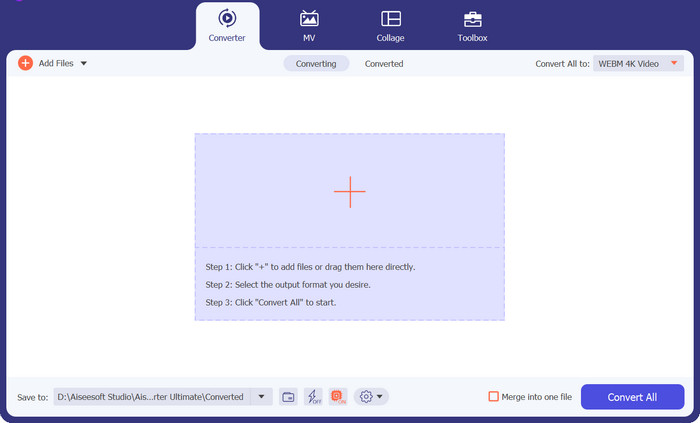
Po instalaci programu zvolte tlačítko Plus uprostřed rozhraní. Jakmile se zobrazí adresář počítače, vyberte soubor MOV, který chcete nahrát. Kromě toho můžete nahrát i více souborů najednou pro hromadný převod.
Krok 3. Zvolte výstupní formát
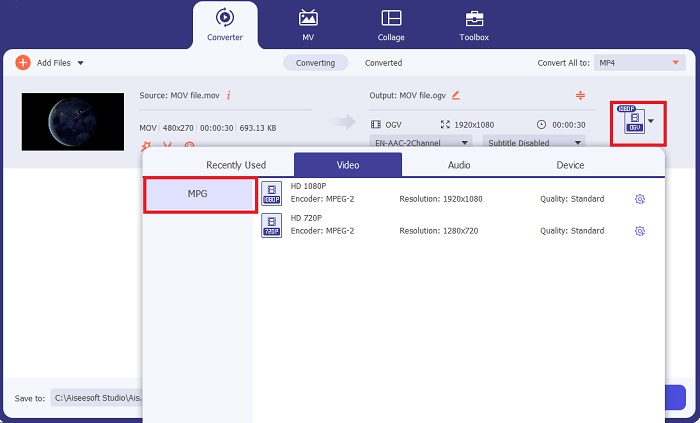
V programu se zobrazí náhled vašeho souboru MOV, čímž se potvrdí úspěšné nahrání. Pro výběr výstupního formátu rozbalte kartu Output (Výstup) a klikněte na panel Video. Odtud posuňte nabídku a vyberte MPG.
Krok 4. Spusťte převod
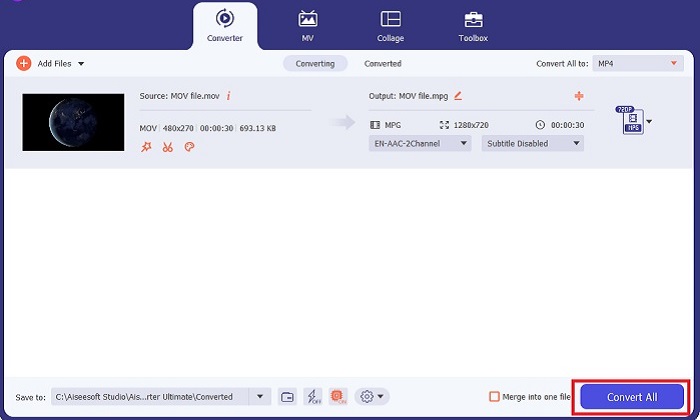
Nakonec upravte požadavky na kvalitu výstupu změnou nastavení výstupu. Jakmile skončíte, klikněte na tlačítko Convert (Převést), aby se váš MOV převedl na MPG.
Klíčové funkce
◆ Bezproblémová konverze MOV do MPG: Jedna věc, kterou na Video Converter Ultimate milujeme, je jeho uživatelsky přívětivé rozhraní. Tento nástroj je nejlepší pro každého, ať už začátečník nebo zkušený uživatel.
◆ 50x rychlejší konverze: Díky technologii kódování GPU Acceleration Video Converter Ultimate překonává všechny ostatní offline konvertory díky své rychlé konverzi bez prodlev a pádů.
◆ Funkce hromadného převodu: S Video Converter Ultimate můžete také převést složku souborů MOV na výběr 100o+ formátů jiných než MPG.
2. Free Video Converter Online
Free Video Converter Online je další software, který mění způsob práce s převodem formátů. Ačkoli tento online program nenabízí tak komplexní nástroje jako offline software, obstojí jako spolehlivý program pro online převod MOV na MPG. Nabízí funkci hromadného převodu a dává vám plnou kontrolu nad výstupem.
Krok 1. Nejprve přejděte na hlavní web Free Video Converter Online. Před nahráním souboru MOV klikněte na Add Files (Přidat soubory) a nejprve budete vyzváni ke spuštění online nástroje.
Krok 2. Chcete-li nahrát soubor, který chcete převést, znovu zvolte tlačítko Add Files (Přidat soubory) a jedenkrát nahrajte svůj soubor. Můžete také využít funkci přetažení myší (drag-and-drop).
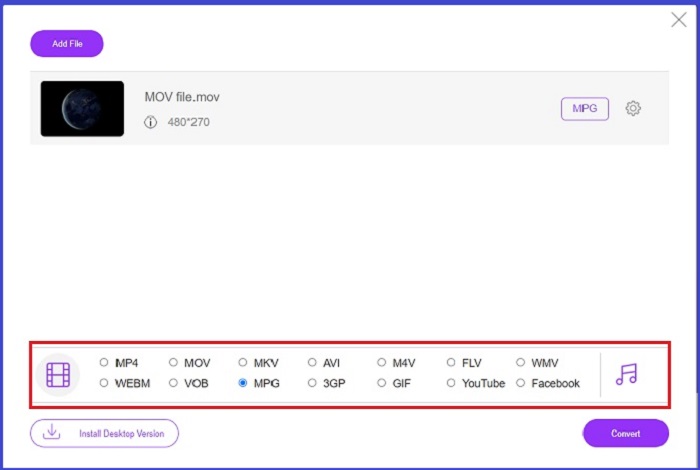
Krok 3. Jakmile se objeví váš původní soubor, vyberte výstupní formát v dolním rohu obrazovky. Na panelu Video uvidíte všechny dostupné formáty a v našem případě zvolte MPG. Nakonec klikněte na tlačítko Convert (Převést) a počkejte na stažení souboru.
Klíčové funkce
◆ Multiplatformní online převaděč: Ať už jste na telefonu, tabletu nebo počítači, tento nástroj funguje perfektně, což umožňuje konverzi videa nebo zvuku.
◆ Záruka ochrany osobních údajů: Kdo chce napadnout soukromé informace? S Free Video Converter Online byste neměli o tomto problému čelit žádným dilematům. Tento online nástroj umožňuje uživatelům převádět MOV na MPG zdarma, aniž by vyžadovali procesy registrace.
◆ Žádné požadavky na instalaci: Tento nástroj je dalším bezproblémovým převodníkem, který vám pomůže zbavit se hektických instalací, zvláště pokud vám dojde nějaký digitální prostor.
Část 2. Převod MPG na MOV
1. Video Converter Ultimate
Ještě jednou, Video Converter Ultimate je stále nejlepší řešení, které vám můžeme nabídnout pro převod MOV na MPG na zařízeních Mac i Windows. Tento nástroj podporuje více než 1000 video a audio formátů, včetně těch speciálně přizpůsobených zařízením, jako jsou Samsung, Apple, Sony a další. Postupujte podle níže uvedeného návodu a převeďte libovolné své soubory MPG na MOV.
Zdarma ke staženíPro Windows 7 nebo novějšíBezpečné stažení
Free DownloadPro macOS 10.7 nebo novějšíBezpečné stažení
Krok 1. Klikněte na tlačítko Add Files (Přidat soubory) a importujte do programu soubory MPG.
Krok 2. Poté, co se váš soubor načte na obrazovku, vyberte výstup kliknutím na Output > Video > MOV. Pro lepší kvalitu můžete také upravit parametry videa.
Krok 3. Klikněte na tlačítko Convert (Převést), aby program převedl soubory z MPG na MOV. Jakmile je převod dokončen, můžete si výstup v programu zkontrolovat.
2. AnyConv
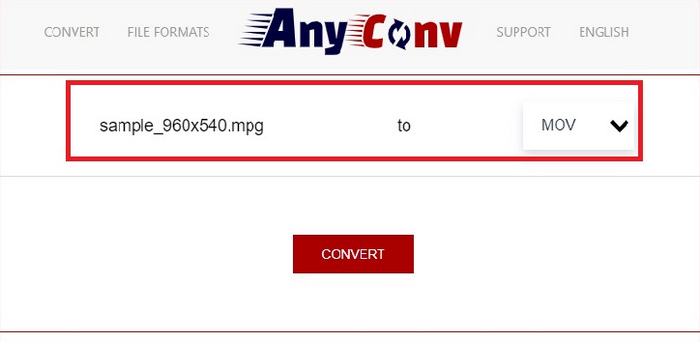
AnyConv je bezplatný online převodník MPG na MOV. Tento program funguje dobře na jakémkoli zařízení a nabízí funkci drag-and-drop při nahrávání souborů MPG. Toto online řešení navíc zabezpečuje data uživatelů tím, že po hodině smaže jejich převedené soubory. Kromě MOV můžete své MPG soubory převést na 3GP, AVCHD, MP4, MKV a další.
Krok 1. Nejprve otevřete webovou stránku AnyConv. Jakmile se zobrazí na obrazovce, klikněte na Choose File (Vybrat soubor) a zvolte cílový záznam MOV, který chcete převést.
Krok 2. Jakmile je váš soubor MOV nahrán, vyberte MPG ze seznamu výstupních formátů ve sloupci Output (Výstup) uprostřed.
Krok 3. Nakonec klikněte na tlačítko Convert (Převést) a počkejte, až se váš soubor stáhne.
Další čtení:
3 nejlepší způsoby, jak rychle převést MPG na MP4
5 nejlepších špičkových převodníků MOV na 3GP, které si nesmíte nechat ujít
Část 3. Často kladené otázky o tom, jak převést MPG na MOV
Existuje bezplatný převodník MOV na MPG?
Určitě ano! Online převodníky jsou vaší nejlepší volbou, abyste se vyhnuli placení poplatků. Můžete si vybrat Free Online Video Converter pro převod MOV do MPG zdarma.
Je MPG lepší než MOV?
MOV je lepší než MPG kvůli jejich rozdílům v typu. MOV je formát kontejneru, který ukládá všechna vaše původní data. MPG je zároveň komprimovaný kodek používaný ke zmenšení velikosti souboru videa pro rychlejší přenos souborů přes internet.
Jaká je výhoda souboru MOV?
Soubory MOV jsou vhodné pro úpravy a jsou považovány za standardy pro výběr nejlepšího formátu videa. Jednou nevýhodou tohoto souboru je, že tento formát otevírá pouze několik přehrávačů médií.
Snižuje MOV na MPG kvalitu?
Ano. Převedením souborů z MOV do MPG se nejen zmenší velikost souboru videa, ale také se sníží kvalita. Oba soubory jsou skvělé v každém případě, kdy je budete potřebovat.
Mohu hrát MOV ve Windows Media Player?
Naštěstí lze soubory MOV v programu Windows Media Player přehrávat, pokud je ve verzi 12 nebo vyšší.
Závěr
Tímto jsme si ukázali možné způsoby, jak převést MPG na MOV nebo naopak. Oba formáty vám mohou skvěle posloužit pro různé potřeby. S online převodníky získáte přímočarý převod. Pokud však chcete své soubory vylepšit úpravou jejich kvality a dokonce je i editovat, doporučujeme vám Video Converter Ultimate.
-
 FLV na MPG - Jak převést FLV na MPG na Mac, PC a online zdarma
 Jak převést FLV na MPEG? Mohu převést FLV na MPG zdarma? Tento příspěvek sdílí 3 bezplatné převaděče videa, které vám pomohou převést FLV na MPG bez ztráty kvality.
-
 Jak převést MPG na M4V na Mac a pomocí online nástroje
 Jste novým uživatelem Macu a nevíte, jak převést MPG na M4V? Pak si můžete přečíst tento článek, kde se dozvíte více a zjistíte, jak převádět soubory pomocí Macu.
-
 8 nejlepších přehrávačů MOV pro přehrávání souborů QuickTime MOV v původní kvalitě
 Prostě se dozvíte více o 8 nejlepších přehrávačích MOV dostupných pro Windows i Mac. Můžete vybrat požadovaný a vhodný soubor pro přehrávání souborů MOV v původní kvalitě.
