


 Video Converter Ultimate
 Bildschirm recorder
 Videoreparatur
Erfahren Sie, wie Sie AMV in MOV konvertieren, ohne die Qualität zu beeinträchtigen
AMV ist ein proprietäres Videoformat, das zur Speicherung von Videowiedergaben auf S1‑MP3- und MP4‑Mediaplayern verwendet wird. Die .amv-Dateiendung steht für eine niedrige Auflösung und starke Komprimierung, damit die Datei auf diesen tragbaren Mediaplayer passt. Obwohl das Format noch existiert, ist es schwierig, einen Mediaplayer zu finden, der es auf aktuellen Handys abspielt, da das Format veraltet ist. Anstatt lange nach einem kompatiblen Player zu suchen, können Sie die AMV-Dateien einfach in ein neues Format umwandeln, das weit verbreitet unterstützt wird, etwa MOV. Wenn Sie also den besten Weg kennenlernen möchten, AMV in MOV zu konvertieren, dann beginnen wir jetzt mit der Analyse.

Teil 1. Kurze Einführung in AMV und MOV
Die Idee von Action Media Video oder AMV ist es, MP4 als universelles Format zu ersetzen, weil dieses Format besser und viel komprimierter ist. Außerdem ist dieses Format die bessere Version des AVI-Formats. Aber das Format wurde in dieser neuen Ära ignoriert, da es kein Update zur Verbesserung der Auflösungsqualität erhält. Und jetzt, wenn Sie dieses Format auf unseren Mobilgeräten speichern und abspielen, können Sie damit rechnen, dass Sie es nicht abspielen können, da das Format nicht unterstützt wird. Wenn Sie also ein Video in diesem Format abspielen möchten, müssen Sie einen Mediaplayer eines Drittanbieters für AMV herunterladen. Während MOV erhält dieses Format viel Unterstützung, da es das native Dateiformat ist, das QuickTime entwickelt.
Teil 2. Konvertieren Sie AMV in MOV mit der Ultimate Desktop Software
FVC Video Converter Ultimate
Konvertieren Sie AMV in MOV mit Hilfe dieses professionellen Videokonverters, der eine herausragende Ausgabe liefert, mit der keiner konkurrieren kann: FVC Video Converter Ultimate. Dieser Konverter ist für PC und Mac verfügbar, und beide Versionen bieten die gleichen erweiterten Funktionen. Zudem sind die schnelle Konvertierung und die Hardwarebeschleunigung, die auf dem PC verfügbar sind, auch auf dem Mac nutzbar. Viele Anwender haben sich bereits für diese Software als erste Wahl entschieden, um ihre Probleme zu lösen. Bevor Sie dieses Tool jedoch verwenden können, müssen Sie es bei FVC erwerben. Auch wenn es kostenpflichtig ist, werden Sie dafür keine Hundert Dollar ausgeben müssen, und der Preis ist sein Geld wert. Ohne weitere Umschweife testen wir nun dieses Tool, um zu sehen, ob wir die ultimative Konvertierung erreichen können, wie es der Name verspricht.
Schritte zum Konvertieren von AMV in MOV mit dem FVC Video Converter Ultimate:
Schritt 1. Laden Sie den FVC Video Converter Ultimate auf Ihren Desktop herunter, indem Sie auf die Schaltfläche unten klicken, und installieren Sie die Software nach Abschluss des Downloads.
Gratis DownloadFür Windows 7 oder neuerSicherer Download
Gratis DownloadFür MacOS 10.7 oder neuerSicherer Download
Schritt 2. Öffnen Sie die Software, um sie zu nutzen, und klicken Sie zum Hochladen der .amv-Datei auf das +‑Symbol. Suchen Sie die Datei im Ordner und klicken Sie auf Öffnen, um sie einzufügen.
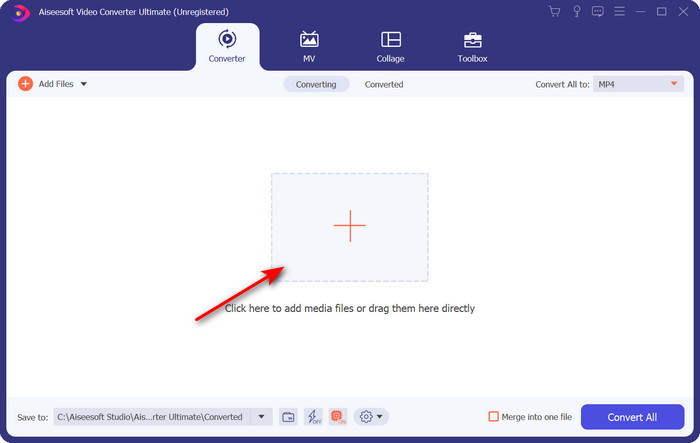
Schritt 3. Um das Format in MOV zu ändern, klicken Sie auf Alle konvertieren in: und wählen Sie MOV oder ein anderes gewünschtes Format aus.
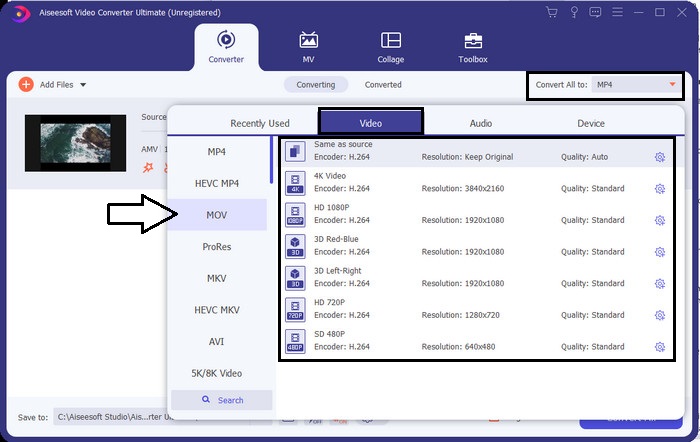
Schritt 4. Um die AMV-Datei in MOV umzuwandeln, klicken Sie auf Alle konvertieren, um den Konvertierungsprozess zu starten.
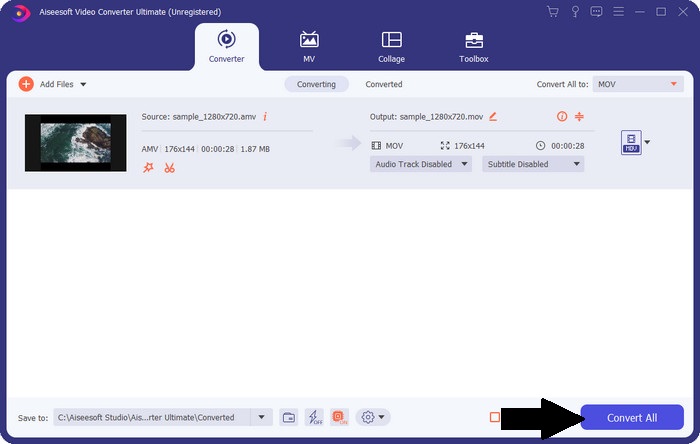
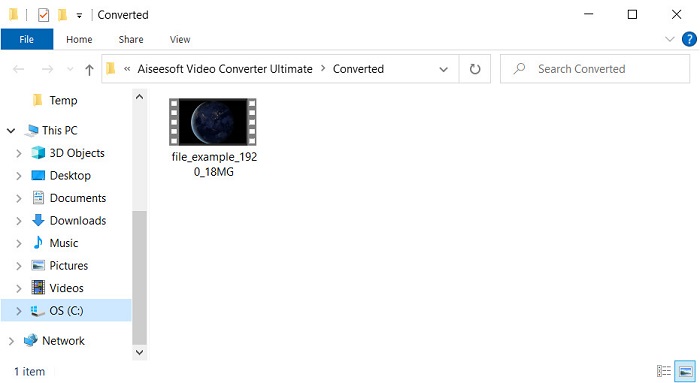
Schritt 5. Die Konvertierung der Datei dauert nur wenige Sekunden. Warten Sie, bis sich der Ordner mit der zuvor erstellten .mov-Datei öffnet, und klicken Sie auf die Datei, um sie mit Ihrem Standard‑Mediaplayer abzuspielen.
Teil 3. Konvertieren Sie AMV in MOV mit dem 2 verfügbaren Online Service Converter
1. Dateien konvertieren
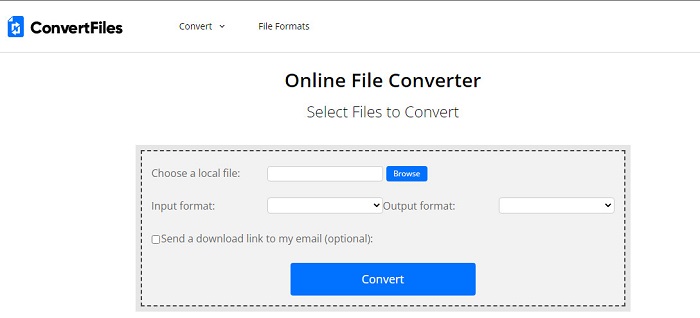
Einer der besten Online-Konverter, auf den Sie über Ihren bevorzugten Browser zugreifen können, ist ConvertFiles. Dieses Online-Tool kann Ihr Format ohne Probleme in ein neues Format umwandeln. Zudem unterstützt dieses Tool eine kleine Auswahl an Formaten, aus denen Sie wählen können. Allerdings dauert das Herunterladen der konvertierten Datei hier recht lange, da keine schnelle Konvertierung angeboten wird. Ein weiterer Nachteil sind die Werbeanzeigen; es gibt sehr viele davon in der Benutzeroberfläche. Trotz der Probleme mit dem Downloadprozess und den Anzeigen leistet dieses Tool als kostenloses Online-Werkzeug gute Dienste.
Schritte zum Konvertieren von AMV in MOV mit ConvertFiles:
Schritt 1. Öffnen Sie Ihren bevorzugten Browser und suchen Sie nach ConvertFiles.
Schritt 2. Sobald die Webseite geöffnet ist, klicken Sie auf Browse, um die Datei im Ordner zu lokalisieren; wählen Sie unter Output Format das Format MOV aus und klicken Sie auf Convert.
Schritt 3. Wenn die Konvertierung abgeschlossen ist, klicken Sie auf den blau hervorgehobenen Link, um die Datei auf Ihren Computer herunterzuladen.
2. MConverter
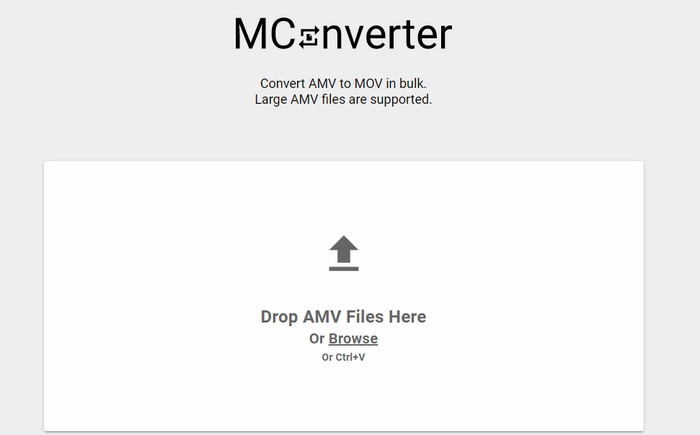
Sie möchten keine Werbung in der Oberfläche sehen, um AMV in MOV in Ruhe zu konvertieren? Dann versuchen Sie, den im Browser verfügbaren MConverter zu verwenden. Dieses Tool unterstützt außerdem Batch‑Konvertierung, um die Umwandlung ebenso effizient zu gestalten wie mit dem FVC Video Converter Ultimate. Der Nachteil dieses Online-Tools ist jedoch, dass die Dateigröße 200 MB nicht überschreiten darf. Wenn Sie also ein langes Video konvertieren möchten und die Dateigröße diese Grenze überschreitet, ist dies nicht die richtige Wahl. Möchten Sie jedoch ein besseres Konvertierungserlebnis als mit ConvertFiles, folgen Sie den untenstehenden Schritten.
Schritte zum Konvertieren von AMV in MOV mit MConverter:
Schritt 1. Suchen Sie in Ihrer Suchmaschine nach MConverter und öffnen Sie die Seite.
Schritt 2. Klicken Sie auf die Schaltfläche Upload, um die Datei einzufügen, warten Sie einen Moment, bis das Webtool geladen ist, suchen Sie das Format MOV und klicken Sie darauf. Die Konvertierung der Datei beginnt, sobald Sie das MOV-Format ausgewählt haben.
Schritt 3. Klicken Sie auf Download All, um die Datei zu speichern.
Teil 4. FAQs zu AMV und MOV
Kann ich mein MP4 in AMV umwandeln?
Sie können Ihre MP4-Datei in AMV umwandeln, um sie online schneller zu übertragen. Besonders wenn das Video eine Stunde lang ist, empfehlen wir Ihnen, die .mp4-Dateien in .amv zu konvertieren, da dieses Format im Vergleich der beiden deutlich kleiner ist.
Unterstützt VLC AMV?
Glücklicherweise können Sie den VLC Media Player verwenden, um .amv-Dateien auf diesem Player abzuspielen, auch wenn das Format veraltet ist. Aber wussten Sie, dass es Mediaplayer gibt, die VLC sogar übertreffen? Wenn Sie wissen möchten, welche Mediaplayer das sind, klicken Sie auf diesen Link, um die 5 alternativen Mediaplayer zu VLC kennenzulernen.
Wie wandle ich mein AMV in AVI um?
AMV ist die verbesserte Version von AVI; sprechen wir jedoch von der Qualität, liefert AVI im Vergleich zu diesem alten Format eine deutlich bessere Leistung. Außerdem ist AVI mit allen Plattformen sehr kompatibel. Wenn Sie Ihre AMV-Dateien also in besserer Qualität und auf allen Plattformen ansehen möchten, sollten Sie lernen, wie man AMV in AVI konvertiert.
Fazit
Die Diskussion muss hier beendet werden; Obwohl wir eine AMV-Datei auf unserer Festplatte speichern möchten, ist das Kompatibilitätsproblem ein Grund, warum wir sie konvertieren müssen. Immerhin soll AMV schon früher beliebt gewesen sein, weil dieser Container die Datei komprimiert. Heute müssen Sie jedoch in Betracht ziehen, es in ein neues Format zu konvertieren, um es weiterhin verwenden zu können. Darüber hinaus konvertieren die hier bereitgestellten Lösungen effektiv. Dennoch schneidet der FVC Video Converter Ultimate im Vergleich zu den anderen beiden Tools phänomenal ab. Wenn Sie also das beste Tool erleben möchten, müssen Sie es auf Ihren Computer herunterladen und die oben angegebenen Schritte kopieren.
-
 4 Beste Methoden zum einfachen Konvertieren von MOV in MP3 unter Windows und Mac
 Wenn Sie die MP3-Audiodateien aus MOV-Dateien extrahieren möchten, erfahren Sie mehr über die 4 effizientesten MOV-zu-MP3-Konverter, um die gewünschten Dateien aus dem Artikel zu erhalten.
-
 MKV in MOV - So konvertieren Sie MKV in MOV
 Wie konvertiere ich MKV in MOV auf einem Mac? Kann iMovie MKV lesen? Was bedeutet MOV-Format? In diesem Beitrag werden zwei einfache Möglichkeiten beschrieben, wie Sie MKV mit kostenlosen Online- und professionellen Videokonvertern in MOV konvertieren können.
-
 FLV in MOV - So konvertieren Sie FLV in MOV auf Mac / PC / Online Free
 Wie konvertiert man FLV in MOV? Wie konvertiere ich FLV in MOV auf dem Mac? Gibt es eine kostenlose Möglichkeit, YouTube FLV online in MOV zu konvertieren? Dieser Beitrag teilt 3 FLV-zu-MOV-Konverter, um FLV-Dateien in MOV zu ändern.
