


 Video Converter Ultimate
 Bildschirm recorder
 Videoreparatur
 Sicherer Download
So komprimieren Sie PDF-Dateien für E-Mails 3 effektive Möglichkeiten zur Auswahl
Indeed, sending large files via email can be a hassle. In fact, it may cause you some problems, or it may not be delivered at all. Also, many email providers restrict attachments to specific file sizes, which is easy to exceed with a complex PDF. This can be especially true for PDFs with lots of images or lengthy documents. To address this, most people in this situation resort to file-sharing services like Dropbox or Google Drive. However, they almost forget a handy trick, and that is via file compression. Many free online tools can do this, and some are quite popular. But how to compress a PDF for email effectively? That is what you are about to learn as you continue reading the entire content below.

Teil 1. Was ist die beste PDF-Größe für E-Mails?
Fakt ist: Es gibt keine magische Zahl für die ideale PDF-Größe für E-Mails. Sie müssen auf die Anhangsbeschränkung Ihrer E-Mail-Plattform achten. Beliebte Dienste begrenzen Anhänge auf etwa 20 MB, was überraschend leicht erreicht werden kann, insbesondere bei PDFs, die viele Bilder enthalten oder sehr lange Dokumente sind. Wenn Ihr PDF also größer als die genannte 20-MB-Beschränkung ist, wird Ihre E-Mail wahrscheinlich nicht gesendet und Sie erhalten eine Fehlermeldung. Anstatt eine bestimmte Größe oder die beste PDF-Größe für E-Mails anzustreben, ist es am besten, auf Nummer sicher zu gehen und die Größe unter 20 MB zu halten. Auf diese Weise können Sie sicher sein, dass die Datei erfolgreich angehängt und gesendet wird.
Teil 2. PDF-Dateien für E-Mails mit einem Klick komprimieren
Here’s a great and quick way to compress email files. Get ready to experience this free tool called FVC Free PDF Compressor, which can shrink your hefty PDF files without messing them up. Now, since most email services only allow attachments of around 20MB, PDFs with pictures or lots of text can easily reach that limit. This compressor can get your PDF way smaller, even under 100 kilobytes! You don’t need to worry about how it shrinks PDFs for email dramatically because it still maintains the quality of the files. In fact, you probably won't even notice a difference between the original and the shrunk version.
Darüber hinaus ist dieses erstaunliche Tool super einfach zu bedienen und kann von jedem mit beliebigem Fachwissen verwendet werden. Sie müssen die PDF-Datei nur per Drag & Drop in das Programm ziehen und es verkleinert sie automatisch. Anschließend können Sie die kleinere PDF-Datei mit nur einem Klick auf Ihrem Computer speichern. Auf diese Weise können Sie PDF-Dateien schnell online auf E-Mail-Größe komprimieren, auf eine Größe, die perfekt zum Versenden per E-Mail oder Hochladen geeignet ist, ohne dass das endgültige Dokument Wasserzeichen enthält. Um den Vorgang besser zu verstehen, lesen Sie die detaillierten Richtlinien unten.
Step 1. On its main interface, click the Add PDF File tab and choose the PDF file that you need to compress.
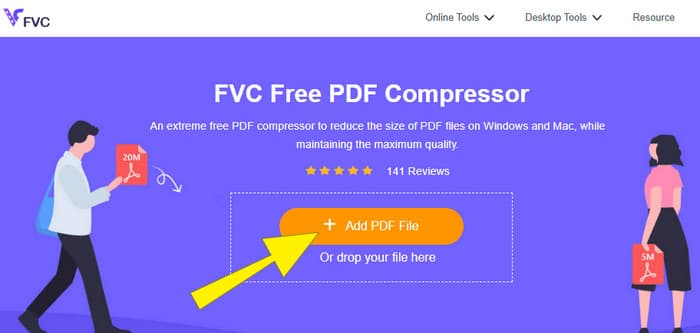
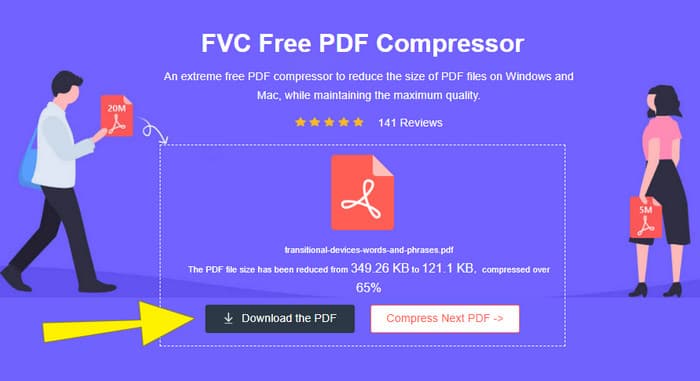
Step 2. While the PDF file is uploading, the tool is also working for its compression.
Step 3. Once done, click the Download the PDF button.
Teil 3. Komprimieren Sie PDF-Dateien für E-Mails mit Bearbeitungsfunktionen
If you prefer a tool that comes with editing features, then Adobe Acrobat is what you need for this task. Adobe Acrobat is a program known for creating, editing, and managing PDF files. It's like a powerful toolkit specifically designed for working with PDFs. One of its handy features is PDF compression, which you can use when you have a bulky PDF that won't fit into your email because of size limits. Adobe Acrobat, which comes with an online and desktop version, can help you compress large PDF files for email without messing with the quality too much. Well, it does this in a few ways, like reducing the size of images within the PDF or getting rid of unnecessary fonts. However, knowing Adobe and its suits, you must not be surprised if you find its learning curve steep. Hence, here are the steps to help you ease the process.
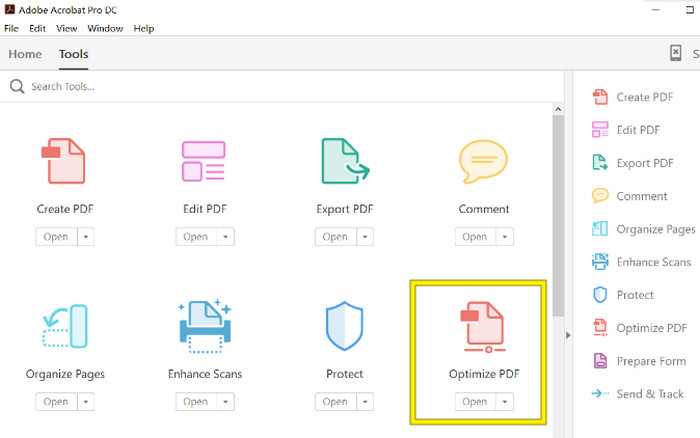
Step 1. Launch the Acrobat and open the PDF file that you need to work on. To do so, go to Tools-Optimize PDF-Open.
Step 2. Once you open the PDF file, click the Reduce File Size option from the new navigation shown. Then, set or use the editing options given to achieve your desired compression and optimization.
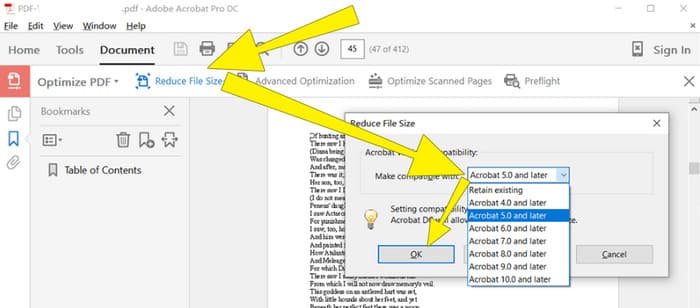
Step 3. After that, save the compressed PDF file.
Teil 4. PDF-Dateien für E-Mail komprimieren durch Konvertieren
Want to learn a new trick on how to compress a PDF to send via email? Let’s convert the file to JPG. This conversion trick can be done perfectly using PowerPoint. PowerPoint is a program you likely use to create presentations. Imagine a slideshow with text, pictures, and maybe even videos. PowerPoint lets you build these presentations with individual slides that you click through to show your audience. It's a popular tool for teachers, students, business people, and anyone who wants to share information visually.
Das Einfügen einer PDF-Datei in Ihre PowerPoint-Präsentation kann praktisch sein, ist aber möglicherweise nicht der intuitivste Vorgang. Wenn Sie das jedoch einmal gemacht haben, ist die Erstellung einer JPG-Datei ein Kinderspiel. Aber keine Sorge! Wir führen Sie Schritt für Schritt durch den Vorgang, damit Sie Ihre PDF-Datei im Handumdrehen einbetten können.
Step 1. Launch the PowerPoint on your PC and select the correct slide where you can open the PDF file.
Step 2. Now, navigate to the Insert tab menu and look for the Object option from the Text selection. Click the option, and a new window will pop up. From that window, toggle the Create from the File option, which is located on the left side of that interface. Then, click the Browse button, which will enable you to import the PDF file onto the slide.
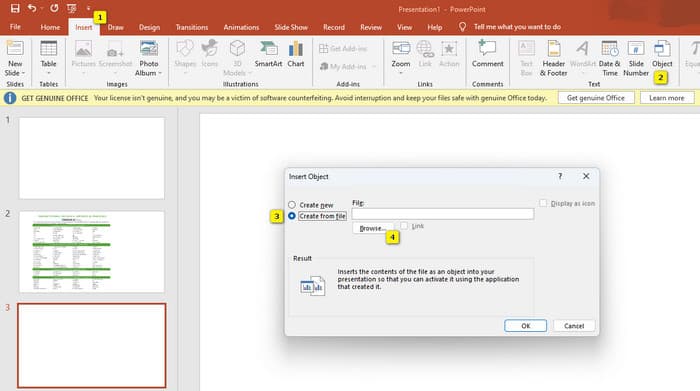
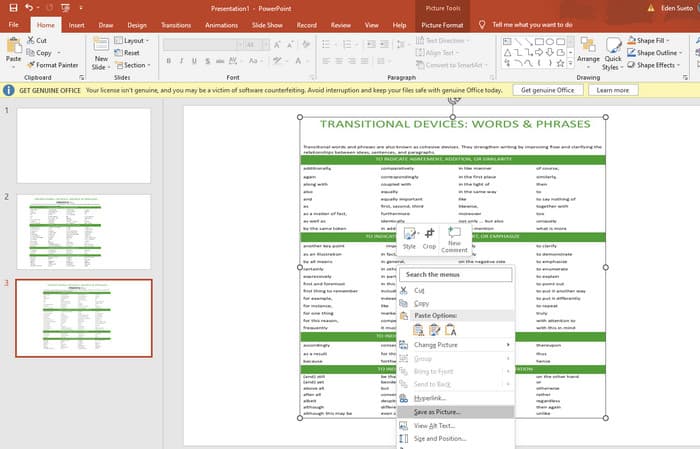
Step 3. Once the PDF file is uploaded, you can convert it to JPG. To do so, right-click the PDF on the slide, select Save As Picture, and save it as a JPEG.
Teil 5. Häufig gestellte Fragen zu PDF und Komprimierung
Welche Größe kann ein PDF-Anhang per E-Mail haben?
Das hängt von Ihrem E-Mail-Anbieter ab, aber die meisten begrenzen Anhänge auf etwa 20 MB.
Was ist der beste kostenlose PDF-Kompressor?
Es gibt kostenlose PDF-Kompressoren, aber der beste hängt immer von den Vorlieben des Benutzers ab. Bisher ist der FVC Free PDF Compressor das am meisten empfohlene kostenlose Online-Tool.
Wie komprimiere ich PDF-Dateien für E-Mails?
Tatsächlich funktioniert das Zippen bei PDFs, da es sich dabei bereits um komprimierte Dateien handelt.
Fazit
This article talks about how to compress PDF files for email in the best ways. You can now ensure a smoother and better way to send your PDFs via email as long as you reduce them properly to achieve the file limitation.
-
 Die 3 besten Lösungen zum einfachen Entfernen von Wasserzeichen aus Videos
 Möchten Sie das lästige Wasserzeichen auf dem Video entfernen? In diesem Blog können Sie die verschiedenen Ideen zum Entfernen des Wasserzeichens in einem Video kennenlernen.
-
 4 beste Möglichkeiten zum schnellen Hinzufügen von Wasserzeichen zu beliebigen Videos
 Lassen Sie uns lernen, wie Sie Wasserzeichen zu Videos unter Windows, Mac, Online, iOS und Android mit detaillierten Schritten hinzufügen, wenn Sie diesen Artikel lesen.
-
 3 einfachste Möglichkeiten, einem GIF online und offline Wasserzeichen hinzuzufügen
 Das Hinzufügen eines Wasserzeichens zu einem GIF kann so einfach sein wie 1-2-3, wenn Sie das richtige Werkzeug richtig verwenden. Die Tools auf dem Markt sind zu breit gefächert, aber wir stellen die drei Tools vor, auf die Sie sich verlassen können.
