


 Video Converter Ultimate
 Bildschirm recorder
 Videoreparatur
 Sicherer Download
4 Online-Music Cutters und Mergers zum Trimmen des Songs und Kombinieren von Audioclips
Wenn Sie Hintergrundmusik für Tiktok oder YouTube machen möchten, wie können Sie Songs online schneiden und zusammenführen? Wenn Sie Ihre Stimme mit Ihrer Lieblingsmusik kombinieren oder den gewünschten Teil für das Video zuschneiden möchten, insbesondere die Audiodateien in verschiedenen Formaten vorliegen, können Sie mehr über die 4 besten Online-Musikschneider und -zusammenführungen erfahren. Erfahren Sie einfach mehr über die Funktionen und wählen Sie die gewünschte nach Ihren Anforderungen aus.

Teil 1: 4 beste Methoden zum Schneiden und Zusammenführen von Songs online
Methode 1: Klideo
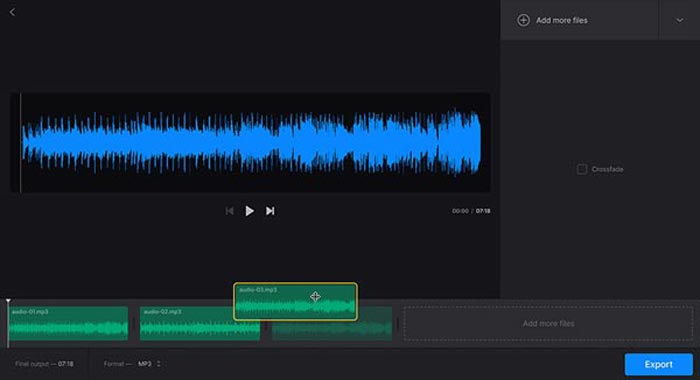
Clideo ist eine der beliebtesten Methoden, um Songs online für MP3, WMV und viele andere Audioformate zu schneiden und zusammenzufügen. Sie können Audiodateien von Ihrer Festplatte, Google Drive, Dropbox und sogar per URL hochladen. Außerdem können Sie Überblend‑Effekte anwenden, um Musikdateien zu verschmelzen.
Schritt 1: Um Songs online zu schneiden und zusammenzufügen, können Sie den Audio-Joiner oder den Audio-Cutter aufrufen und Audiodateien aus verschiedenen Kanälen auswählen. Außerdem können Sie auch Ihre Datei auswählen oder ihre URL einfügen.
Schritt 2: Sobald Sie den Song hochgeladen haben, können Sie den Zeitraum zum Zuschneiden der Audiodatei eingeben oder weitere Spuren zum Zusammenführen hinzufügen. Anschließend können Sie den gewünschten Teil auswählen, der kombiniert oder gelöscht werden soll.
Schritt 3: Nachdem Sie sich die zusammengefügten oder gekürzten Songs angehört haben, können Sie auf die Schaltfläche Download klicken, um die Musik auf Ihren Computer oder in ein Cloud-Speicherkonto herunterzuladen.
Methode 2: Soundtrap
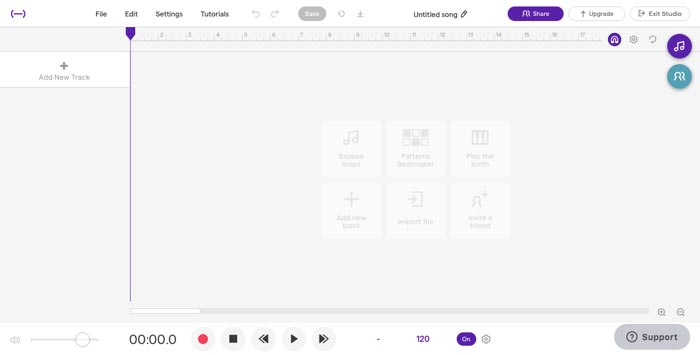
Wenn Sie als Profi beeindruckende Musikdateien erstellen müssen, ist Soundtrap ein hervorragendes Online-Tool zum Schneiden und Zusammenführen, mit dem Sie Stimme, Mikrofon, Klavier, Keyboard, Gitarre, Bass, Schlagzeug und vieles mehr hinzufügen können. Sie können Musik online in Echtzeit zusammen mit Ihren Musikerfreunden auf der ganzen Welt bearbeiten.
Schritt 1: Sobald Sie das Studio von Soundtrap betreten haben, können Sie ein neues Projekt erstellen und auf die Schaltfläche Music klicken, um verschiedene Audioclips zu importieren, um Songs online zu schneiden und zusammenzufügen.
Schritt 2: Wählen Sie das Menü Edit und dann die Option Split region oder Merge region, um die Musikdateien zu bearbeiten. Außerdem können Sie Bereiche stumm schalten oder die Audiodateien automatisch stimmen lassen.
Schritt 3: Wenn Sie mit der Audiodatei zufrieden sind, können Sie die Audioqualität anpassen und die MIDI-Einstellungen feinjustieren. Hören Sie sich die Musikdatei online an, bevor Sie auf die Schaltfläche Save klicken, um die Datei zu exportieren.
Methode 3: Audiotool
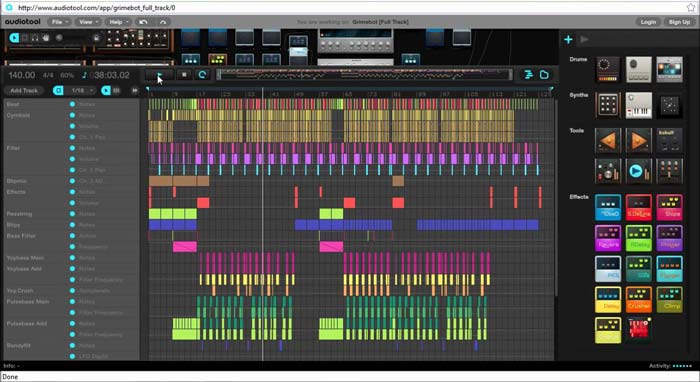
Audiotool verfügt über eine einzigartige und optisch ansprechende Benutzeroberfläche, mit der Sie Songs online schneiden und zusammenführen können. Das kollaborative, webbasierte Musikproduktionsstudio kann Ihre Musik aufpeppen, Songs kombinieren und sogar Dateien direkt in Ihrem Browser importieren.
Schritt 1: Wenn Sie die Audiodateien in den Online-Musikeditor importiert haben, können Sie über das Menü Project eine neue Datei erstellen, indem Sie auf die Schaltfläche New klicken. Danach können Sie das Audio innerhalb des Programms vorhören.
Schritt 2: Anschließend können Sie die gewünschten Effekte auswählen, das passende Werkzeug wählen, Notizen zu den Dateien hinzufügen und mehr. Danach können Sie den gewünschten Audioclip auswählen, um Songs online zu kürzen und zusammenzuführen.
Schritt 3: Sobald Sie die gewünschten Dateien erhalten haben, können Sie auf die Option Publish klicken, um die Songs auf Ihren Computer zu exportieren oder sie je nach Bedarf in sozialen Netzwerken zu teilen.
Methode 4: TwistedWave
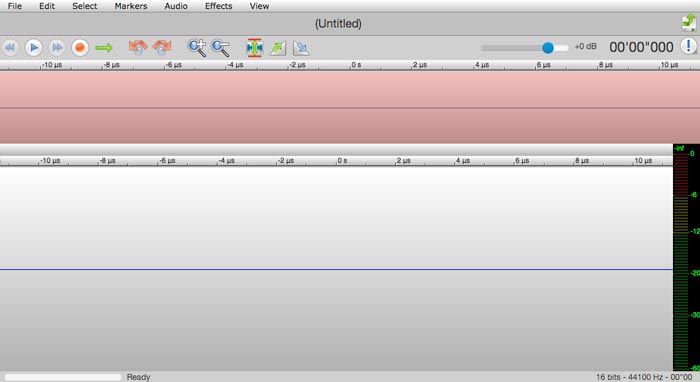
TwistedWave ist ein webbasiertes Audio-Bearbeitungstool, mit dem Sie nicht nur Songs online schneiden und zusammenführen, sondern auch Audiodateien von YouTube aufnehmen können. Es bietet Dutzende von Effekten, wie VST-Effekte, Verstärkung, Ein- und Ausblenden, Entfernen von DC-Offset oder Umkehren von Audiodateien.
Schritt 1: Gehen Sie zum Online-Musikeditor; dort können Sie Audiodateien von Google Drive und vielen anderen Cloud-Diensten importieren. Anschließend können Sie die Audiodateien direkt online vorhören.
Schritt 2: Wenn Sie den gewünschten Teil ausschneiden möchten, können Sie zwei Pfeile greifen und ziehen, um den Audioausschnitt hinein- oder herauszuschieben. Außerdem sind die beiden Pfeile auf jeder Seite des Schnitts sichtbar.
Schritt 3: Um Audiodateien online zusammenzuführen, können Sie mit den Option- oder Shift-Option-Tastenkombinationen beim Doppelklicken ganze Kanäle zur aktuellen Auswahl hinzufügen oder daraus entfernen.
Teil 2: Beste Online-Musik-Cutter- und Merger-Alternative
Was sollten Sie tun, wenn Sie den Ton aus einem Video kombinieren möchten? Wie lassen sich verschiedene Audiodateien in bester Qualität zusammenführen? Wenn Sie Songs online mit dem bestmöglichen Ergebnis schneiden und zusammenfügen möchten, ist der FVC Online Video Converter der passende Audiokonverter. Er ermöglicht es Ihnen, Audio- und Videodateien zu konvertieren sowie Video-Bitrate, Abtastrate, Bildfrequenz und Auflösung anzupassen.
- 1. Konvertieren Sie die Videos und Audiodateien in dieselben Audioformate.
- 2. Passen Sie Audio-Bitrate, Abtastrate, Auflösung, Lautstärke und mehr an.
- 3. Stellen Sie mehrere Audio- und Videoausgabeformate zur Auswahl bereit.
- 4. Während des Konvertierungsprozesses gehen keine Daten verloren.
Gratis DownloadFür Windows 7 oder neuerSicherer Download
Gratis DownloadFür MacOS 10.7 oder neuerSicherer Download
Teil 3: Häufig gestellte Fragen zum Online-Schneiden und Zusammenführen von Songs
1. Ist es möglich, Musik aus einem Video zu schneiden und zusammenzuführen?
Ja. Sie können das Video einfach in den Online-Musikschneider importieren und zusammenführen, um die Audiodateien zu extrahieren, wenn die Videoformate kompatibel sind. Natürlich können Sie die Videodateien auch vorher in Audioformate umwandeln.
2. Wann schneiden und fügen Sie Songs online zusammen?
Anders als bei professionellen Musikeditoren wie Adobe Premiere Pro oder Final Cut Pro können Sie Songs bequem online schneiden und zusammenführen. Sie können das Programm immer verwenden, wenn Sie über eine solide Internetverbindung verfügen.
3. Was sind die besten Apps auf iOS/Android, um Musik zu schneiden und zusammenzuführen?
Um Musik auf einem iPhone oder Android-Telefon zu schneiden und zusammenzuführen, können Sie einige Apps auch direkt verwenden, z. B. TonePad, Medly, GarageBand, Music Maker Jam und mehr. Unabhängig von Ihrem Kenntnisstand können Sie Ihre Musik immer bequem bearbeiten und erstellen.
Fazit
Wenn Sie einige atemberaubende Songs erstellen möchten, indem Sie Songs online schneiden und zusammenführen, können Sie in diesem Artikel mehr über die 5 besten Methoden erfahren. Wenn Sie die Musik professionell bearbeiten möchten, ist FVC Free Audio Convert der beste Begleiter zum Konvertieren, Anpassen von Videobitrate, Abtastung, Bildrate, Auflösung und anderen Parametern.
-
 MP3 VS MP4: Was ist der Unterschied zwischen MP3 und MP4?
 MP3 oder MP4, was ist besser? Was ist der Unterschied zwischen MP3 und MP4? In diesem Artikel wird MP3 mit MP4 unter allen Aspekten verglichen, die Sie sich vorstellen können.
-
 So fügen Sie Video kostenlos Audio und Musik auf Ihrem Computer / Telefon hinzu
 Dieser Artikel zeigt 4 einfache Möglichkeiten, um Audio kostenlos zu Video hinzuzufügen. Unabhängig davon, welche Audiospur Sie Ihrem Video hinzufügen möchten, können Sie hier zufriedenstellende Ergebnisse erzielen.
-
 Konkretes Tutorial – Wie man zwei Audiospuren in Audacity zusammenführt
 Audacity genießt den Ruf, Audio zu bearbeiten. Sie haben Audacity heruntergeladen, wissen aber nicht, wie Sie Audiospuren in Audacity zusammenführen? In diesem Beitrag erfahren Sie, wie Sie Tracks in Audacity zusammenführen.
