


 Video Converter Ultimate
 Bildschirm recorder
 Videoreparatur
 Sicherer Download
Effektive Möglichkeiten zum Konvertieren von TIFF in JPG und PNG
TIFF ist ein Bilddateiformat, das unter Fotografen und Grafikdesignern weit verbreitet ist. Es bietet hohe Qualität, Flexibilität und nahezu universelle Kompatibilität. Allerdings ist die Dateigröße größer, was das Teilen mit anderen oder im Web erschwert. In diesem Fall gehört es zu den besten Lösungen, diese Datei in andere Formate zu konvertieren. Die Dateiformate JPG und PNG sind kleiner als TIFF. Daher ist es sinnvoll, TIFF in JPG und PNG umzuwandeln. Dieser Artikel stellt Ihnen die besten Methoden vor, um TIFF in JPG/PNG zu konvertieren. Außerdem erfahren Sie alle wichtigen Informationen zu diesen Bilddateiformaten. Lesen Sie also diesen Beitrag, um die gesuchte Lösung zu erhalten.

Teil 1. TIFF vs. JPG vs. PNG
| Datei Format | TIF/TIFF | JPG | PNG |
| Dateinamenerweiterung | .tif / .tiff | .jpg | .png |
| Entwickelt von | Aldus (von Adobe übernommen) | Gemeinsame fotografische Expertengruppe | PNG-Entwicklungsgruppe |
| Beschreibung | 1992 wurde das Tag Image File Format (TIFF) wurde entwickelt. Entwickler können diesen flexiblen Dateityp erweitern, um vielen Anforderungen gerecht zu werden. TIF- und TIFF-Dateien sind beides Bilddateiformate, die zum Speichern von Bildern verwendet werden. Es gibt jedoch einige Unterschiede zwischen diesen Formaten. TIFF-Bilddateien können mehr als ein Bild in einer Datei speichern. Andererseits können TIF-Dateien nur ein Bild speichern. Außerdem können die TIFF-Dateien Metadaten zum Bild speichern, die TIF-Dateien jedoch nicht. | JPG und JPEG sind gleiche Erweiterungen, die sich auf dasselbe digitale Bildformat beziehen. Es gibt keine Unterschiede zwischen den Formaten JPEG und JPG. Der einzige Unterschied besteht in der Anzahl der verwendeten Zeichen. JPG-Dateien werden mit der Dateierweiterung .jpg und JPEG-Dateien mit der Erweiterung .jpeg gespeichert. JPEG ist ein Akronym für Joint Photographics Experts Group. | Die Abkürzung PNG steht für Portable Network Graphic. Sie können Fotos in hoher Qualität speichern und im PNG-Format teilen. PNGs können unglaubliche 16 Millionen Farben verarbeiten. Es unterstützt auch transparente und halbtransparente Hintergründe. Die PNG-Bilddatei ist ein offenes Format, was bedeutet, dass Sie eine PNG-Datei von jeder Bildbearbeitungssoftware aus speichern und öffnen können. |
Teil 2. Hervorragende Methoden zum Online-Konvertieren von TIF/TIFF in JPG/PNG
Der FVC Free Image Converter ist der ideale Konverter, mit dem Sie TIFF online in JPG/PNG umwandeln können. Der Konvertierungsvorgang ist zudem sehr einfach. Bilder können in drei einfachen Schritten konvertiert werden. Zusätzlich wird eine Stapelkonvertierung angeboten. So können mehrere Fotos gleichzeitig umgewandelt werden. Das bedeutet, dass Sie Ihre Bilder in kürzerer Zeit konvertieren können. Das Tool ist leicht zu verstehen und bietet eine intuitive Benutzeroberfläche mit klaren Einstellungen. Außerdem unterstützt FVC Free Image Converter eine Vielzahl von Eingabeformaten. Es werden verschiedene Formate unterstützt, darunter JPG, PNG, BMP, TIFF, WEBP und GIF. Darüber hinaus ist dieser Konverter vollständig kostenlos. Er schützt außerdem die Privatsphäre der Nutzer. Ihre Daten werden sofort gelöscht, sobald Ihre Bilder konvertiert und gespeichert wurden. Die Tatsache, dass Sie diese Online-Anwendung in allen gängigen Browsern nutzen können, erhöht die Zugänglichkeit für die Benutzer. Befolgen Sie die nachstehenden einfachen Anweisungen, um diesen TIFF-zu-JPG-Konverter zu verwenden.
Konvertieren Sie TIF/TIFF in JPG
Schritt 1: Rufen Sie die Website des FVC Free Image Converter in Ihrem Browser auf. Wählen Sie dann das Dateiformat JPG unter der Option Konvertieren in aus.
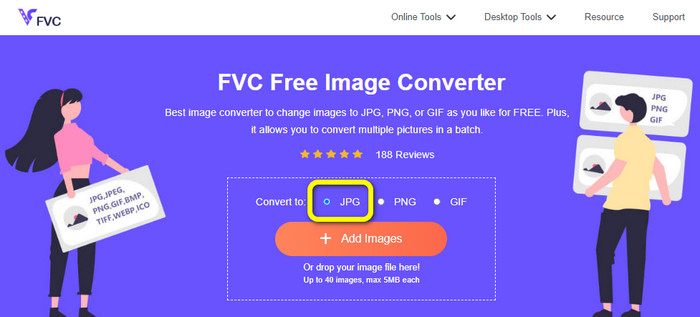
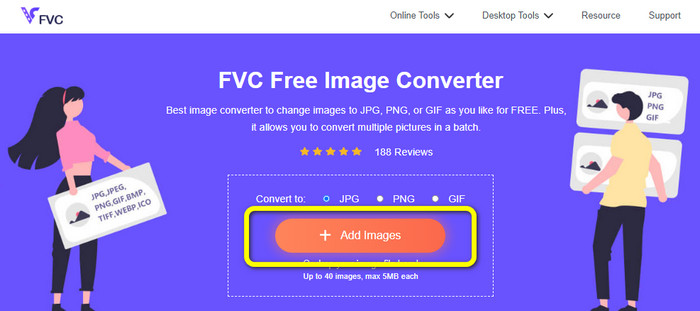
Schritt 2: Klicken Sie im nächsten Schritt auf die Schaltfläche Bilder hinzufügen. Nach dem Klicken erscheint der Dateimanager auf Ihrem Computerbildschirm. Wählen Sie die Bilddatei aus und klicken Sie auf Öffnen.
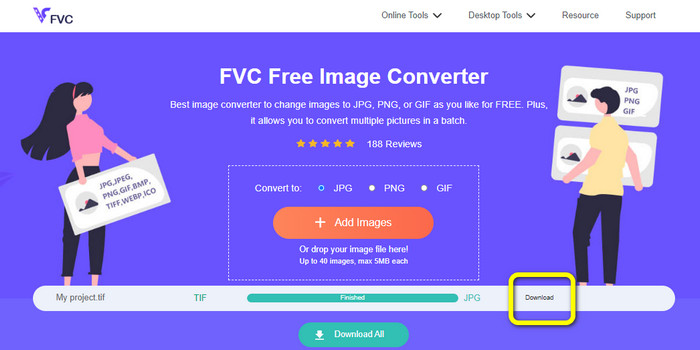
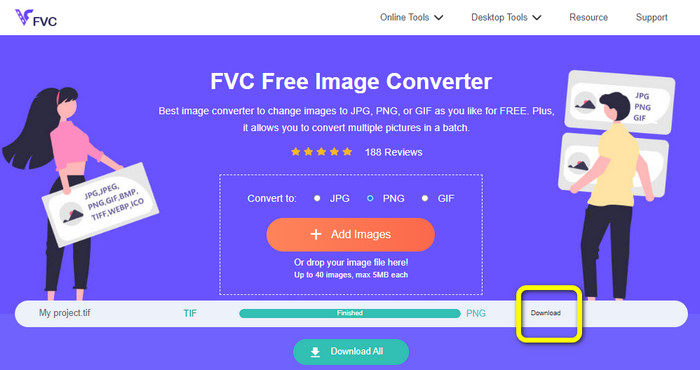
Schritt 3: Der Image Converter konvertiert Ihr Bild nach dem Hochladen automatisch. Klicken Sie auf die Schaltfläche Download, um Ihr konvertiertes Bild auf Ihrem Computer zu speichern und herunterzuladen.
Konvertieren Sie TIFF/TIF in PNG
Schritt 1: Wählen Sie auf der Webseite das Dateiformat PNG in der Format-Option aus.
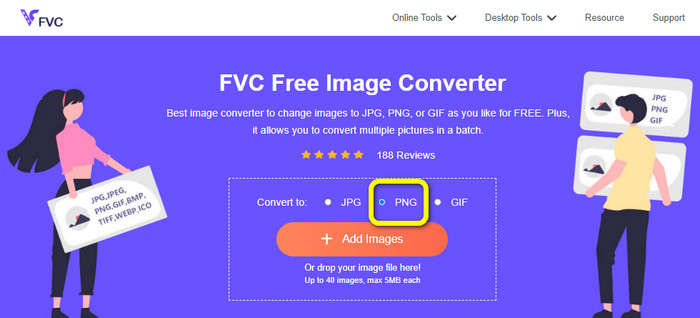
Schritt 2: Klicken Sie auf die Schaltfläche Bilder hinzufügen. Wenn dann der Dateimanager auf dem Bildschirm angezeigt wird, wählen Sie die PNG-Datei aus, die Sie konvertieren möchten. Öffnen Sie sie anschließend.
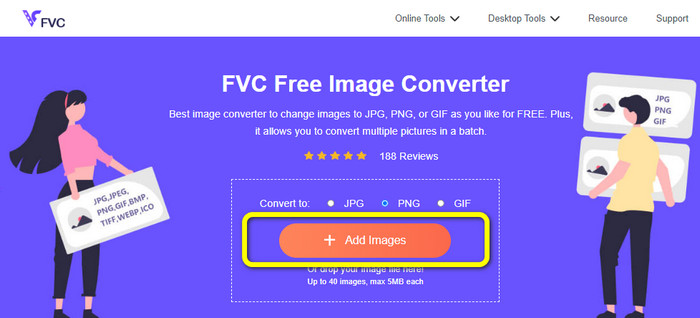
Schritt 3: Klicken Sie nach Abschluss des Konvertierungsvorgangs auf die Schaltfläche Download. Warten Sie, bis der Speichervorgang abgeschlossen ist, und öffnen Sie Ihr Bild aus Ihrem Ordner. Klicken Sie hier, um zu erfahren, wie Sie BMP in JPG oder PNG konvertieren.
Teil 3. Die besten Wege zum Offline-Konvertieren von TIF/TIFF in JPG/PNG
Video Converter Ultimate ist eine der besten Offline-Lösungen, um eine TIF-Datei in JPG und PNG zu konvertieren. Sie können dieses Programm sowohl auf Mac- als auch auf Windows-Betriebssystemen herunterladen. Mit diesem Offline-Bildkonverter können Sie Ihre TIF-Datei in JPG und PNG umwandeln. Außerdem unterstützt er andere Formate wie WEBP, BMP, GIF, TIFF, JPG, PNG und mehr. Der Konverter bietet eine benutzerfreundliche Oberfläche und ist damit sowohl für Profis als auch für Einsteiger ideal. Wenn Sie mehrere Dateien gleichzeitig konvertieren möchten, ist das ebenfalls möglich. Eines der bemerkenswerten Merkmale ist die Durchführung eines Stapelkonvertierungsprozesses. Dadurch wird es für alle Nutzer, die Bilddateien konvertieren möchten, besonders bequem. Zudem können Sie während der Bildkonvertierung noch mehr tun. Über das Einstellungssymbol können Sie Ihre Bilder vergrößern oder verkleinern. Sie können auch die Bildqualität je nach persönlicher Vorliebe anpassen. So erhalten Sie genau das Ergebnis, das Sie sich wünschen. Befolgen Sie die folgenden grundlegenden Schritte, um TIF in die Formate JPG und PNG zu konvertieren.
Konvertieren Sie TIFF in JPG
Schritt 1: Laden Sie Video Converter Ultimate auf Ihren Computer herunter. Führen Sie anschließend das Programm nach der Installation aus. Sehen Sie sich die Download-Schaltfläche unten an und klicken Sie darauf, um schnell auf den Konverter zuzugreifen.
Gratis DownloadFür Windows 7 oder neuerSicherer Download
Gratis DownloadFür MacOS 10.7 oder neuerSicherer Download
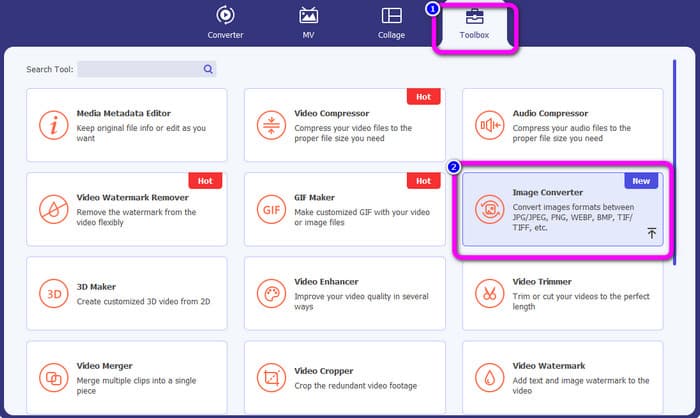
Schritt 2: Klicken Sie im oberen Bereich der Oberfläche auf den Bereich Toolbox. Wählen Sie die Funktion Image Converter aus.
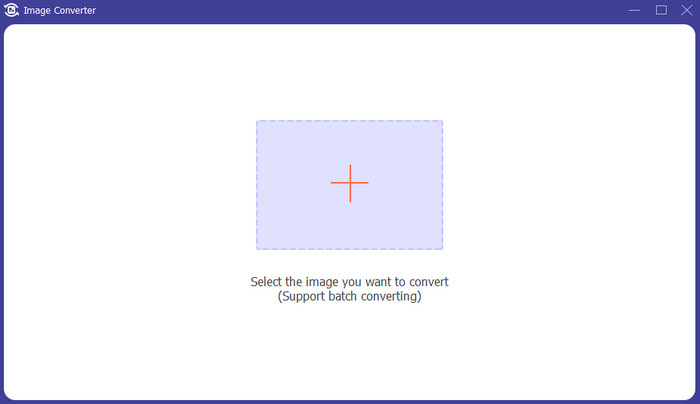
Schritt 3: Klicken Sie dann auf die Schaltfläche mit dem Plus-Symbol in der Mitte der Oberfläche. Wählen Sie die TIFF-Bilddatei aus Ihrem Dateimanager aus und öffnen Sie sie.
Schritt 4: Wenn Sie weitere Bilder hinzufügen möchten, klicken Sie auf die Schaltfläche Quelldatei hinzufügen. Gehen Sie dann zur Option Alles konvertieren in und wählen Sie das Dateiformat JPG aus.
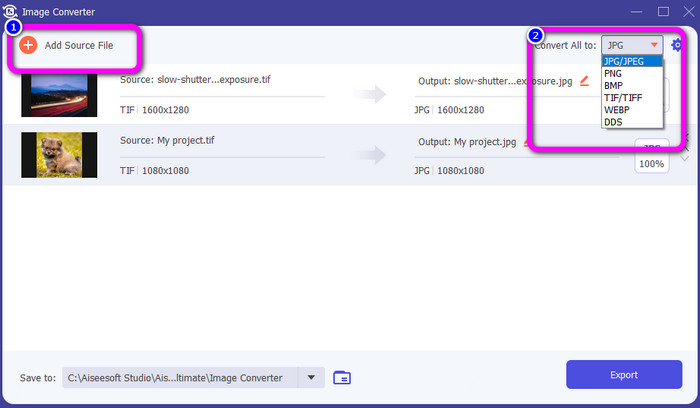
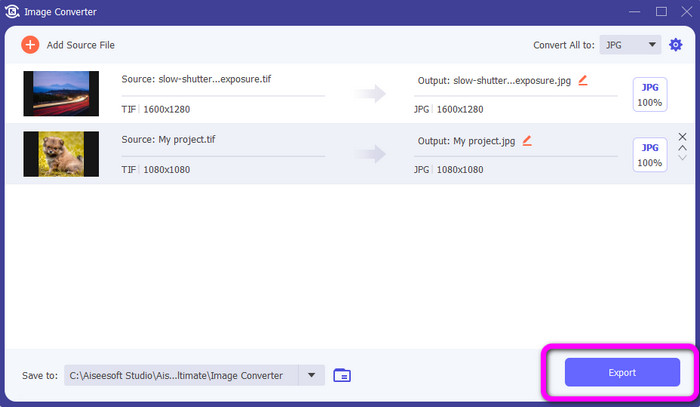
Schritt 5: Klicken Sie abschließend auf die Schaltfläche Exportieren, nachdem Sie JPG als Ausgabeformat ausgewählt haben. Nach dem Konvertierungsvorgang können Sie Ihr konvertiertes Bild in Ihrem Dateimanager öffnen.
Konvertieren Sie TIFF in PNG
Schritt 1: Sie können denselben Vorgang wie oben beschrieben ausführen. Gehen Sie zum Bereich Toolbox und wählen Sie die Funktion Image Converter.
Schritt 2: Klicken Sie auf das Plus-Symbol, um das TIFF hinzuzufügen, das Sie konvertieren möchten.
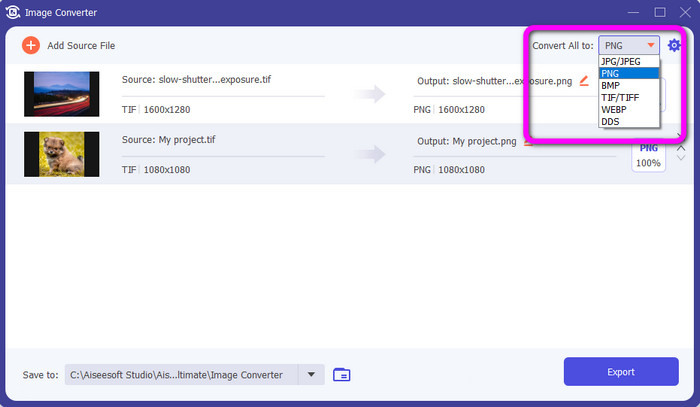
Schritt 3: Nachdem Sie Ihre TIFF-Bilder hinzugefügt haben, können Sie zur Option Alles konvertieren in gehen. Wählen Sie das Dateiformat PNG als Ausgabeformat aus.
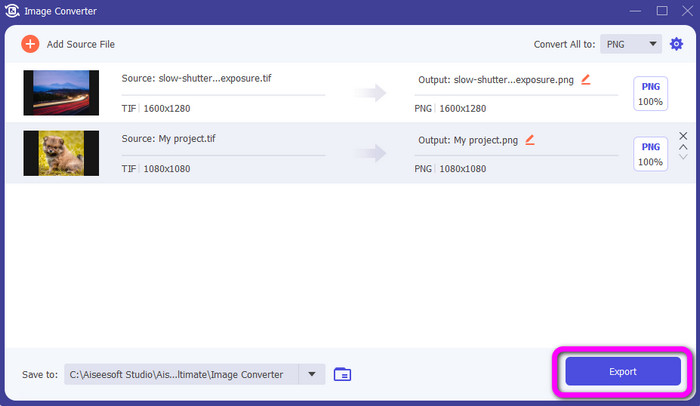
Schritt 4: Klicken Sie zum Abschluss im linken unteren Bereich der Oberfläche auf die Schaltfläche Exportieren. Mit dieser Software können Sie außerdem JPG in PNG konvertieren.
Teil 4. Häufig gestellte Fragen zum Konvertieren von TIF/TIFF in JPG/PNG
1. Wie konvertiert man TIFF in PNG auf dem Mac?
Eine der effektivsten Möglichkeiten, TIFF auf dem Mac in PNG zu konvertieren, ist die Verwendung des FVC Free Image Converter. Öffnen Sie Safari auf Ihrem Mac und rufen Sie diesen Online-Bildkonverter auf. Wählen Sie auf der Hauptseite im Formatmenü das Format PNG aus. Klicken Sie auf die Schaltfläche Bilder hinzufügen, um die TIFF-Datei hinzuzufügen, die Sie konvertieren möchten. Beim Hochladen wird die Datei automatisch konvertiert. Klicken Sie anschließend auf die Download-Schaltfläche, um das konvertierte Bild auf Ihrem Mac zu speichern.
2. Was sind die Vorteile der Konvertierung von TIF in PNG?
Wenn Sie Ihre Datei verkleinern möchten, müssen Sie Ihre TIF-Datei in andere Formate umwandeln. Das Konvertieren von TIF in eine PNG-Datei ist am besten, da PNG eine kleinere Dateigröße hat. Es gibt Ihnen eine überschaubare Dateigröße für Webbrowser und Geräte.
3. Welche Datei ist einfacher zu versenden, JPG oder TIFF?
Das JPG-Dateiformat hat eine kleinere Dateigröße. Es erleichtert das Versenden eines Bildes online oder per E-Mail. TIFF hat eine größere Dateigröße, wodurch das Senden eines Bildes langsam wird.
Fazit
Nun wissen Sie, dass TIFF-Bilddateien in der Regel eine größere Dateigröße haben. Wenn Sie also ein Bild schneller online versenden möchten, ist es besser, es in andere Formate mit kleineren Dateigrößen zu konvertieren. Daher hat Ihnen dieser Artikel die beste Lösung geboten, um TIFF in JPG und PNG zu konvertieren. Wenn Sie einen einfacheren Weg zur Konvertierung von Bilddateien suchen, verwenden Sie den FVC Free Image Converter. Er bietet eine leicht verständliche Oberfläche mit einfachen Methoden zum Konvertieren von Bilddateien.
-
 Konvertieren Sie JPEG effizient in JPG [Fünf Methoden aufgelistet]
 Holen Sie sich die einfachsten Tutorials zum Konvertieren von JPEG in das JPG-Bilddateiformat. Klicken Sie auf diesen Wegweiser und lernen Sie Ihre bevorzugten Methoden kennen
-
 Top 5 der führenden Tutorials zum schnellen Konvertieren von PNG in JPG
 Wenn Sie Ihre PNG-Datei in das JPG-Format konvertieren müssen, erfahren Sie hier, wie Sie am besten vorgehen. Sie lernen auch den Unterschied zwischen PNG- und JPG-Dateiformaten kennen
-
 Vollständige Details zu den Unterschieden von JPEG vs. JPG vs. PNG
 Dieser Beitrag wird Ihnen genügend Informationen über die Unterschiede von JPEG vs. JPG vs. PNG geben. Außerdem erfahren Sie, wie Sie Bilder in diese Dateien konvertieren
