


 Video Converter Ultimate
 Bildschirm recorder
 Videoreparatur
 Sicherer Download
3 Möglichkeiten zum einfachen Komprimieren von Fotos für E-Mails [Anleitung]
E-Mail ist eine großartige Plattform zum Senden von Nachrichten mit Fotoanhängen und anderen benötigten Dateien. Einige Benutzer haben jedoch Probleme beim Senden großer Fotodateien, da dies zu langen Upload-Zeiten, fehlgeschlagenen Zustellungen oder Überschreitungen der von E-Mail-Anbietern festgelegten Größenbeschränkungen für Anhänge führt. Um diese Probleme zu vermeiden, ist es wichtig, die Größe Ihrer Fotos vor dem Senden zu ändern.
Damit führen wir Sie in diesem Artikel durch 3 Methoden, wie Sie Fotos für E-Mails komprimieren können, sodass Ihre Fotoanhänge sich leicht senden und empfangen lassen, ohne die Qualität zu beeinträchtigen.

Teil 1. Vorteile der Komprimierung von Fotos für E-Mails
Das Komprimieren von Fotos bietet im Allgemeinen viele Vorteile, auch für die Verwendung per E-Mail. Die folgenden Dinge können Sie beim Ändern der Größe von Fotos für E-Mails nutzen:
• Da Bildkomprimierung bedeutet, das Foto auf eine kleinere Größe zu verkleinern, können Sie im Vergleich zu unkomprimierten Fotos problemlos mehrere Fotoanhänge in einer E-Mail versenden.
• Häufig legen E-Mail-Anbieter Beschränkungen für die Größe der Anhänge fest, die Sie senden können. Wenn Sie Ihre Fotos für E-Mails komprimieren, bleiben Sie innerhalb dieser Grenzen und stellen sicher, dass Ihre E-Mail ohne Probleme zugestellt wird. Das ist besonders hilfreich, wenn Sie E-Mails an mehrere Empfänger senden oder zusätzlich zu Ihren Fotos noch andere Arten von Anhängen beifügen.
• Wenn Fotos komprimiert werden, bedeutet das lediglich, dass sie weniger Speicherplatz einnehmen, sodass Sie Ihr E-Mail-Speicherkontingent besser ausnutzen können.
• Große E-Mail-Anhänge können manchmal von Mail-Servern herausgefiltert werden, was zu Zustellfehlern oder dazu führt, dass E-Mails als Spam markiert werden. Das Komprimieren Ihrer Fotos für E-Mails hilft, diese Probleme zu vermeiden und stellt sicher, dass Ihre E-Mail-Anhänge ohne Schwierigkeiten bei den vorgesehenen Empfängern ankommen.
• In bestimmten Situationen, in denen Nutzer ihre E-Mails auf dem Smartphone abrufen, sind gesendete komprimierte Fotos im Vergleich zu unkomprimierten deutlich einfacher auf mobilen Geräten herunterzuladen und anzusehen.
Teil 2. Komprimieren Sie Fotos für E-Mails, indem Sie das Bildformat konvertieren
Wenn Sie Fotos für E-Mails komprimieren möchten, können Sie zunächst ein Bildkonvertierungstool verwenden. Damit wird Ihr Bild in das gewünschte Format konvertiert, wobei der Konvertierungsprozess Ihr Foto auch auf eine wünschenswerte und handlichere Größe optimiert.
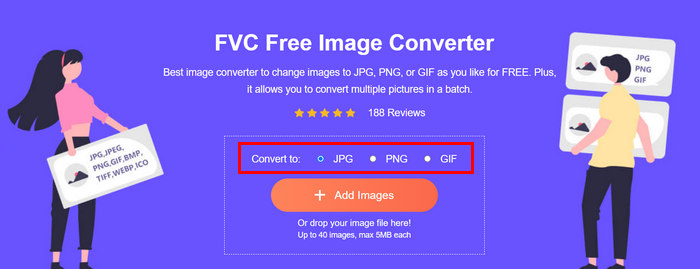
FVC Free Image Converter ist ein kostenloses Konvertierungstool, mit dem Nutzer ihre Fotos in verschiedene Bilddateiformate wie JPG, PNG und GIF umwandeln können. Wenn Sie also ein Bild per E-Mail in einem Format versenden, das mehr Daten enthält und dadurch eine größere Dateigröße hat, können Sie dieses Tool optimal nutzen. Außerdem ist es ideal, wenn Sie mehrere große Dateien versenden möchten, da es bis zu 40 Bilder auf einmal im Stapel verfahren konvertieren kann. So verwenden Sie dieses Tool, um Ihre Fotos für E-Mails zu komprimieren:
Schritt 1. Suchen Sie zuerst in Ihrem Browser nach FVC Free Image Converter, um auf das Online-Tool zuzugreifen.
Schritt 2. Wählen Sie anschließend unter der Option Convert to das gewünschte Ausgabeformat. Klicken Sie danach auf die Schaltfläche Add Images, um die Bilder zu importieren, die Sie konvertieren möchten.
Schritt 3. Klicken Sie zum Schluss auf die Schaltfläche Download All.
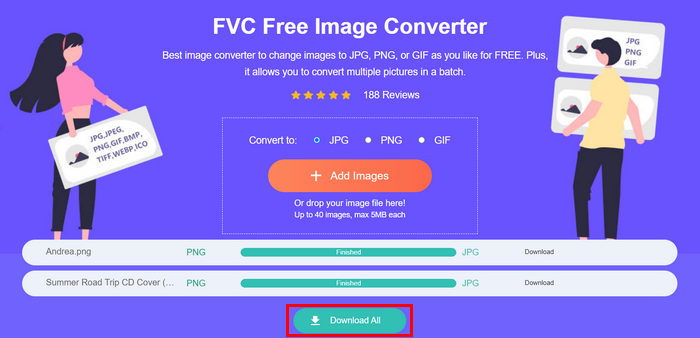 Mit dem kostenlosen Bildkonverter-Tool FVC ist garantiert, dass Ihre konvertierten Fotos jetzt komprimiert und in ihrer Größe reduziert werden, was perfekt für die Verwendung per E-Mail ist.
 Teil 3. Fotos für E-Mails mit einem Online-Komprimierungstool verkleinern
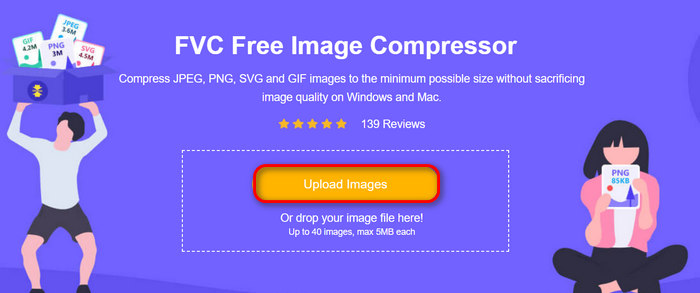
FVC Free Image Compressor ist ein kostenloses Online-Komprimierungstool, das den Prozess der Fotokomprimierung für E-Mails vereinfacht. Sie müssen nur die Bilddateien hochladen oder importieren und das Tool lässt sie automatisch komprimieren. Wenn Sie sich wegen Qualitätsverlust Sorgen machen: Dieses Tool nutzt optimale Optimierungs- und fortschrittliche Komprimierungsalgorithmen. Dadurch wird sichergestellt, dass die Qualität Ihres Bildes beim Komprimieren für E-Mails erhalten bleibt.
Wenn Sie ein Bild stapelweise komprimieren müssen, können Sie mit diesem Tool 40 Bilder gleichzeitig komprimieren. Außerdem unterstützt es verschiedene gängige Bildformate wie JPEG, PNG, SVG und animierte GIFs.
Schritt 1. Rufen Sie in Ihrem Browser die offizielle Website auf.
Schritt 2. Klicken Sie anschließend auf Upload Images, um die Bilder zu importieren, die Sie für Ihre Website komprimieren möchten. Bitte beachten Sie, dass dieses Tool Ihre Fotos automatisch komprimiert, sobald Sie sie ausgewählt und auf „Öffnen“ geklickt haben.
Schritt 3. Nach der Komprimierung Ihrer Bilder können Sie sie prüfen, indem Sie ihre neue Größe nach der Komprimierung ansehen. Klicken Sie abschließend auf Download All, um Ihr Bild zu speichern.
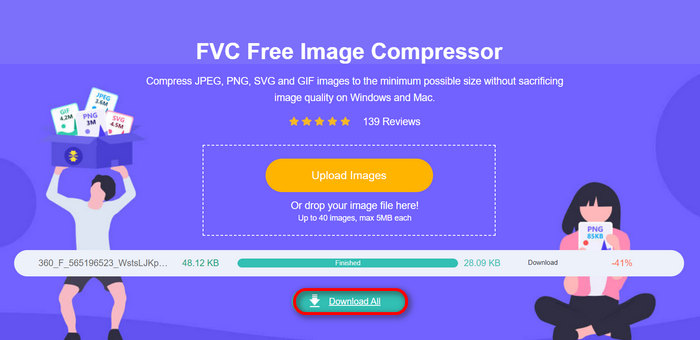
Mit dieser Methode können Sie Fotos wirklich für E-Mails komprimieren, ohne komplizierte Schritte und Abonnementgebühren durchführen zu müssen. Darüber hinaus ist es dank seiner benutzerfreundlichen und intuitiven Oberfläche ein ideales Tool für Benutzer aller Erfahrungsstufen. Wenn Sie also Ihre Fotos für die Verwendung per E-Mail optimieren möchten, probieren Sie diese Methode jetzt aus.
Teil 4. Größe von Fotos für E-Mails auf eine bestimmte Größe ändern
Wenn Sie die Größe von Fotos für E-Mails auf eine bestimmte Größe ändern möchten, können Sie das Tool IMGonline ausprobieren. Mit diesem Bildkomprimierungstool können Sie die Größe Ihres Bilds auf eine beliebige Größe ändern. So geht's:
Schritt 1. Klicken Sie auf der Website auf die Schaltfläche Choose File, um das Foto hinzuzufügen, das Sie komprimieren möchten.

Schritt 2. Legen Sie als Nächstes die Einstellungen für die JPEG-Komprimierung fest. Geben Sie die gewünschte Größe ein, in KB oder MB, je nach Ihrer Wahl.

Schritt 3. Wählen Sie im Menü Size Reducing in Megapixel, wie stark Sie Ihr Foto komprimieren bzw. wie stark Sie die Komprimierung Ihres Fotos begrenzen möchten.
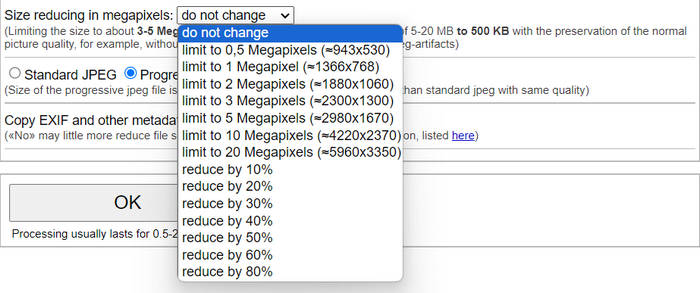
Schritt 4. Wählen Sie anschließend zwischen Standard JPG oder Progressive JPG.

Schritt 5. Klicken Sie abschließend einfach auf die Schaltfläche OK.
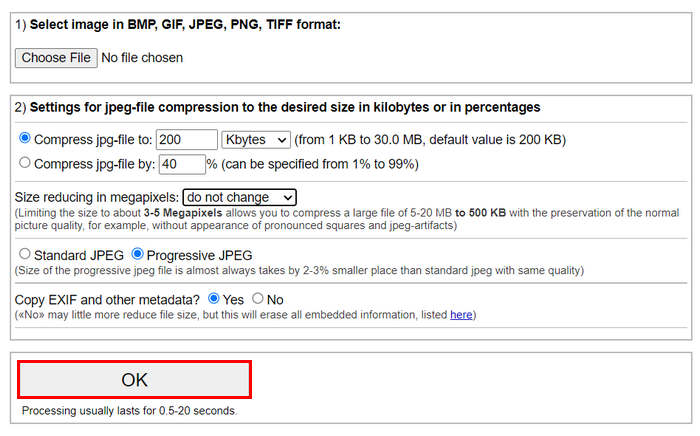
Bedenken Sie bei der Wahl zwischen Standard-JPG und progressivem JPG, dass die Größe der progressiven JPEG-Datei bei gleicher Qualität immer um 2-3% kleiner ist als die des Standard-JPG.
Teil 5. Häufig gestellte Fragen zum Komprimieren von Fotos für E-Mails
Auf welche Größe sollte ich meine Fotos für E-Mails ändern?
Was die ideale Größe zum Senden von Fotos in E-Mails betrifft, gibt es zwar keine Beschränkung, aber es wird allgemein empfohlen, die Größe Ihrer Fotos auf maximal 1024 x 768 Pixel zu reduzieren. Wenn Sie die Bildgröße unter 1 MB halten, vermeiden Sie außerdem Probleme mit Anhangsbeschränkungen und können die Bilder einfacher herunterladen und anzeigen.
Wie komprimiere ich Bilder für Gmail?
Das Komprimieren von Bildern für Gmail kann auf verschiedene Arten erfolgen. Eine der einfachsten Methoden ist die Nutzung von Online-Komprimierungstools wie dem kostenlosen FVC Image Compressor Tool. Dazu müssen Sie nur Ihre Bilddateien hochladen, und sie werden automatisch komprimiert.
Welcher Bildtyp eignet sich am besten für E-Mails?
Die besten Bildformate für E-Mails sind JPEG und PNG. JPEG wird aufgrund seiner guten Komprimierungsrate und des ausgewogenen Verhältnisses zwischen Dateigröße und Qualität häufig verwendet und ist damit ideal für Fotos und Bilder mit vielen Farben. PNG wird bevorzugt für Bilder, die Transparenz benötigen oder Text, Logos oder Grafiken mit scharfen Kanten enthalten, da es für diese Elemente eine höhere Qualität bewahrt, auch wenn die Dateigröße im Vergleich zu JPEG größer sein kann.
Fazit
Es ist wirklich wichtig zu wissen, wie man Fotos für E-Mails komprimiert, um langsame Uploadzeiten, fehlgeschlagene Zustellungen und Begrenzungen der Anhangsgröße zu vermeiden. Wenn Sie den in diesem Artikel ausführlich beschriebenen Methoden folgen, können Sie sicherstellen, dass Ihre Fotoanhänge handlich sind und sich schnell senden und empfangen lassen.
Worauf warten Sie noch? Beginnen Sie noch heute mit der Optimierung Ihrer E-Mail-Anhänge mit diesen 3 einfachen Methoden.
-
 Zu stark komprimierte Fotos: So können Sie das Problem ganz einfach beheben
 Sie fragen sich, was zu tun ist, wenn Ihr Bild übermäßig komprimiert ist? Lesen Sie diesen Artikel und erfahren Sie, warum dieses Bildproblem auftritt, und lernen Sie zwei Methoden kennen, um es zu beheben.
-
 Bildgröße auf 100 KB ändern: 3 beste Möglichkeiten zur effizienten Komprimierung
 Suchen Sie nach einem Tool, mit dem Sie die Bildgröße auf 100 KB ändern können? Lesen Sie diesen Artikel und erfahren Sie 3 Methoden, wie Sie Ihre Bilder auf die gewünschte Dateigröße verkleinern können.
-
 So komprimieren Sie Bilder in Word [Windows und Mac]
 Sie fragen sich, wie Sie Word zur Bildkomprimierung nutzen können? In dieser Anleitung erfahren Sie, wie Sie Bilder in Word nahtlos komprimieren.
