


 Video Converter Ultimate
 Bildschirm recorder
 Videoreparatur
Große Auswahl an verschiedenen Konvertern für MOV zu AVI Online und Offline
MOV ist ein von Apple Inc. entwickeltes Format, das auf deren Standard-Mediaplayer, dem QuickTime Player, abgespielt werden soll. Wenn du deine MOV-Datei jedoch auf ein anderes Desktop-Programm wie Windows o.Ä. überträgst, ist die Wahrscheinlichkeit hoch, dass sie dort nicht unterstützt wird, da sie im Grunde nur für Mac‑Nutzer gedacht ist. Wenn du also zu den Nutzern gehörst, die Schwierigkeiten haben, MOV-Dateien auf ihrem Desktop abzuspielen, solltest du unbedingt diesen Artikel weiterlesen, um herauszufinden, was für dich am besten geeignet ist. Er dient dir als persönlicher Konverter‑Leitfaden und zeigt dir, wie du MOV in AVI konvertieren kannst, ohne Qualität oder Sicherheit einzubüßen.

Teil 1. Konvertieren Sie MOV in AVI Online ohne Einschränkungen
FVC Free Online Video Converter
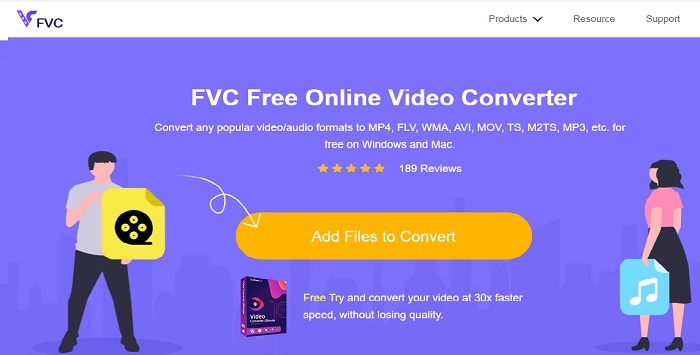
Einer der besten Online‑Konverter ist der FVC Free Video Converter. Wenn du beim Online‑Konvertieren von Video oder Audio ein neues Level erleben möchtest, ist dieses Tool genau das Richtige für dich. Es gehört zu den besten kostenlosen MOV‑zu‑AVI‑Konvertern. Der Nachteil ist allerdings, dass es – im Gegensatz zur kostenpflichtigen Version – keine Premium‑Funktionen bietet und die Format-Auswahl begrenzt ist. Obwohl du ohne Mengenbegrenzung konvertieren kannst, sind keine Mehrfachkonvertierungen in einem Durchgang möglich. Wie erwähnt ist das Tool kostenlos und als Konverter besser geeignet als VLC. Möchtest du wissen, wie man dieses Online‑Tool verwendet? Folge den Schritten unten, um mühelos zu konvertieren.
Schritt 1. Klicke auf diesen Link, um zur Hauptseite zu gelangen. Du musst dir keine Sorgen machen, sie ist sicher und kann bedenkenlos aufgerufen werden.
Schritt 2. Klicke auf Dateien hinzufügen zum Konvertieren, um das Programm zu starten.
Laden Sie die Desktop‑Version herunter, um Dateien stapelweise zu konvertieren.
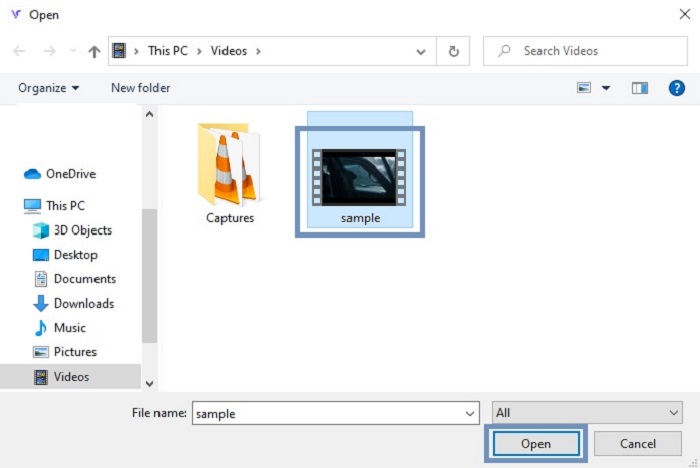
Schritt 3. Wähle die MOV-Datei aus, die du konvertieren möchtest, und drücke auf OK, um fortzufahren.
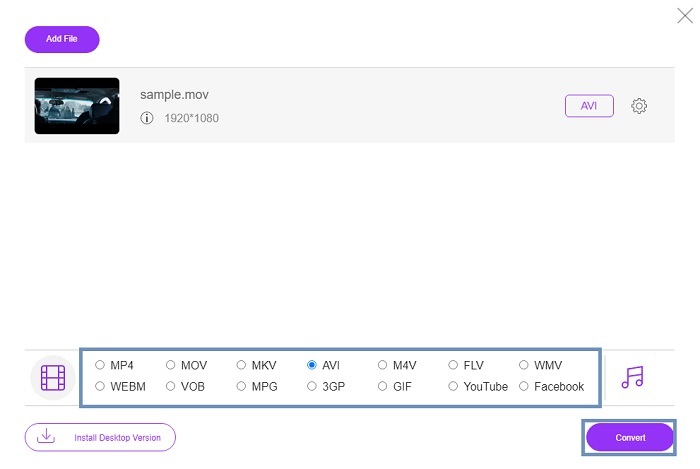
Schritt 4. Nachdem du das Format AVI oder ein anderes gewünschtes Format ausgewählt hast, klicke auf Konvertieren, um den Vorgang zu starten.
Schritt 5. Warte ein paar Minuten, bis der Vorgang abgeschlossen ist. Klicke dann auf diesen Ordner, um das Endergebnis anzusehen.

Teil 2. Konvertieren Sie die MOV-Desktop-App offline in eine AVI-Desktop-App
Wenn Online-Konvertierung nicht Ihre Stärke ist, sollten Sie diese großartigen Desktop-basierten Tools in Betracht ziehen. Wählen Sie den besten Konverter, um die Arbeit zu erledigen.
1. FVC Video Converter Ultimate
Wenn du das volle Potenzial beim Konvertieren, Bearbeiten und Optimieren von Video und Audio ausschöpfen willst, ist der FVC Video Converter Ultimate das passende Werkzeug für dich. Konvertiere dein MOV‑Format in AVI, ohne ins Schwitzen zu geraten. Dank benutzerfreundlicher Oberfläche und ressourcenschonender Arbeitsweise ist er zur ersten Wahl vieler Nutzer im Internet geworden. Die Zahl der Nutzer, die dieses Tool herunterladen, ist bis heute stark gestiegen – sowohl in Bezug auf Menge als auch auf Erfahrung. Anders als viele andere hier und im Web vorgestellte Tools ist es, als hättest du mit diesem Programm ein Schweizer Taschenmesser auf deinem Rechner. Obwohl es ein umfassendes Funktionspaket bietet, basiert die Software auf einem Bezahlmodell. Das bedeutet, wenn du sie nutzen möchtest, musst du sie kaufen. Aber keine Sorge: Der Preis ist niedrig und die Bezahlung ist sicher, unterstützt werden u.a. PayPal, Banküberweisung, Visa und mehr. Wenn du dir unsicher bist, ob dies wirklich die beste Wahl ist, lies dir die folgenden Schritte durch und finde heraus, ob dies der richtige Konverter für dich ist.
Schritt 1. Lade die Software auf deine Desktop‑Festplatte herunter und wähle die Version, die am besten zu deinem System passt. Passe bei Bedarf die Einstellungen an und klicke auf „Fertigstellen“, um die Software auf deinem Laufwerk zu installieren.
Gratis DownloadFür Windows 7 oder neuerSicherer Download
Gratis DownloadFür MacOS 10.7 oder neuerSicherer Download
Schritt 2. Nach der Installation wird das Programm automatisch geöffnet. So sieht eine Beispieloberfläche aus.
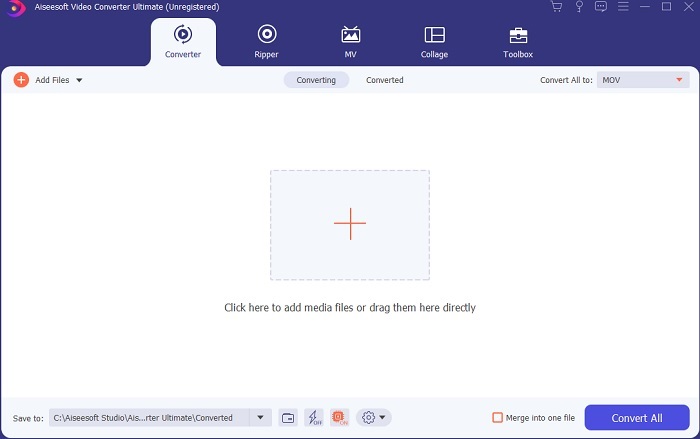
Schritt 3. Klicke auf die Schaltfläche Dateien hinzufügen und wähle die MOV-Datei aus, die du konvertieren möchtest. Wenn du viele MOV-Dateien konvertieren willst, kannst du sie per Drag‑and‑Drop in die Programmoberfläche ziehen.
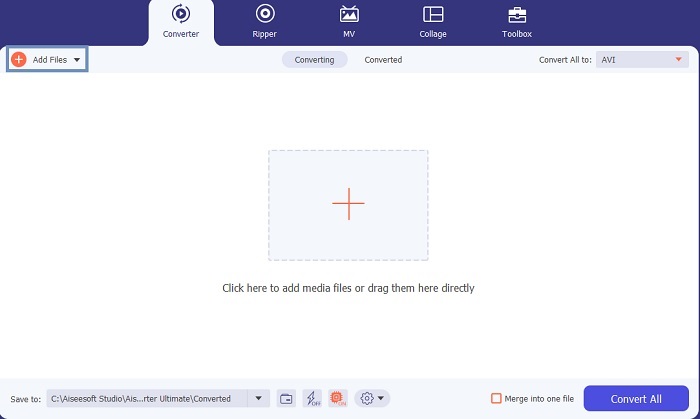
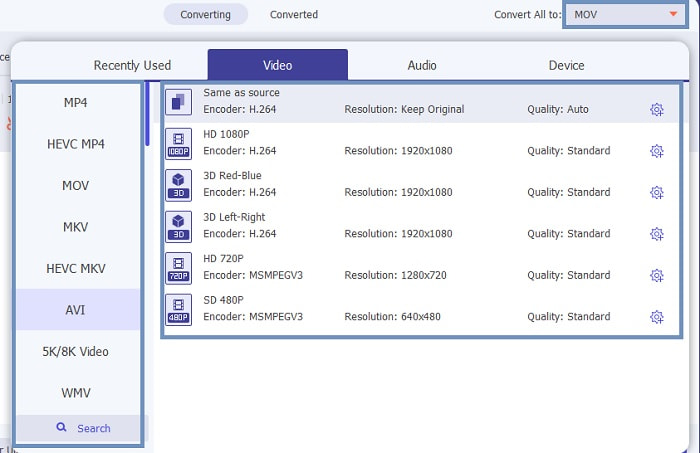
Schritt 4. Wähle im Untermenü von Alles konvertieren in das gewünschte Format aus. Es stehen verschiedene Varianten zur Auswahl. Um den Vorgang zu starten, klicke auf Alles konvertieren.
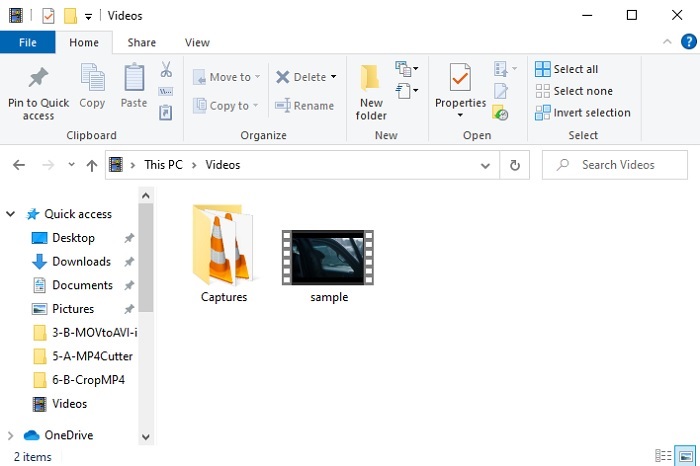
Schritt 5. Dies dauert nur ein paar Sekunden. Sobald es fertig ist, öffnet sich ein Dateiexplorer auf deinem Bildschirm; klicke auf die Datei, die du konvertiert hast, um sie jetzt auf deinem Computer anzusehen. Wenn du das Video hinzufügen, verbessern oder etwas Besonderes damit machen möchtest, gehe zum Bereich „Toolbar“ und schaue dir die verfügbaren Funktionen an, mit denen du deine Videos oder Audios aufwerten kannst.
2. VLC Media Player
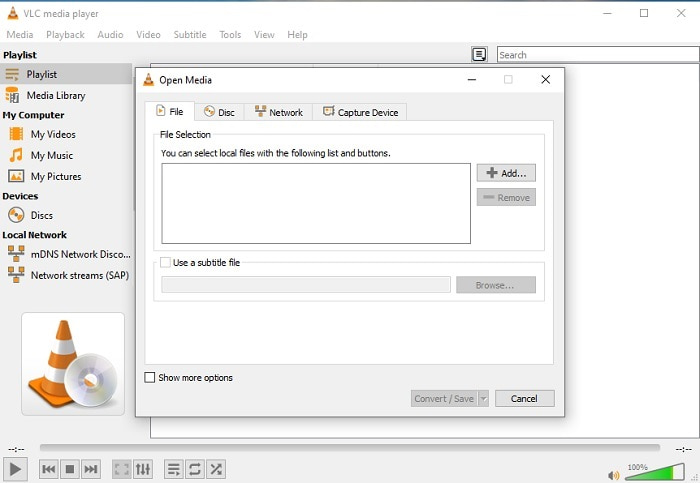
Wusstest du, dass du MOV mit VLC in AVI konvertieren kannst? Ja, du kannst diesen Mediaplayer auch als Konverter verwenden. Obwohl VLC Formate konvertieren kann, ist es nicht die beste Wahl als Konverter. Das Programm ist nicht besonders benutzerfreundlich, die Oberfläche bietet kaum Anleitungen zur Nutzung, und die Auswahl an Formaten ist recht eingeschränkt. Es mag einer der besten Mediaplayer sein, aber als Konverter ist es nicht seine Stärke. Wenn du es dennoch ausprobieren möchtest, kannst du dich selbst überzeugen und es zur Formatkonvertierung verwenden.
3. Pazera
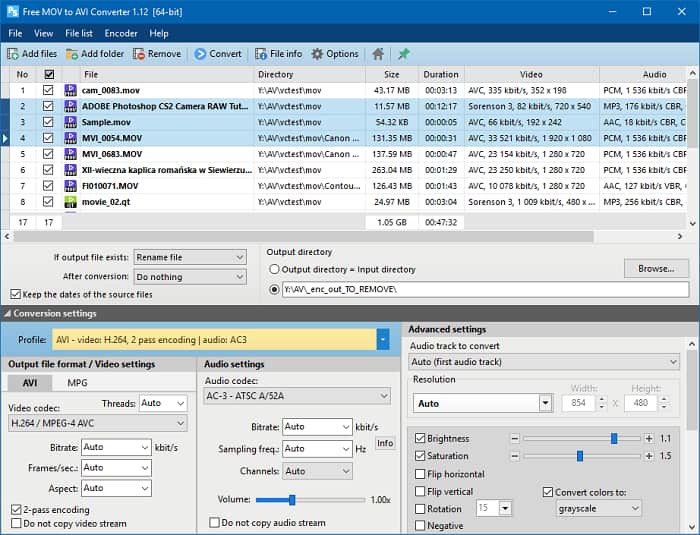
Du kannst den Pazera MOV‑zu‑AVI‑Konverter kostenlos herunterladen. Dieses Tool ist einfach zu bedienen und bietet eine durchaus solide Konvertierungsleistung. Der abschreckende Punkt ist jedoch, dass es kein Multi‑Konverter ist. Im Gegensatz zu den zuvor vorgestellten Tools ermöglicht dieser Konverter nur eine einzige Art der Konvertierung. Zur Verdeutlichung: Wenn du einen MP4‑zu‑AVI‑Konverter herunterlädst, ist genau diese Konvertierung auch das Einzige, was du bekommst. Wenn du also einen Allround‑Konverter suchst, sollte dieses Tool eher die letzte Option sein. Außerdem erscheinen beim Aufruf der Download‑Webseite viele Pop‑up‑Werbungen, die sehr störend sind. Du solltest also vorsichtig sein, wenn du diese Seite aufrufst.
Weiterführende Informationen
Wie man MOV in FLV konvertiert
Wie man MOV in GIF konvertiert
MOV im Vergleich zu AVI
Das MOV-Format kann zum Speichern eines Films, einer Fernsehsendung, eines kurzen Videoclips oder eines Heimvideos verwendet werden. Es wird tatsächlich im QuickTime-Dateiformat (QTFF) gespeichert, das 1991 von Apple eingeführt wurde. MOV-Dateien werden häufig verwendet, wenn Leute ein Video in hoher Qualität speichern möchten.
Basierend auf dem Resource Interchange File Format (RIFF) wurde das AVI-Format 1992 von Microsoft eingeführt. Es kann Video/Audio in hoher Qualität speichern, da es weniger Komprimierung verwendet. Aber das verursacht auch die große Dateigröße einer AVI-Datei, was bei begrenztem Speicherplatz ein Problem sein kann.
Teil 3. Häufig gestellte Fragen zu MOV to AVI
Kann QuickTime MOV in AVI konvertieren?
Obwohl QuickTime dafür bekannt ist, der Standard-Mediaplayer von Mac zu sein. Eine Konvertierung über QuickTime ist möglich. Sie können diesen Link überprüfen, wenn Sie wissen möchten, wie Sie MOV in AVI mit QuickTime konvertieren.
Was sind die Unterschiede zwischen MOV und AVI?
Der erste große Unterschied zwischen den beiden ist ihr Besitzer. Wie bereits erwähnt, wurde MOV von Apple Inc. als ihr einzigartiges Format für QuickTime-Player hergestellt. MOV wurde als eines der besten Formate beliebt, die Sie verwenden können, da es auch verschiedene Audio-, Video- und Textdateien speichert. AVI wurde von Microsoft entwickelt, um mit MOV zu konkurrieren. Obwohl dieses Format unkomprimiert ist. Wenn Sie also eine Datei in diesem Format aufnehmen oder herunterladen, erwarten Sie eine große Dateigröße. Wenn Sie also die Dateigröße verringern möchten, müssen Sie sie komprimieren. Aber das Gute daran ist, dass es eine super hochwertige Video- und Audioausgabe erzeugt.
Wo kann ich mein konvertiertes MOV in AVI abspielen?
Wenn du deine neu konvertierte AVI‑ oder MOV‑Datei ansehen möchtest, kannst du den FVC Free Video Player verwenden. So kannst du sie auch dann später ansehen, wenn du eine MOV‑Datei nicht auf dem Mac oder PC in AVI konvertierst.
Fazit
Zum Abschluss unserer „Reise“ ist nun deutlich geworden, dass Konvertieren eine der einfachsten Aufgaben ist, die jeder bewältigen kann. Aus diesem Artikel zu lernen, ist für uns alle ein großer Vorteil, denn er bietet Details, Schritt‑für‑Schritt‑Anleitungen und Alternativen. Wenn du also immer noch unsicher bist, welchen Konverter du als Hauptlösung nutzen sollst, sollte das hier Klarheit schaffen: FVC Video Converter Ultimate ist ein Allround‑Konverter, nach dem du immer gesucht hast. Die Möglichkeiten zum Konvertieren, Bearbeiten, Optimieren und Erstellen stecken alle in diesem Tool. Worauf wartest du also noch? Du musst dir keine Sorgen machen – der FVC Video Converter Ultimate ist der unangefochtene Konverter.
-
 4 Beste Methoden zum einfachen Konvertieren von MOV in MP3 unter Windows und Mac
 Wenn Sie die MP3-Audiodateien aus MOV-Dateien extrahieren möchten, erfahren Sie mehr über die 4 effizientesten MOV-zu-MP3-Konverter, um die gewünschten Dateien aus dem Artikel zu erhalten.
-
 8 besten MOV-Spieler zum Abspielen von QuickTime-MOV-Dateien in Originalqualität
 Erfahren Sie mehr über die 8 besten MOV-Player für Windows und Mac. Sie können die gewünschte und geeignete auswählen, um MOV-Dateien mit der Originalqualität abzuspielen.
-
 MKV in MOV - So konvertieren Sie MKV in MOV
 Wie konvertiere ich MKV in MOV auf einem Mac? Kann iMovie MKV lesen? Was bedeutet MOV-Format? In diesem Beitrag werden zwei einfache Möglichkeiten beschrieben, wie Sie MKV mit kostenlosen Online- und professionellen Videokonvertern in MOV konvertieren können.

