


 Video Converter Ultimate
 Bildschirm recorder
 Videoreparatur
 Sicherer Download
MOV zu MPG: Die Kurzanleitung zum Konvertieren dieser Formate im Jahr 2023
Zur Information: MOV-Dateien erhalten heutzutage viel Anerkennung, da sie als eines der geeigneten Formate zur Speicherung von Filmen gelten. Dieses Dateiformat ist weithin als Standardformat für Apple‑Produkte wie iPhones, iPads und MacBooks anerkannt. Wenn Sie jedoch versuchen, MOV‑Dateien im Internet hochzuladen, kann es schwierig werden, da sie im Vergleich zu anderen Videoformaten eine größere Dateigröße haben. Um dies zu umgehen, können Sie sich dafür entscheiden, MOV in MPG zu konvertieren. Bleiben Sie daher bei diesem Leitfaden, wir helfen Ihnen dabei, zu lernen, wie Sie das erfolgreich umsetzen.

Teil 1. MOV in MPG konvertieren
1. Videokonverter Ultimate
Video Converter Ultimate ist die ultimative Offline‑Lösung, um all Ihre Anforderungen bei der Umwandlung von MOV in MPG zu erfüllen. Mit nur wenigen Klicks können Sie damit Dateien beliebiger Größe konvertieren. Außerdem ist dieses Tool mit Einstellungen zur Ausgabaanpassung ausgestattet, sodass Nutzer ein hochwertiges Ausgabeformat erhalten und ihre individuellen Vorlieben berücksichtigen können. Nachfolgend finden Sie eine einfache Anleitung, wie Sie MOV schnell in MPG umwandeln.
Schritt 1. Programm installieren
Klicken Sie zunächst unten auf die für Ihr Gerät passende Download-Schaltfläche. Klicken Sie anschließend auf das Installationsprogramm und führen Sie es aus, um das Programm auf Ihrem Bildschirm zu starten.
Gratis DownloadFür Windows 7 oder neuerSicherer Download
Kostenloser DownloadFür macOS 10.7 oder höherSicherer Download
Schritt 2. MOV-Dateien zum Konvertieren hochladen
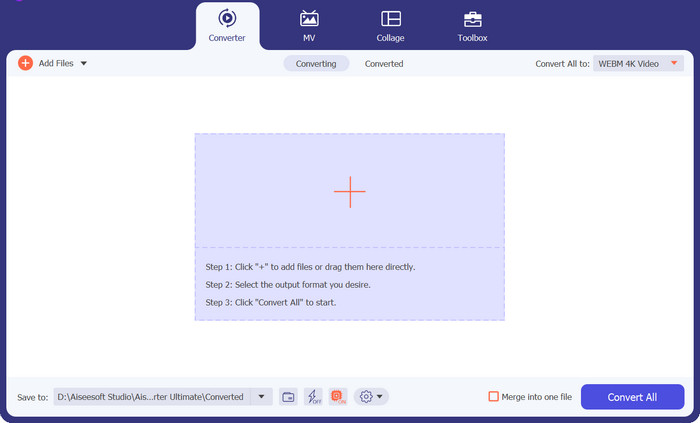
Nachdem Sie das Programm installiert haben, wählen Sie die Plus-Schaltfläche in der Mitte der Benutzeroberfläche. Sobald das Verzeichnis Ihres Computers erscheint, wählen Sie die MOV-Datei zum Hochladen aus. Außerdem können Sie mehr als eine Datei für eine Stapelkonvertierung hinzufügen.
Schritt 3. Ausgabeformat wählen
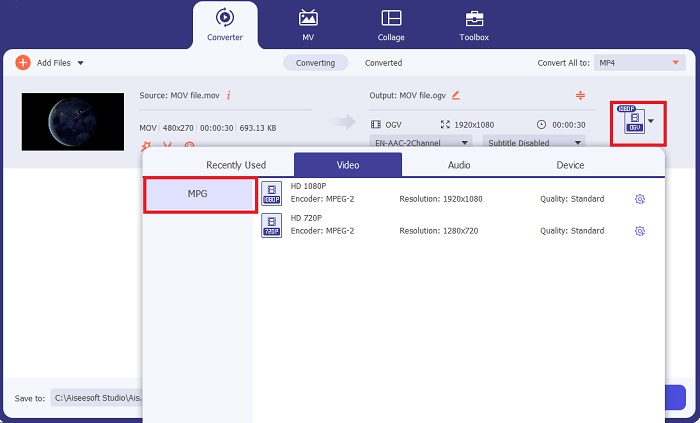
Eine Miniaturansicht Ihrer MOV-Datei wird im Programm angezeigt und bestätigt damit den erfolgreichen Upload. Um Ihr Ausgabeformat auszuwählen, erweitern Sie die Registerkarte Output und klicken Sie auf den Bereich Video. Scrollen Sie dort durch die Liste und wählen Sie MPG.
Schritt 4. Konvertierung starten
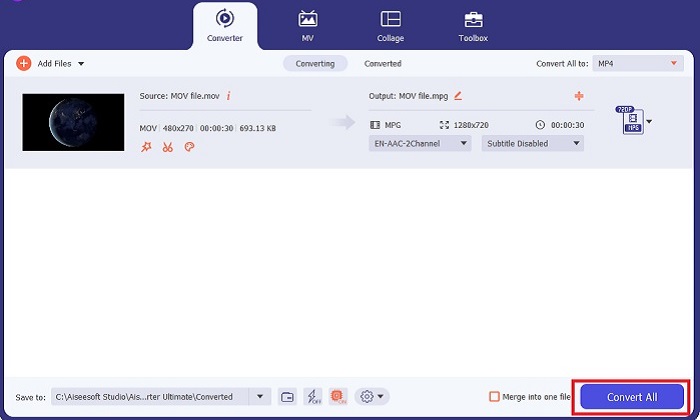
Passen Sie zuletzt die gewünschte Ausgabequalität an, indem Sie die Ausgabeeinstellungen ändern. Wenn alles eingestellt ist, klicken Sie auf die Schaltfläche Convert, um Ihre MOV-Datei in MPG zu verarbeiten.
Hauptfunktionen
◆ Nahtlose MOV-zu-MPG-Konvertierung: Eine Sache, die wir an Video Converter Ultimate lieben, ist seine benutzerfreundliche Oberfläche. Dieses Tool ist für jeden geeignet, egal ob Anfänger oder erfahrener Benutzer.
◆ 50-mal schnellere Konvertierungsgeschwindigkeit: Dank der GPU-Beschleunigungs-Kodierungstechnologie übertrifft Video Converter Ultimate alle anderen Offline-Konverter aufgrund seiner schnellen Konvertierung ohne Verzögerungen und Abstürze.
◆ Massenkonvertierungsfunktion: Mit Video Converter Ultimate können Sie auch einen Ordner mit MOV-Dateien in über 1000 andere Formate als MPG konvertieren.
2. Kostenloser Online-Videokonverter
Free Video Converter Online ist eine weitere Software, die die Formatkonvertierung neu definiert. Auch wenn dieses Online‑Programm nicht so umfassende Werkzeuge bietet wie manche Offline‑Software, besteht es dennoch den Praxistest als zuverlässiges Programm, um MOV online in MPG zu konvertieren. Es unterstützt Stapelkonvertierung und gibt Ihnen die vollständige Kontrolle über Ihre Ausgabe.
Schritt 1. Rufen Sie zunächst die Hauptwebsite von Free Video Converter Online auf. Bevor Sie die MOV-Datei hochladen, klicken Sie auf Add Files; Sie werden zunächst aufgefordert, das Online‑Tool zu starten.
Schritt 2. Um die Datei hochzuladen, die Sie konvertieren möchten, klicken Sie erneut auf die Schaltfläche Add Files und laden Sie Ihre Datei hoch. Sie können auch die Drag-&-Drop‑Funktion verwenden.
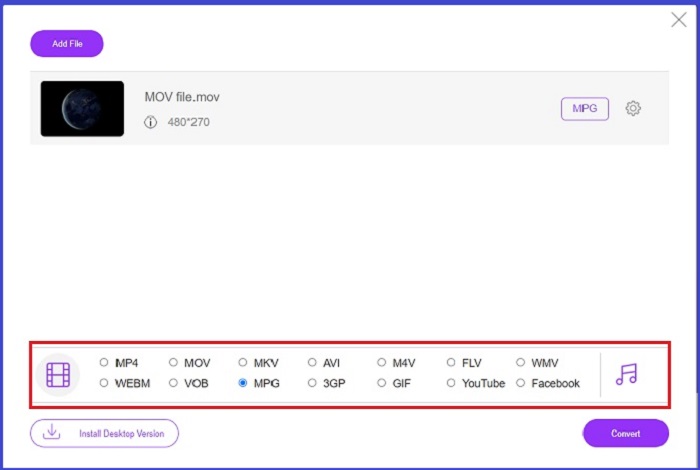
Schritt 3. Sobald Ihre Originaldatei erscheint, wählen Sie Ihr Ausgabeformat in der unteren Ecke des Bildschirms. Im Videobereich sehen Sie alle möglichen Formate – in unserem Fall wählen Sie MPG. Klicken Sie schließlich auf die Schaltfläche Convert und warten Sie, bis Ihre Datei heruntergeladen wird.
Hauptfunktionen
◆ Plattformübergreifender Online-Konverter: Egal, ob Sie Ihr Telefon, Tablet oder Ihren Computer verwenden, dieses Tool funktioniert einwandfrei und ermöglicht die Video- oder Audiokonvertierung.
◆ Datenschutzgarantie: Wer möchte schon, dass private Daten angegriffen werden? Mit Free Video Converter Online sollten Sie bei diesem Problem keine Probleme mehr haben. Mit diesem Online-Tool können Benutzer MOV kostenlos in MPG konvertieren, ohne dass ein Anmeldevorgang erforderlich ist.
◆ Keine Installationsanforderungen: Dieses Tool ist ein weiterer problemloser Konverter, der Ihnen hilft, hektische Installationen zu vermeiden, insbesondere wenn Ihnen der digitale Speicherplatz ausgeht.
Teil 2. MPG in MOV konvertieren
1. Videokonverter Ultimate
Auch hier ist Video Converter Ultimate weiterhin die beste Lösung, die wir Ihnen bieten können, um MOV zu MPG auf Mac‑ und Windows‑Geräten zu konvertieren. Dieses Tool unterstützt über 1000 Video‑ und Audioformate, einschließlich solcher, die speziell für Geräte wie Samsung, Apple, Sony und viele weitere optimiert sind. Folgen Sie der Anleitung unten, um beliebige MPG‑Dateien in MOV umzuwandeln.
Gratis DownloadFür Windows 7 oder neuerSicherer Download
Kostenloser DownloadFür macOS 10.7 oder höherSicherer Download
Schritt 1. Klicken Sie auf die Schaltfläche Add Files, um MPG in das Programm zu importieren.
Schritt 2. Nachdem Ihre Datei im Programm geladen wurde, wählen Sie das Ausgabeformat, indem Sie auf Output > Video > MOV klicken. Für eine bessere Qualität können Sie zusätzlich die Videoparameter anpassen.
Schritt 3. Wählen Sie die Schaltfläche Convert, um das Programm anzuweisen, Dateien von MPG in MOV zu konvertieren. Sobald die Konvertierung abgeschlossen ist, können Sie die Ausgabedatei direkt im Programm überprüfen.
2. AnyConv
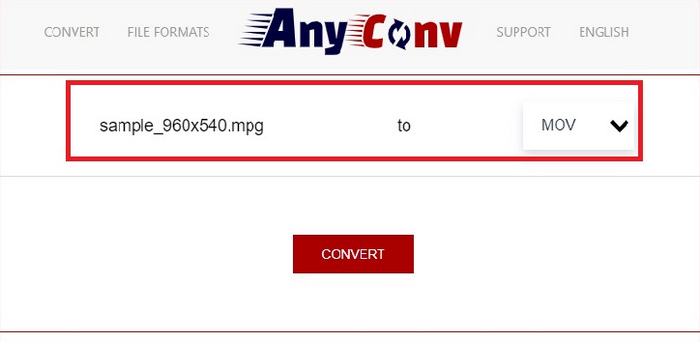
AnyConv ist ein kostenloser MPG-zu-MOV-Konverter online. Dieses Programm funktioniert gut auf jedem Gerät und bietet eine Drag-and-Drop-Funktion beim Hochladen Ihrer MPG-Dateien. Darüber hinaus schützt diese Online-Lösung die Daten der Benutzer, indem ihre konvertierten Dateien nach einer Stunde gelöscht werden. Neben MOV können Sie Ihre MPG-Dateien auch in 3GP, AVCHD, MP4, MKV und mehr konvertieren.
Schritt 1. Öffnen Sie zunächst die Website von AnyConv. Sobald sie auf Ihrem Bildschirm erscheint, klicken Sie auf Choose File und wählen Sie das gewünschte MOV‑Material zur Konvertierung aus.
Schritt 2. Sobald Ihre MOV‑Datei hochgeladen wurde, wählen Sie MPG aus der Liste der Ausgabeformate in der Spalte „Output“ in der Mitte.
Schritt 3. Klicken Sie abschließend auf die Schaltfläche Convert und warten Sie, bis Ihre Datei heruntergeladen wird.
Weiterführende Lektüre:
3 beste Wege, um MPG schnell in MP4 zu konvertieren
5 erstklassige MOV-zu-3GP-Konverter, die Sie nicht verpassen dürfen
Teil 3. FAQs zum Konvertieren von MPG in MOV
Gibt es einen kostenlosen MOV-zu-MPG-Konverter?
Definitiv Ja! Online-Konverter sind Ihre erste Wahl, um die Zahlung von Gebühren zu vermeiden. Sie können den kostenlosen Online-Videokonverter wählen, um MOV kostenlos in MPG zu konvertieren.
Ist MPG besser als MOV?
MOV ist aufgrund der unterschiedlichen Typen besser als MPG. MOV ist ein Containerformat, das alle Ihre Originaldaten speichert. Gleichzeitig ist MPG ein komprimierter Codec, der zur Reduzierung der Dateigröße eines Videos für eine schnellere Dateiübertragung über das Internet verwendet wird.
Was ist der Vorteil einer MOV-Datei?
MOV-Dateien eignen sich zur Bearbeitung und gelten als Standards für die Auswahl des besten Videoformats. Ein Nachteil dieser Datei ist, dass nur wenige Mediaplayer dieses Format öffnen.
Reduziert MOV zu MPG die Qualität?
Ja. Durch die Konvertierung Ihrer Dateien von MOV in MPG verringert sich nicht nur die Dateigröße Ihres Videos, sondern auch die Qualität. Beide Dateien sind auf jeden Fall großartig, wenn Sie sie benötigen.
Kann ich MOV im Windows Media Player abspielen?
Glücklicherweise können MOV-Dateien auf dem Windows Media Player abgespielt werden, sofern dieser in Version 12 oder höher vorliegt.
Fazit
Damit kennen Sie nun die möglichen Wege, um MPG in MOV oder umgekehrt zu konvertieren. Beide Formate können Ihnen je nach Einsatzzweck gute Dienste leisten. Mit Online‑Konvertern erhalten Sie eine unkomplizierte Umwandlung. Wenn Sie Ihre Dateien hingegen durch Qualitätsanpassungen oder Bearbeitung weiter verfeinern möchten, empfehlen wir Ihnen Video Converter Ultimate.
-
 FLV in MPG - So konvertieren Sie FLV in MPG auf Mac, PC und Online Free
 Wie konvertiert man FLV in MPEG? Kann ich FLV kostenlos in MPG konvertieren? In diesem Beitrag werden 3 kostenlose Videokonverter geteilt, mit denen Sie FLV in MPG ohne Qualitätsverlust konvertieren können.
-
 So konvertieren Sie MPG in M4V auf einem Mac und verwenden das Online-Tool
 Sind Sie ein neuer Mac-Benutzer und wissen nicht, wie man MPG in M4V konvertiert? Dann können Sie diesen Artikel lesen, um mehr zu erfahren und herauszufinden, wie Sie Dateien mit Ihrem Mac konvertieren.
-
 8 besten MOV-Spieler zum Abspielen von QuickTime-MOV-Dateien in Originalqualität
 Erfahren Sie mehr über die 8 besten MOV-Player für Windows und Mac. Sie können die gewünschte und geeignete auswählen, um MOV-Dateien mit der Originalqualität abzuspielen.
