


 Video Converter Ultimate
 Bildschirm recorder
 Videoreparatur
Vereinfachtes Tutorial zum Konvertieren von TRP in WMV mithilfe von Pro Converters
Schwer zu handhabende TRP‑Dateien, weil sie sich in Ihrem Media Player oder Video-Editor nicht öffnen lassen? Viele Internetnutzer haben ebenfalls Schwierigkeiten mit ihren TRP‑Dateien. Wenn Sie zu diesen Personen gehören, sollten Sie jetzt dranbleiben und diesen Artikel lesen, in dem wir mehr über das TRP‑Format erklären. Um Ihr Problem mit diesem Format zu lösen, empfehlen wir außerdem, die Dateien in WMV zu konvertieren – besonders dann, wenn Sie sie unter Windows abspielen möchten. Worauf warten Sie also noch? Gehen wir zu den Details unten über, um TRP in WMV zu konvertieren.

Teil 1. Konvertieren Sie TRP in WMV mit Video Converter Ultimate
Möchten Sie wissen, wie man TRP mit einem professionellen Tool in WMV umwandelt? Dann verwenden Sie dazu den FVC Video Converter Ultimate. Bevor wir uns ansehen, wie Sie Ihre TRP‑Datei konvertieren, sollten wir dieses Konvertierungstool kurz vorstellen. Dieser Konverter ermöglicht einen einfachen und schnellen Umwandlungsprozess, den bereits Millionen von Nutzern schätzen. Außerdem kann er Ihre TRP‑Datei in WMV, AMV, MKV, AVI oder jedes andere gewünschte Format konvertieren. Darüber hinaus sind auch erweiterte Bearbeitungsfunktionen verfügbar. Möchten Sie einen vollständigen Überblick über die Funktionen dieses Tools erhalten? Dann lesen Sie unten weiter.

FVC Video Converter Ultimate
5.689.200++ Downloads- Unterstützt die Konvertierung von TRP in WMV, AVI, MP4, MOV, MKV und in über 200 verfügbare Formate.
- Es ist einfach zu bedienen und verfügt über eine integrierte ultraschnelle Konvertierung für eine schnellere Transcodierung.
- Keine Einschränkung bei der Konvertierung, und die Batch-Konvertierung funktioniert gut.
- Erweiterte Bearbeitungsfunktionen befinden sich in der Toolbox.
Gratis DownloadFür Windows 7 oder neuerSicherer Download
Gratis DownloadFür MacOS 10.7 oder neuerSicherer Download
Beginnen wir ohne weitere Verzögerung mit der Verwendung dieses A1-Konverters, indem wir die folgenden Schritte ausführen.
Schritt 1. Laden Sie den FVC Video Converter Ultimate auf Ihre Festplatte herunter, indem Sie auf die unten angegebene Download-Schaltfläche klicken. Folgen Sie der Installation und starten Sie anschließend das Programm.
Gratis DownloadFür Windows 7 oder neuerSicherer Download
Gratis DownloadFür MacOS 10.7 oder neuerSicherer Download
Schritt 2. Klicken Sie auf der Startseite des Konverters oben links in der Benutzeroberfläche auf Dateien hinzufügen. Suchen Sie dann im angezeigten Ordner die TRP‑Datei, die Sie konvertieren möchten, und klicken Sie auf Öffnen, um fortzufahren.
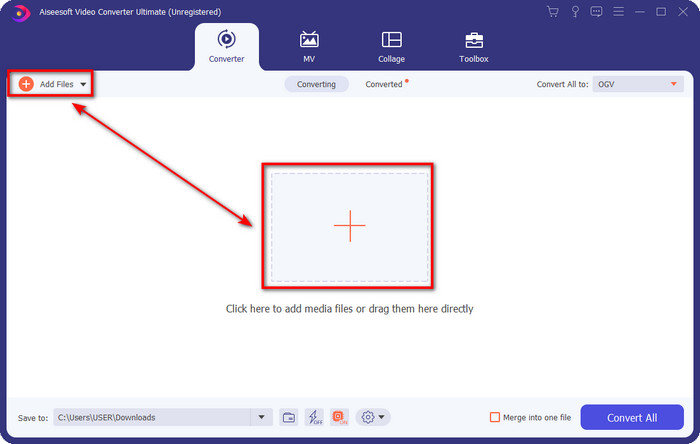
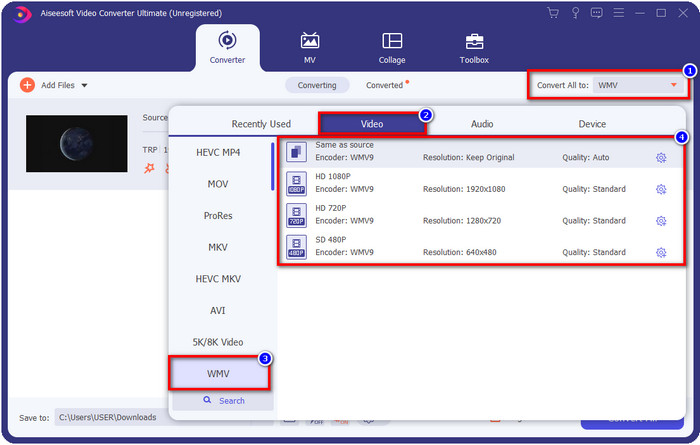
Schritt 3. Sobald Sie die Datei hochgeladen haben, müssen Sie das Format in WMV ändern, indem Sie auf die Schaltfläche Alle konvertieren in klicken. Sie werden sehen, dass jedes verfügbare Format eigene Eigenschaften besitzt, aus denen Sie in der Liste wählen können.
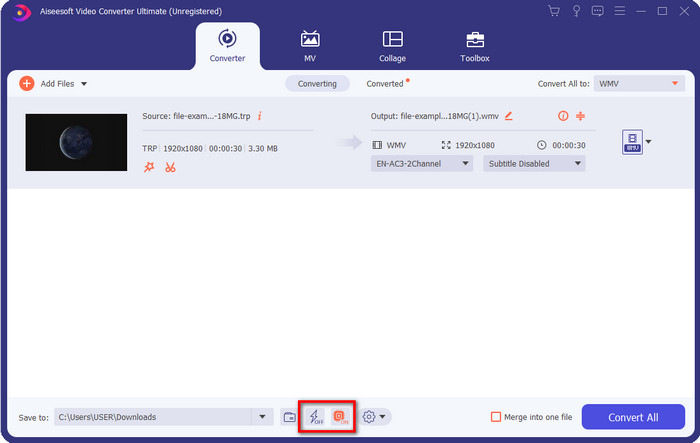
Optional. Möchten Sie die besonders schnelle Konvertierung nutzen, von der wir gesprochen haben? Dann klicken Sie unten auf Ultraschnelle Konvertierung und Hardwarebeschleunigung und aktivieren Sie diese Optionen.
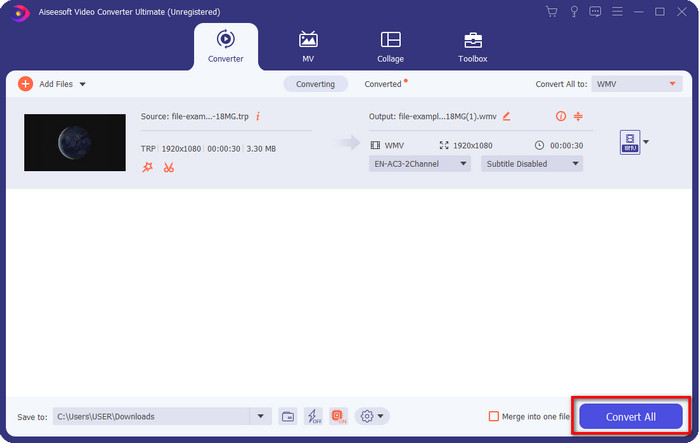
Schritt 4. Starten Sie den Konvertierungsvorgang, indem Sie unten rechts auf die Schaltfläche Alle konvertieren klicken.
Teil 2. Konvertieren Sie TRP in WMV Online
Im Internet stehen viele Konverter zur Verfügung, mit denen Sie TRP in WMV umwandeln können. Dennoch ist der FVC Free Video Converter Online der beste und professionellste Online-Konverter. Dieses Tool ist kostenlos und erfordert keinen Download. Es hat bereits vielen Internetnutzern dabei geholfen, das Problem zu lösen, TRP in WMV, AVI, MP4 und MOV zu konvertieren. Allerdings unterstützt dieser Konverter nicht so viele Formate wie der FVC Video Converter Ultimate und bietet auch keine Bearbeitungsfunktionen. Wenn Sie nun wissen möchten, wie Sie diesen Konverter verwenden, folgen Sie den nachstehenden Schritten.
Schritt 1. Klicken Sie auf diesen Link, um die Hauptseite des FVC Free Video Converter Online zu öffnen.
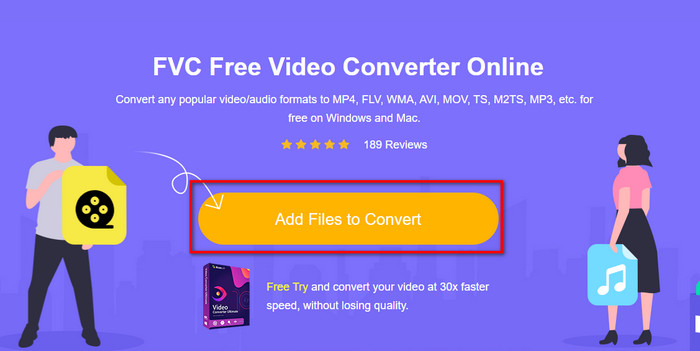
Schritt 2. Drücken Sie die Schaltfläche Dateien zum Konvertieren hinzufügen, woraufhin sich ein Ordner auf Ihrem Desktop öffnet. Suchen Sie die TRP‑Datei, die Sie konvertieren möchten, und klicken Sie auf Öffnen.
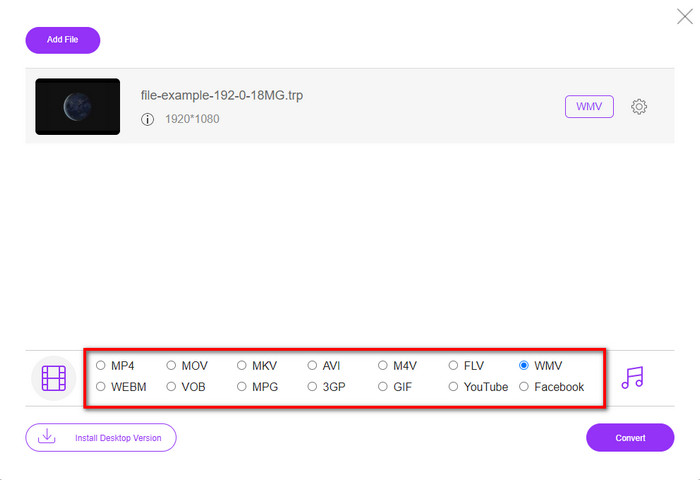
Schritt 3. Nachdem Sie die TRP‑Datei hochgeladen haben, wählen Sie das WMV-Format in der Liste unten aus.
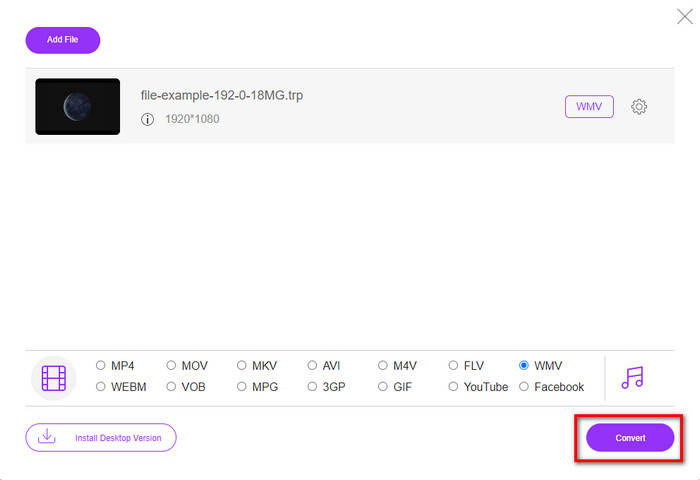
Schritt 4. Starten Sie den Konvertierungsvorgang, indem Sie auf Konvertieren klicken; die Datei wird nach Abschluss des Vorgangs automatisch auf Ihrem Laufwerk gespeichert.
Teil 3. Was ist der Unterschied zwischen TRP und WMV
Obwohl sich diese beiden Formate hervorragend für Online-Streaming eignen, haben TRP und WMV immer noch unterschiedliche Strukturen und Verwendungszwecke. Außerdem unterscheidet sich ihr Codec stark voneinander. Wenn Sie also jetzt detailliertere und tiefgreifendere Informationen über TRP-Dateien und WMV erhalten möchten, müssen Sie den Ball am Laufen halten und die folgenden Informationen lesen.
TRP enthält die High-Definition-Mediendatei, die im Transportformat MPEG-2 Teil 1 codiert ist. Dieses Format ist für das Multiplexen von Streams bekannt, die Medieninhalte synchronisieren können. Auch dieses Format wird oft bei DVB oder Digital Video Broadcasting zur Fehlerkorrektur dieses Formats bereitgestellt. Darüber hinaus unterscheiden sich die Daten, die TRP verwendet, von H.264 auf Video und AC3 auf Audio. Derzeit wird das TRP-Format nicht viel unterstützt, insbesondere in den meisten Mediaplayern unter Windows.
Auf der anderen Seite hat WMV eine Reihe von Video-Codecs mit unterschiedlichen Zwecken zum Codieren der Datei. Microsoft hat dieses Format eingeführt, um mit dem RM-Format bei Online-Streaming-Inhalten zu konkurrieren. Und jetzt wurde das Format auf WMV9 aktualisiert, das aktiviert wird, wenn die Videoauflösung des Medieninhalts 300.000 Pixel überschreitet. Dieses Format aktualisierte Version angepasst an HD DVD und Blu-ray Discs.
Zur Vereinfachung muss TRP aufgrund des Kompatibilitätsproblems beim Abspielen über Windows in WMV umgewandelt werden. Obwohl TRP und WMV eine gute Wahl für das Online-Streaming sind, müssen Sie es dennoch kompatibel machen, wenn Sie Ihr TRP unter Windows ansehen möchten. Aus diesem Grund stehen Ihnen die oben genannten Tools zur Verfügung, wenn Sie TRP in WMV konvertieren müssen.
Teil 4. Häufig gestellte Fragen zur Konvertierung von TRP in WMV
Kann ich TRP auf einem Mac verwenden?
Sie können dieses Format verwenden, wenn Sie einen Media Player oder Video-Editor eines Drittanbieters herunterladen, der diesen Typ unterstützt. Allerdings gibt es nur wenige Mac‑Apps, die dieses Format unterstützen. Wir haben jedoch eine Idee, wie Sie Ihre TRP‑Datei nutzen können, ohne eine Drittanbieter-App herunterzuladen. Möchten Sie mehr darüber erfahren? Dann klicken Sie auf diesen Link und lesen Sie, wie man TRP in MOV konvertiert.
Ist es sicher, einen Online-TRP-Konverter zu verwenden?
Ja, Sie können einen Online-Konverter verwenden, um Ihre TRP‑Datei in ein Format Ihrer Wahl umzuwandeln. Aber nicht alle Online-Konverter sind empfehlenswert, da viele Tools mit schädlichen Problemen behaftet sind. Um dies zu vermeiden, raten wir Ihnen, ein sicheres Tool zu wählen, wie den FVC Free Video Converter Online. Im Gegensatz zu typischen Konvertern ist dieses Tool frei von solchen Problemen, da es garantiert sicher und frei von Malware ist.
Was muss ich tun, damit meine .trp-Datei abspielbar ist?
Einigen Untersuchungen zufolge können Sie die Dateierweiterung in .ts oder .mpg ändern, um sie mit den anderen Desktop-Apps kompatibel zu machen. Aber die Erfolgsgarantie dafür ist nicht 100%. Sie können die .trp-Datei jedoch in das gewünschte Format konvertieren, um sie kompatibel zu machen. Anstatt Ihre Zeit mit dem Ändern der Dateierweiterung zu verschwenden und viele Male zu scheitern, müssen Sie sie konvertieren, um Zeit zu sparen und das Ansehen oder Bearbeiten des Videos zu genießen.
Fazit
Letztendlich haben wir herausgefunden, dass TRP in das WMV‑Format konvertiert werden sollte, wenn Sie es unter Windows problemlos nutzen möchten. Zwar können Sie eine Drittanbieter-App herunterladen, um die TRP‑Datei abzuspielen oder zu bearbeiten, doch nur wenige Anwendungen unterstützen dieses Format. Anstatt mühsam per Versuch und Irrtum Apps auszuprobieren, warum wandeln Sie die Datei nicht einfach in WMV um? Jetzt liegt es in Ihrer Hand, welchen Konverter Sie wählen. Wir empfehlen Ihnen jedoch ausdrücklich den FVC Video Converter Ultimate. Aus einem einfachen Grund: Er bietet eine unkomplizierte Handhabung und einen perfekten Konvertierungsprozess, den Sie selbst erleben werden.
-
 Einfachste Anleitung zum Konvertieren von TRP in AVI unter Windows und Mac
 Vielleicht sind Sie mit dem TRP-Videoformat nicht vertraut und fragen sich, wie Sie TRP in AVI konvertieren sollen? Lesen Sie diesen Artikel weiter, um die Details zu erfahren, die das Problem betreffen.
-
 Konvertieren Sie TRP in FLV mit den einfachsten Offline- und Online-Methoden
 Möchten Sie Ihre TRP-Videodatei schnell und problemlos in FLV konvertieren? Lesen Sie diesen Artikel, um Ihnen die beste Software und den besten Online-Service bereitzustellen, die der jeweiligen Situation am besten entsprechen.
-
 Die drei wichtigsten Möglichkeiten zum Konvertieren von FLV in WMV unter Windows und Mac
 Suchen Sie nach dem besten Weg, um FLV in WMV zu konvertieren, ohne die Qualität auf PC oder Mac zu verlieren? Sie haben Glück, denn hier teilen wir drei Methoden, um die Arbeit einfach zu erledigen.
