


 Video Converter Ultimate
 Bildschirm recorder
 Videoreparatur
In ausführlichen Rezensionen zu den Top 5 barrierefreien Soundverstärker-Apps
Alle Menschen im gesamten Universum lieben Musik, ganz gleich ob Pop, Metal, Rock, Jazz und so weiter. Allerdings liefern nicht alle Lautsprecher eine so gute Klangqualität, dass wir eine Gänsehaut bekommen. Außerdem kostet der Kauf von Verstärkern oft mehr als hundert Dollar oder im schlimmsten Fall sogar über tausend. Ziemlich teuer, oder? Aber wir können vermeiden, so viel Geld auszugeben, wenn wir versuchen, diese besten Verstärker zu nutzen, die auf allen Plattformen verfügbar sind. Und wenn du jetzt eine Sound-Amplifier-App verwenden möchtest, dann lies die Liste unten – sie kostet dich weniger als die oben genannte Summe und erzielt trotzdem einen großartigen Verstärkungseffekt.

Teil 1. Phänomenaler Soundverstärker Verfügbar für PC und Mac
Wenn du einen 8D- oder 16D-Effekt erreichen willst, ohne viel Geld für Audioverstärker-Hardware auszugeben, dann probiere den Video Converter Ultimate aus. Anders als bei physischer Verstärker-Hardware gibst du mit diesem Tool deutlich weniger aus und musst weder eine aufwendige Installation vornehmen noch ein dickes Handbuch lesen, um zu verstehen, wie es funktioniert. Außerdem ist diese Desktop-Software hervorragend darin, deine Videos, Audiodateien, GIFs und mehr zu verbessern. Obwohl das Tool kostenpflichtig ist, lässt es sich dennoch problemlos nutzen und bietet erweiterte Funktionen, die du ganz einfach auf deine Videos und Audios anwenden kannst. Wenn du also wissen willst, wie man die Software benutzt, solltest du die unten aufgeführten Schritte unbedingt befolgen.
Schritte zur Verwendung des Lautstärke-Boosters von Video Converter Ultimate:
Schritt 1. Lade zunächst die Software auf deine PC- oder Mac-Festplatte herunter. Installiere sie dann auf deinem Computer und führe die einfache manuelle Einrichtung durch.
Gratis DownloadFür Windows 7 oder neuerSicherer Download
Gratis DownloadFür MacOS 10.7 oder neuerSicherer Download
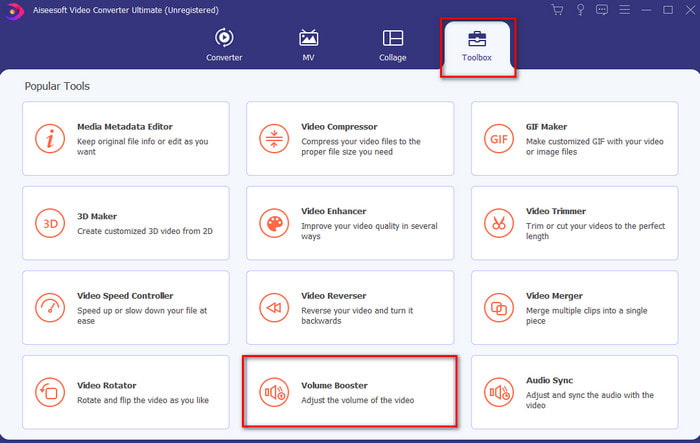
Schritt 2. Klicke im Bereich Toolbox auf Volume Booster.
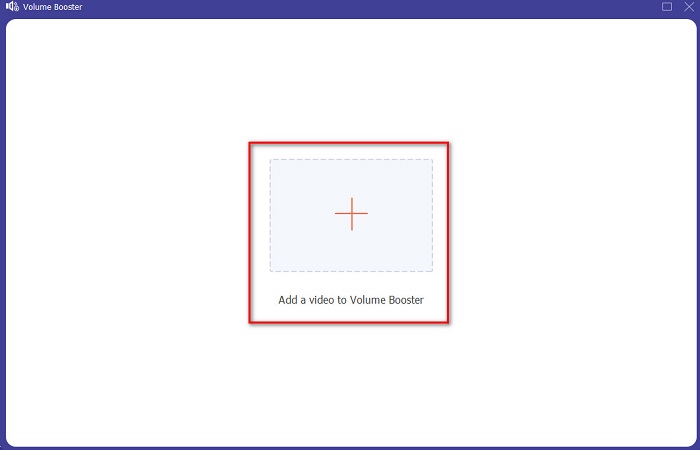
Schritt 3. Klicke auf die Schaltfläche +, um die Datei auszuwählen, deren Ton du verstärken möchtest. Drücke anschließend auf Öffnen, um fortzufahren.
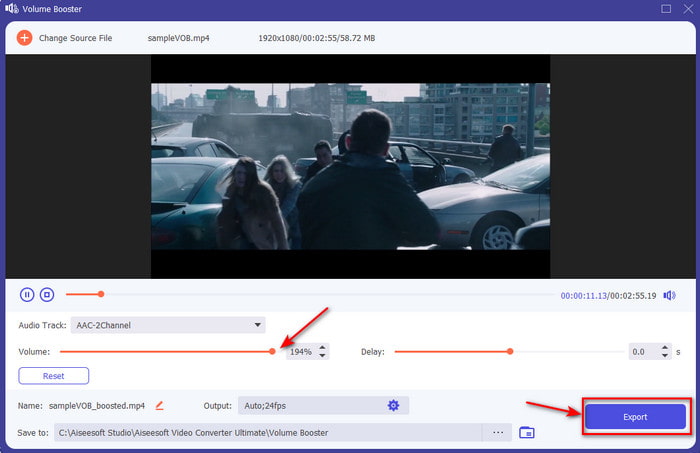
Schritt 4. In der Benutzeroberfläche kannst du nun den Lautstärkeregler verschieben, um den Klang lauter und klarer zu machen. Wenn du die Audioanpassung abgeschlossen hast, klicke auf Exportieren.
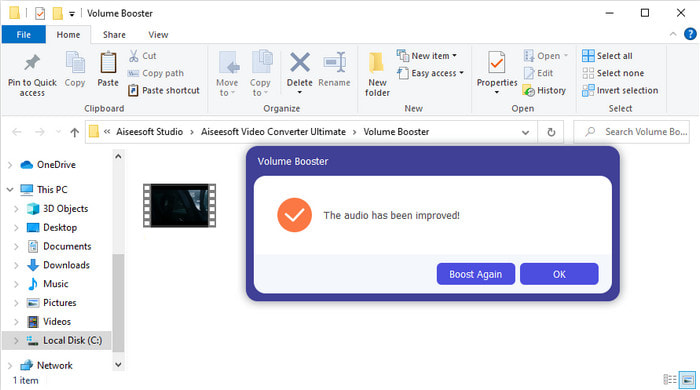
Schritt 5. Warte einige Sekunden, bis der Vorgang abgeschlossen ist. Sobald er fertig ist, wird ein Dateimanager auf deinem Bildschirm angezeigt, der die verstärkte Datei enthält. Klicke auf die Datei, um sie anzuhören.
Vorteile
- Diese Software ist einfach zu bedienen und kann Ihr Audio phänomenal klingen lassen.
- Die Leistung der Software wird von den Kunden sehr geschätzt.
- Es ist verfügbar und kann problemlos auf PC und Mac heruntergeladen werden.
Nachteile
- Diese Software unterstützt keine Mobilgeräte.
- Dieses Tool ist kostenpflichtig, aber im Vergleich zu den anderen Desktop-Tools nicht so teuer.
Verwandt:
So erhöhst du die Lautstärke eines MP4-Videos
So behebst du Audioverzögerungen in VLC
Teil 2. 4 der besten Soundverstärker-App, die auf iOS- und Android-Mobiltelefonen verfügbar ist
1. Lautstärke erhöhen – Sound Amplifier 4+ (iOS)
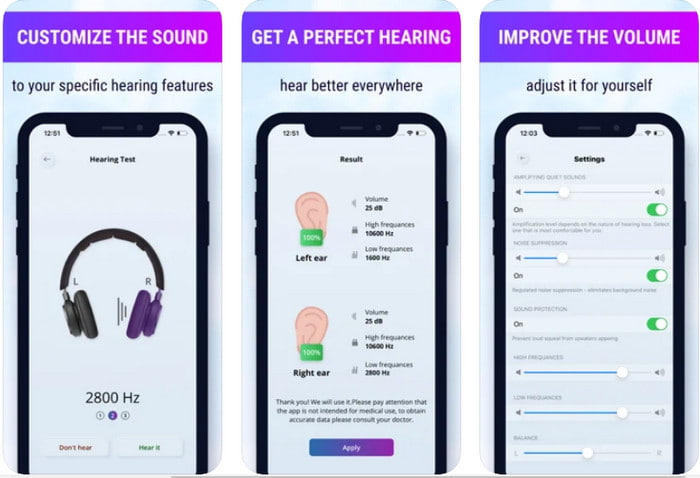
iOS-Nutzer können die App Volume Boost- Sound Amplifier 4+ ganz einfach kostenlos herunterladen. Diese App kann den Ton ohne großen Aufwand mit einer automatischen Anpassung verstärken, du kannst aber auch manuell eingreifen. Darüber hinaus eignet sich die App sehr gut als Verstärker, allerdings funktioniert sie nicht mit Bluetooth-Lautsprechern und kabellosen Ohrhörern oder AirPods. Außerdem wirst du bei der Nutzung dieser App mit vielen Abstürzen und unvermeidlichen Werbeanzeigen konfrontiert. Obwohl die App kostenlos heruntergeladen werden kann, gibt es In-App-Käufe, um die Werbung zu entfernen und weitere Funktionen freizuschalten.
Vorteile
- Kostenloser Download auf allen iOS-Geräten.
- Verstärken Sie den Ton Ihres Lautsprechers ganz einfach um bis zu 30 dB.
- Intuitive Benutzeroberfläche und Einrichtung.
Nachteile
- Erleben Sie viele Abstürze, Einfrierungen und Fehler sind immer noch in dieser App.
- Werbung ist viel zu vermeiden.
2. Extra Volume Booster - lauter Lautsprecher (Android)
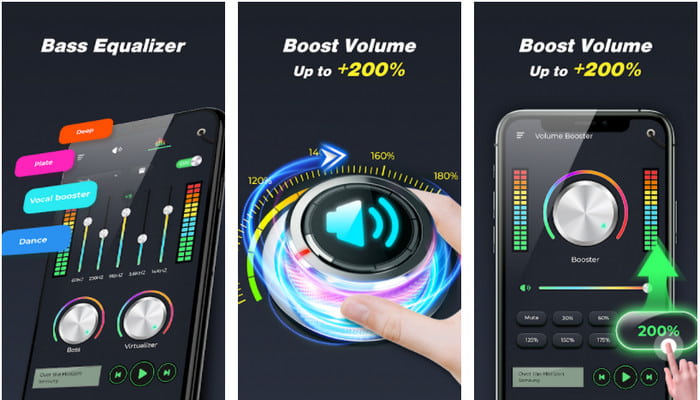
Wenn iOS-Nutzer einen Soundverstärker fürs Handy haben, sollten Android-Nutzer ebenfalls etwas Vergleichbares wie den Extra Volume Booster besitzen. Viele Nutzer sind bereits mit der Leistung dieser App zufrieden, weil sie sich hervorragend zum Verstärken und Boosten eignet. Wenn du diese App allerdings aktivierst, werden alle auf deinem Telefon erzeugten Töne – wie Klingeltöne, Alarme, Benachrichtigungen und mehr – verstärkt. Das bedeutet, es gibt keine getrennten Einstellungen für diese einzelnen Bereiche. Obwohl das Tool kostenlos ist, schneidet es im Vergleich zu anderen kostenpflichtigen Apps auf Android oder sogar iOS insgesamt recht gut ab. Wenn du die Lautstärke jedoch auf 200% maximierst, musst du damit rechnen, dass deine eingebauten Lautsprecher oder Bluetooth-Lautsprecher Schaden nehmen, wenn sie eine Lautstärke von 200% nicht verkraften.
Vorteile
- Vereinfachte Version des Verstärkers, die Sie auf Android-Geräte herunterladen können.
- Obwohl die App-Oberfläche nicht viel ist, ist sie großartig.
- In dieser App sind verschiedene Verstärkungen und Verstärkungen verfügbar.
Nachteile
- Erwarten Sie unzählige Anzeigen, während Sie die App verwenden.
- Während der Verwendung des Tools besteht die Möglichkeit, dass sich die CPU oder das Telefon erwärmen.
3. Lautsprecher-Boost: Volume Booster & Sound Amplifier 3D (Android)
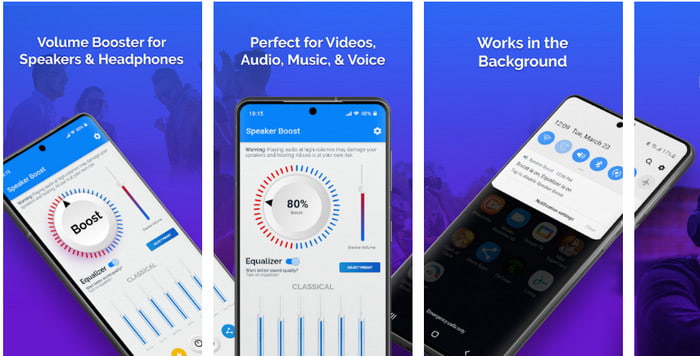
Eine weitere Android-App, mit der du einen großartigen Surround-Sound-Verstärkungseffekt erzielen kannst, ist Speaker Boost. Genau wie Extra Volume Booster ist diese App sehr zielgerichtet und deutlich einfacher zu bedienen, selbst wenn du keine Erfahrung hast. Du kannst dieses Tool ebenfalls kostenlos herunterladen, es bietet jedoch In-App-Käufe, die du möglicherweise nutzen möchtest – etwa um nervige Werbung zu entfernen und mehr. Obwohl die App insgesamt ganz ordentlich ist, sind die In-App-Käufe hier im Vergleich zu anderen in dieser Liste erwähnten Programmen recht teuer. Ein weiteres Problem, das viele Nutzer beschäftigt, ist, dass die App trotz Werbeblocker funktioniert und die Sorge besteht, dass es sich um Spyware handeln könnte.
Vorteile
- Auf den Punkt gebracht, um den Sound einfach zu verstärken, und dennoch leistungsstark in der Anwendung.
- Laden Sie das Tool kostenlos herunter, ohne die Sounds verstärken zu müssen.
- Führen Sie die manuelle Übersteuerung des Equalizers durch.
Nachteile
- Dieses Tool ist unvollständig, was im Grunde bedeutet, dass es experimentell ist.
- Wenn Sie den Ton erhöhen, werden Sie einige Verzerrungen hören.
4. Boom: Bass Booster & Equalizer 4+ (iOS)
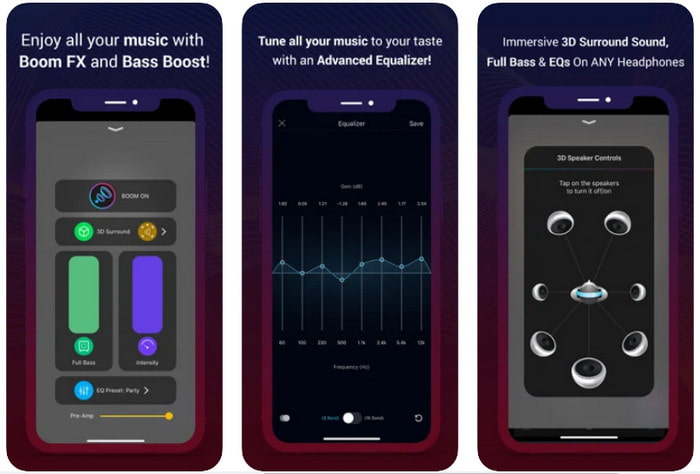
Wenn du nach einer fortgeschrittenen Sound-Amplifier-App suchst, ist Boom: Bass Booster eine gute Wahl. Diese App ist allerdings nur auf iOS-Geräten verfügbar und nicht für Android-Geräte zu finden. Bisher hat dieses Tool bereits viel Lob von den Nutzern erhalten, doch einige Formate werden bei der Verstärkung nicht unterstützt. Außerdem musst du bei der Nutzung der App mit Bugs und Abstürzen rechnen. Darüber hinaus ist die App für neue Nutzer teilweise irreführend. Obwohl die Leistung der App insgesamt akzeptabel wirkt, besteht weiterhin Verbesserungsbedarf, um sie wirklich herausragend zu machen.
Vorteile
- Einige der erweiterten Funktionen sind hier verfügbar.
- Tragbare Verstärker, die Sie einfach verwenden können.
- Die App erhält 4,1 von 5 Sternen.
Nachteile
- Aufgrund der verwirrenden Oberflächenstruktur nicht die beste Wahl für Anfänger.
- Die meisten Audioformate werden nicht unterstützt, um mit dieser App verstärkt zu werden.
- Probleme mit Fehlern und Verzögerungen treten immer noch mit der App auf.
Teil 3. FAQs zu Tonverstärkern
Was ist dB?
Db bedeutet Dezibel und dies ist die Maßeinheit, um die Lautstärke oder Kraft der Schallwelle auszudrücken. Außerdem können wir mit Hilfe von Dezibel leicht bestimmen, welchen Ton wir sicher über lange Zeit hören können. Und alle 85 Dezibel darunter sind sehr sicher zu hören.
Was sind die Nachteile von lautem Ton?
Es ist für uns sehr üblich, dass das Gehör geschädigt werden kann, wenn wir lauten Geräuschen ausgesetzt sind. Aber wussten Sie, dass dies zu Übelkeit, Kopfschmerzen, Stress, Müdigkeit und mehr führen kann? Wenn Sie also einen Verstärker verwenden, verwenden Sie ihn richtig und übertreiben Sie ihn nicht, um die unvermeidlichen schädlichen Auswirkungen zu vermeiden.
Warum höre ich einige Risse auf meinen Lautsprechern?
Dieses Problem ist sehr üblich, da die Lautsprecher mit einer sehr begrenzten Hertzfrequenz umgehen können. Wenn Sie also die Lautstärke erhöhen, stellen Sie sicher, dass der Lautsprecher damit umgehen kann. Und wenn Sie ein Knacken hören, müssen Sie den Ton sofort verringern. Wenn Sie jedoch einige Risse hören, selbst wenn Sie den Ton leiser stellen, ist es zu spät.
Fazit
Alle hier vorgestellten Apps und Programme eignen sich gut als Verstärker. Auch wenn sich die oben genannten Programme in einigen Punkten unterscheiden, sind ihre Funktionen ähnlich. Wenn du jedoch nach dem besten Soundverstärker für PC und Mac suchst, dann ist der Video Converter Ultimate vermutlich die beste Wahl. Er bietet herausragende, erweiterte Funktionen, die du ganz einfach nutzen kannst. Wenn du dich also fragst, ob dies die beste Option ist, dann lade die Software zunächst auf deine Festplatte herunter und befolge die oben angegebenen Schritte.
Gratis DownloadFür Windows 7 oder neuerSicherer Download
Gratis DownloadFür MacOS 10.7 oder neuerSicherer Download
-
 [Einfach] So beheben Sie nicht synchronisiertes Audio und Video
 Angenommen, Sie planen Ihren Stream für morgen, aber wenn Sie Ihre Einrichtung überprüfen, sind Audio und Video nicht synchron. Lesen Sie diesen Artikel, um mehr über dieses Problem zu erfahren.
-
 7 einfache Schritte zur Behebung von OBS-Audioverzögerungsproblemen [Gelöst]
 Haben Sie Schwierigkeiten, Ihren Videoclip nach der Aufnahme aufgrund der Audioverzögerung bei der Verwendung von OBS Studio anzusehen? Lesen Sie den folgenden Artikel, um zu erfahren, wie Sie asynchrones Audio effektiv beheben können.
-
 So fügen Sie Video kostenlos Audio und Musik auf Ihrem Computer / Telefon hinzu
 Dieser Artikel zeigt 4 einfache Möglichkeiten, um Audio kostenlos zu Video hinzuzufügen. Unabhängig davon, welche Audiospur Sie Ihrem Video hinzufügen möchten, können Sie hier zufriedenstellende Ergebnisse erzielen.
