


 Video Converter Ultimate
 Bildschirm recorder
 Videoreparatur
Lernen Sie die 7 besten Volume Booster-Apps kennen, die Sie auf Ihrem Desktop und Telefon verwenden können
Ist es nicht frustrierend, wenn die Lautstärke eines Videos so niedrig ist, dass sich auch bei maximal aufgedrehtem Lautstärkeregler nichts ändert? Es gibt mehrere Gründe, warum die Lautstärke leiser geworden sein kann. Anstatt sich über das Video zu ärgern, können Sie einen Booster verwenden, um Ihren Ton lauter und klarer zu machen. Heute ist Ihr Glückstag, denn wir stellen verschiedene Lautstärkebooster vor, aus denen Sie wählen können. Alle hier vorgestellten Tools wurden vom Autor dieses Artikels selbst verwendet, um die Fakten zu den Tools je nach dem von Ihnen verwendeten Betriebssystem darzustellen. Und damit wir fortfahren können, beginnen wir nun unsere Schritt-für-Schritt‑Übersicht über die verschiedenen Sound‑Booster, die Sie unter Windows, auf dem Mac, auf iPhones und Android nutzen können.

Teil 1. 4 der besten Lautstärke-Booster für Windows PC, Mac & Online
1. Videokonverter Ultimate
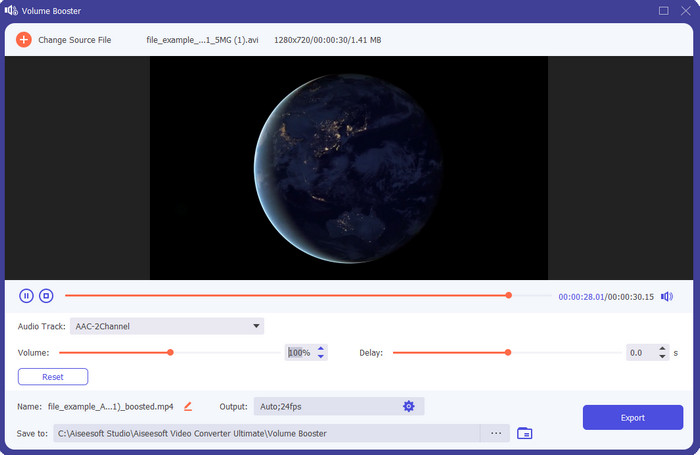
Wenn Sie nach der besten Volume-Booster-App suchen, dann ist der Video Converter Ultimate wahrscheinlich genau das Richtige. Dieses Tool kann die Qualität Ihres Audios verbessern, ohne Ihre Lautsprecher zu beschädigen. Wenn Sie also mit diesem Tool die Lautstärke erhöhen, müssen Sie keine knisternden oder verzerrten Geräusche aus den Lautsprechern befürchten. Wenn Sie zudem Probleme mit minderwertiger Audioqualität haben, können Sie dieses Programm zur Verbesserung einsetzen. Selbst wenn Sie kein Profi sind, können Sie mit diesem Tool problemlos einen Audio‑Boost durchführen. Und nicht nur das: Diese Software bietet viele zusätzliche Funktionen, die Sie nach dem Download nutzen können. Im Gegensatz zu anderen Audio‑Boostern in dieser Liste stellt dieses Tool zahlreiche Verbesserungsfunktionen bereit, um Ihren Sound aufzuwerten. Haben Sie außerdem Probleme mit einer Audioverschiebung, können Sie dieses Programm ebenfalls einsetzen. Es ist ehrlich gesagt das herausragendste Tool in dieser Liste, wenn wir alle miteinander vergleichen würden. Wenn Sie also ein intensives 8‑ oder 16‑D‑Audioerlebnis haben möchten, laden Sie dieses Tool jetzt herunter.
Gratis DownloadFür Windows 7 oder neuerSicherer Download
Gratis DownloadFür MacOS 10.7 oder neuerSicherer Download
Vorteile
- Passen Sie Equalizer und Voreinstellungen automatisch an, um Ihre Arbeit einfacher und besser zu machen.
- Die endgültige Audioausgabe wurde viel besser als zuvor und ohne Ihr Gehör oder sogar die Lautsprecher zu zerstören.
- Es ist sehr intuitiv, dass sogar Benutzer, die keine Erfahrung mit dem Boosten haben, es tun können.
Nachteile
- Es ist nur auf dem Desktop und nicht in der Telefonversion verfügbar.
- Kaufen Sie, bevor Sie darauf zugreifen können, aber es ist nicht so teuer.
2.VLC Mediaplayer
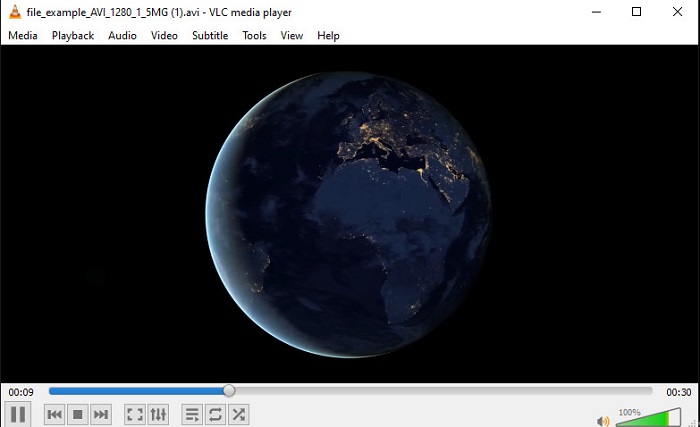
VLC Media Player ist einer der besten Media‑Player, die Sie im Internet herunterladen können. Dieses Programm verfügt bereits über einen integrierten, kostenlosen Lautstärkebooster in seiner Oberfläche, und die Lautstärke kann – wenn Sie möchten – auf bis zu 125% Prozent erhöht werden. Allerdings überwacht dieses Desktop‑Tool nicht, wie viel Ihre Lautsprecher tatsächlich aushalten. Das bedeutet: Wenn Sie die Lautstärke dauerhaft auf das Maximum aufdrehen, besteht die Gefahr, dass Ihre Lautsprecher mit der Zeit anfangen zu knistern, insbesondere eingebaute Lautsprecher. Doch dieses Programm ist die einzige hier vorgestellte App, die Booster und Player in einem bietet. Wenn Sie also gleichzeitig Videos ansehen und die Lautstärke anheben möchten, versuchen Sie dieses Tool. Obwohl es die Lautstärke anhebt, kann es Ihnen aber keine hervorragende Klangqualität garantieren, da lediglich die Lautstärke erhöht wird.
Vorteile
- Eingebauter Audio-Booster.
- Steigern Sie Ihr Audio auf bis zu 125%, um es lauter klingen zu lassen.
- Kostenloser Download auf PC oder Mac.
Nachteile
- Das Tool hat keinen eingebauten Equalizer, um die Audioqualität zu verbessern.
- Es überwacht nicht, wie laut Ihr Audio sein sollte.
Verwandt:
So beheben Sie, dass VLC keine MKV‑Dateien abspielt
So behebst du: VLC spielt keine DVDs ab
3. Boom 3D
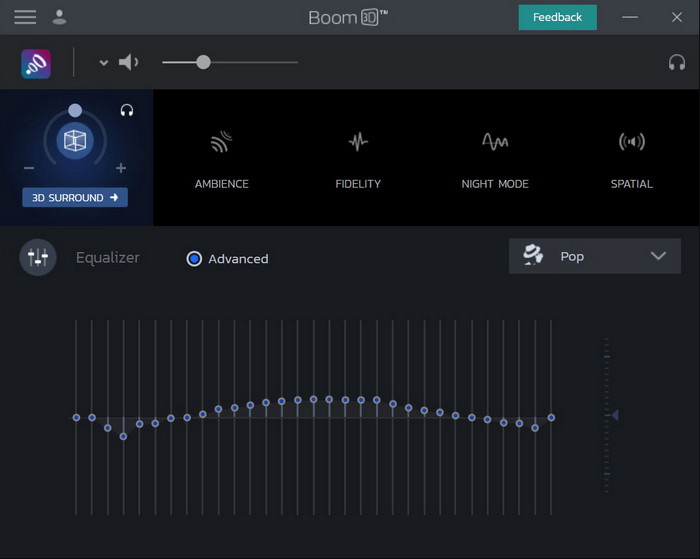
Boom 3D ist eines der fortschrittlichsten Programme im Bereich Audio‑Optimierung. Dieser Lautstärkebooster für Windows 10 und Mac bietet zahlreiche Klangverbesserungen, die Sie nutzen können. Außerdem können Sie Equalizer und Presets manuell anpassen, wohingegen der Video Converter Ultimate dies automatisch für Sie übernimmt. Auch wenn das Tool beeindruckend aussieht, gibt es dennoch Nachteile. Gerade für Einsteiger kann die Einrichtung und Bedienung ziemlich anspruchsvoll sein. Nichtsdestotrotz lohnt es sich – auch wenn es Zeit kostet –, sich in die Nutzung dieses Tools einzuarbeiten.
Vorteile
- Überschreiben Sie den Equalizer und die Voreinstellung manuell.
- Für den Zugriff auf das Tool ist kein Internet erforderlich.
- Es ist großartig, von Profis verwendet zu werden, die eine gute Audioqualität wünschen.
Nachteile
- Es ist nicht die beste Wahl für Anfänger, die keine Ahnung haben, was Equalizer und Presets sind.
- Benötigen Sie viel Zeit, um die Verwendung dieses Tools zu lernen.
4. Volumenverstärker
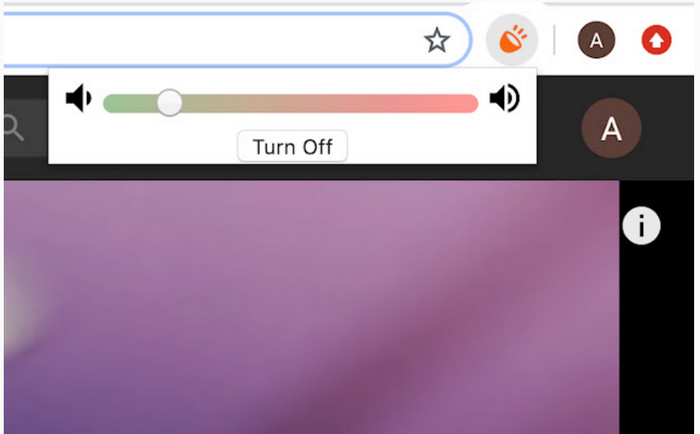
Volume Booster ist eine Volume-Booster‑Chrome‑Erweiterung, auf die Sie mit einer Internetverbindung leicht zugreifen können. Dieses Tool kann von jedem kostenlos verwendet werden und ist zudem sicher, da es aus dem Chrome Web Store stammt. Wenn Sie diese Erweiterung nutzen, können Sie mit einem deutlichen Lautstärkezuwachs bei der Wiedergabe rechnen. Allerdings können Sie diese Erweiterung nicht außerhalb von Chrome verwenden. Möchten Sie also Audiodateien anhören, die lokal auf Ihrem Laufwerk gespeichert sind, können Sie damit keine Verbesserung vornehmen. Zudem haben wir beim Testen bei maximaler Lautstärke ein gewisses Knistern festgestellt. Um dies zu vermeiden, sollten Sie den Regler nur knapp über das Minimum hinaus anheben.
Vorteile
- Das Tool ist sicher, weil es eine Erweiterung von Chrom ist.
- Benutzerfreundlich.
Nachteile
- Kann nicht außerhalb des Chroms verwendet werden.
- Wenn Sie ihn auf Maximum drehen, ist ein gewisses Knacken des Tons zu hören.
- Equalizer werden nicht unterstützt.
Teil 2. Top 3 Volume Booster Apps für iPhone & Android
1. Volume Booster – Equalizer-Effekte
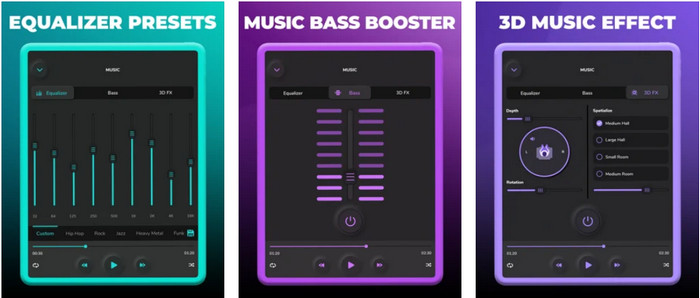
Volume Booster – Equalizer FX reizt die maximale Lautstärkegrenze Ihres iPhones aus, um einen lauteren und besseren Klang zu erzielen. Dieser iPhone‑Lautstärkebooster wird von vielen iOS‑Nutzern verwendet, um ihren eigenen Equalizer‑Sound einzustellen. Die App hat bereits eine solide Bewertung von 3,9 Sternen erhalten – weder schlecht noch überragend. Dieses Tool kann allerdings keine Online‑Streams lauter machen, und die Werbung beeinträchtigt die Nutzung spürbar. Außerdem kommt es immer noch zu Abstürzen und weiteren Bugs. Wenn Sie jedoch vor allem einen kräftigeren Bass auf dem iPhone möchten, sollten Sie diese App auf jeden Fall ausprobieren.
Vorteile
- Es ist ein guter Booster für iPhone-Benutzer.
- Sie können eine grundlegende Entzerrung und Audioanpassung durchführen.
Nachteile
- Meistens stürzt das Tool ab.
- Es gibt eine Einschränkung, wo Sie die Audioverstärkung verwenden können.
2.AmpMe – Lautsprecher- und Musiksynchronisierung
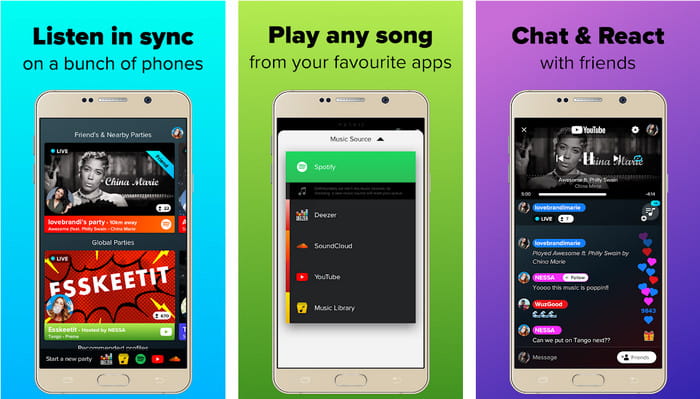
AmpMe - Speaker & Music Sync ist ein großartiger herunterladbarer Lautstärkebooster für Android‑Geräte. Es ist mehr als nur ein Booster, denn Sie können als Host Ihre eigene Playlist abspielen oder über die App an einer Live‑Party teilnehmen. Vereinfacht gesagt: Mit dieser App können Sie mit anderen interagieren, während Sie gleichzeitig Musik hören und chatten. Auch wenn das Tool beeindruckend ist, werden Sie dennoch auf einige Bugs und Abstürze stoßen. Zudem haben einige Nutzer Schwierigkeiten, Musik zu ihrer Playlist hinzuzufügen, was ziemlich nervig ist. Und die Bedienung ist etwas kompliziert, insbesondere wenn man mit den Funktionen nicht vertraut ist. Insgesamt ist die App für Android‑Nutzer jedoch sehr empfehlenswert.
Vorteile
- Sie können mit AmpMe Ihr eigener DJ sein und ihn mit der gleichen App an andere Personen in der Nähe weitergeben.
- Zuhören und gleichzeitig chatten.
- Es erzeugt qualitativ hochwertiges Audio.
Nachteile
- Die Abonnementgebühr ist zu hoch, um bezahlt zu werden, wenn Sie billiger werden möchten.
- Es ist schwierig, das Abonnement zu kündigen, selbst wenn Sie das Konto gelöscht haben.
- Wenn Sie einer Live-Party beitreten, wird die App manchmal automatisch getrennt.
3. Volumenverstärker GOODEV
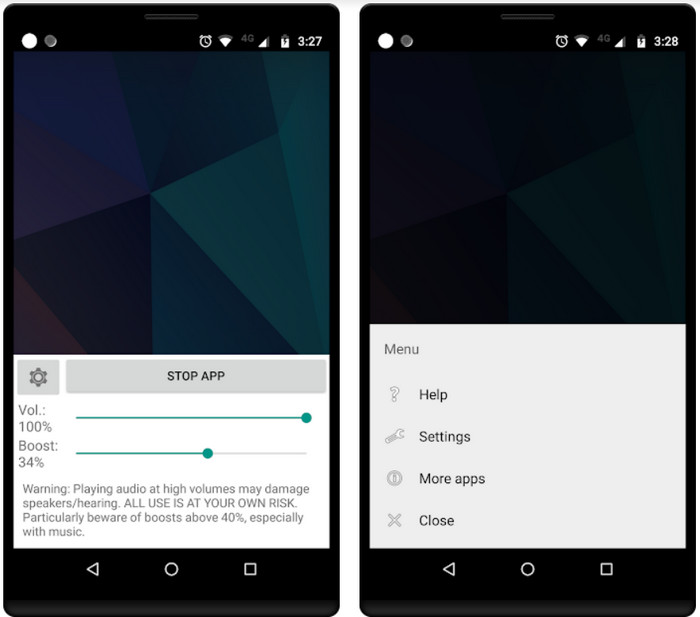
Volume Booster GOODEV verfügt über eine einfache und leicht zu bedienende Oberfläche. Dieser Lautstärkebooster hat bereits eine sehr gute Bewertung von 4,4 Sternen durch seine Nutzer erhalten. Viele Rezensionen loben dieses Tool als das beste seiner Art. Inzwischen treten jedoch einige Abstürze auf, und häufig verstärkt das Programm den Ton nicht mehr, selbst wenn Sie es starten. Um es wieder zu aktivieren, müssen Sie Ihr Smartphone neu starten oder die App neu öffnen – so lässt sich das Problem in der Regel beheben.
Vorteile
- Leicht verständlicher Audio-Booster, der einfach auf Ihr Android-Handy heruntergeladen werden kann.
- Benutzerfreundlich.
Nachteile
- Anzeigen werden aus dem Nichts geschaltet.
- Meistens stürzt die App ohne unbekannten Grund von alleine ab.
- Die alte Version dieser App ist viel besser als die aktualisierte Version.
Teil 3. Welcher ist der beste Volumen-Booster?
Hier ist eine Vergleichstabelle, die Ihnen angezeigt wird, um zu vergleichen, welche Tool-Funktionen Sie verwenden können, mit dem Tool, das das andere Tool nicht hat.
| Tool Feature / s | Video Converter Ultimate | VLC Media Player | Boom 3D | Lautstärke-Booster | Lautstärke Booster – Equalizer FX | AmpMe – Lautsprecher- und Musiksynchronisierung | Volumen-Booster GOODEV |
| Audio-Booster |  | | | | | | |
| Audio-Enhancer | |  | | | | | |
| Audio- und Video-Synchronisationsfunktion | | | | | | | |
| Benutzerfreundlich | | | | | | | |
| Unterstützte Plattformen | Desktop-basiertes Tool | Desktop-basiertes Tool | Desktop-basiertes Tool | Chrome-Erweiterungstool | Herunterladbares iOS-basiertes Tool | Herunterladbares Android-basiertes Tool | Herunterladbares Android-basiertes Tool |
| Preisklasse | 1 Monat: $25.00 Lebenslange Lizenz: $55.20 Multi-User-Lizenz lebenslang/5 PCs: $119.00 | Kostenlos zum Download | $11.99 und $23.99 | Frei | 3 bis 20 $ | $0.99 – $99.99 pro Artikel | Frei |
Teil 4. Häufig gestellte Fragen zu Volume Booster
Schädigt die Erhöhung der Lautstärke das Gehör?
Eigentlich ja. Besonders wenn Sie Kopfhörer oder Headset verwenden und die Lautstärke des Audios auf Maximum stellen, fügen Sie dann einen Lautstärkeverstärker hinzu. Dann rechnen Sie damit, dass Ihr Gehör langfristig langsam zerstört wird. Also, um dies zu vermeiden, können Sie. Es ist unser Vorschlag, dass Sie es auf mittel oder niedrig beschränken müssen und nicht das Maximum anstreben.
Was sind die anderen Nachteile der Audioverstärkung bei Lautsprechern?
Wir verwenden einen Audio-Booster, um den Ton viel besser zu hören, wenn die Töne leise sind. Aber Sie wussten nicht, dass Lautsprecher auch eine Hertz-Grenze haben, zu der sie in der Lage sind. Je höher das Hertz, desto lauter können Sie sein, aber einige eingebaute Lautsprecher können einen super lauten Ton nicht verarbeiten. Es besteht also die Möglichkeit, dass der Lautsprecher knistert, was bedeutet, dass der Ton vom Lautsprecher nicht verarbeitet werden kann.
Was sind die Unterschiede von Bässen und Höhen von Lautsprechern?
Diese beiden sind die bekanntesten eingebauten Lautsprecher, aber sie haben ihren eigenen Zweck, warum sie in Lautsprechern sind. Was den Bass betrifft, kann es mit niedrigen Audiofrequenzen umgehen und nicht mit hohen Frequenzen, außerdem ist es darauf spezialisiert, uns den Boom der Musik spüren zu lassen. Während Treble sich auf hohe Frequenzen konzentriert, die Bass nicht verarbeiten kann.
Fazit
Abschließend lässt sich sagen: Sie müssen keine Audios mit schlechter Qualität mehr ertragen, wenn Sie sie mit Hilfe eines Lautstärkeboosters auf dem PC, Mac, online oder auf mobilen Geräten verstärken. Die hier vorgestellten Tools eignen sich hervorragend für alle, die Musik auf einem neuen Niveau erleben möchten. Es gibt jedoch ein Tool, das es seinen Nutzern besonders leicht macht, ihr Audio einfacher und besser zu boosten. Anstatt sich mühsam mit Equalizer‑Einstellungen und Presets zu beschäftigen, übernimmt der Video Converter Ultimate dies bereits für Sie. Um zu sehen, wie leistungsstark dieses Programm wirklich ist, probieren Sie es einfach selbst aus und laden Sie es auf Ihr Gerät herunter.
-
 So fügen Sie Video kostenlos Audio und Musik auf Ihrem Computer / Telefon hinzu
 Dieser Artikel zeigt 4 einfache Möglichkeiten, um Audio kostenlos zu Video hinzuzufügen. Unabhängig davon, welche Audiospur Sie Ihrem Video hinzufügen möchten, können Sie hier zufriedenstellende Ergebnisse erzielen.
-
 Der unvoreingenommene Cinch Review Audio Recorder und die beste Alternative
 Cinch Audio Recorder ist der beste Weg, um Musik von Streaming-Sites herunterzuladen. Erfahren Sie einfach mehr über die unvoreingenommene Bewertung und die beste Alternative aus dem Artikel.
-
 Machbare Möglichkeiten, wie Sie mit dem VLC Player Audio aufnehmen können
 Erfahren Sie, wie Sie am besten Audio mit dem VLC-Player und anderen praktischen Tools aufnehmen, indem Sie den Artikel durchlesen.
