


 Video Converter Ultimate
 Εγγραφή οθόνης
 Επισκευή βίντεο
Κορυφαίες 4 συσκευές εγγραφής FLV Κατάλληλες για υπολογιστές Chrome, Windows και Mac
Έχετε αναρωτηθεί ποτέ τι κάνει τα βίντεο που βλέπετε να κυκλοφορούν στον ιστό; Οι περισσότεροι ιστότοποι HTML 5 χρησιμοποιούν μορφή WebM για την αναπαραγωγή βίντεο. Εκτός από το WebM, χρησιμοποιείται και το FLV. Κυρίως αυτές οι δωρεάν τοποθεσίες δωρεάν ταινιών και τηλεοπτικών εκπομπών. Πώς θα ξέρετε αν πρόκειται για αρχείο FLV; Συνήθως, εάν το βίντεο δεν αναπαράγεται, θα δείτε ένα μήνυμα σφάλματος που λέει εγκατάσταση του Adobe Flash Player. Αυτές τις μέρες, πολλά βίντεο είναι ενσωματωμένα σε αρχεία FLV. Αλλά όταν εγγράφετε το βίντεο είτε χρησιμοποιώντας την ενσωματωμένη συσκευή εγγραφής είτε άλλη συσκευή εγγραφής, η πιθανότητα αλλαγής της ποιότητας του βίντεο είναι υψηλή.
Έτσι, θα είναι προτιμότερο να χρησιμοποιήσετε έναν καταγραφέα που μπορεί να δημιουργεί και αρχεία FLV ή που μπορεί να παράγει καλύτερη ποιότητα ανεξάρτητα από τη μορφή αρχείου. Αν ανησυχείτε μήπως αλλοιωθεί η ποιότητα του βίντεο, ανακαλύψτε FLV Recorders που δεν απαιτούν εγγραφή για να τα χρησιμοποιήσετε.

Μέρος 1. Η καλύτερη επιλογή χρήστη - FVC Screen Recorder
Ανάμεσα στους FLV Recorders που βρίσκονται στο διαδίκτυο, το FVC Screen Recorder είναι από τα «crème de la crème», ή για να το πούμε απλά, είναι το απολύτως καλύτερο. Οι απαιτήσεις των χρηστών μερικές φορές είναι μεγαλύτερες από αυτά που μπορεί να προσφέρει ένα προϊόν, και δεν μπορούν όλα να είναι η καλύτερη επιλογή. Άλλοι πελάτες αναζητούν το καλύτερο προϊόν που πρέπει να χρησιμοποιήσουν. Το FVC Screen Recorder ξεπερνά περισσότερους από χίλιους premium καταγραφείς, ειδικά σε σύγκριση με τον τρέχοντα καταγραφέα σας. Με την ομαλή απόδοση εγγραφής του, μπορείτε να αξιοποιήσετε στο έπακρο το βίντεο που θέλετε να καταγράψετε. Επιπλέον, μπορείτε να αλλάξετε το bit rate και το frame rate του βίντεο, κάτι που θα έχει ως αποτέλεσμα καλύτερη ποιότητα εικόνας. Γι’ αυτό είναι απαραίτητο να δώσετε προσοχή σε αυτό το review για τον καλύτερο FLV recorder. Στο μεταξύ, για να χρησιμοποιήσετε το εργαλείο, ακολουθεί ένας εύκολος οδηγός βήμα προς βήμα.
Βήμα 1. Χρησιμοποιήστε τα κουμπιά λήψης παρακάτω για να αποκτήσετε την εφαρμογή. Εγκαταστήστε την και ακολουθήστε τις οδηγίες μέχρι να εκκινηθεί η εφαρμογή.
Δωρεάν ΛήψηΓια Windows 7 ή νεότεραΑσφαλής Λήψη
Δωρεάν ΛήψηΓια MacOS 10.7 ή νεότεροΑσφαλής Λήψη
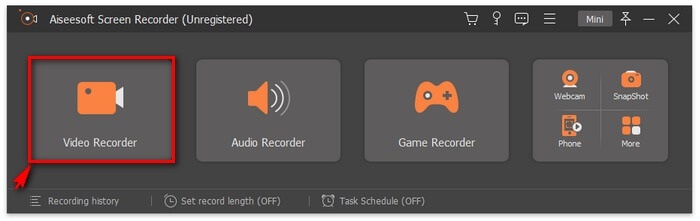
Βήμα 2. Επιλέξτε ανάμεσα στις καρτέλες. Εφόσον προσπαθούμε να καταγράψουμε βίντεο, κάντε κλικ στο Video Recorder. Μετά από αυτό θα εμφανιστεί ένα διάστικτο πλαίσιο μαζί με τη πλωτή γραμμή εργαλείων.
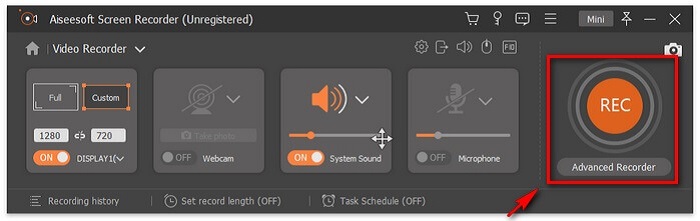
Βήμα 3. Ρυθμίστε το διάστικτο πλαίσιο για να ορίσετε την αναλογία διαστάσεων της οθόνης και έπειτα κάντε κλικ στο κουμπί REC για να ξεκινήσει η εγγραφή.
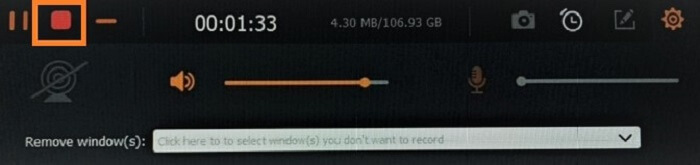
Βήμα 4. Για να σταματήσετε την εγγραφή, κάντε κλικ στο κόκκινο κουμπί Square από την πλωτή γραμμή εργαλείων. Από εκεί θα εμφανιστεί ένα νέο παράθυρο. Εκεί μπορείτε να επιλέξετε αν θα αποθηκεύσετε ή θα επαναλάβετε την εγγραφή αν δεν είστε ικανοποιημένοι με το αποτέλεσμα.
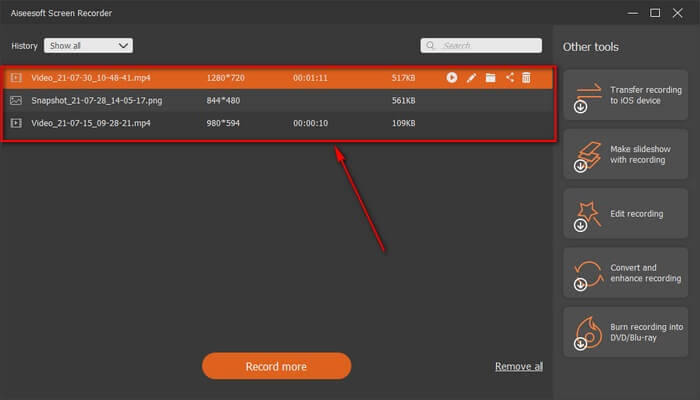
Βήμα 5. Ας πούμε ότι αποθηκεύσατε το αρχείο· στο επόμενο παράθυρο θα μπορείτε να επιλέξετε τη θέση του αρχείου που θα αποθηκευτεί. Επιλέξτε τον φάκελο και κάντε κλικ στο Next.
Μέρος 2. Άλλη δωρεάν συσκευή εγγραφής βίντεο FLV
FLV Recorder για όλους τους φυλλομετρητές - FVC Free Screen Recorder
Είναι γνωστό ότι το FVC Free Screen Recorder είναι ελαφρύ και διαθέτει επίσης ισχυρές λειτουργίες. Έτσι, αν είστε αρχάριος που θέλει να κάνει εγγραφές για διασκέδαση, μπορείτε να το χρησιμοποιήσετε, ή αν είστε επαγγελματίας που θέλει να καταγράψει μια επαγγελματική συνάντηση. Και στις δύο περιπτώσεις, λειτουργεί άψογα. Το καλύτερο χαρακτηριστικό που προσφέρει αυτός ο καταγραφέας είναι ότι μπορείτε να εγγράψετε οποιοδήποτε τμήμα της οθόνης σας χωρίς να σας ενοχλεί η πλωτή γραμμή εργαλείων του εργαλείου. Καταγράφει αυτόματα μόνο την οθόνη. Τραβήξτε όσα στιγμιότυπα οθόνης θέλετε χωρίς ενόχληση με τη βοήθεια της λειτουργίας Lock-in screen. Χωρίς άλλη καθυστέρηση, ας προχωρήσουμε τώρα στο πώς να χρησιμοποιήσετε αυτόν τον FLV recorder. Πρέπει να ακολουθήσετε τα βήματα που παρέχονται παρακάτω.
Βήμα 1. Επισκεφθείτε τον επίσημο ιστότοπο του FVC Free Screen Recorder και εκκινήστε την εφαρμογή.
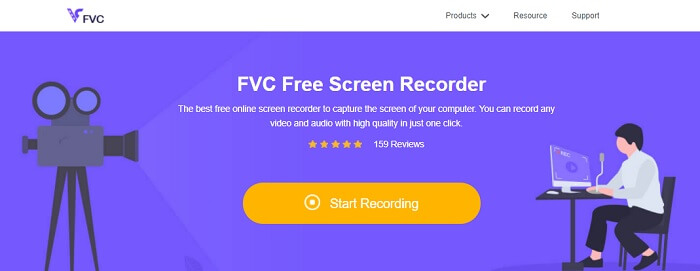
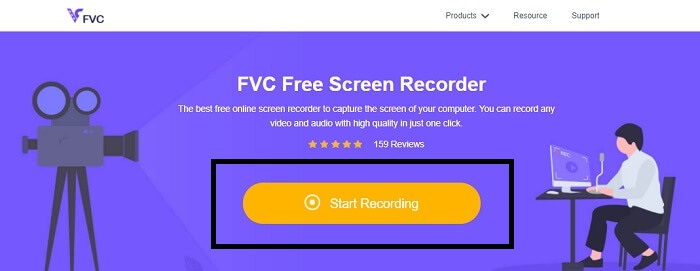
Βήμα 2. Εκκινήστε το εργαλείο κάνοντας κλικ στο Start Recording και προχωρήστε στο επόμενο βήμα.
Βήμα 3. Στη γραμμή εργαλείων του, κάντε κλικ στο κουμπί γραναζιού για να αλλάξετε τις ρυθμίσεις σύμφωνα με τις ανάγκες σας. Αν βρίσκεστε πλέον στο μενού προτιμήσεων, βρείτε την καρτέλα Output και αλλάξτε τη μορφή βίντεο σύμφωνα με τις επιθυμίες σας. Κάντε κλικ στο OK αν όλα έχουν ρυθμιστεί.
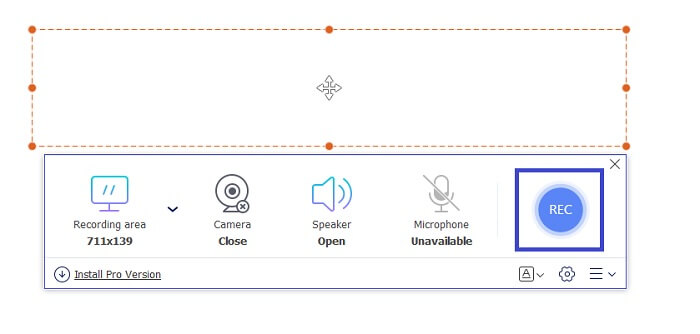
Βήμα 4. Στην πλωτή γραμμή εργαλείων, μπορείτε τώρα να ρυθμίσετε το frame ratio της οθόνης. Προσθέστε επίσης την αντίδραση του προσώπου σας ενεργοποιώντας την Webcam. Το System Sound χρησιμοποιείται για να προσθέσει τον φυσικό ήχο του προγράμματος. Και τέλος, προσθέστε τη φωνή σας ενεργοποιώντας το Microphone. Για να ξεκινήσει η εγγραφή FLV, κάντε κλικ στο κουμπί REC για έναρξη.
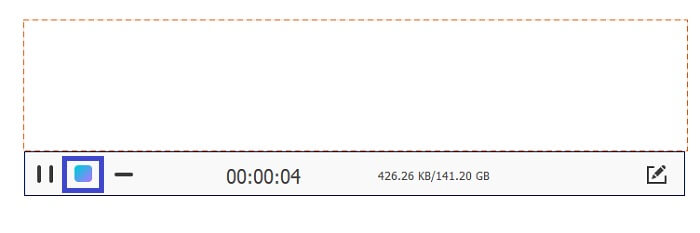
Βήμα 5. Για να τερματίσετε την εγγραφή FLV, κάντε κλικ στο κουμπί cube για διακοπή. Έπειτα, κάντε κλικ στο Save και Next. Όλες οι εγγραφές που πραγματοποιείτε βρίσκονται στη History list.
Συσκευή εγγραφής FLV για Chrome - SCREEN.IO
Εάν δεν θέλετε να κάνετε λήψη επιπλέον αρχείων στη μονάδα δίσκου σας, μπορείτε να χρησιμοποιήσετε αυτήν την ενσωματωμένη συσκευή εγγραφής Chrome. Αυτή η συσκευή εγγραφής FLV για το Chrome βοηθά πολλούς ανθρώπους σε ολόκληρο τον ιστό. Επομένως, εάν είστε λάτρης της εξοικονόμησης χώρου στον αποθηκευτικό χώρο σας, τότε πρέπει να δοκιμάσετε αυτό το SCREEN.IO. Παρόλο που το εργαλείο δεν παρέχει ειδικές δυνατότητες παρόμοιες με άλλες συσκευές εγγραφής. Αλλά η ικανότητα εγγραφής του είναι πολύ τυπική. Εάν συγκρίνουμε μια συσκευή εγγραφής Chrome και μια συσκευή εγγραφής επιτραπέζιου υπολογιστή, η επιφάνεια εργασίας είναι ο αποτελεσματικός τρόπος για να κάνετε την εγγραφή γιατί δεν θα σας πειράζει αν η σύνδεση στο Διαδίκτυο έχει διακοπεί.
FLV Recorder για Windows - VLC Media Player
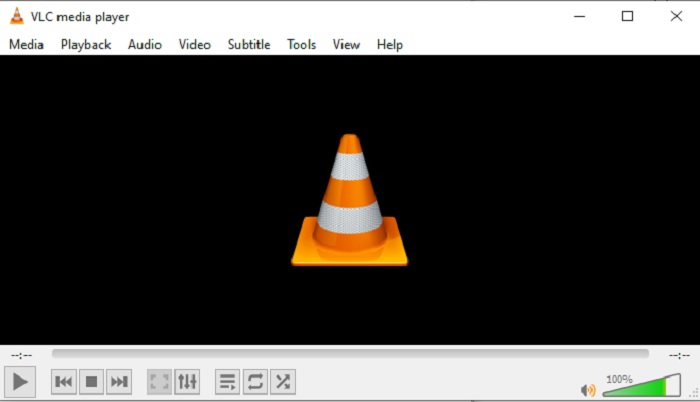
Το VLC Media Player δεν είναι μόνο γνωστό ως το καλύτερο media player στην αγορά. Διαθέτει επίσης διάφορες λειτουργίες, όπως εγγραφή, μετατροπή και άλλα. Παρόλο που είναι ο καλύτερος media player, όλες αυτές οι πρόσθετες λειτουργίες δεν είναι οι κορυφαίες. Και σε ορισμένες περιπτώσεις, μορφές βίντεο ή ήχου δεν είναι αναπαράξιμες εδώ επειδή τα codecs τους είναι ιδιόκτητα. Έτσι, αντ' αυτού, μπορείτε να χρησιμοποιήσετε το VLC Media Player Alternative που υποστηρίζει αρχεία ακόμη κι αν είναι ιδιόκτητα.
FLV Recorder για Mac - OBS Studio
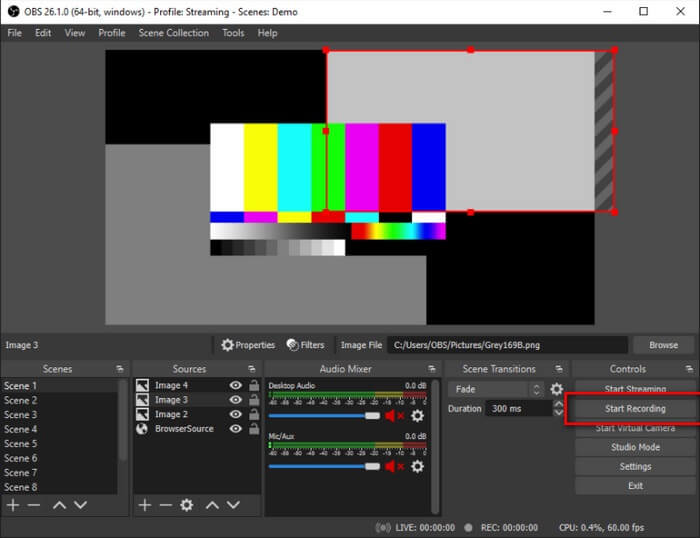
Ίσως σκέφτεστε ότι ξεχάσαμε τους χρήστες Mac. Αυτός ο FLV recorder για Mac είναι ένας από τους πιο ισχυρούς καταγραφείς στη λίστα, επειδή μπορείτε να κάνετε και streaming από εδώ. Παρά τα εντυπωσιακά χαρακτηριστικά του, το ίδιο το εργαλείο είναι λίγο τρομακτικό, ειδικά αν είστε νέοι στις εγγραφές, επειδή συμβαίνουν πολλά επάνω στο interface όταν ανοίγετε το εργαλείο.
Μέρος 3. Συχνές ερωτήσεις σχετικά με τη συσκευή εγγραφής βίντεο FLV
Αρχείο FLV, Είναι ασφαλές να το κατεβάσω στον υπολογιστή μου;
Στην πραγματικότητα, δεν είναι το αρχείο για το οποίο μιλάμε όσον αφορά την ασφάλεια. Τα αρχεία FLV είναι ενσωματωμένα σε ιστότοπους κοινής χρήσης βίντεο, επομένως η ερώτησή σας θα πρέπει να είναι, πώς μπορώ να αναγνωρίσω εάν το βίντεο που κατεβάζω από έναν ιστότοπο δεν έχει κακόβουλο λογισμικό; Χρησιμοποιήστε μια ασφάλεια για τον υπολογιστή σας. Υπάρχουν πολλοί υπερασπιστές λογισμικού και σαρωτές που μπορείτε να βρείτε στο διαδίκτυο. Αλλά το ίδιο το αρχείο είναι ασφαλές. Αν δεν βάλουν κακόβουλο λογισμικό σε αυτό, είναι ασφαλές.
Ποιο πρόγραμμα μπορεί να ανοίξει αρχεία FLV;
Υπάρχουν πολλοί media players εκεί έξω, αλλά αυτό που προτείνω είναι το VLC player. Αυτός ο player είναι ευέλικτος και μπορεί να αναπαράγει σχεδόν όλες τις μορφές αρχείων, είτε είναι ασυμπίεστες είτε συμπιεσμένες. Κάντε κλικ εδώ για να βρείτε ακόμη περισσότερους δημοφιλείς FLV players.
Ποια είναι τα πλεονεκτήματα των αρχείων FLV;
Το πρώτο σημαντικό πλεονέκτημα του FLV είναι η ικανότητά του να παράγει βίντεο υψηλής ποιότητας σε μικρό μέγεθος. Από τη φύση του, το αρχείο είναι ευέλικτο. Γιατί; Μπορείτε εύκολα να μετατρέψετε αυτό το αρχείο σε διαφορετική μορφή ακόμη και χρησιμοποιώντας διαδικτυακούς μετατροπείς.
Μέρος 4. Διάγραμμα σύγκρισης
| Χαρακτηριστικά | FVC Screen Recorder | Δωρεάν εγγραφή οθόνης FVC | VLC Media Player | OBS Studio |
| Εγγραφή οθόνης |  | | | |
| Συσκευή εγγραφής ήχου | | | | |
| Υποστηρίζει FLV | | | | |
| Συσκευή αναπαραγωγής πολυμέσων |  | | | |
| Ρυθμιζόμενος ρυθμός bit και ρυθμός καρέ | | | | |
συμπέρασμα
Όλα τα εργαλεία που αναφέρονται είναι χρήσιμα για την εγγραφή βίντεο FLV και την παραγωγή της καλύτερης δυνατής ποιότητας βίντεο. Επίσης, εάν δεν είστε σίγουροι ποιο εργαλείο θα χρησιμοποιήσετε, μπορείτε να ανατρέξετε στο γράφημα σύγκρισης. Αλλά μεταξύ των καταγραφέων FLV που αναφέρονται. Το FVC Screen Recorder έχει μεγαλύτερο πλεονέκτημα λόγω της δυνατότητας κλειδώματος παραθύρου.
-
 Το πιο χρήσιμο OGG Recorder του 2021 [Δωρεάν & Διαδικτυακό]
 Αυτή η εγγραφή μιλά για τα καλύτερα εργαλεία εγγραφής OGG που σας βοηθούν να κάνετε εγγραφή ήχου OGG. Για να προσθέσετε πιο λεπτομερείς πληροφορίες για τον χρήστη, συνεχίστε να το διαβάζετε.
-
 Top 5 καλύτερα λογισμικά εγγραφής M4B για PC και Mac [Δωρεάν και επί πληρωμή]
 Η εγγραφή M4B συμπιέζεται με απώλειες για αρχείο ήχου βιβλίου MPEG-4. Σε ορισμένες πτυχές τα M4A και M4B είναι σχεδόν κοινά αλλά έχουν διαφορές. Για να ξέρετε τι είναι διαβάστε το άρθρο.
-
 Κορυφαία 5 καλύτερα εργαλεία εγγραφής AMR διαθέσιμα για όλα τα λειτουργικά συστήματα
 Θέλετε να μάθετε τι είναι μια μορφή AMR και ποια είναι η καλύτερη συσκευή εγγραφής AMR που πρέπει να επιλέξετε και θα σας προσφέρει καταπληκτική εγγραφή.
