


 Video Converter Ultimate
 Εγγραφή οθόνης
 Επισκευή βίντεο
 Ασφαλές κατέβασμα
Πώς να αφαιρέσετε το υδατογράφημα στο SmartDraw με 2 πιθανούς τρόπους
Αν χρειάζεστε έναν εύκολο και ισχυρό τρόπο για να δημιουργείτε γραφήματα, διαγράμματα και χάρτες και στη συνέχεια να τα παρουσιάζετε σε επαγγελματική, εταιρικού επιπέδου ποιότητα, τότε χρησιμοποιήστε το SmartDraw. Μπορείτε να αξιοποιήσετε τη φαντασία σας και να τη μετατρέψετε σε πραγματικότητα με τη βοήθεια του SmartDraw. Είναι το εργαλείο δωρεάν; Μπορείτε να χρησιμοποιήσετε τη δωρεάν δοκιμή επτά ημερών που προσφέρει, ώστε να το χρησιμοποιήσετε χωρίς χρέωση, με υδατογράφημα όμως στα αρχεία. Η διαχείριση του υδατογραφήματος στα εξαγόμενα αρχεία μπορεί να είναι ενοχλητική. Εδώ σας παρουσιάζουμε αυτήν την ανάρτηση ιστολογίου, καθώς παρουσιάζουμε μόνο το καλύτερο εργαλείο που μπορείτε να βρείτε στην αγορά και που λειτουργεί αποτελεσματικά στην αφαίρεση υδατογραφημάτων. Συνεχίστε να διαβάζετε τις πληροφορίες παρακάτω για να μάθετε πώς να αφαιρέσετε το υδατογράφημα στο SmartDraw με δύο αποτελεσματικούς τρόπους.

Μέρος 1. Πώς να αφαιρέσετε το υδατογράφημα στο Smart Draw αγοράζοντας ένα κλειδί άδειας χρήσης [Επίσημη έκδοση]
Πώς να αφαιρέσετε το υδατογράφημα από το SmartDraw; Είναι ο πρώτος τρόπος που θα σας παρουσιάσουμε και είναι με την αγορά του κλειδιού άδειας χρήσης για αυτό το εργαλείο. Αυτή η πλατφόρμα σάς προσφέρει διαφορετικούς τύπους σχεδίων που μπορείτε να αποκτήσετε που θα ωφελήσουν το τέλος σας. Επιπλέον, δεν μπορείτε να αγοράσετε πρόσβαση ενός μήνα σε αυτό το εργαλείο, επομένως εάν σκοπεύετε να αγοράσετε το κλειδί άδειας χρήσης του, θα χρεώνεστε μηνιαία, αλλά το σύνολο που θα πληρώνετε είναι στην ετήσια έκδοσή του. Εάν εκτιμάτε την απόδοση αυτού του εργαλείου και θέλετε να το αγοράσετε, μπορείτε να ακολουθήσετε τα βήματα που προσθέτουμε παρακάτω.
Βήματα σχετικά με τον τρόπο κατάργησης του υδατογραφήματος στο SmartDraw με κλειδί άδειας χρήσης:
Βήμα 1. Ανοίξτε την επίσημη ιστοσελίδα του SmartDraw και βεβαιωθείτε ότι έχετε μπει στη σωστή σελίδα, ώστε η συναλλαγή σας να είναι ασφαλής.
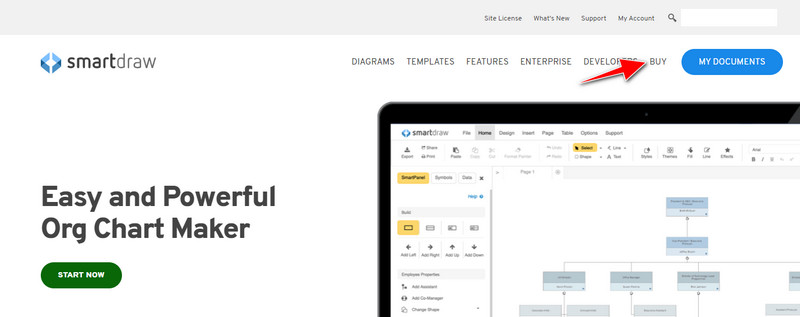
Βήμα 2. Στην ιστοσελίδα, κάντε κλικ στο Buy για να δείτε τα διαθέσιμα πλάνα.
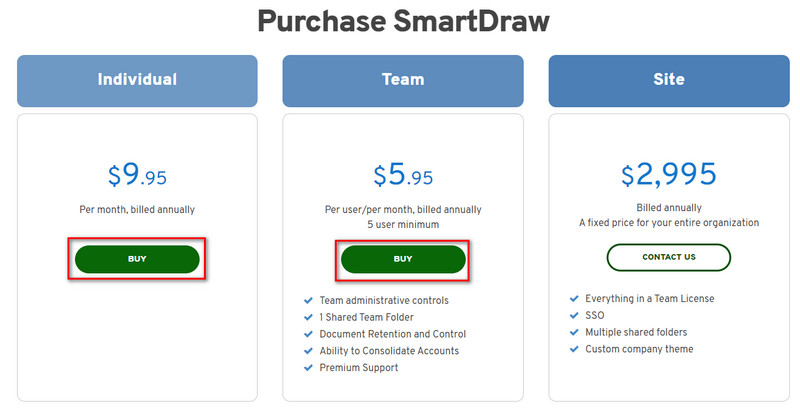
Βήμα 3. Μπορείτε να αγοράσετε το SmartDraw ως Individual, Team, or Site. Κάντε κλικ στο Buy Now αν πρόκειται να αγοράσετε την έκδοση Individual ή Team.
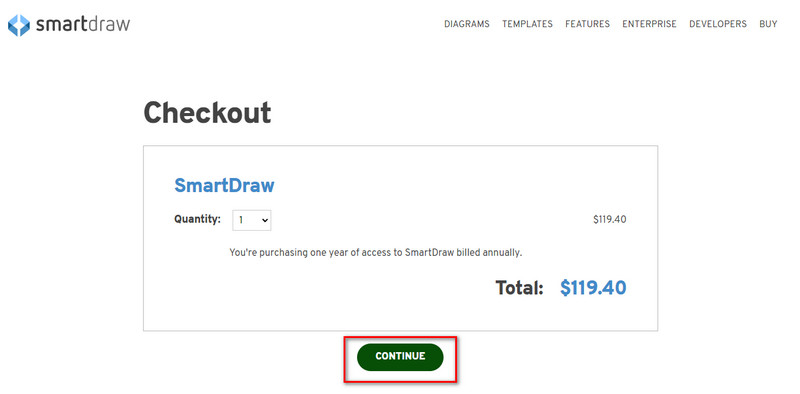
Βήμα 4. Στα δεξιά θα δείτε το συνολικό ποσό που θα χρεωθείτε ετησίως· κάντε κλικ στο Continue για να συνεχίσετε.
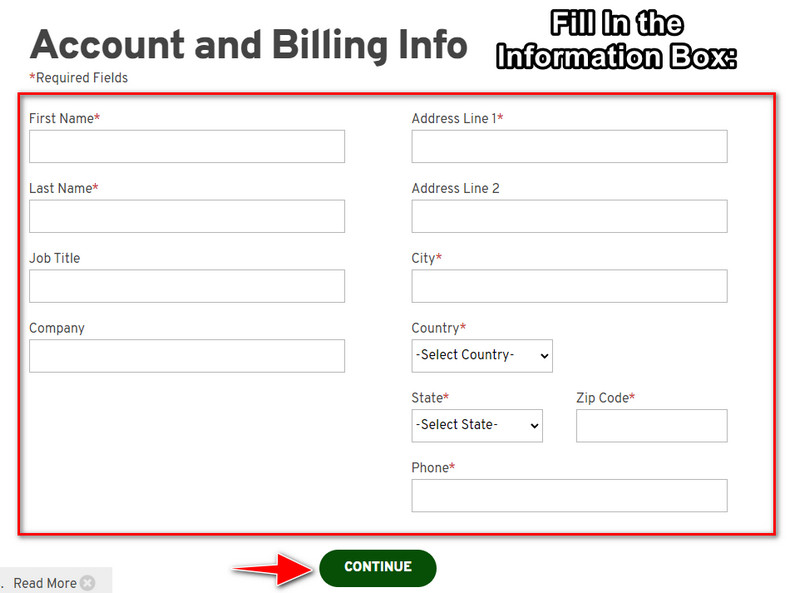
Βήμα 5. Προσθέστε τα στοιχεία λογαριασμού και πληρωμής που απαιτούνται και στη συνέχεια πατήστε Continue για να προχωρήσετε και να λάβετε το κλειδί άδειας (license key).
Μέρος 2. Πώς να αφαιρέσετε το υδατογράφημα στο Smart Draw δωρεάν χρησιμοποιώντας την υπηρεσία Web [Χωρίς κόστος]
Πώς να αφαιρέσετε το υδατογράφημα από τη δοκιμαστική έκδοση του SmartDraw χωρίς να αγοράσετε; Τότε θα χρειαστεί να χρησιμοποιήσετε το FVC Free Watermark Remover Online. Αυτό το εργαλείο αφαίρεσης υδατογραφημάτων είναι έτοιμο προς χρήση. Δεν χρειάζεστε ειδικές γνώσεις για να αφαιρέσετε το υδατογράφημα από την εικόνα σας, γιατί η χρήση του δεν είναι καθόλου δύσκολη. Ακόμα κι αν είστε ειδικός, μπορείτε και πάλι να χρησιμοποιήσετε αυτό το λογισμικό για να αφαιρέσετε ανεπιθύμητα υδατογραφήματα ή αντικείμενα από την εικόνα σας. Με τη βοήθεια αυτού του εργαλείου, δεν θα υπάρχει κανένα «λεκές» στην εικόνα σας που να μην μπορεί να αφαιρεθεί. Θέλετε να δοκιμάσετε αυτό το λογισμικό αντί να αγοράσετε κλειδί άδειας; Αν ναι, ακολουθήστε προσεκτικά το παρακάτω σεμινάριο για να αφαιρέσετε αποτελεσματικά το υδατογράφημα από τις εικόνες.
Βήματα για το πώς να αφαιρέσετε το υδατογράφημα του SmartDraw σε γράφημα ή διάγραμμα δωρεάν:
Βήμα 1. Αντί να αναζητήσετε το διαδικτυακό εργαλείο στον φυλλομετρητή σας, μπορείτε να κάνετε κλικ σε αυτόν τον σύνδεσμο για να το ανοίξετε· θα ανοίξει σε νέα καρτέλα στο πρόγραμμα περιήγησής σας.
Βήμα 2. Χρησιμοποιώντας το ποντίκι σας, σύρετε και αποθέστε το γράφημα ή το διάγραμμα που δημιουργήσατε στο SmartDraw, ώστε να γίνει η μεταφόρτωση.
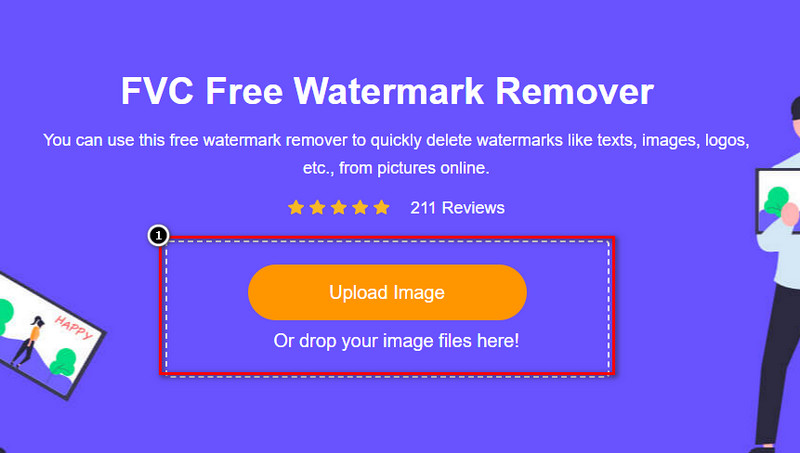
Βήμα 3. Τώρα που έχει ανοίξει το διαδικτυακό εργαλείο αφαίρεσης υδατογραφημάτων, επιλέξτε το εργαλείο που θέλετε για να επισημάνετε το υδατογράφημα πάνω στην εικόνα.
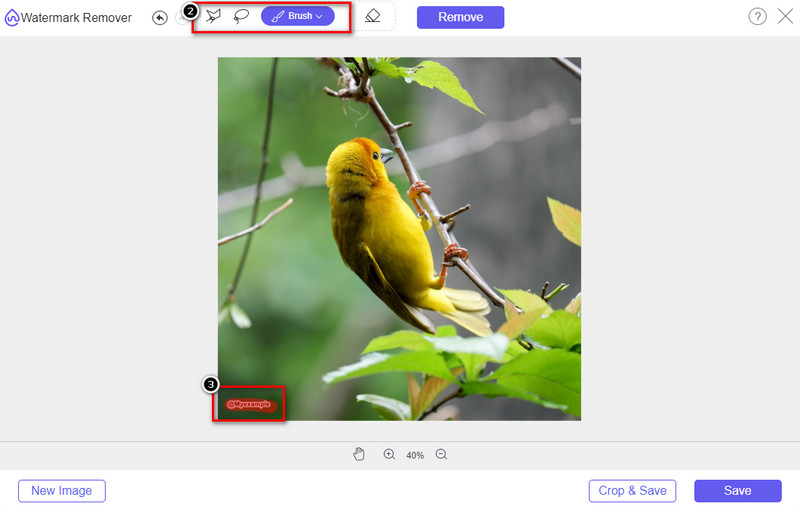
Βήμα 4. Αφού επισημάνετε το υδατογράφημα ή το λογότυπο στην εικόνα που ανεβάσατε, πατήστε Remove.
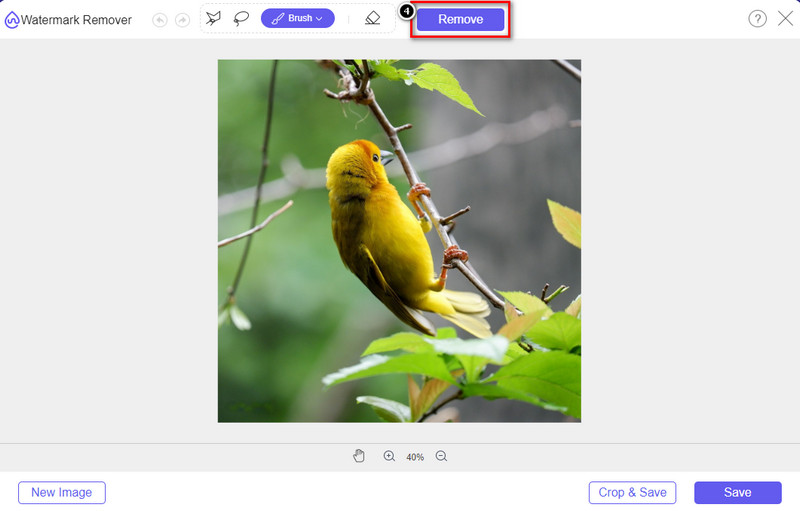
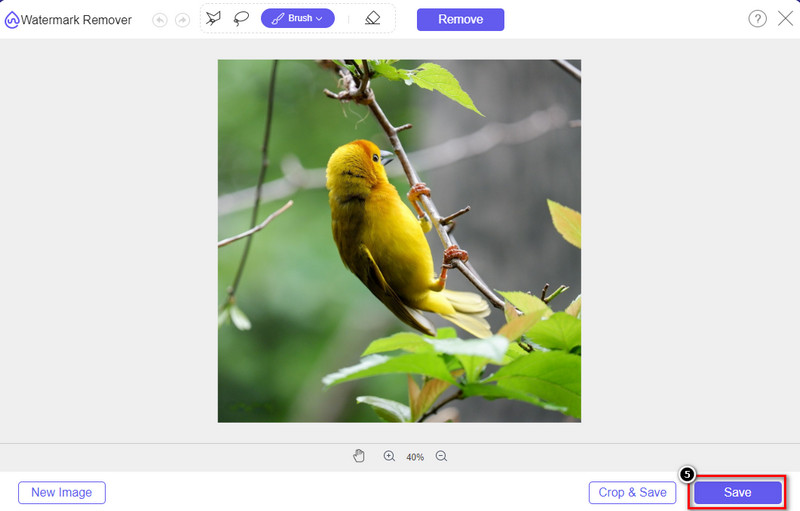
Βήμα 5. Περιμένετε να ολοκληρωθεί η διαδικασία αφαίρεσης του υδατογραφήματος και κάντε κλικ στο Save για να κατεβάσετε το γράφημα ή διάγραμμα που ανεβάσατε. Ένας φάκελος θα εμφανιστεί στην οθόνη σας· ελέγξτε εκεί την έκδοση του γραφήματος ή διαγράμματος που δημιουργήσατε χωρίς το υδατογράφημα.
Πλεονεκτήματα από τη χρήση του FVC Free Watermark Remover Online:
◆ Η λήψη της εφαρμογής δεν είναι απαραίτητη επειδή είναι διαθέσιμη στον ιστό.
◆ Υποστηρίζει ένα ευρύ φάσμα εικόνων και μπορεί να αφαιρέσει αποτελεσματικά τα υδατογραφήματα.
◆ Είναι ένα ειδικό εργαλείο αφαίρεσης υδατογραφήματος που παράγει αποτελέσματα υψηλής ποιότητας.
◆ Δεν προστίθεται υδατογράφημα στο τελικό αποτέλεσμα μετά την εξαγωγή.
◆ Δεν υπάρχει περιορισμός στο πόσες φορές θα χρησιμοποιηθεί και στο μέγεθος του αρχείου.
Μέρος 3. Πρόσθετο μέρος – Πώς να κάνετε ένα γράφημα, ένα γράφημα ή ένα διάγραμμα στο SmartDraw με λεπτομερή βήματα
Το προηγούμενο μέρος σάς διδάσκει πώς να απαλλαγείτε από το υδατογράφημα SmartDraw. Σε αυτό το μέρος, θα σας διδάξουμε πώς να φτιάξετε ένα γράφημα, ένα γράφημα και ένα διάγραμμα με τη βοήθεια του SmartDraw. μπορείτε να ακολουθήσετε τα βήματα που προσθέτουμε παρακάτω για να μάθετε πώς να το κάνετε.
Βήμα 1. Μεταβείτε στην επίσημη ιστοσελίδα του για να δημιουργήσετε ένα γράφημα, διάγραμμα ή χάρτη ροής.
Βήμα 2. Αφού ανοίξετε την επίσημη ιστοσελίδα, κάντε κλικ στο Start Now και συνδεθείτε στον λογαριασμό σας.
Βήμα 3. Στην αριστερή πλευρά, επιλέξτε τι είδους πρότυπο θέλετε να χρησιμοποιήσετε ή να δημιουργήσετε.
Βήμα 4. Προσθέστε τις πληροφορίες σε κάθε διάγραμμα ροής. Στο αριστερό μέρος της ιστοσελίδας θα βρείτε επιπλέον επιλογές που μπορείτε να χρησιμοποιήσετε.
Βήμα 5. Κάντε κλικ στο κουμπί Export, επιλέξτε σε ποια μορφή αρχείου θέλετε να εξαχθεί και κάντε κλικ για να ξεκινήσει η διαδικασία. Αν χρησιμοποιείτε τη δωρεάν έκδοση, θα υπάρχει υδατογράφημα· μπορείτε να αντιγράψετε τα βήματα του μέρους 2 για να αφαιρέσετε το υδατογράφημα.
Περαιτέρω ανάγνωση:
Πώς να αφαιρέσετε το υδατογράφημα B612 από τις εικόνες σας
Πώς να αφαιρέσετε δωρεάν το υδατογράφημα του WOW Slider
Μέρος 4. Συχνές ερωτήσεις σχετικά με τον τρόπο κατάργησης του υδατογραφήματος SmartDraw
Μπορεί το SmartDraw να εξάγει εικόνες PNG;
Ναι, μπορείτε να έχετε ένα διαφανές γράφημα σε μορφή PNG. Ωστόσο, θα προσθέσει ένα υδατογράφημα εάν χρησιμοποιείτε τη δωρεάν έκδοση. Μπορείτε να αγοράσετε την επίσημη έκδοση, επομένως θα υπάρχει ένα υδατογράφημα στην εικόνα που εξάγεται.
Πόσο είναι η τιμή του SmartDraw;
Εάν πρόκειται να αγοράσετε ένα πρόγραμμα στο SmartDraw, μπορείτε να αγοράσετε το πρόγραμμά του ξεκινώντας από το $ 5.95. Μπορείτε να δείτε τις άλλες τιμές που παρέχει στον επίσημο ιστότοπο.
Ποιο είναι το πλεονέκτημα της αγοράς της premium έκδοσης του SmartDraw;
Μπορείτε να αποκτήσετε έλεγχο διαχειριστή ομάδας, φάκελο ομάδας, υποστήριξη premium και εξαγωγή εικόνων χωρίς υδατογράφημα για μεμονωμένα σχέδια. Για άλλα πλεονεκτήματα premium, μπορείτε να αποκτήσετε, επισκεφθείτε τον επίσημο ιστότοπο και δείτε ποιες δυνατότητες και λειτουργίες μπορείτε να αποκτήσετε.
συμπέρασμα
Τώρα που ξέρετε πώς να αποθηκεύσετε το SmartDraw χωρίς υδατογράφημα με τους δύο τρόπους που προσθέτουμε. Είτε το αγοράζετε είτε χρησιμοποιείτε ένα εργαλείο για να αφαιρέσετε το υδατογράφημα στο εξαγόμενο αρχείο. Εάν δεν σας αρέσει να αγοράσετε το εργαλείο, πρέπει να το χρησιμοποιήσετε γιατί είναι το πιο αποτελεσματικό εργαλείο web για την εξάλειψη του υδατογραφήματος. Εάν πιστεύετε ότι αυτό το άρθρο σας βοήθησε να λύσετε το πρόβλημα, τότε μας βαθμολογείτε με 5 αστέρια.
-
 4 καλύτεροι τρόποι για να αφαιρέσετε το υδατογράφημα από το GIF [Online & Offline]
 Θέλετε να αφαιρέσετε το υδατογράφημα από το GIF; Με το εργαλείο σε αυτό το άρθρο, θα μάθετε τα διαφορετικά στυλ με το διαφορετικό εργαλείο αφαίρεσης υδατογραφήματος που είναι διαθέσιμο στην πλατφόρμα σας.
-
 5 ευκολότεροι τρόποι για να αφαιρέσετε μεταδεδομένα σε οποιαδήποτε αρχεία πολυμέσων
 Πώς να αφαιρέσετε τα μεταδεδομένα; Είναι δύσκολο να το κάνεις; Χρειάζεται να αγοράσω ή να χρησιμοποιήσω ένα δωρεάν εργαλείο για να αφαιρέσω ετικέτες; Όλες αυτές οι ερωτήσεις έχουν απαντήσεις σε αυτό το άρθρο.
-
 Εξαιρετικό Photobucket Watermark Remover Online και Offline
 Μάθετε πώς να αφαιρείτε το υδατογράφημα Photobucket από τις φωτογραφίες σας χρησιμοποιώντας αυτό το εκπληκτικό εργαλείο αφαίρεσης υδατογραφήματος Photobucket. Διαβάστε αυτό το άρθρο για να μάθετε τους τρόπους.
