


 Video Converter Ultimate
 ضبط صفحه
 تعمیر ویدیو
آموزش استفاده از Premiere Pro برای افزایش سرعت یک ویدیو با 2 گزینه پریمیر
Premiere Pro یکی از نرمافزارهای ردهبالای توسعه دادهشده توسط Adobe برای تدوین و ویرایش حرفهای ویدئو است. همچنین عملکرد این ابزار توسط بسیاری از کاربرانی که از آن استفاده میکنند مورد تحسین قرار گرفته است. در واقع، ما به شما آموزش میدهیم که چطور با کمک این ابزار ویدئوهای خود را تندتر کنید. به این ترتیب لازم نیست درگیر تنظیمات زیاد یا مراحل اولیه پیچیده شوید. حالا بیایید به شما آموزش دهیم که چگونه سرعت ویدیو را در Premiere Pro افزایش دهیم و چه جایگزینهایی برای آن وجود دارد.

قسمت 1. نحوه افزایش سرعت یک ویدیو در پریمیر پرو
ویرایشگر ویدئوی ردهبالایی که احتمالاً دوست دارید بخرید و از آن استفاده کنید Adobe Premiere Pro است. این ابزار یک پکیج کامل است که هر کاربر حرفهای قطعاً از کار با آن لذت میبرد. زیرا این نرمافزار میتواند حجم بالایی از کارهای سنگین ویرایشی را که یک حرفهای دوست دارد انجام دهد، مدیریت کند. همچنین اگر میخواهید خروجی چشمگیری داشته باشید باید کار با این ابزار را یاد بگیرید. اما یادگیری Premiere Pro بدون شک زمان زیادی از شما میگیرد، پس اگر فرد پرمشغلهای هستید این نرمافزار باید آخرین انتخاب شما باشد. با این حال اگر مشتاق یادگیری هستید و وقت آزاد زیادی دارید، حتماً آن را امتحان کنید.
علاوه بر این، اگر می خواهید از این ابزار استفاده کنید، باید مقدار زیادی پول خرج کنید، زیرا در مقایسه با سایر ابزارهای ویرایش ویدیو، به معنای واقعی کلمه گران است. بنابراین اکنون، اگر میخواهید نحوه استفاده از Adobe Premiere Pro cc 2018 یا نسخههای بالاتر را برای افزایش سرعت ویدیو یاد بگیرید، مراحل سادهشده زیر را دنبال کنید.
مراحل افزایش سرعت ویدیو در Adobe Premiere Pro:
مرحله 1. نرمافزار Adobe Premiere Pro را از وبسایت رسمی آن بخرید و دانلود کنید. سپس برنامه را اجرا کنید تا فرایند افزایش سرعت را شروع کنید.
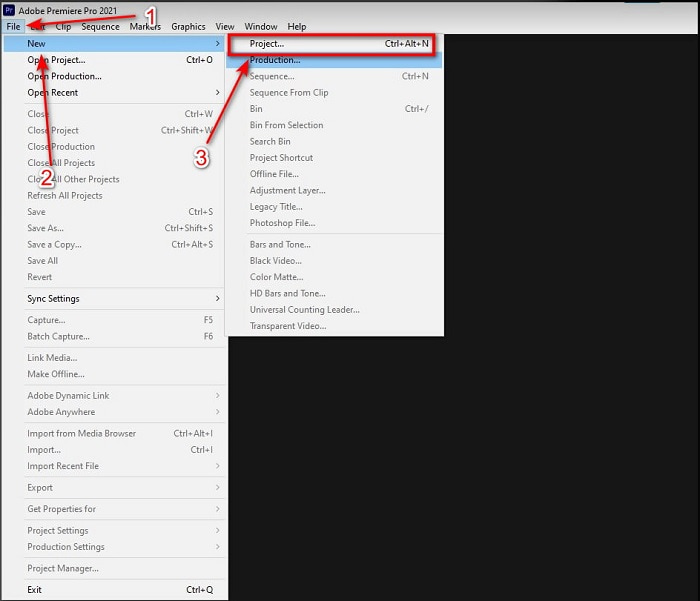
مرحله 2. روی File کلیک کنید، سپس به New و بعد Project بروید. صبر کنید تا پنجرهای مانند تصویر ظاهر شود و برای ادامه روی OK کلیک کنید. پوشه را باز کرده و ویدیو را پیدا کنید، فایل را بکشید و در Media Browser رها کنید تا در کنار Timeline قرار بگیرد.
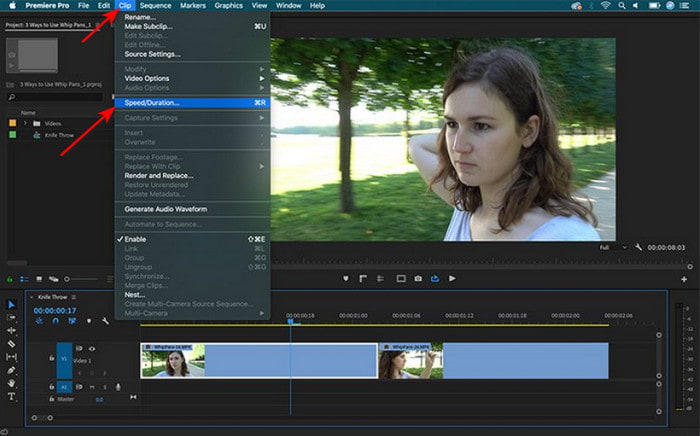
مرحله 3. روی ویدئویی که در Timeline قرار دادهاید کلیک کنید و در نوار بالا روی Clip کلیک کنید. سپس از منوی زیر آن گزینه Speed/Duration را انتخاب کنید. درصد سرعت را مطابق میل خود تغییر دهید و برای ذخیره تنظیمات افزایش سرعت روی OK کلیک کنید؛ سپس برای ذخیره فایل روی دکمه Export بزنید.
قسمت 2. 2 از بهترین جایگزین های Premiere Pro برای افزایش سرعت ویدیوها
1. Video Converter Ultimate
اگر مشکل شما افزایش سرعت ویدیو است، این ابزار میتواند راهحل شما باشد: Video Converter Ultimate. برخلاف بسیاری از ویرایشگرهای ویدئو، این ابزار شگفتانگیز در همه انواع ویرایش، تبدیل، ساخت GIF، تقویتکننده، معکوسکننده، افزایش سرعت و موارد دیگر بهترین است. همچنین بسیاری از کاربران این نرمافزار را دوست دارند، زیرا امکانات پیشرفتهای شبیه Adobe Premiere Pro ارائه میدهد، اما در قالبی سادهتر. علاوه بر این، ابزار دیگری پیدا نمیکنیم که قابلیتهای پیشرفته را تا این حد ساده ارائه کند. در واقع هیچ ابزاری مثل Video Converter Ultimate نیست. اگرچه این برنامه پولی است، اما برای هر پولی که خرج میکنید ارزش دارد و در عین حال بسیار ارزان است. بنابراین اگر میخواهید بدانید جایگزین چگونه سرعت ویدیو را در Premiere Pro افزایش دهیم چیست، مراحل زیر را به دقت دنبال کنید.
مراحل افزایش سرعت ویدیو با کمک Video Converter Ultimate:
مرحله 1. نرمافزار را روی درایو کامپیوتر خود دانلود کرده، سپس برای ادامه آن را نصب کنید.
دانلود رایگانبرای ویندوز 7 یا بالاتردانلود امن
دانلود رایگانبرای MacOS 10.7 یا بالاتردانلود امن
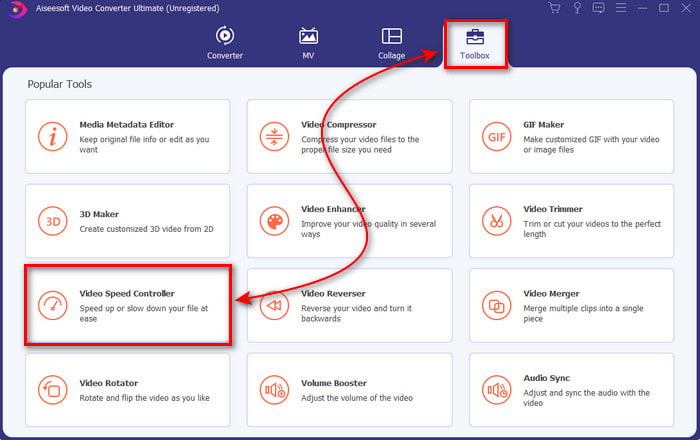
مرحله 2. برنامه را اجرا کنید، سپس روی Toolbox کلیک کرده و Video Speed Controller را پیدا کنید.
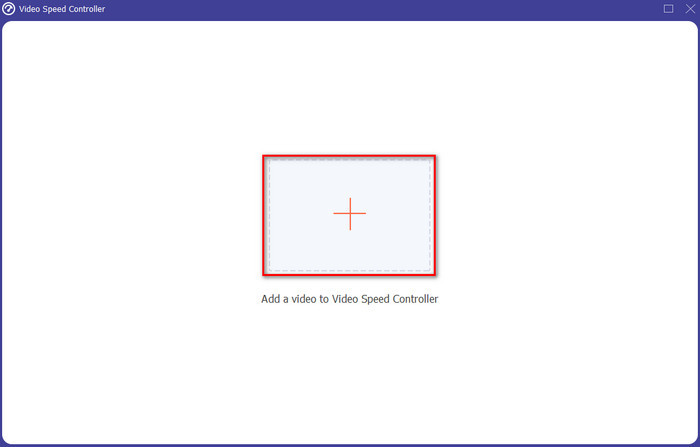
مرحله 3. برای اضافه کردن ویدیویی که میخواهید سرعتش را بالا ببرید، روی دکمه + کلیک کنید. سپس فایل را در پوشه پیدا کرده و برای افزودن ویدئو روی Open کلیک کنید.
مرحله 4. سپس با کلیک روی گزینههای موجود در جعبههای سرعت، سرعت دلخواه را برای ویدئو انتخاب کنید. اگر از سرعت ویدئوی خود راضی هستید، برای ذخیره آن مستقیماً در کامپیوترتان روی Export کلیک کنید.
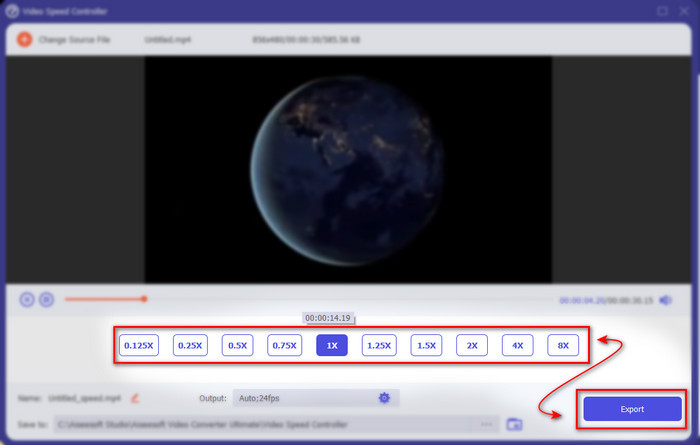
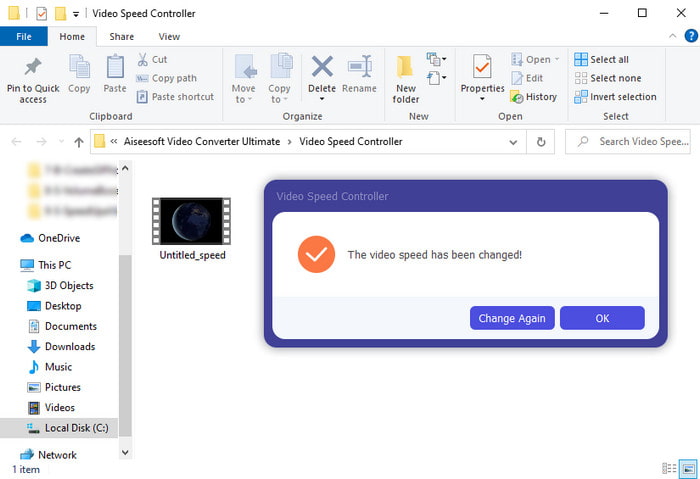
مرحله 5. بعد از پایان فرایند خروجی گرفتن، یک پوشه باز میشود. روی فایلی که قبلاً سرعتش را بالا بردهاید کلیک کنید و از افزایش سرعت بدون افت کیفیت شگفتزده شوید.
2. iMovie
اگر از مک استفاده میکنید، استفاده از این ابزار برای شما ضروری است، زیرا بهطور پیشفرض روی مک نصب شده است. iMovie یکی از ویرایشگرهای ویدئوی محبوبی است که به خاطر امکانات رایگانش استفاده از آن را دوست خواهید داشت. اگر کاربر ویندوز هستید، انتظار نداشته باشید بتوانید از این ابزار استفاده کنید، چون برای کامپیوتر شما در دسترس نیست. هرچند استفاده از این برنامه رایگان است، اما باز هم محدودیتهایی دارد؛ از جمله نبود برخی قابلیتهای ویرایشی پیشرفتهای که ممکن است به آنها نیاز داشته باشید. با این حال اگر بودجه محدودی دارید، این ابزار میتواند انتخاب اصلی شما روی مک باشد. همچنین اگر میخواهید به نتیجهای شبیه به افزایش سرعت ویدیو در Premiere Pro برسید، مراحل زیر را دنبال کنید.
چگونه سرعت ویدیو را در iMovie افزایش دهیم:
مرحله 1. iMovie را در مک خود باز کنید و روی File سپس Import Media کلیک کرده و فایل مورد نظر را انتخاب کنید.
مرحله 2. ویدئویی را که وارد کردید به Timeline بکشید. سپس روی فایل ویدئو در Timeline کلیک کنید تا بتوانید سرعت را تنظیم کنید. در سمت راست روی Speed کلیک کرده و از منوی کشویی، سرعت دلخواه را انتخاب کنید.
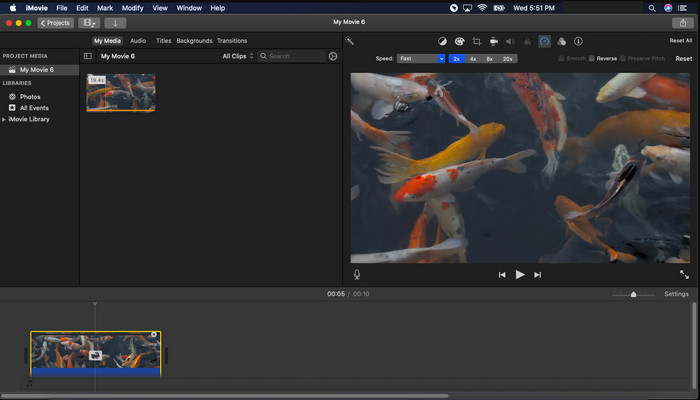
مرحله 3. بعد از اعمال افزایش سرعت، روی Export و سپس Export File کلیک کنید تا نسخه تندترِ ویدئو را ذخیره کنید.
بخش 3. سوالات متداول در مورد پریمیر پرو Speed Up
آیا می توانم یک ویدیو را در Premiere Pro کم کنم؟
بله، کاملاً امکانپذیر است؛ فقط همان مراحلی را که در بالا انجام دادیم تکرار کنید، اما این بار درصد سرعت را به کمتر از صد تغییر دهید تا ویدئو آهستهتر شود. یا میتوانید اینجا کلیک کنید تا بهطور مفصل یاد بگیرید چگونه سرعت یک ویدیو را کم کنید.
چقدر سریع می توانم ویدیو را در Premiere Pro تنظیم کنم؟
حداکثر درصدی که می توانید روی سرعت ویدیو تنظیم کنید 10000% درصد است. بنابراین، اگر می خواهید بدانید که آیا واقعی است، آن را برای خودتان بررسی کنید و سرعت را روی 10000% تنظیم کنید.
آیا Adobe Premiere Pro نیاز به سیستم دارد؟
در واقع بله، حداقل نیازهایی وجود دارد که نرم افزار Adobe بتواند به درستی از ابزار استفاده کند. مانند، در این لیست زیر: GPU: Intel® i5-4590 / AMD FX 8350 معادل یا آخرین. رم: 8 گیگابایت رم یا حتی بالاتر. سیستم عامل: مایکروسافت ویندوز یا macOS؛ صفحه نمایش باید 1920 x 1080 یا بالاتر باشد.
نتیجه
همانطور که به پایان می رسیم، اکنون برای ما واضح تر شده است که حتی افزایش سرعت ساده را می توان با premiere pro انجام داد. با این حال، premiere pro فوق العاده گران است، بنابراین ما برخی از نرم افزارهای مقرون به صرفه را لیست می کنیم که دوست دارید برای افزایش سرعت از آنها استفاده کنید. مانند Video Converter Ultimate زیرا این نرمافزار ویژگیهای ویرایش بالا را حتی اگر رایانه شما پایینرده باشد، ارائه میدهد. بنابراین، اگر می خواهید بدانید که چگونه سرعت یک ویدیو را در پریمیر پرو به راحتی افزایش دهید، Video Converter Ultimate را دانلود کنید تا همان ویژگی را اما در یک نسخه آسان تجربه کنید.
-
 [4 راه] چگونه به راحتی ویدیوهای خود را به صورت آنلاین افزایش دهید
 آیا می خواهید سرعت یک ویدیوی آنلاین را افزایش دهید؟ این مقاله را بخوانید تا در مورد افزایش سرعت ویدیو به روش های مختلف بیشتر بدانید.
-
 راههای سادهتر برای افزایش سرعت ویدئوهای فرمت MP4 [آفلاین و آنلاین]
 آیا می خواهید سرعت ویدیوی خود را افزایش دهید، اما در فرمت MP4 است؟ این مقاله ممکن است به شما کمک کند تفاوتها را در نحوه سرعت بخشیدن به ویدیوی آنلاین یا آفلاین خود بدانید.
-
 4 پخش کننده ویدیوی برتر با کنترل کننده سرعت در سال 2021
 آیا هنگام پخش ویدیو به سرعت پخش هر پخش کننده رسانه ای توجه نکرده اید؟ این مقاله برای یادگیری همه چیز در مورد پخش کننده های ویدئویی با کنترل سرعت مناسب است.
