


 Video Converter Ultimate
 ضبط صفحه
 تعمیر ویدیو
تجزیه و تحلیل مختصر درباره متن موجود در برنامه های ویدیویی Windows/Mac/Android/iOS
محافظت از پروژهتان ضروری است، مخصوصاً اگر آن را به صورت آنلاین منتشر میکنید تا از سرقت و دزدیدن کارتان جلوگیری شود. با این حال، همهٔ وبسایتها نمیتوانند از کار شما در برابر احتمال دزدیده شدن توسط دیگران محافظت کنند. پس پیش از آنکه پروژهتان را در وب قرار دهید، بهتر است یک واترمارک به آن اضافه کنید. اگرچه واترمارک همیشه نمیتواند به طور کامل از کارتان حفاظت کند، اما میتوان گفت یکی از راههای ایمنتر کردن کار شما در برابر سرقت احتمالی است. در نتیجه، این مطلب ابزارهایی را در اختیارتان میگذارد که میتوانید از آنها استفاده کنید؛ اغلب آنها رایگان هستند اما برای برخی لازم است خرید انجام دهید تا بتوانید از تمام قابلیتهای ابزار استفاده کنید. همین حالا، بیایید نگاهی کلی به اپلیکیشن متن روی ویدیو در سال ۲۰۲۲ بیندازیم.

قسمت 1. 3 از بهترین متن در برنامه های ویدیویی که می توانید در ویندوز و مک دانلود کنید
FVC Video Converter Ultimate
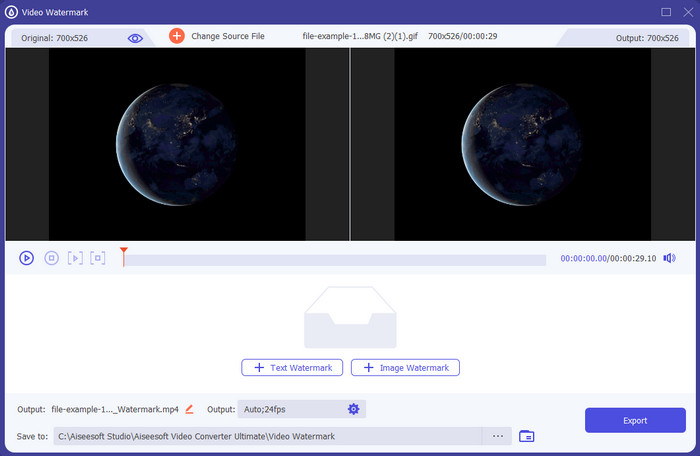
هزینه: نسخهٔ آزمایشی رایگان در دسترس است، قیمت از $39.50 برای یک سال، $55.20 برای لایفتایم، و برای ۲ تا ۵ دستگاه، لایفتایم $119.00 شروع میشود.
پلتفرمهای پشتیبانیشده: ویندوز و مک.
اگر میخواهید با یک اپلیکیشن روی ویدیو متن اضافه کنید، باید سراغ پرطرفدارترین ابزار سال ۲۰۲۲ یعنی FVC Video Converter Ultimate بروید. این ابزار از فرمتهای گستردهای پشتیبانی میکند که میتوانید در آنها ویدیو بارگذاری کنید، بنابراین افزودن فایل ویدیویی در این نرمافزار برایتان دردسرساز نخواهد بود؛ در صورت نیاز میتوانید فرمت ویدیو را هم تغییر دهید. در نگاه اول به رابط کاربری، ابزار هم تمیز و مرتب به نظر میرسد و هم حرفهای. با وجود حرفهای بودن این نرمافزار، کاربرانی با تجربهٔ کم یا حتی بدون تجربه هم میتوانند خیلی سریع نحوهٔ کار با آن را یاد بگیرند. منحنی یادگیری آن مانند ادوبی فوتوشاپ سخت و شیبدار نیست.
علاوه بر این، این ابزار باعث افتخار نام خود به عنوان ابزار نهایی است زیرا دارای سریعترین فرآیند آپلود و بارگیری، چه یک، دو یا چند فایل است. در صورت استفاده از این ابزار، رمزگذاری فرمت فایل با اتلاف یا بدون اتلاف سریع و آسان است. اگرچه این ابزار از لیست ویرایشگر متن ویدیو کمی گران است، اما همچنان این ابزار را آسانترین و در عین حال مؤثرترین آن میدانیم.
دانلود رایگانبرای ویندوز 7 یا بالاتردانلود امن
دانلود رایگانبرای MacOS 10.7 یا بالاتردانلود امن
فتوشاپ
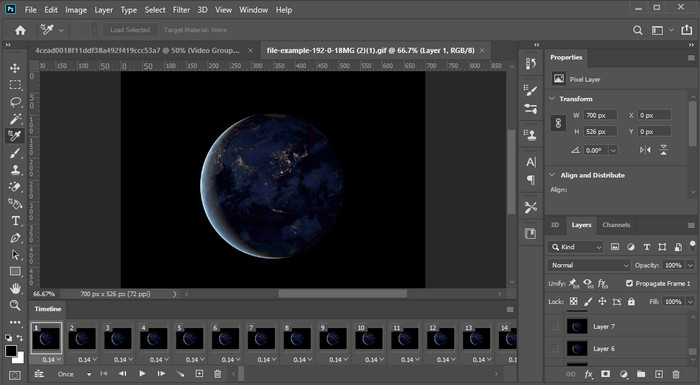
هزینه: ۷ روز نسخهٔ آزمایشی رایگان و ماهانه $20.99.
پلتفرمهای پشتیبانیشده: ویندوز، مک و آیپد.
به ابزار حرفهای برای انجام این کار نیاز دارید؟ خوب، Adobe Photoshop همان ابزار حرفهای در بین این گزینهها است. رابط کاربری کامل و سرشار از امکانات و ویژگیهای آن باعث شده نخستین انتخاب حرفهایها برای ویرایش، در پلتفرم خودشان باشد. علاوه بر این، این ابزار امکانات پیشرفتهٔ ویرایشی ارائه میدهد که میتوانید برای بهتر از همیشه کردن متن روی ویدیو از آنها استفاده کنید.
با این حال، اگر در ویرایش مبتدی هستید، این ابزار بهترین انتخاب نیست، زیرا آنقدر فنی است که حتی برخی از حرفه ای ها نیاز به خواندن برخی از آموزش های نحوه انجام یک کار خاص دارند. اما اگر میخواهید از آن استفاده کنید، متن را به برنامه ویدیو اضافه کنید. می توانید آن را در وب سایت رسمی Adobe دانلود کنید.
iMovie
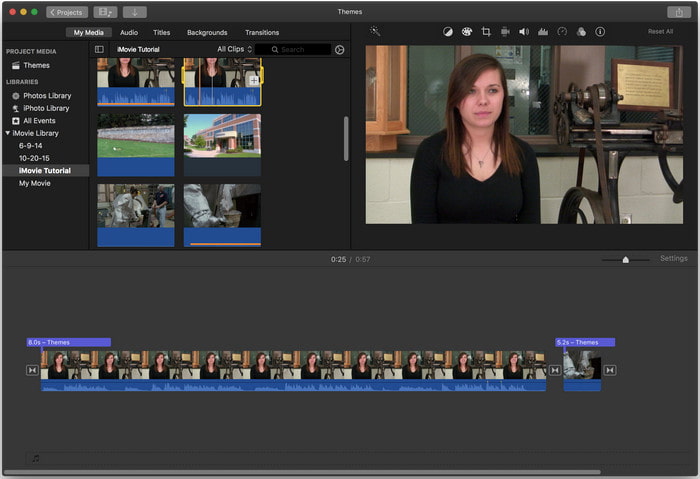
هزینه: بهصورت پیشفرض رایگان نصب شده است.
پلتفرمهای پشتیبانیشده: مک و iOS.
اگر به ابزاری رایگان روی دستگاه مک یا iOS خود نیاز دارید تا روی ویدیو واترمارک اضافه کنید، میتوانید از iMovie برای انجام این کار کمک بگیرید. این ابزار روی دستگاههای ویندوز یا اندروید قابل دانلود نیست، زیرا فقط مخصوص دستگاههای اپل است. گرچه این نرمافزار از نظر پلتفرمهای پشتیبانیشده محدود است، اما همچنان یکی از بهترین ویرایشگرهای واترمارک است که میتوانید روی مک و iOS به کار بگیرید. بیشتر مبتدیها به خاطر امکانات ویرایشی کامل و در عین حال رایگان آن، این برنامه را دوست دارند. بنابراین اگر مک یا iOS دارید، باید ابتدا این اپ اضافهکردن متن روی ویدیو را امتحان کنید و ببینید آیا با نیازهای شما سازگار است یا نه.
قسمت 2. 3 بهترین برنامه متن ویدیویی موجود در همه اندروید و iOS
همه ابزارهای ذکر شده در بالا در ویندوز و مک در دسترس هستند، در حالی که برخی از آنها از دستگاه های تلفن همراه محدود پشتیبانی می کنند. اگر یک دستگاه تلفن همراه داشته باشید و بخواهید متنی را به عنوان واترمارک روی یک ویدیو اضافه کنید چه؟ آیا هنوز می توانید آن را انجام دهید؟ شما می توانید با ابزاری که در زیر ارائه می کنیم. آن را با احتیاط بخوانید تا بدانید که آیا این ابزار نیازهای شما را کفایت می کند یا خیر.
ویرایشگر ویدیو: متن روی ویدیو
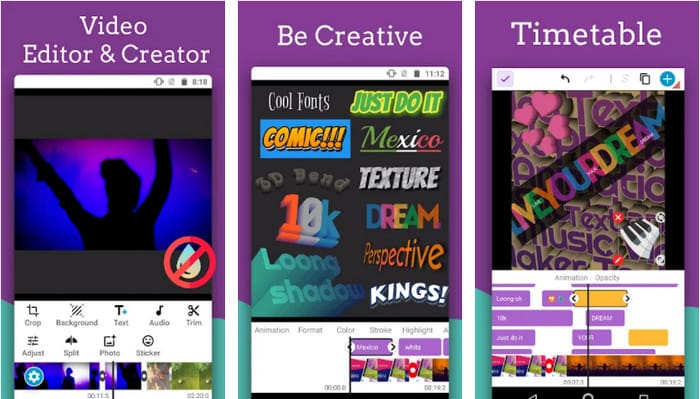
هزینه: دانلود رایگان.
پلتفرمهای پشتیبانیشده: اندروید.
با اینکه اپلیکیشنهای زیادی برای افزودن متن به ویدیو روی اندروید بهصورت رایگان قابل دانلود هستند، ما همچنان Video Editor: Text on Video را از بسیاری جهات عالی میدانیم. این اپ اندرویدی امکانات ویرایشی پیشرفتهٔ متعددی در اختیار کاربران قرار میدهد تا ویدیویشان را چشمگیر و برجسته کنند. اگر میخواهید از آن استفاده کنید و روی ویدیوتان واترمارک بگذارید، این برنامه انیمیشن متن نیز دارد تا بتوانید متن متحرک روی ویدیو اضافه کنید.
اگرچه این ابزار برای دانلود رایگان است، اما هنوز نیاز به بهبودهای زیادی وجود دارد و باید در این ابزار اصلاح شود، مانند اشکالات و اشکالاتی که برخی از کاربران با آن مواجه می شوند. همچنین، هنگامی که برنامه را در تلفن خود باز کنید و از آن استفاده کنید، برخی از تبلیغات ظاهر می شوند. با این وجود، توسعهدهنده بهروزرسانی ابزار را ادامه میدهد تا بهترین ویرایشگر ویدیو در اندروید شود تا به پتانسیل کامل آن برسد.
Vont - متن روی ویدیوهای 4+
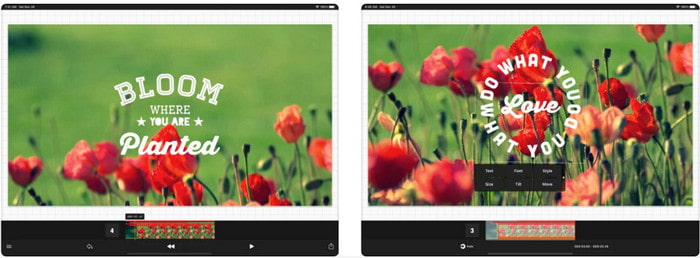
هزینه: دانلود رایگان، خریدهای درونبرنامهای از $2.99 تا $9.49.
پلتفرمهای پشتیبانیشده: آیفون، آیپد و اندروید.
Vont - Text on Videos 4+ یکی از بهترین اپها برای افزودن متن به ویدیو روی تمام دستگاههای موبایل است. این اپ هم از دستگاههای اندروید و هم iOS پشتیبانی میکند، بنابراین طبیعی است که در هر دو سمت (اندروید و iOS) محبوبیت و شهرت بهدست آورده باشد. اما اگر بخواهیم مقایسه کنیم که این اپ کجا بهتر عمل میکند، میتوان گفت روی دستگاههای iOS مطلوبتر است، چون از فرمتهای بیشتری پشتیبانی میکند و امکانات ویرایشی جزئیتر و دقیقتری در اختیار شما میگذارد.
اگرچه این ابزار در iOS بهتر است، اما همچنان میتوانیم موافق باشیم که این ابزار برای استفاده حتی در دستگاههای اندرویدی برای اضافه کردن سریع واترمارک در برخی ویدیوها عالی است.
متن روی ویدیو: Easy Vid Editor 4+
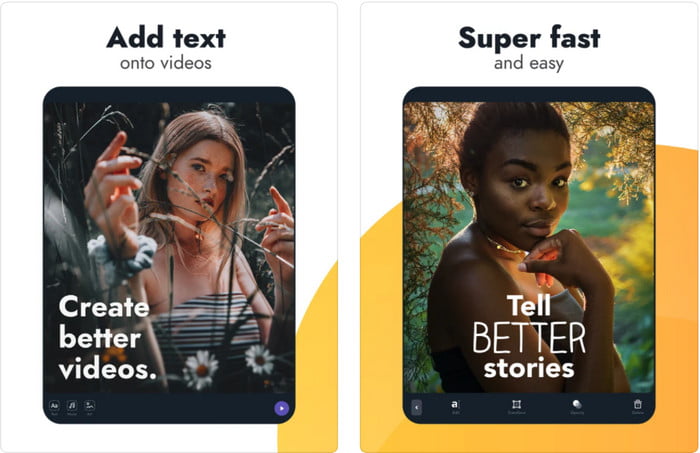
هزینه: دانلود رایگان، خرید درونبرنامهای از $1.99 تا $49.99
پلتفرمهای پشتیبانیشده: آیفون و آیپد.
اگر میخواهید بهترین اپ متن روی ویدیو در iOS را بشناسید، بدون شک Text On Video: Easy Vid Editor 4+ است. این ابزار از چندین قابلیت ویرایشی پشتیبانی میکند که میتوانید با کمک آنها بهراحتی واترمارک متنی با فونتهای مختلف روی ویدیوی خود اضافه کنید.
این ابزار مانند فتوشاپ، واترمارکینگ متن سه بعدی را ترویج میکند تا به شما کمک کند متن را دستکاری کنید و آن را در جایی قرار دهید که گویی در هنگام گرفتن ویدیو یا عکس است. اگرچه ما آن را بهترین میدانیم، اما همچنان فکر میکنیم که اگر به ویرایش بسیار دقیقی که یک حرفهای نیاز دارد، نیاز دارید، این ابزار حرفهای نیست.
مرتبط:
بخش 3. پرسشهای متداول درباره افزودن برنامههای واترمارک متنی
آیا دانلود برنامه واترمارک متنی بی خطر است؟
اگر ابزار را در سایت های رسمی یا دانلود کننده دانلود کرده باشید، بی خطر است. اگر آن را در وب سایت رسمی دانلود کنید مشکلی ایجاد نمی کند. با این حال، همه وبسایتها محافظت نمیشوند، بنابراین برای جلوگیری از هر گونه مشکل، باید مراقب دانلود امنترین ابزار برای استفاده از این ابزار در سیستم عامل خود باشید.
کدام برنامه واترمارک متنی عملکرد بهتری دارد، روی دسکتاپ یا تلفن؟
بدون شک برنامه واترمارک متن دسکتاپ برای کارهای سنگین بهتر عمل می کند زیرا دسکتاپ پردازنده مرکزی بالاتری نسبت به گوشی دارد. اما اگر میخواهید ویرایش نیمه سنگین داشته باشید، واترمارک نوشتار تلفن بهترین گزینه شماست، زیرا میتوانید آن را در هر جایی بیاورید و بدون راهاندازی دسکتاپ از آن استفاده کنید.
آیا خرید برای برنامه واترمارک متن ایده آل است؟
اگر بودجه کمی دارید، پیشنهاد میکنیم از ابزار رایگان استفاده کنید، اما محدودیتهایی وجود دارد، و به دلیل رایگان بودن آن انتظار داشته باشید. اما اگر میخواهید بهترین ویژگیهای موجود در نسخه پرمیوم را داشته باشید، پیشنهاد میکنیم آن را خریداری کنید یا مشترک آن شوید زیرا با نسخه رایگان نمیتوانید آنها را دریافت کنید.
نتیجه
حالا که تحلیل این ابزارها را به پایان رساندیم، وقت آن است که گزینهٔ مناسب خودتان را دانلود کنید. امیدواریم این مطلب به شما کمک کرده باشد تصمیم بگیرید از کدام یک استفاده کنید، اما اگر هنوز نمیتوانید انتخاب کنید، پیشنهاد ما انتخاب FVC Video Converter Ultimate است. چون این یک ابزار همهکاره است که میتوانید آن را روی ویندوز و مک دانلود کنید و تمام قابلیتهایش بهخوبی طراحی شدهاند تا در انجام هر کار مشخصی به شما کمک کنند. بنابراین، بدون هیچ تردیدی، این بهترین اپ واترمارک متنی است که میتوانید از بین موارد بالا دانلود کنید.
-
 چگونه صوتی و موسیقی را به صورت رایگان در رایانه / تلفن خود اضافه کنیم
 این مقاله 4 روش آسان برای افزودن صدا به فیلم به صورت رایگان را نشان می دهد. مهم نیست که کدام آهنگ صوتی را می خواهید به فیلم خود اضافه کنید ، می توانید در اینجا نتایج رضایت بخشی کسب کنید.
-
 تبدیل GIF به فرمت ویدئو: تبدیل میم های GIF به ویدئو [2025]
 نحوه تبدیل GIF به فرمت ویدیویی را با کمک ابزارهای فهرست شده در زیر تعیین کنید. کدام یک را انتخاب کنید و یاد بگیرید که چگونه آن را انجام دهید، زیرا شواهد کافی در مورد آنها جمع آوری می کنیم.
-
 GIF شگفت انگیز به برنامه های ویدئویی برای دستگاه های Android و iOS
 آیا میدانستید که میتوانید فایلهای GIF را با استفاده از گوشی خود به هر فرمت ویدیویی که دوست دارید تبدیل کنید؟ بهترین برنامه ها را در اندروید یا iOS خود انتخاب کنید.
