


 Video Converter Ultimate
 ضبط صفحه
 تعمیر ویدیو
مروری بر Pitch Changer در ویندوز، مک، آنلاین و تلفنها
اغلب با استفاده از یک تغییردهندهٔ گام (Pitch Changer) میتوانیم خیلی سریع زیر و بَم (گام) صدای اصلی را بالا یا پایین ببریم. بیشتر تهیهکنندهها از «پیچ شیفتر» برای افزودن افکتهای ملودیک استفاده میکنند تا آهنگ را از نسخهٔ خام هم بهتر کنند. از طرف دیگر، خرید یک مجموعه ابزار برای تغییر گام میتواند هزینهٔ زیادی روی دستتان بگذارد و یادگیری کار با آنها هم زمانبر باشد؛ هم گران هستند و هم دشوار برای درک. بهجای خرج کردن پول برای چنین ستهایی، چرا نرمافزاری را امتحان نکنید که بتواند گام و زیر و بَم ویدیو یا فایل صوتیای را که دارید، برایتان تغییر دهد؟.
با این بررسی، ما چهار مورد از بهترین برنامهها و برنامههایی را که میتوانید برای تغییر سطح صدا بدون صرف هزینههای هنگفت استفاده کنید، گردآوری کردیم. به خواندن این مقاله ادامه دهید تا بدانید در مورد چه چیزی صحبت می کنیم.

قسمت 1. 4 تعویض کننده برتر در دستگاه های رومیزی، آنلاین و تلفن همراه موجود است
Video Converter Ultimate – بهترین تغییر آهنگ ویدیو در ویندوز و مک
دانلود رایگانبرای ویندوز 7 یا بالاتردانلود امن
دانلود رایگانبرای MacOS 10.7 یا بالاتردانلود امن
برنامهٔ موجود: ویندوز و مک
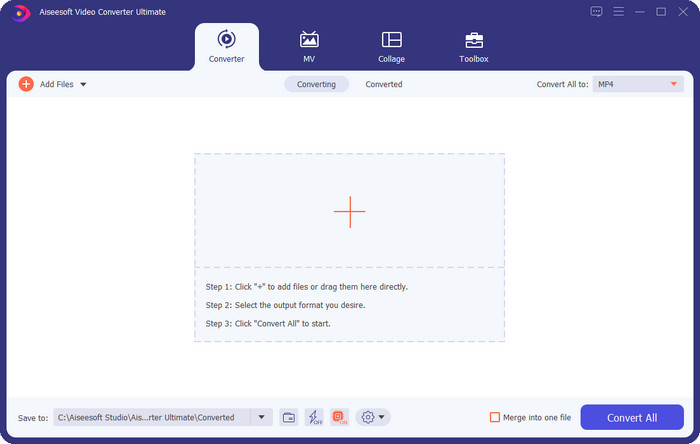
اولین مورد در فهرست ما، بهترین برنامهٔ تغییر گام ویدیو روی سیستمعامل ویندوز و مک شماست. Video Converter Ultimate یک ابزار قدرتمند است که میتوانید از آن برای دستکاری گام صدا استفاده کنید؛ با بالا و پایین بردن سرعت ویدیویی که در اختیار دارید. برخلاف سایر نرمافزارهای مشابه که روی دسکتاپ نصب میکنید، کار با این ابزار وقت زیادی از شما برای یادگیری نمیگیرد، چون نرمافزاری کاملاً سرراست و ساده است. میتوانید زیر و بَم صدای ضبطشده را در کمتر از یک دقیقه بهبود دهید تا از نسخهٔ اصلی هم بهتر به گوش برسد.
در کنار قابلیت تغییر زیر و بم، میتوانید با استفاده از تقویتکننده صدا در زیر جعبه ابزار، حجم صدا را تا حداکثر پتانسیل خود افزایش دهید. در این قابلیت می توانید با استفاده از اسلایدرها، دامنه یا افزایش صدای ویدیوی خود را به سرعت کم یا زیاد کنید. اگرچه شما تولیدکننده ای نیستید که بخواهید این نوع کارها را انجام دهید، اما با کمک این ابزار نهایی موجود در ویندوز و macOS، این کار لذت بخش است و به سرعت انجام می شود. بنابراین، اگر میخواهید از این ابزار نهایی استفاده کنید، در قسمت دوم نحوه استفاده از این ابزار را با مراحل دقیق نشان میدهیم که میتوانید برای تکمیل آن در کمتر از یک دقیقه دنبال کنید.
Vocal Remover.org
برنامهٔ موجود: آنلاین
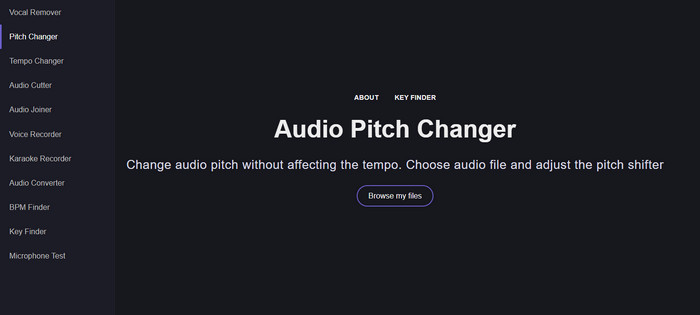
اگر به یک تغییردهندهٔ گام آنلاین نیاز دارید، بیتردید Vocal Remover.org ابزاری است که بهخوبی از عهدهٔ این کار برمیآید. برخلاف ابزار اول، این سرویس برای بهبود و افزایش کیفیت صدا عملکرد بهتری دارد. با این ابزار میتوانید بهراحتی گام صدا را تغییر دهید و تشخیص دهید آهنگ در چه «کلیدی» اجرا میشود. همچنین یک نشانگر وجود دارد که به شما کمک میکند نیمپردهٔ موردنظر برای صدا را انتخاب کنید. میتوانید تنظیم را دستی انجام دهید یا با کشیدن اسلایدر، آن را پلهپله جابهجا کنید. بیشتر کاربرانی که از این سرویس استفاده کردهاند از نتیجهٔ افکت تغییر گام راضی بودهاند و از آن لذت میبرند.
این ابزار در این مورد به خوبی کار می کند، اما شما می توانید فقط یک فایل با فرمت صوتی محدود را در اینجا آپلود کنید و فرمت ویدیو پشتیبانی نمی شود. آپلود فایل ممکن است برای ابزار کمی سخت باشد، زیرا فقط از چند فرمت صوتی پشتیبانی می کند. اگرچه این میتواند برای همه مشکلساز باشد، اما ما همچنان آن را یکی از بهترین ابزارهای آنلاینی میدانیم که میتوانید در وب به آن دسترسی داشته باشید. اما مطمئن شوید که به وب سایت صحیح دسترسی دارید تا از عوارض و مشکلات دیگر جلوگیری کنید. همچنین، به یاد داشته باشید که یک اتصال اینترنتی پایدار داشته باشید زیرا اگر اینترنت شما قوی باشد، این ابزار بهترین عملکرد را دارد.
سرعت بالا: پیچ، تغییر سرعت
برنامهٔ موجود: اندروید
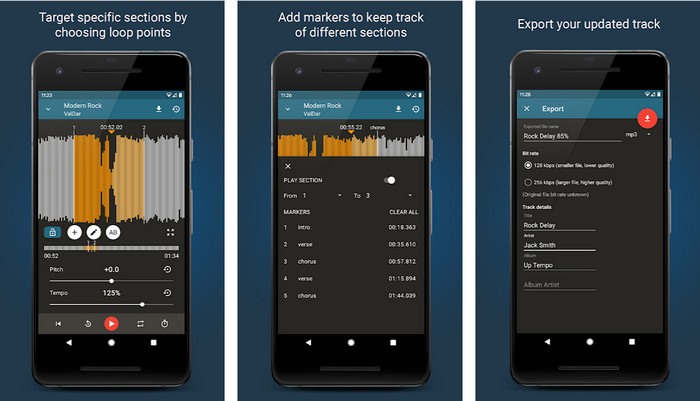
میتوانید این تغییردهندهٔ گام صدا را برای کاربران اندروید دانلود کنید تا حتی وقتی به کامپیوتر دسترسی ندارید هم بتوانید این کار را انجام دهید. با اپلیکیشن Up Tempo: Pitch, Speed Changer تغییر سرعت پخش و گام صدا کاری سریع و در دسترس برای همه شده است. رابط کاربری این برنامه از نمایش موجِ صدا (Waveform) پشتیبانی میکند که کمک میکند تشخیص دهید کدام بخش را میخواهید تقویت یا تغییر دهید. درست مانند ابزار آنلاین، این اپ میتواند موسیقی را پردازش کند و هر زمان لازم باشد، بسیار کار راهانداز است.
اگرچه این برنامه برای دانلود رایگان است، اما اگر می خواهید از این برنامه استفاده کنید باید مواردی را در نظر بگیرید. اکثر کاربران تجربه می کنند که برنامه نمی تواند فایل های صوتی جدید دانلود شده در تلفن شما را شناسایی کند. اگر با این مشکل مواجه شدید، ممکن است فایل صوتی موجود در این برنامه را پشتیبانی نکند، یا ممکن است اشکالی رخ دهد. با این وجود، اگر یک گوشی اندرویدی در دست دارید، این برنامه را دانلود کنید تا ببینید آیا این برنامه برای حل مشکل است یا خیر.
TimePitch-Pitch، Speed Changer 4+
برنامهٔ موجود: iOS
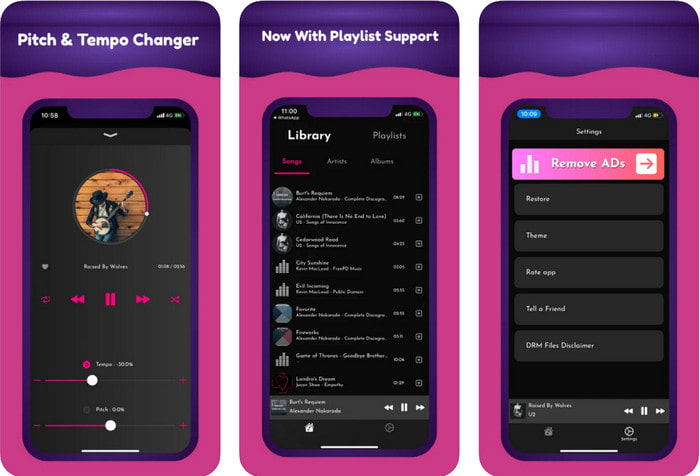
اگر کاربر iOS هستید، باید بدانید که این اپلیکیشن تغییر گام میتواند راهحلی برای مشکل شما ارائه دهد. TimePitch-Pitch, Speed Changer 4+ یک پخشکنندهٔ موسیقی، کتابخانه و تغییردهندهٔ گام است که میتوانید در صورت نیاز روی دستگاه iOS خود از آن استفاده کنید. این اپ برخلاف بقیه کمی متفاوت کار میکند؛ چون میتوانید گام صدایی را که در حال گوش دادن به آن هستید، بهصورت همزمان (Real-time) تغییر دهید؛ یعنی با تنظیم گام، تغییرات ذخیره نمیشوند. اما همین میتواند نقطهٔ قوت اپ باشد، چون لازم نیست منتظر پردازش بمانید؛ فقط با جابهجا کردن تنظیمات، میتوانید فوراً گام صدا را مطابق سلیقهتان عوض کنید.
با این حال، این می تواند نقطه ضعف آن نیز باشد. اگر فایل را در دستگاههای دیگر انتقال دهید، سطحی که با استفاده از این برنامه تغییر دادهاید برای گیرنده اعمال نمیشود. همچنین، باید به خاطر داشته باشید که اگر موسیقی را در iTunes یا Apple Music خریداری کنید، نمی توانید از این برنامه برای تغییر زیر و بم استفاده کنید. چرا؟ زیرا فایل های محافظت شده به هیچ برنامه شخص ثالثی مانند این اجازه دسترسی به فایل را نمی دهند. صرف نظر از آپلود فایل موسیقی، ما همچنان این برنامه را در این مقاله قرار می دهیم زیرا در هر دستگاه iOS بهترین عملکرد را دارد.
قسمت 2. نحوه تغییر زیر و بم یک ویدیو با استفاده از نرم افزار Ultimate Pitch Changer
مراحل زیر را دنبال کنید تا بدانید که چگونه می توانید از این تغییر دهنده آهنگ و تغییر سرعت روی دسکتاپ خود استفاده کنید. بنابراین، اگر به یک آموزش ساده و در عین حال موثر برای استفاده از نرم افزار نهایی نیاز دارید، به خواندن جزئیات زیر ادامه دهید.
گام ۱. دکمهٔ دانلود را فشار دهید تا این نرمافزار نهایی روی دسکتاپتان نصب شود؛ بسته به اینکه از ویندوز استفاده میکنید یا مک، نسخهٔ مناسب را انتخاب کنید. منتظر بمانید تا فرایند دانلود کامل شود، سپس روی فایلی که دانلود کردید کلیک کرده و آن را نصب کنید. بعد از اتمام مراحل تنظیم و نصب، برنامه را اجرا کنید تا از این ابزار قدرتمند استفاده را شروع کنید.
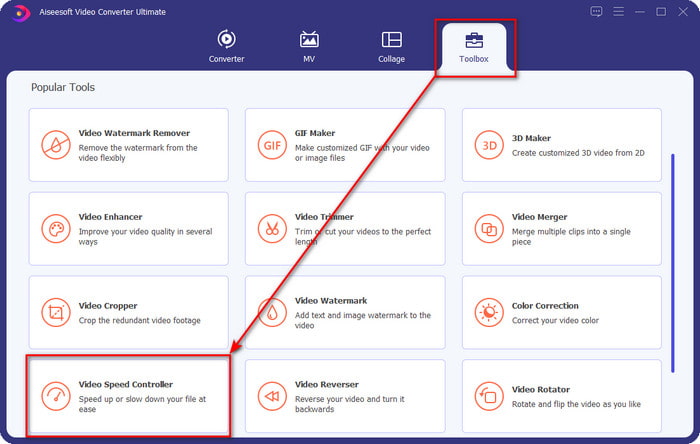
گام ۲. منوی Toolbox را باز کنید و در زیرمجموعهٔ آن، گزینهٔ Video Speed Controller را پیدا کرده و روی آن کلیک کنید تا باز شود. برای یافتن این ابزار، لیست را به پایین اسکرول کنید تا به بخشهای نزدیک انتهای فهرست برسید.
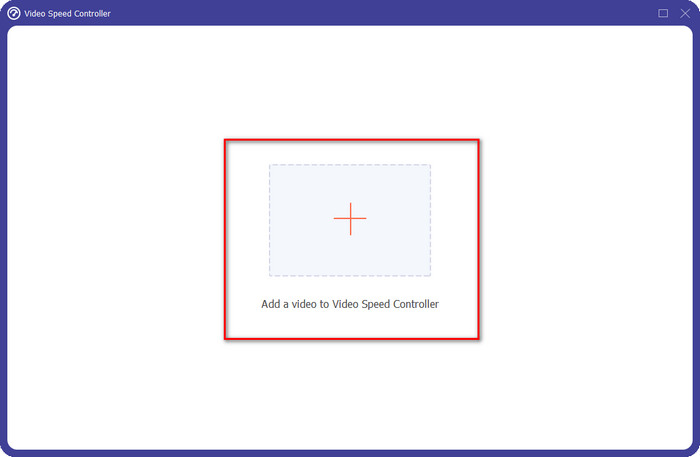
گام ۳. یک پنجرهٔ کوچک جدید روی صفحه ظاهر میشود؛ روی دکمهٔ + کلیک کنید، فایل ویدیوییای را که میخواهید گام آن را تغییر دهید پیدا کنید، سپس روی Open کلیک کنید تا ویدیو بارگذاری شود.
گام ۴. در این مرحله، اکنون میتوانید سرعت صدا را تغییر دهید. با تغییر سرعت، متوجه خواهید شد که گام صدا نیز تغییر میکند. پیشنمایش صدا و تصویر بهطور خودکار روی صفحهٔ پیشنمایش قابل شنیدن و دیدن است.
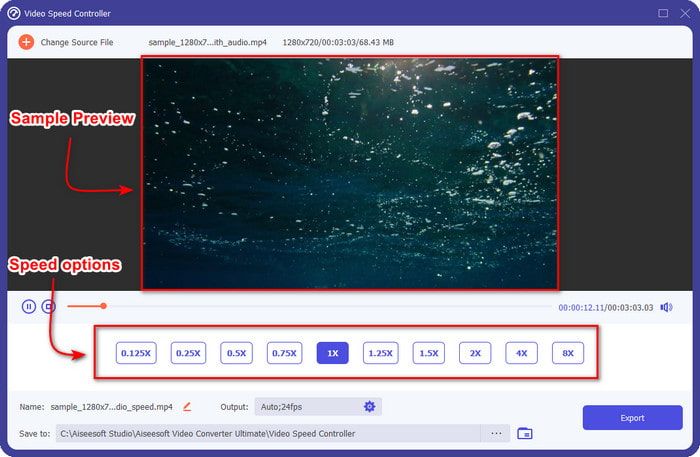
شما فقط می توانید پیش نمایش ویدیو را با سرعت 2 برابر پخش کنید. متوجه خواهید شد که 4x و 8x به شما اجازه پیش نمایش ویدیو را برای جلوگیری از تضاد نمی دهند، اما کیفیت ویدیو و صدا را کاهش نمی دهد.
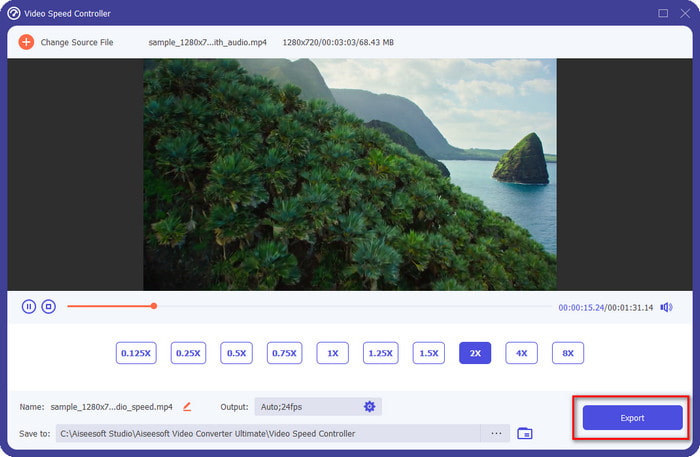
گام ۵. اگر از گامی که به دست آوردهاید راضی هستید، اکنون روی دکمهٔ Export کلیک کنید. آسان نیست؟ با کمک چنین نرمافزاری میتوانید در عرض چند دقیقه از پسِ انواع مشکلات ویدیویی و صوتی برآیید.
مرتبط:
چگونه بهصورت آنلاین سرعت ویدیو را بیشتر کنیم
چگونه سرعت ویدیوهای MP4 را افزایش دهیم
بخش 3. سؤالات متداول در مورد Pitch Changer
زمین چیست؟
کیفیتی که با صدای شما طنین انداز می شود را با اندازه گیری آنها در محدوده، چه بالاتر یا پایین تر، ارزیابی می کند. این یک موج صوتی شبیه به فرکانس است، اما آنها یکسان نیستند.
صدای انسان چقدر می تواند بشنود؟
هرچه هرتز کمتر باشد، همچنان میتوانید آگاهانه آن را بشنوید، اما تعداد کمی از مردم تنها زمانی آن را میشنوند که هرتز بالا میرود. به گفته محققان، همه می توانند به 8000 هرتز گوش دهند و اگر 12000 هرتز بشنوند، گوش های شما به خوبی افراد زیر 50 سال است. ساله، 16000 هرتز، هنوز هم می توانید به آن گوش دهید. برای هر 25 سال و کمتر، هنوز هم می توانید 17000 هرتز و برای زیر 20 سال 20000 هرتز بشنوید. هر چه سن ما بالاتر می رود، آهنگی که می شنویم هر از چند گاهی کمتر موثر می شود. بنابراین، اگر فرکانس ذکر شده را نمی شنوید، باید به پزشک مراجعه کنید تا بررسی شود که آیا مشکلی وجود دارد یا خیر.
چگونه می توانیم محدوده گام را محاسبه کنیم؟
محدوده گام از اکتاو برای محاسبه استفاده می کند، که به خواننده و ابزاری در تعیین اینکه آیا این گام مناسب در آهنگ است یا خیر، استفاده می کند. با ارتعاش، می توانید فرکانس بالا و پایینی که موج صوتی ایجاد می کند را متوجه شوید.
نتیجه
با استفاده از تغییردهندههای گام ویدیو و صدا که در بالا معرفی شد، اکنون میتوانیم خیلی راحت زیر و بَم صدایی را که در اختیار داریم تنظیم کنیم. بهجای خرید فناوریهای خاص و گرانقیمت برای انجام این کار، میتوانید از نرمافزارهای بالا استفاده کنید. هرچند از نظر امکانات و قابلیتها با هم تفاوت دارند، اما میتوان دید که هرکدام در چه زمینهای قوی هستند. با این حال، اگر از کامپیوتر استفاده میکنید، حتماً Video Converter Ultimate را روی دسکتاپ خود دانلود کنید، چون این ابزار نهتنها به شما کمک میکند گام صدا را تغییر دهید، بلکه کارهای «جادویی» دیگری هم برای بهتر شدن ویدیو و صدای شما انجام میدهد. میخواهید بدانید این ابزار چه کارهای جادویی میتواند انجام دهد؟ پس همین حالا با کلیک روی دکمهٔ دانلود بالا آن را دریافت کنید.
-
 3 راه برای افزایش سرعت ویدیو در آیفون [ثابت شده]
 آیا در تنظیم سرعت پخش ویدیوی خود به دلیل استفاده از آیفون مشکل دارید؟ این یک مقاله عالی برای کمک به شما در حل مشکل است.
-
 Windows Media Player | آموزش نحوه افزایش سرعت ویدیوها [ثابت شده]
 می خواهید با استفاده از Windows Media Player سرعت کلیپ ویدیوی خود را کاهش دهید، اما در مورد نحوه انجام آن مشکل دارید؟ این مقاله برای خواندن ایده آل است و می تواند دیدگاه شما را در مورد چگونگی افزایش سرعت ویدیوها با استفاده از Windows Media Player روشن کند.
-
 نحوه تغییر ویدیوی حرکت آهسته به سرعت عادی [مراحل آسان]
 آیا می خواهید بدانید که چگونه یک ویدیوی اسلوموشن را که از اینترنت دانلود کرده اید یا به طور تصادفی با حرکت آهسته ضبط کرده اید، برگردانید؟ با نحوه تبدیل ویدیوهای حرکت آهسته به سرعت عادی در مک، ویندوز، iOS و اندروید آشنا شوید.
