


 Video Converter Ultimate
 ضبط صفحه
 تعمیر ویدیو
آینه ویدیوهای آنلاین برای تغییر تجربه مشاهده ویدیوی شما
تماشای ویدیوهای وارونه یا وارونه می تواند خسته کننده باشد. بله، گرفتن یک لحظه عالی فقط برای فهمیدن اینکه ویدیو باید ورق یا چرخانده شود می تواند خسته کننده باشد. اما نترس ورق زدن ویدیوها به صورت آنلاین یک راه حل آسان و راحت است!
در همین حال، محتوای ویدئویی در شبکههای اجتماعی یا سایتهای اشتراکگذاری ویدئو بهسرعت به یکی از اجزای اصلی اینترنت تبدیل شده است. و دلیل خوبی هم دارد: اشتراکگذاری ویدئوها و دریافت بازخورد از مخاطبانتان فوقالعاده آسان است و میتوان از آنها برای ساختن آگاهی از برند و افزایش تعامل با مخاطب استفاده کرد. در این پست وبلاگ، به روشهای مختلفی میپردازیم که با آنها میتوانید بهصورت آنلاین و بهطور رایگان ویدئوها را برعکس (Flip) کنید.

بخش 1. روش های مختلف برای برگرداندن ویدیوها به صورت آنلاین
در اینجا، ما در مورد بهترین باله های ویدئویی و پسوندهای آینه ویدئویی که می توانید برای تغییر جهت یک ویدئو استفاده کنید، صحبت خواهیم کرد. فرقی نمیکند ویدیو از درایو محلی شما آپلود شود یا ویدیو مستقیماً از یک سایت اشتراکگذاری ویدیو باشد، این ابزارها میتوانند آنها را مدیریت کنند.
1. آینه تصویری
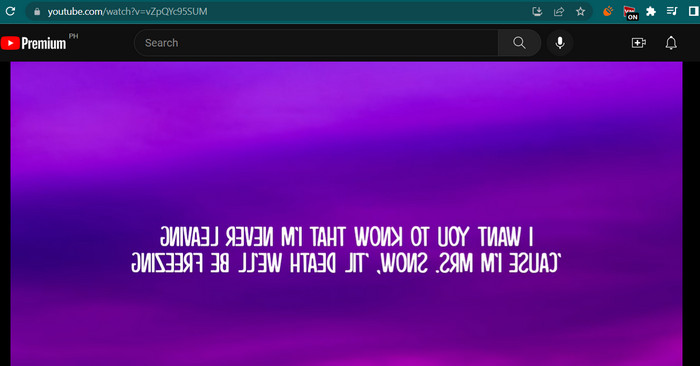
افزونه Video Mirror Chrome ابزاری قدرتمند و کاربرپسند است که به آسانی میتوانید ویدیوهای خود را برای یک تجربه مشاهده بهتر بازتاب کنید. تنها با یک کلیک، می توانید ویدیوهای خود را ورق بزنید و آینه کنید تا هرگونه اعوجاج را برطرف کنید و از آنها در جهت مناسب لذت ببرید. برنامه افزودنی با طیف گسترده ای از فرمت های ویدئویی سازگار است و با محبوب ترین پخش کننده های ویدئویی کار می کند. علاوه بر این، نصب و استفاده از برنامه افزودنی با کنترل های بصری و رابط کاربری ساده آسان است. اگر می خواهید با استفاده از این ابزار ویدیوی افقی را به صورت آنلاین ورق بزنید، مراحل زیر را دنبال کنید:
مرحله ۱. مرورگر دلخواه خود را باز کنید و افزونه Video Mirror را از Chrome Web Store روی مرورگر کروم نصب کنید.
مرحله ۲. پس از نصب، در مرورگر وب خود به ویدئویی که میخواهید برعکس کنید بروید. میتوانید به سایتهای اشتراکگذاری ویدئو مانند YouTube، Netflix و غیره مراجعه کنید.
مرحله ۳. اکنون روی آیکون Video Mirror که در نوار ابزار قرار دارد کلیک کنید. ویدئو بهصورت افقی برعکس و آینهای میشود. متأسفانه با این ابزار نمیتوانید ویدئوها را بهصورت عمودی آینه کنید.
2. کاپوینگ
Kapwing یک پلت فرم آنلاین قدرتمند ویرایش ویدیو است که از طیف گسترده ای از ابزارها و ویژگی ها پشتیبانی می کند تا به شما در ایجاد و ویرایش سریع و آسان فیلم ها کمک کند. با Kapwing میتوانید برش، تغییر اندازه، متن و تصاویر اضافه کنید و حتی افکتها و انتقالها را به ویدیوهای خود اضافه کنید. یکی از ویژگی های جذاب Kapwing توانایی آن در ورق زدن ویدیوها به صورت آنلاین است. فیلم ها را می توان به صورت افقی یا عمودی برگرداند، اعوجاج ها را می توان اصلاح کرد، و می توانید آنها را در جهت ایده آل تماشا کنید.
مرحله ۱. برای شروع کار با این ابزار، مرورگر وب دلخواه خود را اجرا کرده و به صفحه رسمی Kapwing بروید.
مرحله ۲. پس از داشتن یک حساب کاربری، روی دکمه Create New Project کلیک کرده و سپس دکمه Upload را بزنید تا ویدئویی را که میخواهید بهصورت آنلاین برعکس کنید، بارگذاری کنید.
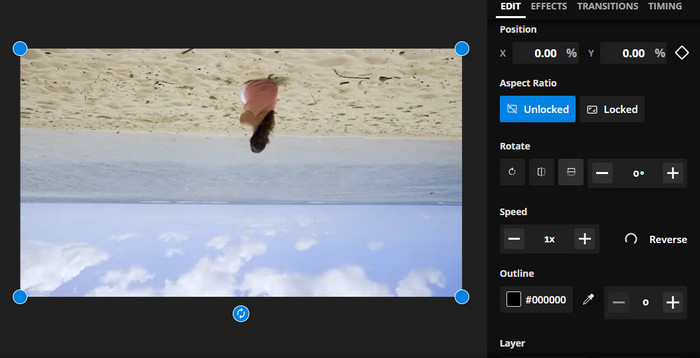
مرحله ۳. وقتی رسانه به ابزار آنلاین اضافه شد، ابزارهای ویرایش در سمت راست بهطور خودکار ظاهر میشوند. اینبار به تب EDIT بروید و بخش Rotate را پیدا کنید. سپس روی آیکون Flip Horizontally یا Flip Vertically کلیک کنید.
مرحله ۴. وقتی راضی بودید، روی دکمه Export Project در گوشهٔ بالا سمت راست رابط کلیک کنید. پس از آن، باید بتوانید ویدئوها را بهصورت افقی و عمودی بهصورت آنلاین برعکس کنید.
3. کلیدیو
Clideo یک ابزار عالی ویرایش ویدیوی آنلاین است که فرآیند ویرایش ویدیو را برای همه ساده می کند. چیزی که در مورد این برنامه عالی است این است که با ابزارهای اختصاصی برای هر هدفی همراه است. یکی از ابزارهای مفید فیلم تلنگر است. میتوانید ویدیوها را به صورت افقی یا عمودی بدون هیچ تنظیمات پیچیده ورق بزنید. همچنین، این ابزار به کاربران امکان می دهد پس از ورق زدن ویدیو، فرمت مورد نظر خود را انتخاب کنند. بنابراین، با انجام مراحل زیر، ویدیو را 90 درجه به صورت آنلاین ورق بزنید:
مرحله ۱. با استفاده از مرورگری که روی رایانه شما در دسترس است، به صفحه وب Clideo بروید. سپس از میان ابزارهای موجود در صفحه اصلی، گزینه Flip Video را پیدا کنید.
مرحله ۲. اکنون روی دکمه Choose file کلیک کنید تا ویدئویی را از هارد کامپیوتر خود بارگذاری کنید. اگر میخواهید از فضای ذخیرهسازی ابری ویدئو را وارد کنید، میتوانید با کلیک روی دکمه کشویی، فضای ذخیرهسازی مورد نظر را انتخاب کنید.
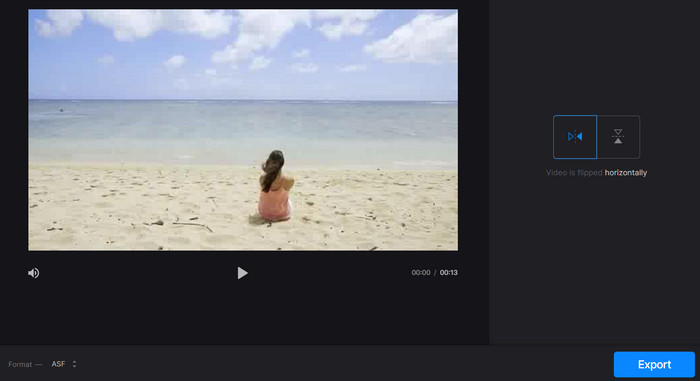
مرحله ۳. سپس بعد از افزودن ویدئو به برنامه، میتوانید جهت ویدئو را تغییر دهید. برای رسیدن به جهت مورد نظرتان روی دکمههای مناسب کلیک کنید.
مرحله ۴. اگر میخواهید فرمت ویدئو را تغییر دهید، روی Format کلیک کرده و سپس دکمه Export را بزنید تا ویدئو را روی رایانه خود ذخیره کنید. پس از انجام این مراحل، باید بتوانید ویدئوها را بهصورت آنلاین، رایگان و بدون واترمارک برعکس کنید.
بخش 2. رویکرد عالی برای برگرداندن ویدیوها به صورت آفلاین
در بسیاری از مواقع، اینترنت در دسترس نیست، بهویژه اگر همیشه در سفر باشید. بنابراین، یک برنامه آفلاین مانند FVC Video Converter Ultimate میتواند کمک شایانی به شما بکند. این ابزار ویرایش دسکتاپ، گزینههای ویرایشی بسیار متنوعتری نسبت به اپلیکیشنهای آنلاین برعکسکردن ویدئو ارائه میدهد. برای هر دو سیستمعامل PC و Mac، FVC Video Editor حرفهایترین برنامه ویرایش ویدئو موجود است. این بهترین ویرایشگر ویدئو است، زیرا به شما اجازه میدهد ویدئوها را آزادانه تبدیل، چرخش (Rotate)، برعکس (Flip)، برش (Clip)، تریم (Trim) و واترمارک کنید.
مرحله ۱. دریافت و نصب نرمافزار
روی دکمه Free Download در زیر کلیک کنید تا یک نسخه از فایل نصب برنامه را دریافت کنید. سپس با کمک راهنمای نصب، آن را راهاندازی کنید. بلافاصله پس از آن، برنامه را روی رایانه خود اجرا کرده و محیط آن را بررسی کنید.
دانلود رایگانبرای ویندوز 7 یا بالاتردانلود ایمن
دانلود رایگانبرای macOS 10.7 یا بالاتردانلود ایمن
مرحله ۲. اجرای ابزار برعکسکننده ویدئو
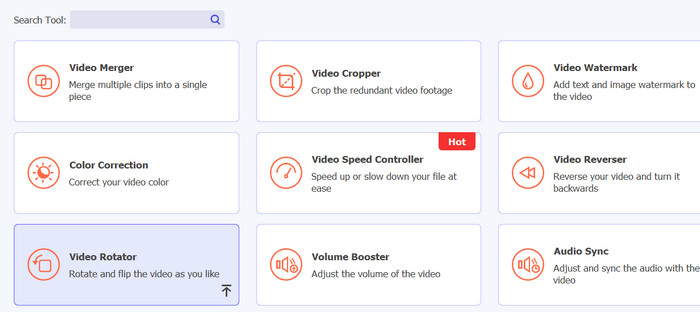
پس از اجرای برنامه، باید چهار تب را در رابط اصلی ببینید. از منوی کشویی گزینه Toolbox > Video Rotator را انتخاب کنید. همچنین میتوانید با استفاده از کادر جستجو، این ابزار را سریع پیدا کنید.
مرحله ۳. بارگذاری یک فایل ویدئویی
علامت مثبت را می توان برای آپلود ویدیوی مورد نظر خود در پانل آپلود Video Rotator انتخاب کرد. رابط برای چرخاندن سپس ارائه خواهد شد.
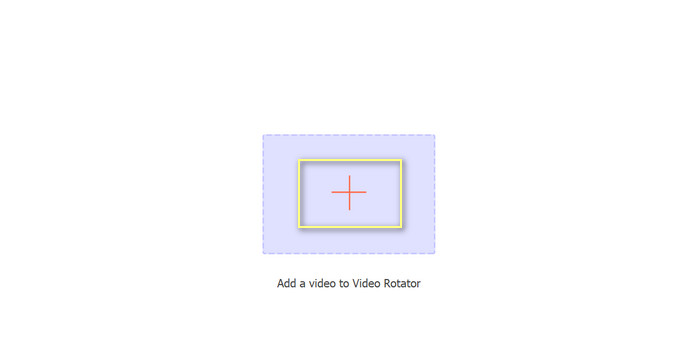
گام 4. برعکس کردن ویدیو
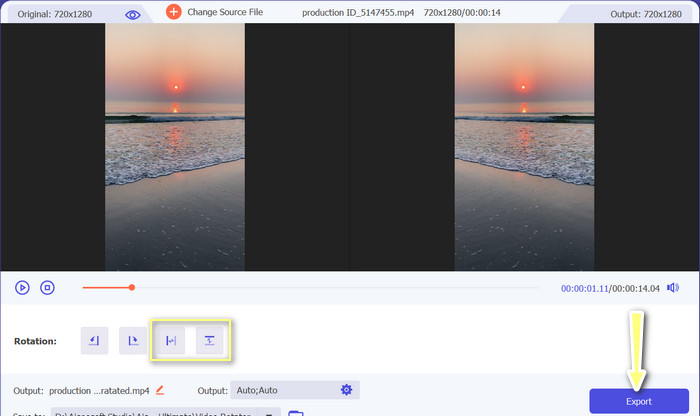
پس از نمایش رابط برعکسکردن، به دکمههای مربوط به برعکسکردن دسترسی خواهید داشت. میتوانید ویدئو را بهصورت افقی یا عمودی بچرخانید/برعکس کنید. دکمه مناسب را انتخاب کرده و سپس برای تکمیل فرایند روی دکمه Export کلیک کنید.
مطالعه بیشتر:
روشهای عالی برای برش راحت ویدیو بهصورت آنلاین
چگونه مانند یک حرفهای، ویدئو را معکوس کنیم تا یک ویدئوی سینمایی عالی بسازیم
بخش 3. پرسش های متداول در مورد چرخش ویدیوهای آنلاین
انعکاس ویدیو به صورت آنلاین به چه معناست؟
انعکاس یک ویدیو به معنای چرخاندن آن به صورت افقی یا عمودی است تا سمت چپ به سمت راست تبدیل شود و بالعکس. این برای تصحیح فیلم هایی که در یک زاویه نامناسب یا هنگام ایجاد انواع خاصی از محتوا ضبط شده اند مفید است.
آیا بازتاب ویدیوی شخص دیگری قانونی است؟
به طور کلی، انعکاس ویدیوی شخص دیگری بدون اجازه یا ذکر منبع قانونی قانونی نیست. قبل از بازتاب هر ویدئو، مطمئن شوید که حق استفاده از آن را دارید و قوانین حق نسخهبرداری را نقض نمیکنید.
آیا می توانم یک ویدیو را در تلفن خود منعکس کنم؟
بله، میتوانید با استفاده از یک برنامه ویرایش ویدیو، یک ویدیو را روی گوشی خود بازتاب دهید. بسیاری از برنامههای ویرایش ویدیوی محبوب مانند InShot، VideoShow و KineMaster گزینههای آینهکاری را ارائه میکنند. به سادگی ویدیو خود را در برنامه آپلود کنید، گزینه Mirroring را انتخاب کنید و نسخه جدید آینه شده را ذخیره کنید.
نتیجه
با وجود تنوع زیاد ابزارهای ویرایش ویدئوی آنلاین، آینهکردن (Mirroring) ویدئوها بهصورت آنلاین هرگز تا این حد آسان نبوده است. با توجه به تعداد زیاد اپلیکیشنهای آینهکردن ویدئو بهصورت آنلاین، مهم است که یک ابزار ویرایش ویدئوی آنلاین قابل اعتماد و باکیفیت را که نیازهای خاص شما را برآورده میکند، انتخاب کنید.
-
 [4 راه] چگونه به راحتی ویدیوهای خود را به صورت آنلاین افزایش دهید
 آیا می خواهید سرعت یک ویدیوی آنلاین را افزایش دهید؟ این مقاله را بخوانید تا در مورد افزایش سرعت ویدیو به روش های مختلف بیشتر بدانید.
-
 چگونه یک ویدیوی تایم لپس در آیفون به طور کامل بسازیم
 آیا می خواهید بدانید که چگونه یک ویدیوی تایم لپس در آیفون خود بسازید؟ با دنبال کردن این مراحل ساده در زیر می توانید یک تایم لپس ویدیویی عالی در آیفون خود ایجاد کنید.
-
 5 بهترین مبدل آنلاین برای GIF به هر فرمت ویدئویی به صورت رایگان و ممتاز
 اگر فایلهای GIF در پلتفرم پشتیبانی نمیشوند، بهتر است GIF خود را به صورت آنلاین به هر فرمت ویدیویی تبدیل کنید. و همچنین محتوای GIF ها را حفظ کنید.
