


 Video Converter Ultimate
 ضبط صفحه
 تعمیر ویدیو
4 روش برتر رایگان برای تبدیل MTS به MOV
من چند فیلم با دوربین فیلمبرداری سونی خود که فایلهای MTS را صادر می کند ضبط کرده ام. متوجه شدم که MTS توسط media player و iMovie من قابل پشتیبانی نیست. من از Mac استفاده می کنم و می خواهم این فیلم های ضبط شده MTS را ویرایش کنم. هر گونه کمک؟ آیا راهی ساده ، به ویژه روشی رایگان برای تبدیل MTS به MOV وجود دارد؟
فرمت ویدیویی با وضوحبالای MTS که بهطور گسترده در دوربینهای فیلمبرداری سونی و پاناسونیک استفاده میشود، پسوند فایل استاندارد AVCHD (Advanced Video Coding High Definition) است. پس از ضبط ویدئو با دوربین دیجیتال، معمولاً یک فایل MTS دریافت میکنید. این فرمت از ویدئوهای HD با وضوح 720p/1080i پشتیبانی میکند و میتواند کیفیت تصویری بالاتری ارائه دهد. با این حال، MTS یک فرمت رایج نیست و اکثر پخشکنندهها یا ویرایشگرهای ویدئو از آن پشتیبانی نمیکنند.

هر زمان که نیاز داشته باشید فایل MTS را در iMovie ویرایش کنید یا آن را با یک پخشکننده رسانه اجرا کنید، بهتر است آن را برای سازگاری بیشتر، به MOV یا MP4 تبدیل کنید. در این مطلب، ۴ مبدل رایگان MTS را به شما معرفی میکنیم تا بتوانید بهراحتی MTS را به MOV تبدیل کنید.
قسمت 1. بهترین روش رایگان برای تبدیل MTS به MOV بدون افت کیفیت
ابزارهای بسیار زیادی برای تبدیل فرمت MTS در اینترنت وجود دارد که میتوانند به شما کمک کنند با کیفیت بالا MTS را به MOV تبدیل کنید. در بخش اول، میخواهیم بهترین نرمافزار رایگان برای تبدیل MTS به MOV یعنی Free MTS Converter را به شما معرفی کنیم.
این به ویژه برای مقابله با انواع تبدیل ها طراحی شده است. تقریباً با تمام فرمت های تصویری و صوتی مانند MP4 ، MOV ، MKV ، MTS ، AVI ، FLV ، WMV ، MP3 ، AAC ، FLAC و موارد دیگر سازگار است. برای تبدیل MTS به MOV رایگان می توانید آن را بارگیری کنید و از راهنمای زیر استفاده کنید.
دانلود رایگانبرای Windows 7 یا بالاتردانلود ایمن
دانلود رایگانبرای macOS 10.7 یا بالاتردانلود ایمن
مرحله 1. ابتدا ، باید این مبدل رایگان MTS به MOV را روی رایانه خود نصب و اجرا کنید. هم نسخه های Windows و هم Mac را برای بارگیری در اختیار شما قرار می دهد.
مرحله ۲. روی Add File(s) کلیک کنید تا فایل یا فایلهای MTS مورد نظر برای تبدیل را وارد کنید. میتوانید یک یا چند فایل MTS را بهطور همزمان تبدیل کنید.
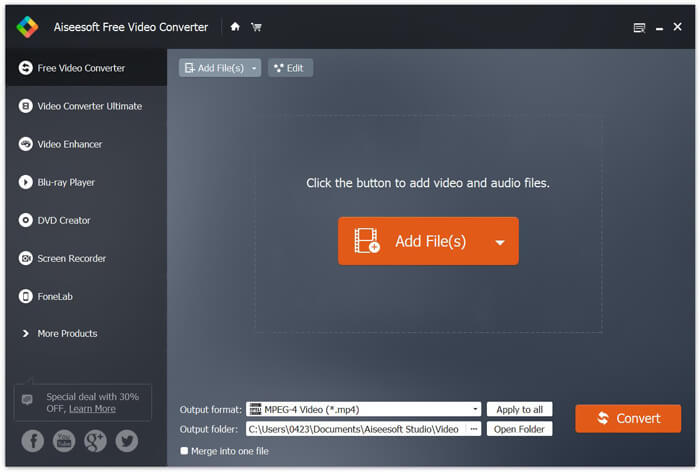
مرحله ۳. از فهرست Output format، فرمت MOV را بهعنوان فرمت خروجی انتخاب کنید. سپس روی دکمه Convert کلیک کنید تا فرآیند تبدیل از MTS به MOV آغاز شود.
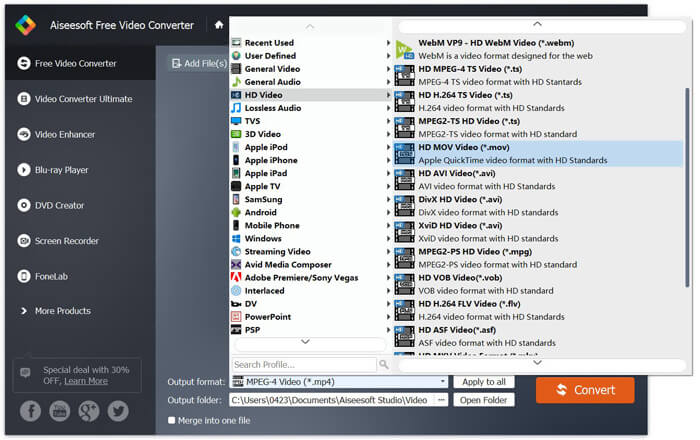
همانطور که از بالا مشاهده می کنید ، این مبدل رایگان MTS به MOV همچنین دارای برخی از ویژگی های اساسی ویرایش است. قبل از تبدیل نهایی ، می توانید از آنها برای سفارشی کردن پرونده MTS خود استفاده کنید. در مقایسه با مبدل های آنلاین ، این مبدل ویدیوی رایگان می تواند سرعت تبدیل سریع تر و کیفیت فیلم خروجی بالاتر را به شما ارائه دهد. به همین دلیل ما آن را اولین توصیه خود می کنیم.
قسمت 2. مبدل آنلاین رایگان به شما کمک می کند فیلم ها را به راحتی تبدیل کنید
وقتی در گوگل روش تبدیل MTS به MOV را جستوجو میکنید، نتایج زیادی از مبدلهای آنلاین رایگان خواهید دید. در اینجا یک مبدل آنلاین رایگان و ساده برای تبدیل MTS به MOV، یعنی FVC Free Online Video Converter را به شما معرفی میکنیم. بدون نصب هیچ نرمافزاری، میتوانید هر فرمت ویدیویی رایجی را به MP4، AVI، MOV و غیره بهصورت رایگان تبدیل کنید. همچنین نیازی به نگرانی درباره امنیت نیست، زیرا این فرایند تبدیل پایدار و ایمن است و هیچ دادهای در طول تبدیل از دست نخواهد رفت.
مرحله ۱. لینک بالا را باز کرده و روی دکمه Add Files to Convert کلیک کنید. پیش از تبدیل، لطفاً FVC launcher را دانلود و نصب کنید. این کار فقط چند ثانیه زمان میبرد.

مرحله ۲. پس از نصب و بهروزرسانی لانچر، ویدیویی را که میخواهید تبدیل کنید انتخاب کنید. سپس فرمت موردنیاز را برگزینید و روی Convert بزنید.

مرحله ۳. لینک بالا را باز کرده و روی دکمه Add Files to Convert کلیک کنید. پیش از تبدیل، لطفاً FVC launcher را دانلود و نصب کنید. این کار فقط چند ثانیه زمان میبرد.
قسمت 3. نحوه تبدیل MTS به MOV رایگان آنلاین با ZAMZAR
ZAMZAR یکی از محبوب ترین نرم افزارهای تبدیل فیلم آنلاین است که می تواند به شما در تبدیل رایگان MTS به MOV کمک کند. این با رابط مختصر و ویژگی تبدیل ساده طراحی شده است. برای تبدیل فیلم MTS می توانید از راهنمای زیر استفاده کنید.
مرحله 1. مرورگر خود را باز کرده و به سایت رسمی ZAMZAR بروید. در اینجا می توانید مستقیماً به صفحه https://www.zamzar.com/convert/mts-to-mov/ بروید. در اینجا مجاز به تبدیل مستقیم MTS به MOV بدون انجام سایر تنظیمات هستید.
مرحله 2. روی دکمه Add Files کلیک کنید تا پرونده MTS مورد نظر برای بارگیری بارگیری شود. برای بارگذاری پرونده MTS می توانید کشیده و رها کنید. یک چیز که باید بدانید این است که ، این مبدل آنلاین رایگان MTS فقط به شما امکان می دهد یک فایل MTS کمتر از 150 مگابایت تبدیل کنید.
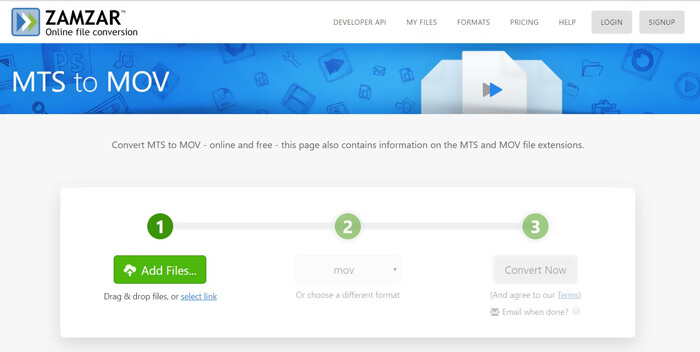
مرحله ۳. پس از بارگذاری فایل، میتوانید روی دکمه Convert Now کلیک کنید تا فرایند تبدیل آنلاین و رایگان MTS به MOV آغاز شود.
قسمت 4. روش آنلاین تبدیل MTS به MOV با FreeConvert
FreeConvert یک مبدل ویدیوی آنلاین محبوب دیگر است که امکان تبدیل ویدئو از MTS به MOV را بهصورت رایگان فراهم میکند. این مبدل رایگان MTS به MOV از فرمتهای MTS و M2TS بهخوبی پشتیبانی میکند. میتوانید فایلی با فرمت MTS تا حجم ۱ گیگابایت آپلود کنید. علاوه بر این، این سایت اجازه میدهد همزمان تا ۲۰ فایل MTS را برای تبدیل بارگذاری کنید. اکنون میتوانید مطابق مراحل زیر، فایل MTS خود را به MOV تبدیل کنید.
مرحله ۱. ابتدا باید در مرورگر خود به سایت FreeConvert.com بروید. برای شروع تبدیل میتوانید مستقیماً به آدرس https://www.freeconvert.com/mts-to-mov مراجعه کنید.
مرحله ۲. روی دکمه بزرگ آبیرنگ Choose MTS Files کلیک کنید تا فایل یا فایلهای MTS موردنظر برای تبدیل به MOV را بارگذاری کنید. همانطور که پیشتر گفته شد، در اینجا میتوانید یک یا چند فایل MTS را برای تبدیل آپلود کنید.
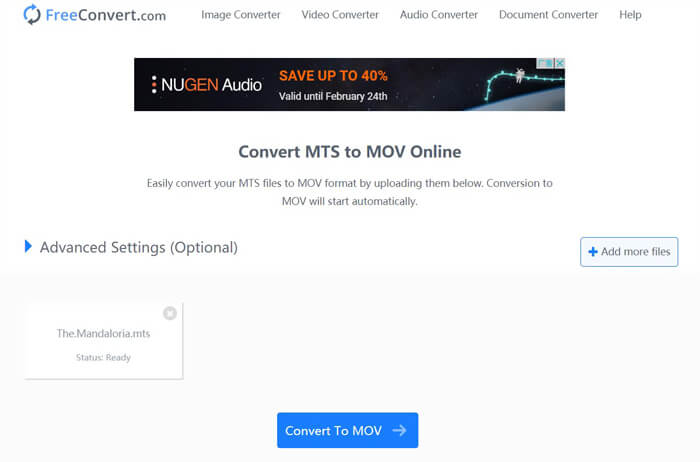
مرحله ۳. روی دکمه Convert To MOV کلیک کنید تا فرایند بارگذاری و تبدیل آغاز شود. پس از پایان کار، باید روی دکمه Download کلیک کنید تا فایل تبدیلشده را در رایانه خود ذخیره کنید.
هنگامی که از مبدلهای آنلاین رایگان برای تبدیل MTS به MOV استفاده میکنید، باید زمان نسبتاً زیادی را صرف بارگذاری و تبدیل کنید. بنابراین بهتر است برای تبدیل آنلاین، از فایلهای MTS با حجم کم استفاده کنید. اگر میخواهید یک ویدئوی بزرگ با فرمت MTS یا M2TS را تبدیل کنید، بهتر است از نرمافزار بسیار پیشنهادی Free Video Converter استفاده کنید.
-
 6 روش آسان برای تبدیل TS به AVI / MKV / MOV / WMV در ویندوز / مک
 آیا می خواهید پرونده های TS را به سرعت به AVI / MKV / MOV / WMV تبدیل کنید؟ این مقاله مبدل های ویدیویی آنلاین و آفلاین را با راهنمای کامل نشان می دهد. شاید بتوانید بهترین مبدل TS رایگان را از اینجا دریافت کنید.
-
 MOV VS MP4 - کدام یک بهتر است
 MOV VS MP4 ، کدام یک بهتر است؟ این پست تفاوت MP4 و MOV را بیان می کند ، بنابراین شما می توانید انتخاب بهتری برای استفاده برای پرونده های ویدیویی خود داشته باشید.
-
 نحوه پیوستن به پرونده های MOV (QuickTime) به صورت رایگان
 ممکن است برای مبتدیان دشوار باشد که به چندین کلیپ ویدیویی MOV با هم ملحق شوند. بنابراین ، آیا یک روش ساده و سریع برای ترکیب فایل های MOV وجود دارد؟ اگر وجود دارد ، پس چگونه از آن استفاده کنیم؟ این پست به شما کمک می کند تا این پاسخ ها را دریافت کنید.
