


 Video Converter Ultimate
 ضبط صفحه
 تعمیر ویدیو
3 روش رایگان برای تبدیل FLV به WAV
میخواهید از ویدیوهای دانلود شده صدا استخراج کنید اما نمیدانید چطور؟ بهدنبال روشی ساده برای تبدیل FLV به WAV یا MP3 هستید؟
در برخی موارد ، شما فقط به آهنگ صوتی یا موسیقی پس زمینه یک ویدیو نیاز دارید. بنابراین شما باید فیلم را به صدا تبدیل کنید. این پست به طور عمده در مورد چگونگی تبدیل FLV به WAV صحبت می کند.

در اینجا ۳ مورد از بهترین مبدلهای FLV به WAV به شما معرفی میشود تا فایلهای FLV خود را تبدیل کنید. میتوانید روش دلخواهتان را برای تبدیل FLV به صدای WAV انتخاب کنید.
قسمت 1. تبدیل FLV به WAV آنلاین
وقتی در اینترنت بهدنبال روشی برای تبدیل FLV به WAV جستوجو میکنید، میبینید که بسیاری از نتایج جستوجو، مبدلهای آنلاین رایگان هستند. اگر نمیدانید از کدام یک استفاده کنید، در اینجا صمیمانه Free Online Video Converter محبوب را به شما معرفی میکنیم. این ابزار بهطور ویژه برای تبدیل FLV به هر فرمت پرکاربرد ویدیو و صدا مثل MP4، MOV، AVI، MP3، AAC، M4A و WAV طراحی شده است.
در مقایسه با سایر مبدل های FLV به WAV آنلاین ، از فرمت های ورودی و خروجی بیشتری پشتیبانی می کند و سرعت تبدیل سریع تری را ارائه می دهد. علاوه بر این ، نیازی به ثبت نام یا ورود به سیستم حساب نیست. به شما امکان می دهد بدون محدودیت اندازه پرونده ، هر پرونده FLV را تبدیل کنید.
مرحله ۱: در مرورگر خود به این سایت مبدل رایگان FLV به WAV بروید. این ابزار با اغلب مرورگرها از جمله Safari، IE، Chrome، Firefox و Yahoo سازگار است.
مرحله ۲: روی Add Files to Convert و سپس دکمه Download کلیک کنید تا لانچر تبدیل FLV نصب شود. پس از نصب، یک پنجره پاپآپ برای بارگذاری فایل FLV شما ظاهر میشود.

مرحله ۳: وقتی وارد پنجره اصلی مبدل شدید، میبینید که برخی فرمتهای محبوب ویدیویی مانند MP4، MOV، AVI، FLV، MKV، VOB، MPG، WMV و موارد دیگر در آنجا فهرست شدهاند. در این مرحله باید روی آیکون Audio کلیک کنید تا فرمتهای صوتی نمایش داده شوند. WAV را بهعنوان فرمت خروجی انتخاب کنید.
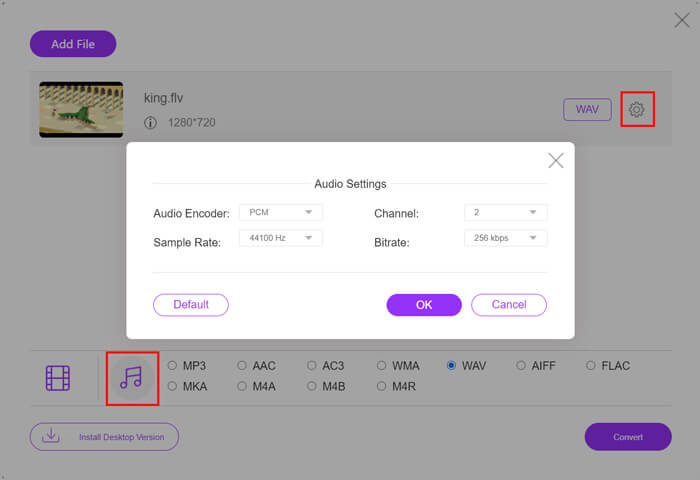
مرحله ۴: پیش از تبدیل FLV به WAV، میتوانید روی آیکون Settings کنار فرمت خروجی کلیک کنید تا تنظیمات بیشتری برای صدا شخصیسازی کنید. در این بخش میتوانید انکودر صدا، کانال، نرخ نمونهبرداری و بیتریت را تنظیم کنید. سپس روی دکمه Convert کلیک کنید تا فایل FLV شما به صدای WAV تبدیل شود.
اگر میخواهید FLV را به فرمتهایی مانند MP3، WMA، WAV و غیره تبدیل کنید، باید روی تب Audio کلیک کرده و آن را تیک بزنید.
قسمت 2. تبدیل FLV به WAV به صورت رایگان
علاوه بر مبدلهای آنلاین FLV، برخی مبدلهای ویدیویی رایگان نیز وجود دارند که میتوانند بهراحتی FLV را به WAV تبدیل کنند. برای این کار میتوانید روی Free FLV Converter حساب کنید.

مبدل FLV به WAV رایگان
155321+ بارگیری- FLV را به WAV ، AAC ، MP3 ، M4A ، MP4 ، MOV ، AVI و موارد دیگر تبدیل کنید.
- از همه قالب های صوتی و تصویری که اغلب استفاده می شود پشتیبانی کنید.
- از آخرین پردازنده های چند هسته ای و شتاب GPU پشتیبانی کنید.
- بدون افت کیفیت ، یک یا چند فایل FLV را تبدیل کنید.
دانلود رایگانبرای ویندوز 7 یا بالاتردانلود امن
دانلود رایگانبرای macOS 10.7 یا بالاتردانلود امن
این کلیه ویژگی های تبدیل مورد نیاز شما را به همراه دارد. راهنمای زیر به شما نشان می دهد که چگونه FLV را با آن به WAV تبدیل کنید.
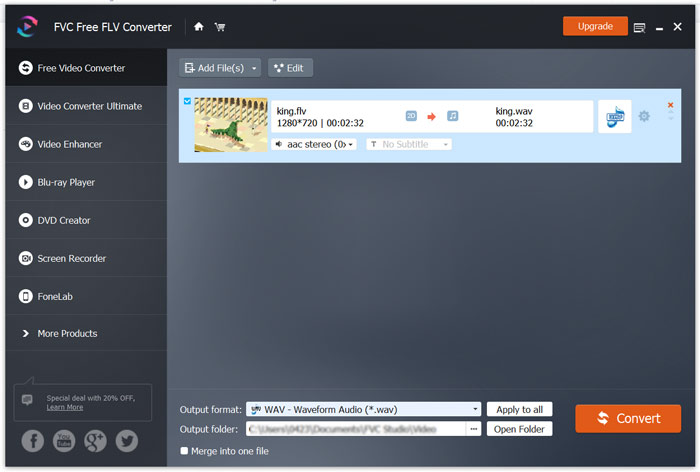
مرحله ۱: این مبدل رایگان FLV به WAV را بهصورت رایگان دانلود، نصب و اجرا کنید. روی Add Files کلیک کنید تا فایل(های) FLV خود را وارد کنید.

مرحله ۲: روی Output format کلیک کرده و WAV را بهعنوان فرمت هدف انتخاب کنید. سپس یک پوشه مقصد مناسب برای فایلها برگزینید.
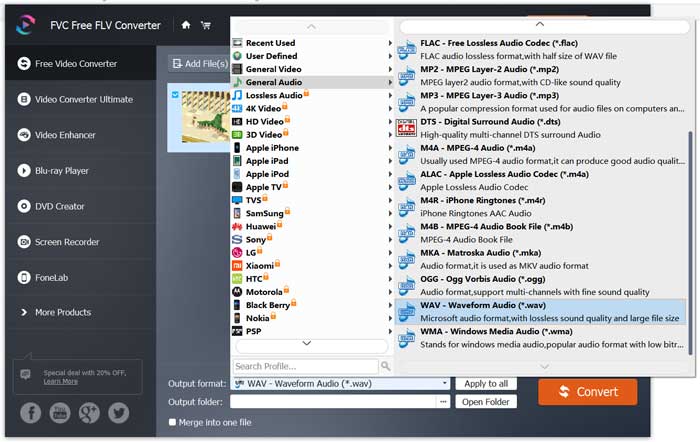
مرحله ۳: روی دکمه Convert کلیک کنید تا فرآیند تبدیل FLV به WAV آغاز شود.
قسمت 3. تبدیل FLV به WAV با VLC
اگر روی کامپیوتر خود VLC Media Player نصب کردهاید، میتوانید برای تبدیل FLV به WAV روی VLC نیز حساب کنید. همانطور که میدانید، VLC یک پخشکننده چندرسانهای محبوب است که برخی امکانات پایهای تبدیل و ویرایش را هم در خود دارد.
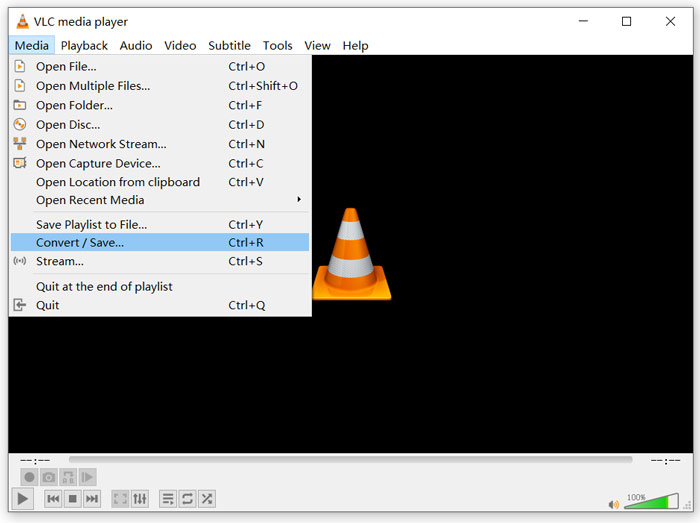
مرحله ۱: VLC Media Player را روی کامپیوتر خود باز کنید. میتوانید آن را بهصورت رایگان از سایت VideoLAN نصب کنید. روی Media کلیک کرده و از منوی کشویی گزینه Convert/Save را انتخاب کنید.
مرحله ۲: اکنون به پنجره Open Media منتقل میشوید. روی دکمه Add کلیک کنید تا فایل FLV موردنظر برای تبدیل را اضافه کنید. سپس روی دکمه Convert/Save کلیک کنید تا پنجره Convert باز شود.
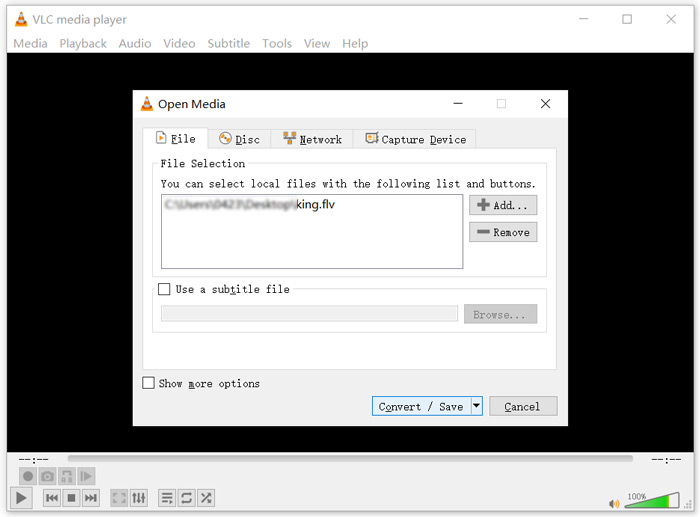
مرحله ۳: گزینه Display the output را زیر تب Convert تیک بزنید. سپس یک فرمت خروجی مناسب را از فهرست کشویی Profile انتخاب کنید. روی دکمه Browse کلیک کنید تا پوشه مقصد مناسبی برگزینید. در این مرحله میتوانید نام فایل خروجی را نیز تغییر دهید.
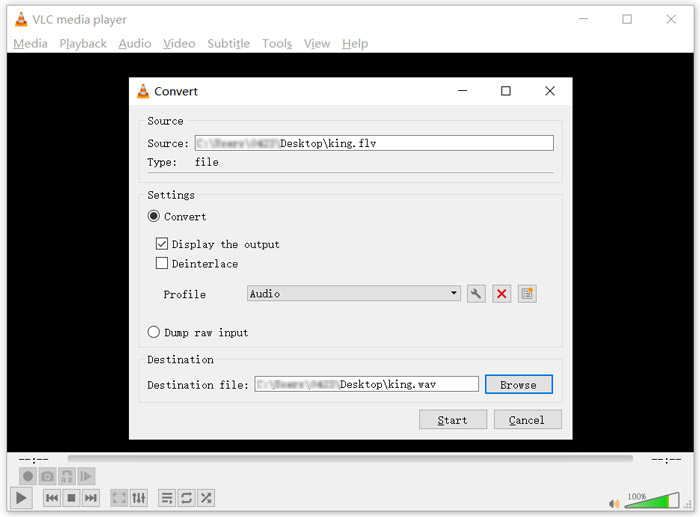
مرحله ۴: روی دکمه Start کلیک کنید تا تبدیل FLV به WAV آغاز شود. پس از پایان، VLC بهطور خودکار فایل WAV تبدیلشده را پخش خواهد کرد. در حین تبدیل، اعلان Converting file را مشاهده میکنید. تا زمان اتمام فرآیند تبدیل، برنامه VLC Media Player را بهطور کامل نبندید.
قسمت 4. سوالات متداول در تبدیل FLV به WAV
FLV در مقابل WAV ، تفاوت FLV با WAV چیست؟
FLV یا Flash Video File یک فایل ویدیویی سازگار با فلش است که توسط شرکت Adobe Systems توسعه داده شده است. این فرمت شامل یک هدر کوتاه و بستههای درهمآمیخته ویدیو، صدا و متادیتاست. FLV در ابتدا برای جاسازی جریانهای ویدیویی در برنامههای Adobe طراحی شد. یک فایل FLV معمولاً شامل یک جریان ویدیویی با وضوح 360×640 و یک جریان صوتی با فرکانس 44.1 کیلوهرتز، ۲ کانال و کدک AAC است.
فایلی با پسوند WAV یک فرمت صوتی Waveform است و در واقع یک کانتینر است که دادهها را بهصورت بخشبندیشده ذخیره میکند. این فرمت در ابتدا توسط Microsoft و IBM توسعه داده شد و صدای فشردهنشده و بدون افت کیفیت را ذخیره میکند که در نتیجه، اندازه فایلها بسیار بزرگ میشود. این فرمت از کانتینرها برای ذخیره دادههای صوتی، شماره ترکها، نرخ نمونهبرداری و بیتریت استفاده میکند.
چگونه FLV را به نرم افزار WAV تبدیل نکنیم؟
اگر می خواهید FLV را بدون هیچگونه نرم افزار مبدل به WAV تبدیل کنید ، می توانید پسوند پرونده را از .flv به .wav تغییر دهید.
چگونه FLV را به WAV دانلود کنیم؟
تعداد زیادی ضبط کننده صفحه نمایش در بازار ارائه شده است که می تواند به شما کمک کند ویدیو را به عنوان فایل صوتی در رایانه محلی خود ذخیره کنید.
نتیجه
بعد از خواندن این مطلب، میتوانید ۳ روش رایگان برای استخراج صدای WAV از فایلهای FLV بیاموزید. هر زمان که نیاز داشتید FLV را به WAV تبدیل کنید، میتوانید مبدل FLV دلخواه خود را برای انجام این کار انتخاب کنید.
-
 5 بهترین بازیکن WAV رایگان برای Android ، iOS و رایانه
 چگونه می توان فایل های WAV را در تلفن Android بازی کرد؟ کدام بازیکن می تواند WAV بازی کند؟ این پست 5 بهترین پخش کننده WAV رایگان برای Android ، iPhone ، Mac و PC را به اشتراک می گذارد.
-
 10 بهترین پخش کننده ویدیوی FLV برای ویندوز 10/8/7 ، Mac ، iOS و Android که باید امتحان کنید
 پخش کننده FLV به شما کمک می کند تا به راحتی به پرونده های FLV خود در دستگاه ویندوز ، Mac ، Android ، iOS دسترسی پیدا کنید. بهترین پخش کننده های فایل FLV را که هم اکنون می توانید بارگیری کنید ، بررسی کنید.
-
 نحوه تبدیل WAV به MP3 با 5 مبدل برتر برتر
 این صفحه یک لیست طولانی از مبدل WAV به MP3 رایگان (iTunes ، Audacity ، VLC ، Windows Media Player و مبدل صوتی رایگان) برای تغییر WAV به MP3 در رایانه است.
