


 Video Converter Ultimate
 ضبط صفحه
 تعمیر ویدیو
2 تا از بهترین مبدل های M4V به FLV برای ویندوز/مک/آنلاین
یک کانتینر ویدئو و صدا که اصلیترین کاربردش در اپل آیتونز است و با پسوند M4V شناخته میشود. این فرمت برای جلوگیری از مشکلات کپیرایت، با سیستم محافظت کپیرایت DRM محافظت میشود. در این شرایط، اگر در آیتونز حساب کاربری و اطلاعات ورود نداشته باشید، پخش فایل دشوار است. بنابراین اگر میخواهید ویدئوها را روی کامپیوتر یا گوشی اندروید خود تماشا کنید، لازم است آنها را به فرمت قابلپخش FLV تبدیل کنید. برای اینکه بدانید چگونه M4V را به FLV تبدیل کنید، این مقاله را بخوانید تا یک دید کلی درباره M4V و FLV به دست آورید.

قسمت 1. انتخاب اول در تبدیل M4V به FLV در مک و کامپیوتر
این کارآمدترین مبدلی است که از کار با آن لذت خواهید برد، بهویژه اگر میخواهید M4V را در مک یا ویندوز به FLV تبدیل کنید. FVC Video Converter Ultimate محبوبترین مبدلی است که بسیاری از کاربران به آن تکیه میکنند. افزون بر این، اگر بهدنبال یک ابزار چندمنظوره با خروجی فوقالعاده هستید، این گزینهای ایدهآل است. همچنین میتوانید هر فایل رسانهای را در این برنامه تبدیل کرده و کیفیت را روی SD، HD، 1080p و حتی ویدئوهای 4K تنظیم کنید. وقتی این ابزار را روی سیستم خود دانلود کنید، انتظار چیزی کمتر از «نهایی» نداشته باشید؛ همانطور که در نامش آمده است. علاوه بر این، اگر میخواهید حداکثر توان تبدیل این ابزار را تجربه کنید، آموزش زیر را دنبال کنید.
نحوه تبدیل M4V به FLV با کمک FVC Video Converter Ultimate:
گام 1. روی دکمه دانلود زیر کلیک کنید و سیستمعامل فعلی خود را انتخاب کنید. پس از دانلود، روی Install کلیک کنید، یک رابط خوشامدگویی ظاهر میشود، سپس روی Start Now فشار دهید.
دانلود رایگانبرای ویندوز 7 یا بالاتردانلود امن
دانلود رایگانبرای MacOS 10.7 یا بالاتردانلود امن
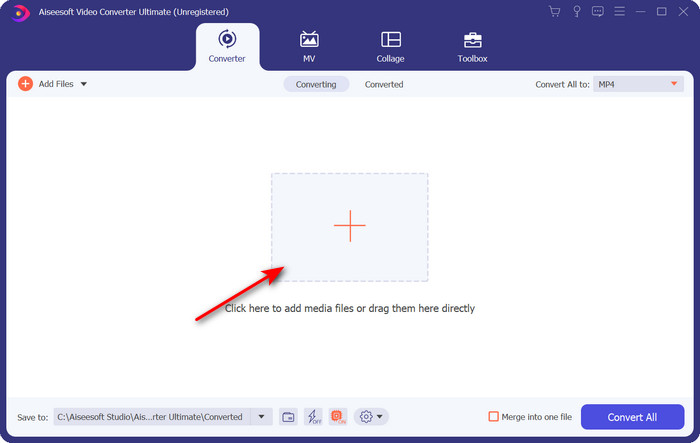
گام 2. برنامه را اجرا کنید، روی علامت + در وسط رابط کلیک کرده و فایل .m4 را از پوشهای که باز میشود انتخاب کنید، روی آن کلیک کرده و Open را بزنید.
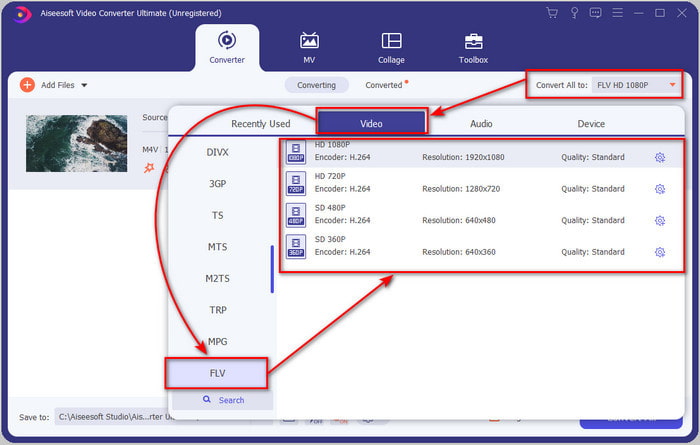
گام 3. وقتی فایل .m4v روی رابط بارگذاری شد، روی Convert All to کلیک کنید و فرمت FLV را پیدا کنید.
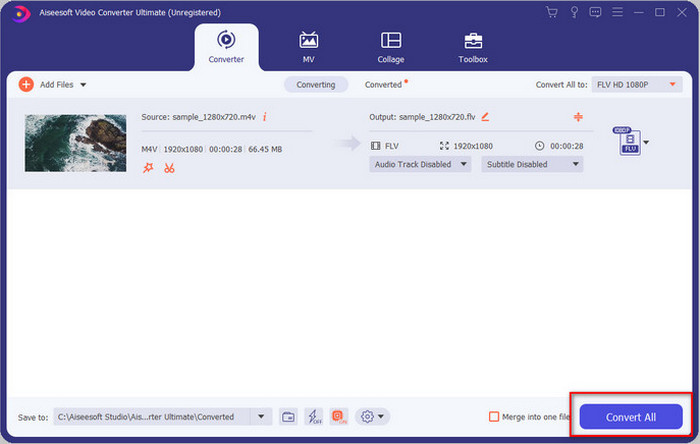
گام 4. حالا روی Convert All کلیک کنید تا فرایند تبدیل M4V به FLV آغاز شود.
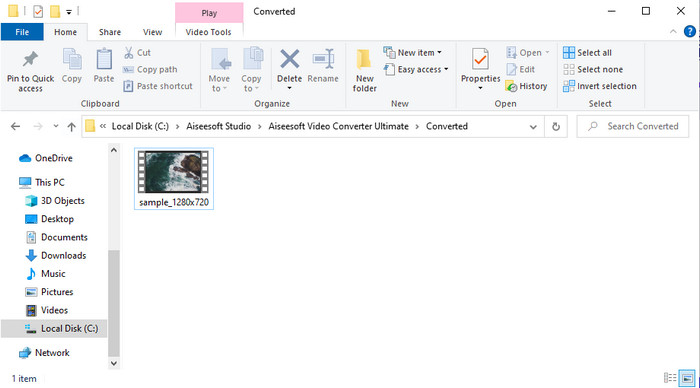
گام 5. تبدیل فایل بهدلیل سرعت بالای این ابزار کمتر از یک دقیقه طول میکشد. پوشهای ظاهر میشود که فایل تبدیلشده شما در آن است؛ روی فایل کلیک کنید تا آن را تماشا کنید یا بهصورت آنلاین به اشتراک بگذارید.
طرفداران
- تبدیل سریع و شتاب سخت افزاری برای بهترین تجربه در دسترس هستند.
- در تمام پلتفرم ها مانند PC یا Mac موجود است.
- انجام ویرایش ویدیوها برای برجسته کردن آنها می تواند در اینجا پیشی بگیرد.
منفی ها
- پرداخت قبل از استفاده اما قیمت آن مقرون به صرفه است.
- قبل از استفاده نرم افزار را دانلود کنید.
قسمت 2. انتخاب دوم در تبدیل M4V به FLV به صورت رایگان از طریق آنلاین
اگر از یک مبدل آنلاین مناسب برای تبدیل M4V به FLV بهصورت آنلاین، با کمک FVC Free Video Converter Online استفاده کنید، تبدیل فایلهایتان بهصورت آنلاین بسیار مؤثر انجام میشود. این ابزار آنلاین، بهترین مبدلی است که در صورت داشتن اتصال اینترنت، میتوانید در تمام مرورگرهای وب به آن دسترسی داشته باشید. همچنین میتوانید بدون محدودیت حجم، فایلها را تبدیل کنید، اما در اینجا امکان تبدیل دستهای وجود ندارد. با اینکه این نرمافزار آنلاین عالی است، همچنان به اتصال اینترنت نیاز دارد، بنابراین اگر اینترنت ندارید، مانند سایر مبدلهای وب، این گزینهای مناسب نیست. اما اگر اتصال اینترنت دارید و میخواهید یک تبدیل آنلاین رایگان و باکیفیت را تجربه کنید، باید مراحل زیر را دنبال کنید.
نحوه تبدیل M4V به FLV با کمک FVC Free Video Converter Online:
گام 1. روی این لینک کلیک کنید تا به مبدل آنلاین رایگانی که FVC در اختیارتان قرار داده است بروید.
گام 2. در رابط وب، روی Add Files to Convert کلیک کنید تا نصبکننده دانلود شود. پس از اتمام دانلود نصبکننده، دوباره روی Add Files to Convert کلیک کنید؛ یک پوشه باز میشود، سپس فایل M4V را انتخاب کنید.
برای تبدیل دستهای فایلها، نسخهٔ دسکتاپ را دانلود کنید.
گام 3. یک رابط وب جدید ظاهر میشود؛ در پایین صفحه، با کلیک روی آن، فرمت FLV را انتخاب کنید.
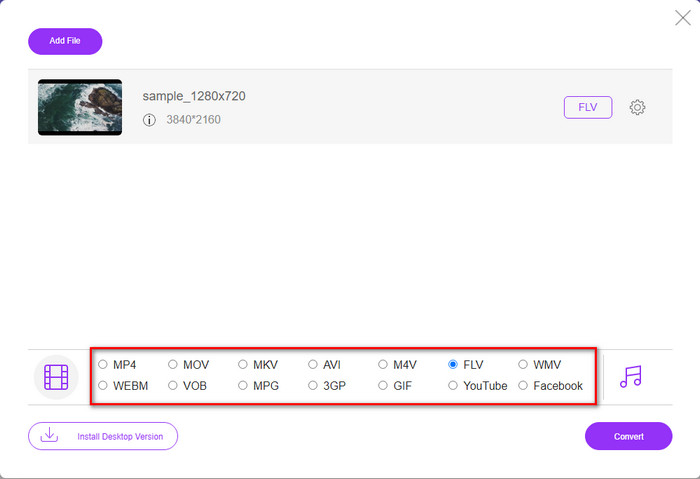
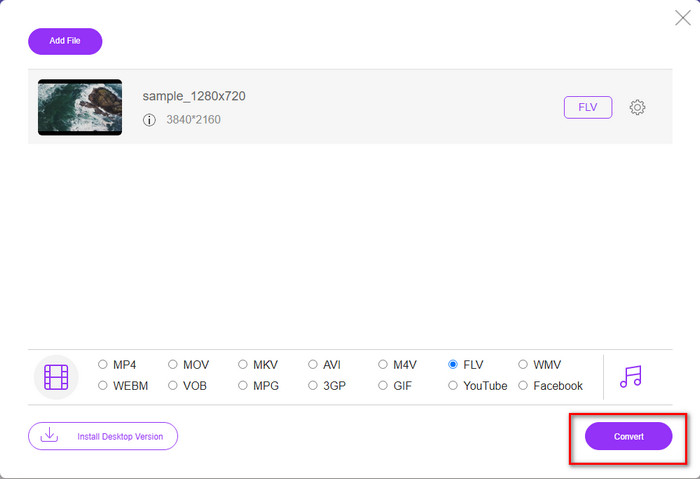
گام 4. برای شروع تبدیل رایگان M4V به FLV، روی Convert کلیک کنید.
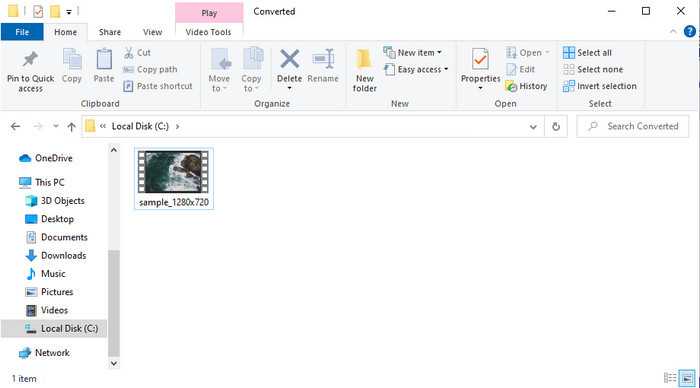
گام 5. پس از پایان تبدیل، یک پوشه در رابط ظاهر میشود؛ روی فایل کلیک کنید تا آن را در پخشکننده رسانهای محلی خود پخش کنید.
طرفداران
- رایگان و سازگار در تمام مرورگرهای وب.
- حجم فایل و تبدیل نامحدود
- ایمن و بدون تبلیغات در ابزار اصلی وب.
منفی ها
- برای استفاده از ابزار نیاز به اتصال به اینترنت دارد.
- فرمت کمتر پشتیبانی شده برای آپلود و تبدیل به.
قسمت 3. تفاوت بین فرمت های M4V و FLV
M4V بالاترین کیفیت ویدیوی دانلود شده را در فروشگاه Apple iTunes شما ذخیره می کند. این فرمت شبیه MP4 است زیرا از کدک MPEG-4 به عنوان کمپرسور استفاده می کنند. اما ویدیوهای M4V تحت حفاظت حق چاپ Apple FairPlay DRM محافظت می شوند. بنابراین، پخش ویدیوها با این فرمت مشکل است، زیرا اگر آنها را در پخش کننده رسانه ای غیر از iTunes یا Quicktime Player قرار دهید، فورا پخش نمی شود. با تغییر پسوند فایل به .mp4 می توان به فایل های محافظت نشده M4V در پخش کننده رسانه خود دسترسی داشت.
در مقابل، FLV برای انتقال داده های تصویری و صوتی در وب در سریع ترین زمان ممکن استفاده می شود. Flash Video مطلوب ترین قالبی است که در هر وب سایت HTML 5 وجود دارد. با این حال، این قالب متوقف شد زیرا Adobe Flash قبلاً بازنشسته شده بود. با این حال، پس از دانلود یا تبدیل، همچنان میتوانید آن را روی پلاگینهای پخشکننده رسانهای که نیاز دارید پخش کنید.
M4V در مقابل FLV
M4V توسط اپل توسعه داده شده است که از MPEG 4 نیز استفاده می کند. فایل های M4V اغلب برای ذخیره ویدیوهای دانلود شده از فروشگاه Apple iTunes استفاده می شود، مانند موزیک ویدیوها، قسمت های تلویزیونی، و غیره. ممکن است برخی از فایل های M4V را در برابر کپی محافظت شده پیدا کنید زیرا از آن استفاده می کند. حفاظت از حق نشر DRM FairPlay اپل.
Adobe Flash Player از FLV برای ارائه محتوای ویدیویی مانند فیلم ها و برنامه های تلویزیونی استفاده می کرد. امروزه Adobe دیگر پخش کننده را توسعه نمی دهد و به کاربران توصیه می کند به دلایل امنیتی آن را حذف نصب کنند. با این حال، همچنان می توانید از فرمت FLV در بسیاری از برنامه های غیر Adobe/Macromedia استفاده کنید.
بخش 4. سوالات متداول در مورد تبدیل M4V به FLV
که بهتر است؛ MP4 یا M4V؟
اگر میخواهید از فایل خود محافظت کنید، فرمتی که باید از آن استفاده کنید M4V است زیرا این فرمت فقط در اپل موجود است و محافظت شده است. اما فرض کنید فرمتی می خواهید که با همه پخش کننده های رسانه، ویرایشگر و موارد دیگر سازگار باشد. در این صورت، MP4 فرمت رسانه ای جهانی است که دوست دارید از آن استفاده کنید.
آیا می توانم M4V را روی VLC بازی کنم؟
VLC رایگان است و با همه پلتفرمها سازگار بوده و تقریباً تمام فرمتهای رسانهای را پخش میکند. اما فایلهای محافظتشده M4V بهدلیل حفاظتشان در این برنامه قابلپخش نیستند. بنابراین اکنون، اگر میخواهید فایل .m4v را در VLC تماشا کنید، لازم است ابتدا آن را به MP4 یا AVI تبدیل کنید.
آیا بعد از تبدیل M4V کیفیت را از دست می دهم؟
پس از تبدیل M4V، کیفیت آن باید نرخ استاندارد کیفیت M4V اصلی را حفظ کند. با این حال، برخی مبدلها از تبدیل ویدیو به HD، 1080 یا 4k پشتیبانی نمیکنند. بنابراین، بهتر است ابزار مناسبی را انتخاب کنید و نه ابزار مناسبی را که بدون از دست دادن کیفیت، نیاز شما را در تبدیل کفایت کند.
نتیجه
در مجموع، دو ابزار آنلاین و آفلاینی که در اینجا معرفی شد، بهویژه برای تبدیل M4V به FLV، گزینههای بسیار قدرتمندی هستند. همچنین با دو فرمت M4V و FLV آشنا شدیم. هرچند تغییر فرمت M4V برای تماشای فایلهای محافظتشده ضروری است، انتخاب ابزار مناسب برای کار، کمی دشوار است. بنابراین، ما دو ابزاری را معرفی کردیم که میتوانید با کمک FVC Free Video Converter Online بهطور رایگان برای تبدیل فرمت استفاده کنید؛ یا اینکه با استفاده از FVC Video Converter Ultimate تجربهای پیشرفتهتر از تبدیل به دست آورید. حالا اگر میخواهید فایلهای M4V خود را رایگان تماشا کنید، منتظر چه هستید؟ یکی از ابزارهای بالا را انتخاب کنید، مراحل سریع و ساده توضیحدادهشده را دنبال کنید و در پایان، از تماشای ویدئو لذت ببرید.
-
 [راهنما] نحوه تبدیل ویدیوهای M4V به GIF متحرک در Windows/Mac
 اگر می خواهید از ویدیوهای M4V مورد علاقه خود فایل های GIF متحرک بسازید ، می توانید با 2 روش آسان و کارآمد برای تبدیل فیلم M4V به GIF با تنظیمات سفارشی آشنا شوید.
-
 3 برنامه تبدیل ویدیو برای تبدیل iTunes M4V به AVI در مک استفاده می شود
 آیا هیچ ایده ای برای تبدیل MKV به فرمت AVI ندارید؟ همانطور که ما به خواندن این مقاله ادامه می دهیم، با 3 ابزاری آشنا می شویم که می توانند به شما در تبدیل فرمت این فایل کمک کنند.
-
 مبدل رایگان M4V به MOV – نحوه تبدیل M4V به MOV
 اگر پخش کننده رسانه شما از M4V پشتیبانی نمی کند، آیا تا به حال برای تماشای فیلم در آیفون خود دچار مشکل شده اید؟ موضوع اصلی این مقاله تبدیل آن به یک فایل ویدئویی MOV است.

